



TABLE OF CONTENTS
NVIDIA H100 SXM On-Demand
Key Takeaways
-
Ollama and vLLM are both frameworks used for running LLM inference, but they serve different use cases
-
Ollama focuses on simplicity and fast setup for running models locally or in small environments
-
It is well-suited for prototyping, testing, and developer-friendly workflows
-
Ollama abstracts much of the GPU and dependency management, reducing setup effort
-
vLLM is designed for high-performance, production-grade inference workloads
-
It uses advanced memory management and batching to deliver higher throughput
-
vLLM performs better in scenarios with multiple concurrent requests
-
Ollama trades performance for ease of use and quicker experimentation
-
vLLM requires more configuration but offers better control and scalability
-
Ollama is a good choice for quick demos, internal tools, and early-stage projects
-
vLLM is better suited for enterprise deployments and large-scale inference systems
-
The right choice depends on whether simplicity or inference performance is the priority
You’ve probably noticed how everyone seems to be running LLMs locally or deploying them into production pipelines lately. But when it comes to inference, should you rely on something simple like Ollama or opt for the high-performance framework vLLM?
Both frameworks offer efficient inference but they serve very different goals. Ollama makes model experimentation effortless while vLLM makes production workloads efficient. Yet choosing the wrong one could mean bottlenecks, wasted compute or poor response times. So, how do you decide which fits your workflow? Let’s talk about it below.
Why Choose Ollama?
Ollama is a lightweight framework built to make running LLMs locally incredibly easy. You think of it as the “plug and play” way to get LLMs working on your machine without getting deep into GPU settings, CUDA versions or complex dependencies. It lets you download and run models directly with simple commands like: ollama run llama3.1

What makes Ollama an ideal choice for quick testing and prototyping is how frictionless it is. You don’t need to worry about quantisation, hardware tuning or runtime environments. It is so accessible that you can start experimenting in minutes, even on a laptop.
Ollama also integrates easily with open-source frameworks such as OpenWebUI, so you can spin up a chat interface or local inference playground instantly.
Why Choose vLLM?
vLLM is an open-source library designed for fast and efficient serving of LLMs. It is specifically optimised for high-throughput inference, making it ideal for large-scale or production-grade deployments.
To give you an idea, vLLM uses PagedAttention that reduces memory waste by enabling non-contiguous storage of attention keys and values. This leads to up to 24x higher serving throughput than traditional methods in vLLM benchmarks.
vLLM also integrates easily with Hugging Face models for faster and more efficient LLM deployment. Unlike lightweight tools like Ollama, vLLM provides full control over batching, GPU usage and parallelisation, so you have the flexibility to tune performance exactly as needed for your environment.
What to Know Before Using Ollama and vLLM
Both frameworks have their strengths but also some trade-offs you should be aware of. Here’s what you need to know before you decide which to use.
Ollama
Ollama is great for quick local testing but it’s not optimised for a production environment, meaning:
Not built for high-speed inference
Ollama takes away many performance details to simplify setup, which can limit speed and scalability when running large workloads.
Possible GPU usage issues
In some cases, Ollama may stop using your GPU without notification (for example, if there’s a temporary GPU issue). When this happens, you’ll notice your model running much slower.
Default Quantised Version
When you run a model in Ollama, it automatically picks a quantised version. For example, instead of using 16-bit floating point numbers (FP16), the quantised default version may use simple numbers like 8-bit integers.
This approach is good for accessibility but it can limit your model’s performance and accuracy. If your hardware can support it, you can manually select higher-precision models for better results. For instance, you can request FP16 models:
ollama pull llama3.1:8b-instruct-fp16
If your model is still running too slowly or refuses to start, try switching to a different quantisation level. Every model in Ollama’s library offers multiple precision versions to balance performance and quality differently. You can explore these versions through their tags here. You will be able to see all available versions of the Llama 3.1 model, from full-precision FP16 versions to lightweight quantised ones.
Limited context window by default
Ollama’s default context size is 2048 tokens, meaning it only remembers a limited conversation history. You can increase this manually (e.g., to 4096 tokens) using the command below:
curl http://localhost:11434/api/generate -d '{
  "model": "llama3.1:8b-instruct-fp16",
  "prompt": "Why is the sky blue?",
  "options": {
    "num_ctx": 4096
  }
}'
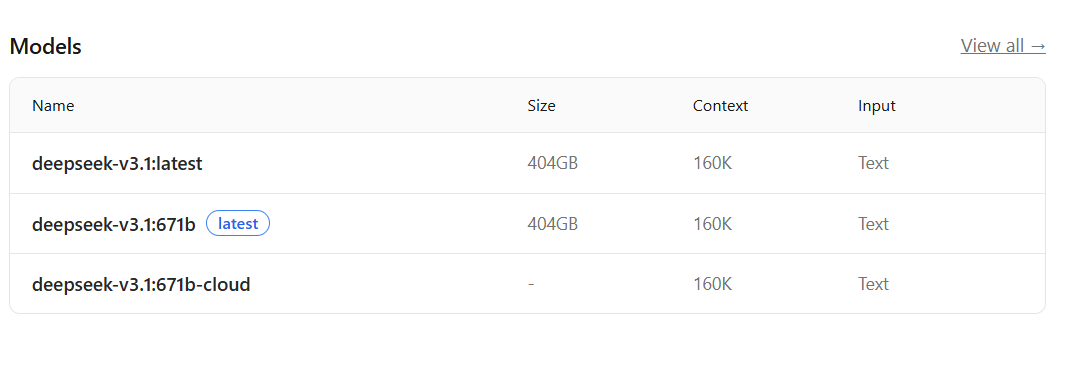
However, the maximum context size depends on both your system’s hardware and the model’s built-in capabilities. You can check this limit by visiting your model’s Model Card and clicking on the ‘Model’ section here. For instance, https://ollama.com/library/llama3.2 or https://ollama.com/library/deepseek-v3.1 (any model that you are using).
vLLM
vLLM is powerful but more complex to deploy, meaning:
- Deployment can be tricky: Even when using Docker images, CUDA version mismatches or dependency conflicts can cause setup issues.
- Longer startup times: vLLM performs low-level optimisations (like compiling CUDA graphs) during deployment, which can make initial launches slower but improve performance afterwards.
- Quantisation is available but less straightforward: You can use quantised models in vLLM, though it requires more manual setup compared to Ollama’s simple approach
- Model availability may lag: Some new models (for example, OpenAI’s DeepSeek) tend to be supported by Ollama earlier than vLLM.
Ollama vs vLLM: Choosing the Right Framework
Here’s the simplest way to decide:
Choose Ollama if:
- You need to quickly test or prototype models.
- You’re running on less powerful hardware and want easy access to quantised models.
- You want simple integration with open-source frameworks like OpenWebUI for local experimentation.
Choose vLLM if:
- You’re handling production workloads that demand optimised speed and efficiency.
- You need full control over inference parameters like parallelisation, GPU usage and batching.
New to Hyperstack?
If you’re building or scaling LLM workloads, infrastructure matters as much as the model itself. Hyperstack gives you access to high-performance cloud environments optimised for LLM training and inference.
Sign up today to access Hyperstack’s high-performance cloud for LLM workloads and build your next AI application with confidence.

You May Also Like to Read
FAQs
What is Ollama?
Ollama is a lightweight framework that lets you easily run large language models locally without complex setup or dependencies.
What is vLLM?
vLLM is an open-source inference engine optimised for high-throughput LLM serving, ideal for production-scale AI deployments.
When should I use Ollama?
You can use Ollama for quick prototyping, local testing and experimenting with quantised models on less powerful hardware.
When should I use vLLM?
You can use vLLM for production workloads where you need optimised speed, GPU control and scalable inference performance.
Why is Ollama not ideal for production?
Ollama simplifies performance management but lacks the speed, scalability and GPU optimisation needed for enterprise-grade LLM inference.
Why is vLLM harder to deploy?
vLLM requires compatible CUDA configurations and manual setup for optimisation, making deployment more complex than Ollama.
Which is better for LLM inference: Ollama or vLLM?
Choose Ollama for simplicity and local testing; choose vLLM for high-speed, scalable and production-level LLM inference performance.
Subscribe to Hyperstack!
Enter your email to get updates to your inbox every week



