


.png)
TABLE OF CONTENTS
With the growing adoption of AI-assisted development tools, intelligent coding assistants are no longer a novelty they are essential productivity enhancers. One such assistant is Claude Code, an AI-powered, agentic coding interface designed to handle complex tasks like code generation, planning, debugging, and reasoning in a conversational, multi-agent architecture.
Unlike typical autocomplete tools, Claude Code allows developers to delegate complex coding tasks to AI agents, which can plan, reason, and execute sequential steps across a project. This makes it ideal for integration with custom LLM backends for improved domain-specific reasoning, context awareness, and team-specific code generation.
Understanding Claude Code
What is Claude Code?
Claude Code is more than just a coding assistant; it’s an agentic programming environment. Its core features include:

- Agentic architecture: Internally, multiple reasoning agents handle tasks like code generation, debugging, and planning. Each agent can communicate and collaborate to solve complex coding problems.
- Conversational interface: Developers can give natural-language commands such as “Generate a Python class for user authentication,” and Claude Code interprets and executes them.
- Integration-ready: Supports external model endpoints, enabling developers to connect custom LLMs.
Why use Claude Code?
Claude Code is particularly useful for:
- Rapid prototyping and code scaffolding, this way developers can focus on higher-level design.
- Conversational debugging, refactoring, and testing assistance.
- Offloading repetitive coding tasks to AI agents for increased productivity.
- Leveraging multiple AI models in parallel for complex workflows (e.g., one model for planning, another for code generation).
Now that we understand Claude Code’s capabilities, let’s explore how Hyperstack AI Studio can enhance its functionality.
Why use Hyperstack AI Studio
Hyperstack AI Studio acts as a backend LLM provider. Its capabilities are particularly valuable when working with Claude Code:
- OpenAI-compatible API: Seamlessly integrates with Claude Code without modifying the agent architecture.
- Model variety: Access multiple base models of varying sizes to balance cost, performance, and context window.
- Custom fine-tuning: Tailor models to your proprietary codebase for domain-specific accuracy.
- Evaluation framework: Benchmark and test models to ensure quality before deployment.
- Interactive playground: Experiment with new models in isolation before connecting them to Claude Code.
- Cost-effective and scalable: GPU-backed inference ensures low latency and predictable cost.
- Secure and private: Keeps data isolated while providing managed compute environments.
So, Hyperstack provides a flexible, scalable, and secure LLM backend that perfectly complements Claude Code’s agentic architecture. We can now proceed to the integration steps.
Understanding the Integration Challenge
Integration is not as simple as pointing Claude Code to Hyperstack’s API endpoint. The challenge lies in the message format expected by Claude Code versus what Hyperstack returns.
Claude Code expects model responses in a specific, agentic format:
[
  {
    "id": "msg-123",
    "type": "message",
    "role": "assistant",
    "content": [
      { "type": "text", "text": "This is a response from Claude." }
    ]
  }
]
Meanwhile, Hyperstack API responses are in a flat OpenAI-style format. Though it is compatible with OpenAI, it does not match Claude Code’s expected structure:
{
  "choices": [
    {
      "message": {
        "role": "assistant",
        "content": "This is a response from the model."
      }
    }
  ]
}
Without adaptation, feeding Hyperstack outputs directly into Claude Code may cause parsing errors because Claude Code expects a nested structure (content array with type and text).
But there is a three step solution: we can create a lightweight proxy server that:
- Accepts Claude Code requests.
- Sends them to Hyperstack API.
- Normalizes the output into Claude Code’s expected message format.
This ensures smooth integration while keeping Hyperstack fully customizable.
Integration Hyperstack with Claude Code
Now that we understand the integration challenge, let’s walk through the steps to connect Claude Code with Hyperstack AI Studio.
Step 1: Retrieve Hyperstack API Details
Before we perform the installation steps of claude code, we have to get some info that later we will be using to configure our Hyperstack LLM with claude code like base url, model id, api key and so on.
- Go to the Hyperstack Console and log in with your credentials.
- Navigate to the AI Studio Playground to explore available models before integration them with Claude Code.
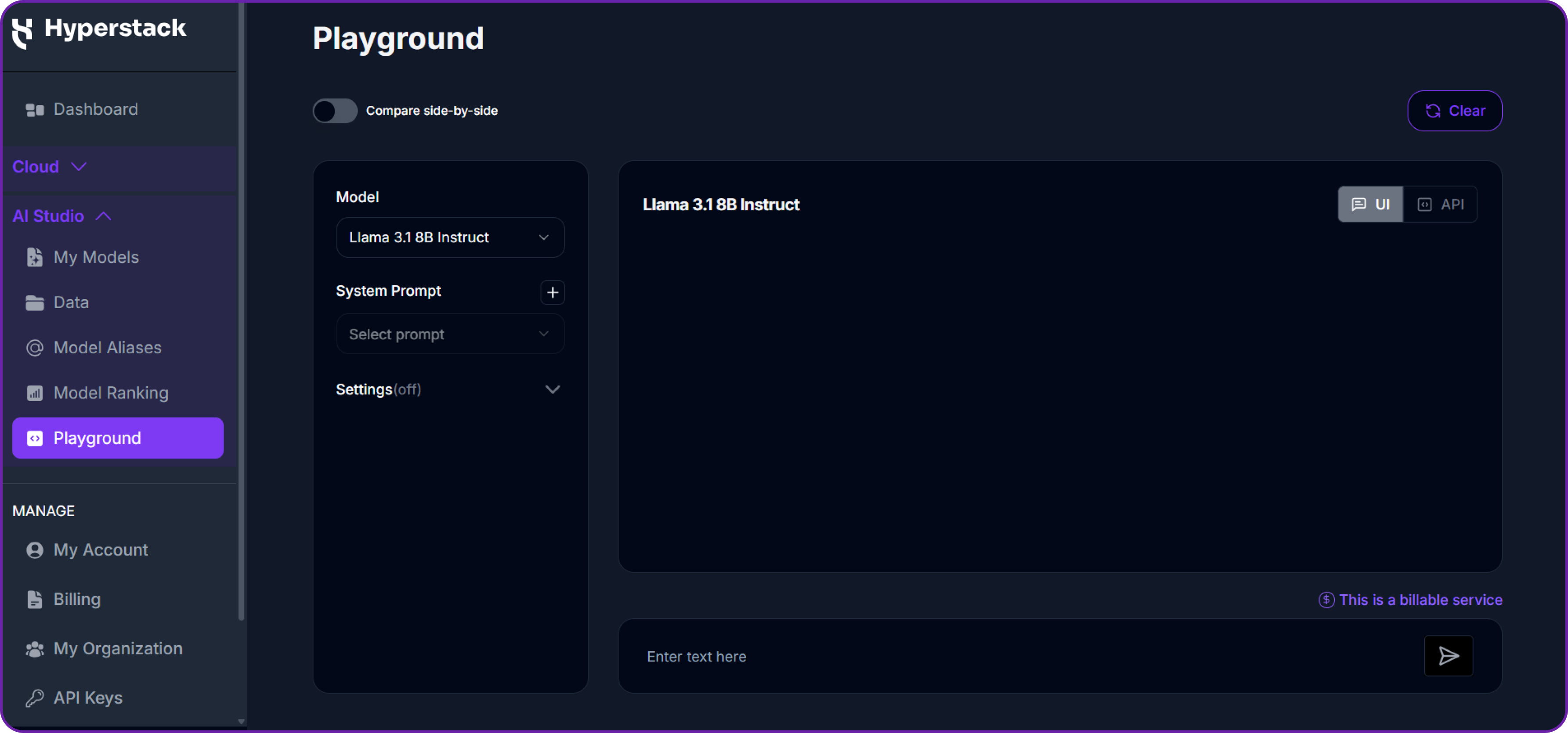
In the playground, Select your desired model after quick testing it on the interface. We are going with openai/gpt-oss-120b for this integration.
Then click on the API section to get the Base URL and Model ID.
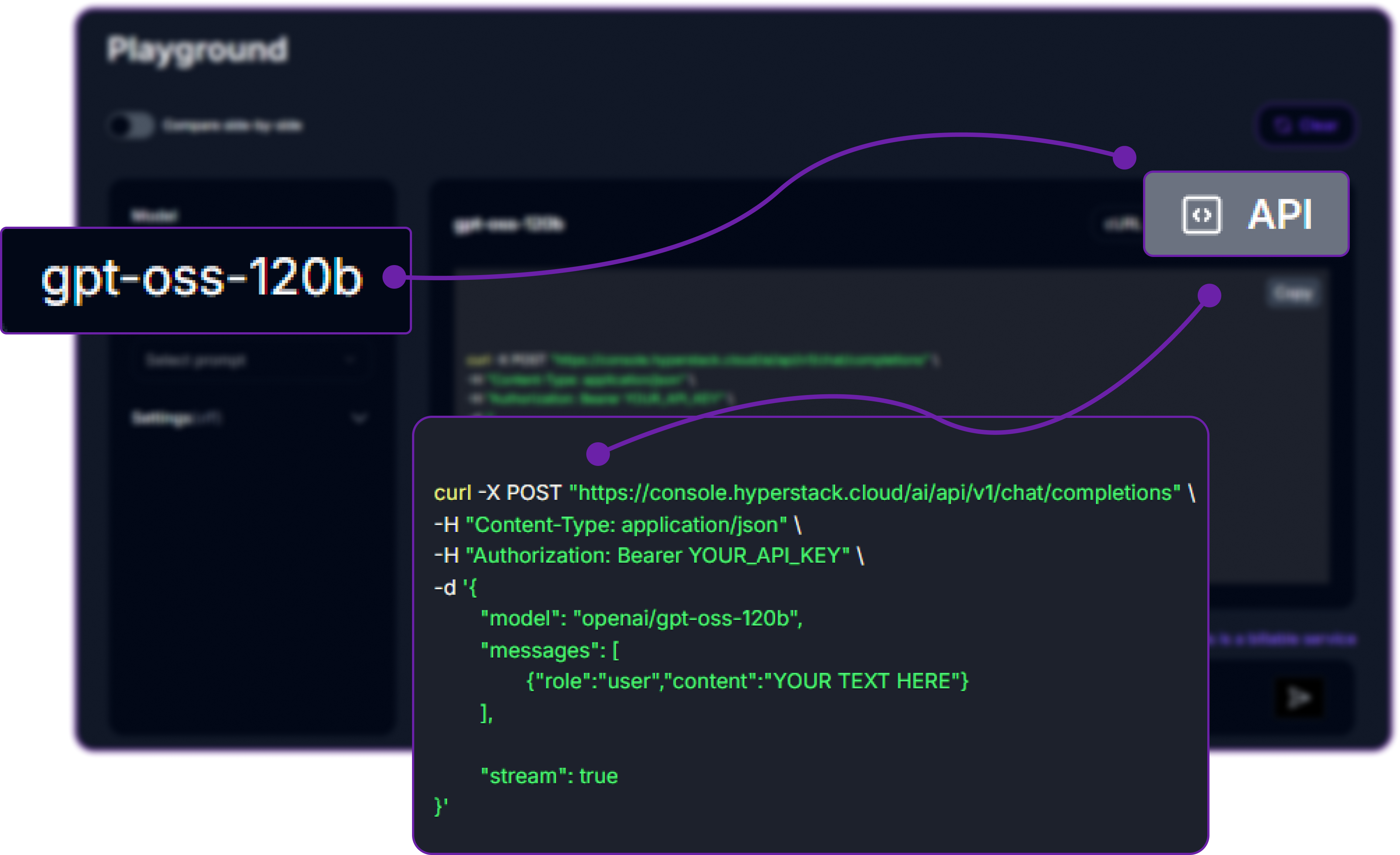
You can check the available models on their base model documentation page. You can copy the model id and base url from here, we will need it in the next step.
Step 2: Generating an API Key
To authenticate, we will need a valid API key from Hyperstack AI Studio.
-
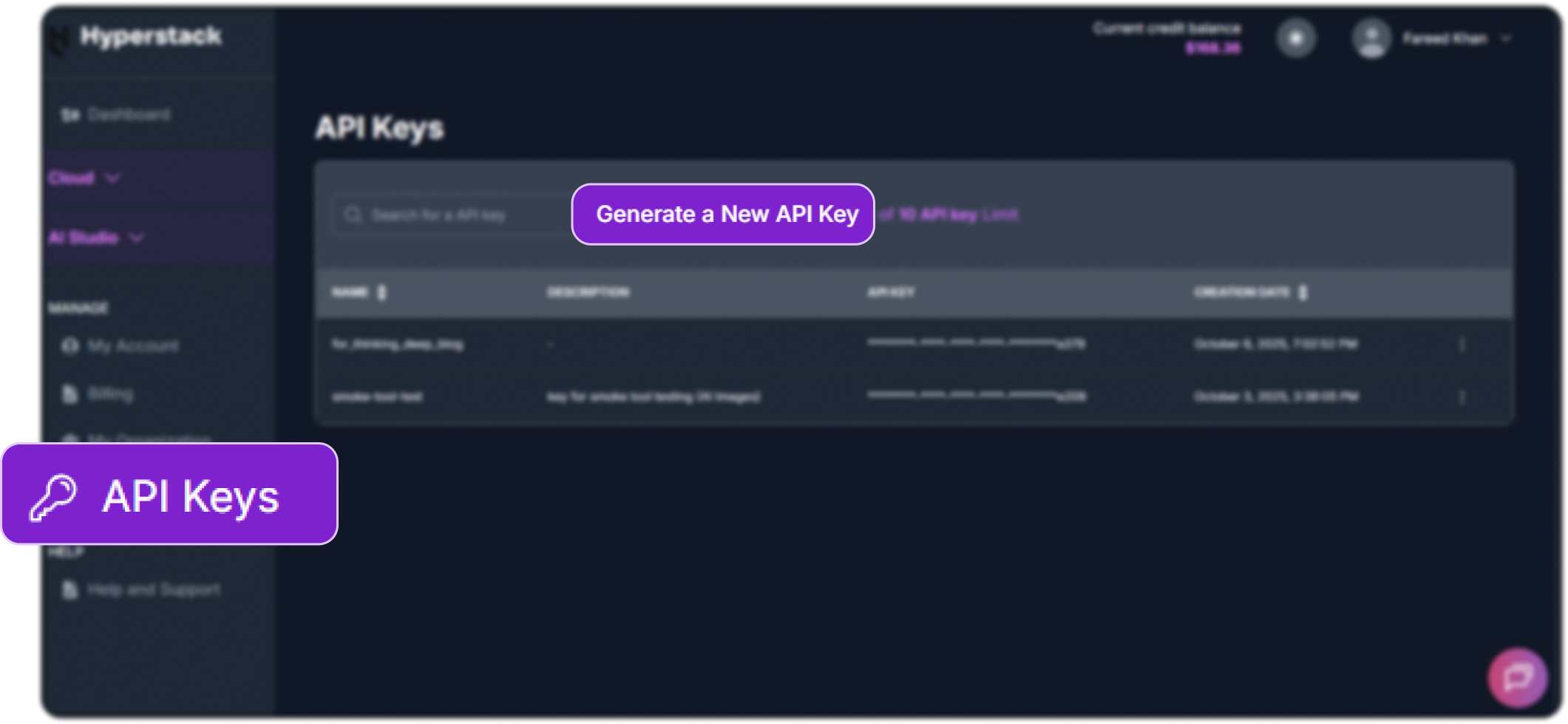
Go to the API Keys section in the Hyperstack console.
-
Click Generate New Key.
-
Give it a name (e.g.,
claudecode-integration-key). -
Copy the generated key, we will use it in claude code module.
Now that we have the required details for claude code, let's now use them.
Step 3: Creating the Hyperstack Proxy
First, we need to create an Express.js file to build a lightweight proxy. This proxy normalizes Hyperstack responses and forwards them to Claude Code.
Let's import necessary packages and set up the Express server.
// Import packages
import express from "express";
import fetch from "node-fetch";

// Initialize Express app
const app = express();

// Allow JSON payloads up to 2MB
app.use(express.json({ limit: "2mb" }));

// Configure Hyperstack API key via environment variable for security
const HYPERSTACK_API_KEY =
  process.env.HYPERSTACK_API_KEY || "YOUR_API_KEY";

// Hyperstack API endpoint
const HYPERSTACK_URL =
  "https://console.hyperstack.cloud/ai/api/v1/chat/completions";
We are basically importing express for the server and node-fetch to make HTTP requests. We also set up JSON parsing middleware and configure the Hyperstack API key and endpoint.
Step 4: Normalizing Messages
Hyperstack outputs a flat message.content, but Claude Code expects an array of objects with type and text. We need to have a function to transform the structure:
/**
 * Normalize Hyperstack messages for Claude Code
 */
function normalizeMessages(messages) {
  if (!Array.isArray(messages)) return [];

  return messages.map((msg) => {
    // Flatten Claude-style arrays to a single string
    if (Array.isArray(msg.content)) {
      const flattened = msg.content
        .map((c) => (c && typeof c.text === "string" ? c.text : ""))
        .join("\n");
      return { role: msg.role || "user", content: flattened };
    }

    // Extract text if content is an object
    if (msg && typeof msg.content === "object" && typeof msg.content.text === "string") {
      return { role: msg.role || "user", content: msg.content.text };
    }

    // Return as-is if already a string
    return msg;
  });
}
In this function, we need to check if messages is an array. If it is, we map over each message and handle three cases:
- If
contentis an array (Claude-style), we flatten it into a single string. - If
contentis an object with atextfield, we extract that - If
contentis already a string, we return it as-is.
Step 5: Creating the Proxy Endpoint
Now we can create the actual proxy endpoint that will handle incoming requests from Claude Code, forward them to Hyperstack, and return normalized responses.
// POST endpoint to handle chat completions from Claude Code
app.post("/chat/completions", async (req, res) => {
  try {
    const body = { ...req.body };
    body.messages = normalizeMessages(body.messages || []);

    // Forward the request to Hyperstack API
    const response = await fetch(HYPERSTACK_URL, {
      method: "POST",
      headers: {
        Authorization: `Bearer ${HYPERSTACK_API_KEY}`,
        "Content-Type": "application/json",
      },
      body: JSON.stringify(body),
    });

    // Parse Hyperstack response
    let data;
    const text = await response.text();
    try { data = JSON.parse(text); } catch { data = { raw: text }; }

    // Return normalized response
    res.status(response.status).json(data);
  } catch (err) {
    console.error("Proxy error:", err);
    res.status(500).json({ error: err?.message || "Internal server error" });
  }
});

// Start Express server
const PORT = process.env.PORT || 5001;
app.listen(PORT, () =>
  console.log(`Hyperstack proxy running at http://127.0.0.1:${PORT}/chat/completions`)
);
This endpoint does the following:
- Receives a POST request from Claude Code.
- Normalizes the incoming message format.
- Forwards the request to the Hyperstack API.
- Returns the Hyperstack response in a Claude-compatible format.
Step 6: Install Claude Code & Router
Now that the proxy is ready, we need to install Claude Code and Claude Code Router globally.
# Install Claude Code globally
npm install -g @anthropic-ai/claude-code

# Install Claude Code Router globally
npm install -g @musistudio/claude-code-router
Claude Code Router allows integration with any OpenAI-compatible API, including Hyperstack, making it easy to plug in custom or fine-tuned models, while the claude-code package provides the coding interface.
Step 7: Configure Claude Code Router via UI
There are two ways to configure Claude Code Router: via command line or UI. The UI is more user-friendly, especially for multi-model setups.
We are going to use the UI method here.
# Start the Router UI
ccr ui
When you run this command, it will start a local server hosting the Router UI.
- Open
http://127.0.0.1:3456/ui/.
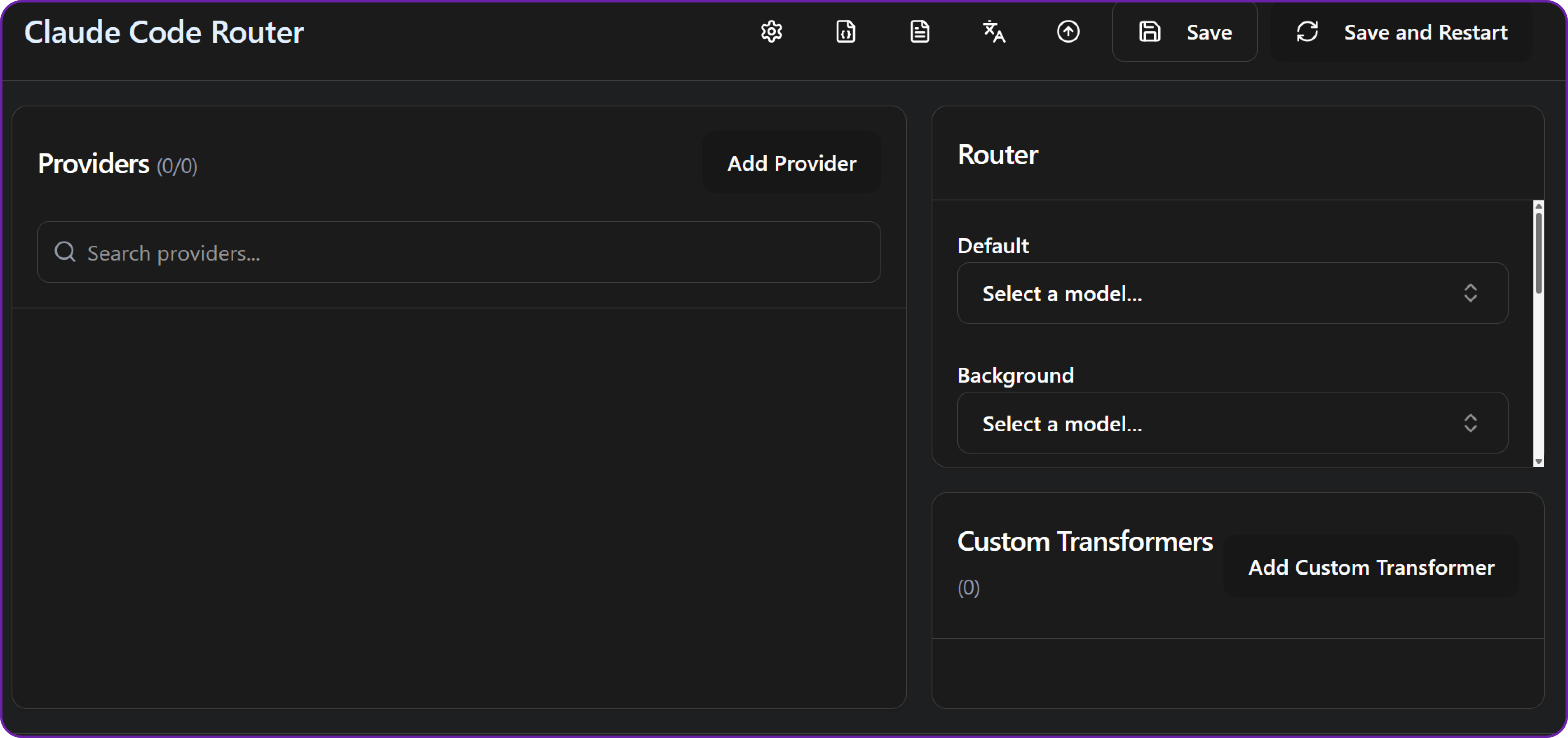
You will see the interface to add providers and models.
Let's add our Hyperstack proxy as a provider.
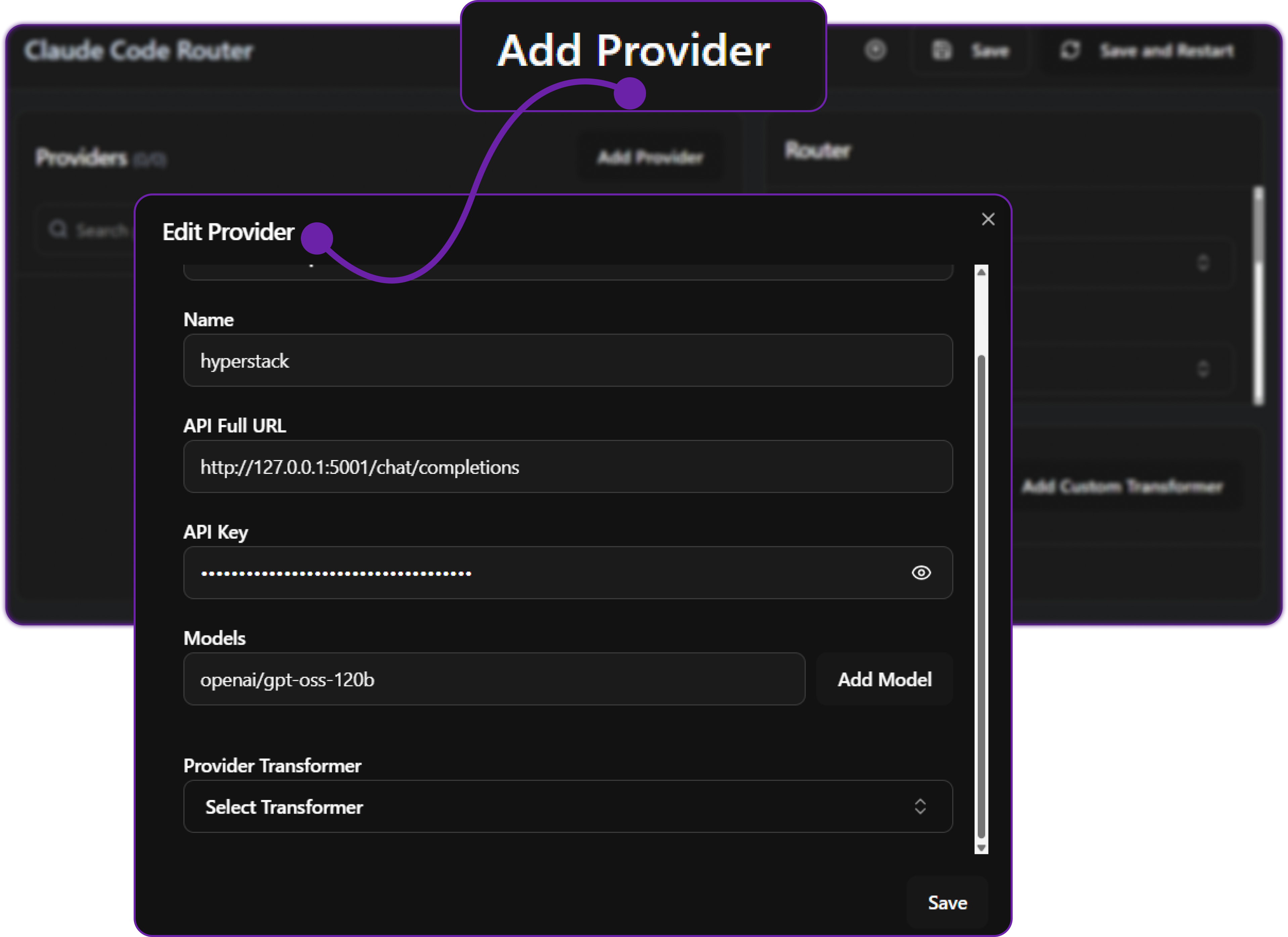
- Add a provider:
- Base URL → Proxy (
http://127.0.0.1:5001/chat/completions) because our proxy is running locally on port 5001. - API Key → Hyperstack API Key that you generated from Hyperstack Console.
- Model Name →
openai/gpt-oss-120b, you can choose any model from Hyperstack AI Studio catalog.
- Base URL → Proxy (
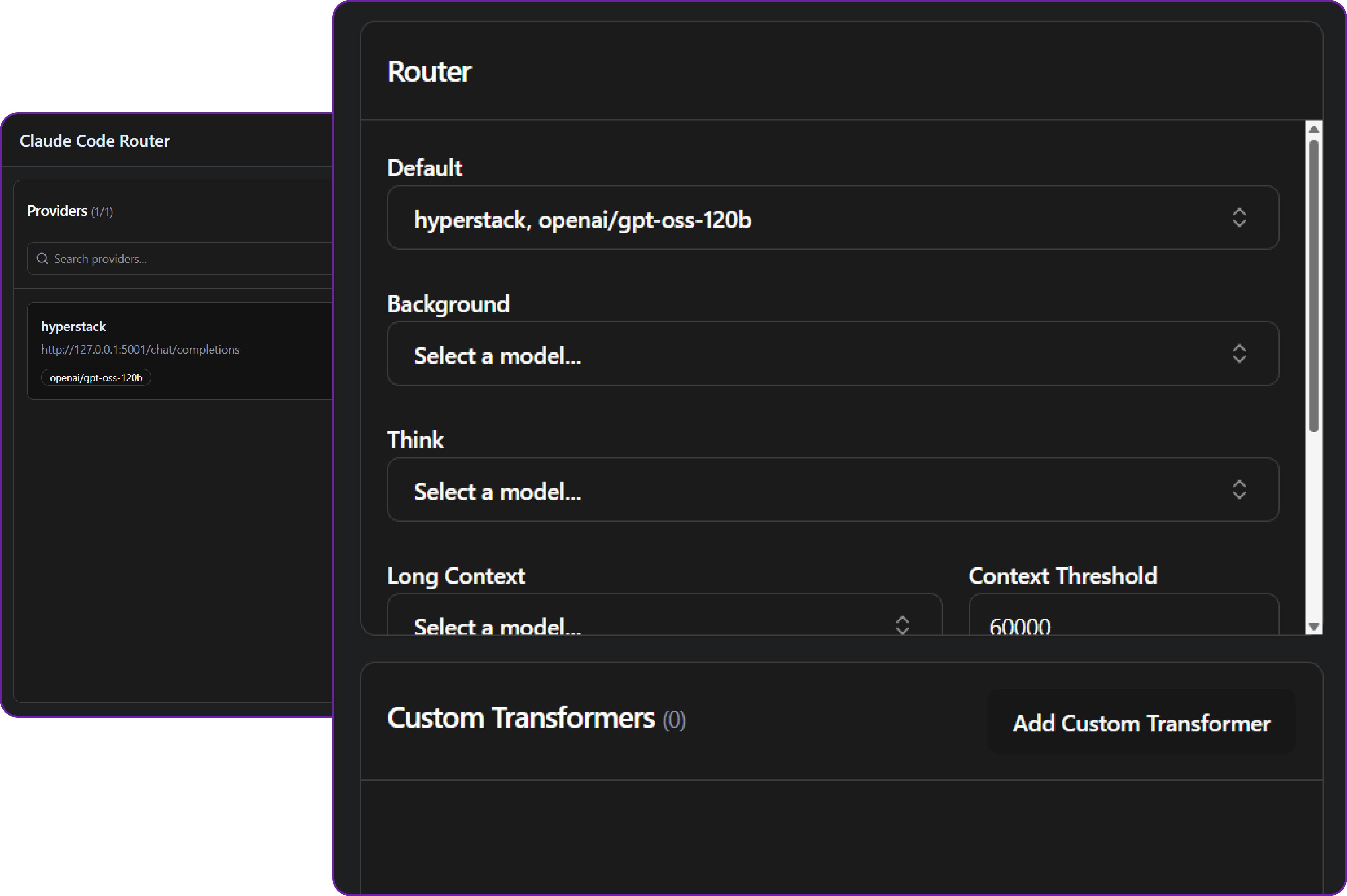
Once you have added the provider, you can create a model using this provider.

You can see that our default model is set to openai/gpt-oss-120b from Hyperstack. We can set other model also like the thinking model or planning model based on our requirement.
Step 8: Testing the Integration
Before testing, we first have to start the proxy server.
# Start proxy server
node hyperstack-proxy.js
This will start the proxy server on http://127.0.0.1:5001/chat/completions, which forwards requests to Hyperstack and normalizes responses.
Now we can start Claude Code.
# Start Claude Code terminal
ccr code
At first it will ask for the some basic settings like UI theme and so on. After that, you will see the Claude Code terminal interface.

Now you can send a simple prompt like hi and observe the response.

This confirms that Claude Code can now communicate with Hyperstack-hosted models, with the proxy ensuring correct message formatting and agentic workflow integrity.
Monitoring the Usage
Hyperstack provides built-in monitoring tools to track usage, and costs of your API calls. Go to the Usage Dashboard in Hyperstack to see your consumption metrics.
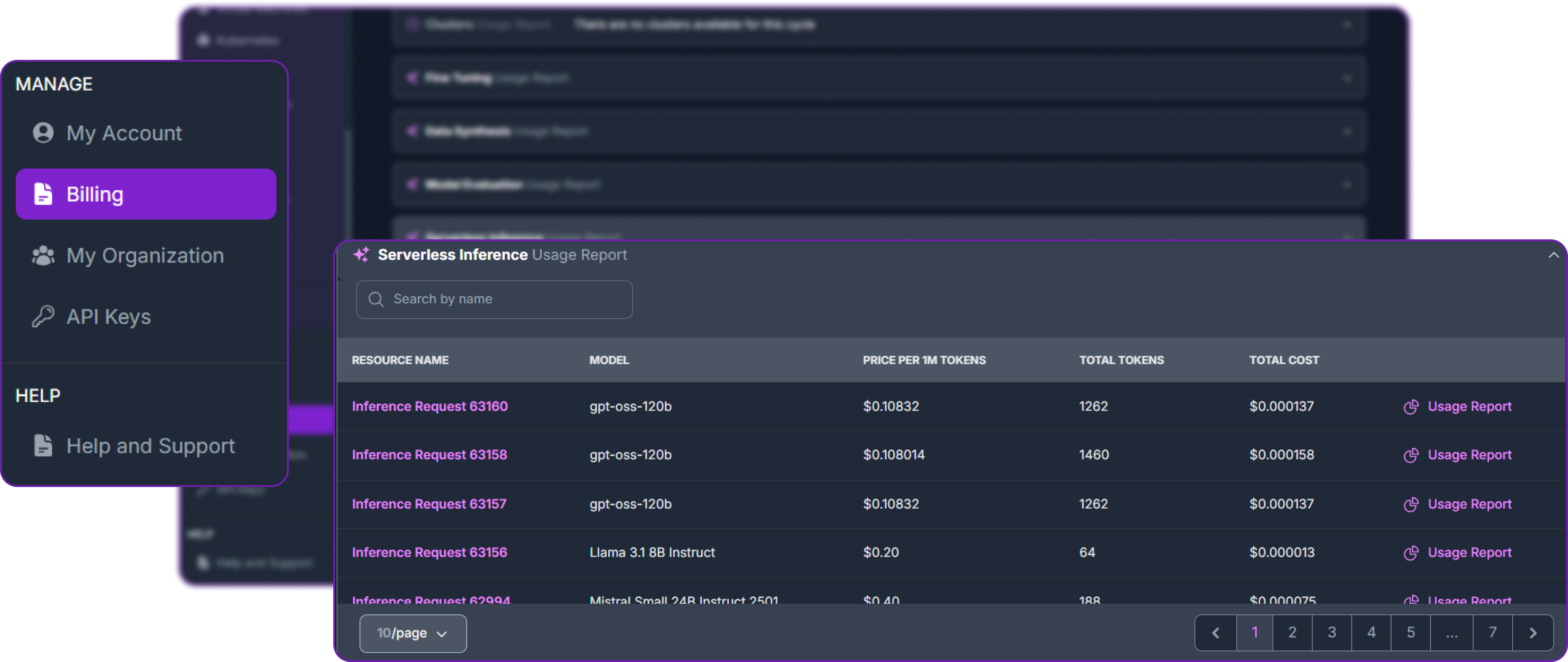
We can monitor API usage along with tokens used, and also according to model chat and tool calling feature also.
Conclusion
In this blog, we explored how to integrate Claude Code with Hyperstack AI Studio to create a powerful AI-assisted coding environment. By building a lightweight proxy server, we normalized message formats to ensure seamless communication between Claude Code and Hyperstack-hosted models.
This setup allows developers to leverage Hyperstack’s flexible model hosting, fine-tuning, and evaluation capabilities while benefiting from Claude Code’s agentic architecture for complex coding tasks.
FAQ
What is the role of a proxy server in integrating Hyperstack with Claude Code?
The proxy normalizes Hyperstack’s output to match Claude Code’s expected format, ensuring smooth agentic communication.
How does Hyperstack enhance Claude Code’s capabilities?
Hyperstack provides customizable, fine-tunable LLMs via an OpenAI-compatible API, boosting code generation, reasoning, and planning.
Can I use multiple Hyperstack models within Claude Code?
Yes, different models can be assigned to separate agents for tasks like planning, coding, and debugging.
Why is message normalization necessary for agentic workflows?
Normalization ensures structured, hierarchical messages so agents can interpret and reason correctly.
How can I fine-tune Hyperstack models for Claude Code?
Hyperstack allows fine-tuning on custom datasets, enabling specialized models for domain-specific tasks.
What are the best practices for using Hyperstack securely with Claude Code?
Store API keys in environment variables and use the proxy to keep credentials and code secure.
Subscribe to Hyperstack!
Enter your email to get updates to your inbox every week



