



TABLE OF CONTENTS
NVIDIA H100 SXM On-Demand
Key Takeaways
-
Container deployment packages applications and their dependencies into isolated, portable units
-
Containers share the host OS kernel, making them lightweight and faster than virtual machines
-
A standard container stack includes infrastructure, host OS, container engine, image, and the running app
-
Immutable container images reduce deployment errors and environment inconsistencies
-
Containers ensure the same application behavior across development, staging, and production
-
Isolation improves stability by preventing one application failure from affecting others
-
Docker is commonly used to build, run, and manage containers, including multi-container setups
-
Kubernetes enables container orchestration at scale with features like auto-scaling and rolling updates
-
Container deployment simplifies scaling, updates, and rollback processes
-
Hyperstack supports containerised workloads through on-demand Kubernetes and GPU-enabled infrastructure.
If you’ve ever shipped an application to production and thought, “Why does it work on my machine but break everywhere else?”, congratulations, you’ve met the exact problem containers were built to solve.
Today, almost every modern engineering team rely on speed, consistency and portability. Whether you're building AI pipelines, microservices or full cloud-native systems, containers are the technology powering your favourite apps and platforms.
In this blog, we discuss all you need to know about container deployment.
What is Container Deployment
A container is an isolated process running on a host operating system, packaged with its own file system, libraries, dependencies and runtime. Unlike virtual machines, containers do not bundle a full operating system. Instead, they share the host OS kernel while maintaining strict isolation through Linux kernel features. This design makes containers extremely lightweight, fast to start and efficient to run at scale.
How Does Containerization Work
Containerization works by creating self-contained software packages that behave the same across different machines. Developers build and deploy container images, which hold everything required to run an application.
A containerised system is structured in layers, each serving a specific role:
1. Infrastructure (Hardware Layer)
This is the physical server, bare-metal machine or cloud GPU VM that provides the CPU, memory, storage and networking resources needed to run containers.
2. Operating System (Host OS Layer)
Containers sit on top of the host OS, typically Linux for on-prem setups or cloud services like Hyperstack. The OS provides kernel-level features that containers rely on for isolation and resource control.
3. Container Engine (Runtime Layer)
Tools like Docker Engine, containerd or CRI-O interpret OCI images and launch containers. They manage isolation, allocate resources and allow multiple containers to run independently on the same host.
4. Container Image (Immutable Package Layer)
Container images package the application, runtime, libraries and configuration. They are versioned, portable, and read-only, meaning the system cannot modify them after creation. At runtime, containers add a thin writable layer on top of the read-only image to handle any changes or temporary data.
5. Application and Dependencies (Execution Layer)
At runtime, the container engine uses the image to start an isolated process that includes the application and all supporting files. Some containers may also include a minimal user-space environment to support the app.
Why Use Container Deployment
Modern day teams use containerization to build and deploy modern applications because:
- Cloud-Native by Design: Containers are lightweight and portable across any cloud or on-prem environment. This makes them perfect for microservices, distributed systems, CI/CD pipelines and horizontally scalable architectures.
- Immutable Infrastructure: A container image never changes after it’s built, if you need a modification, you create a new image. This eliminates configuration drift, hidden dependencies and “it works on my machine” issues.
- Highly Repeatable Deployments: A single container image runs the same way in dev, staging and production. Everything your app needs (libraries, runtime, configs) is versioned and packaged, guaranteeing consistency.
- Fault Tolerance: Containers run in isolated user spaces. If one microservice or container fails, it doesn’t impact the others. This isolation boosts application resilience, uptime and fault recovery.
What are the Different Container Technologies
Below are some popular technologies that developers use for containerization:
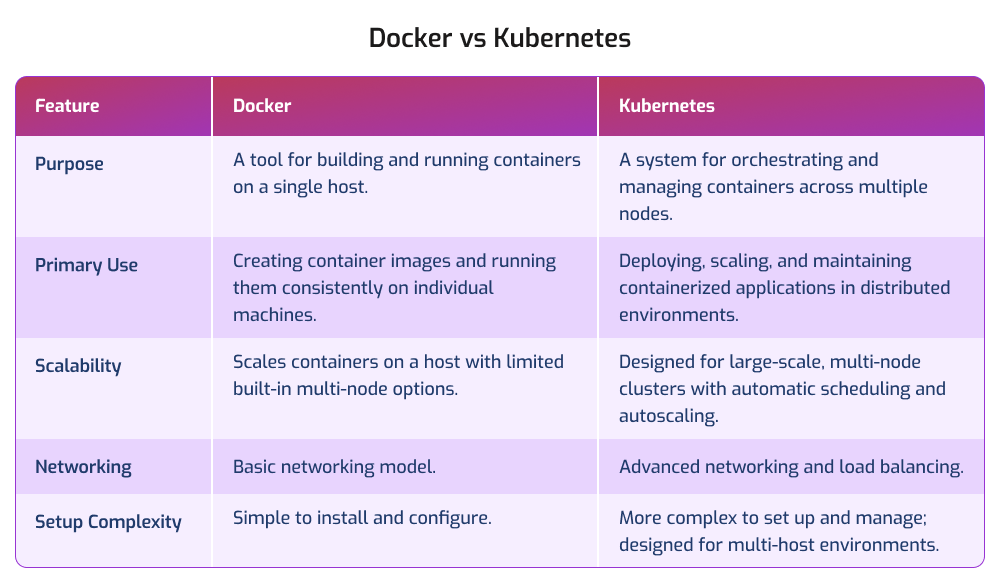
1. Using Containers in Docker and Docker Compose
Docker is the most widely used container platform, allowing developers to package applications and dependencies into portable Docker images. With Docker, developers can build, run and manage containers on any machine that supports the Docker runtime.
- Docker Engine uses containerd to run containers.
- Docker CLI allows easy build, push, and deployment commands.
- Docker Hub acts as a registry for storing and sharing container images.
Docker Compose, on the other hand, is used for multi-container applications. Instead of running containers manually, developers use a docker-compose.yml file to define services, networks, and volumes in a single configuration. This is ideal for local development or orchestrating small, interconnected services such as a web server + database + cache.
Check out this Tutorial to Run a Docker Container on Hyperstack for AI Applications!
2. Using Containers in Kubernetes
Kubernetes is a container orchestration platform designed for large-scale, automated deployments across clusters of machines. It goes beyond running containers because it manages:
- Auto-scaling
- Load balancing
- Self-healing (restarts unhealthy containers)
- Rolling updates and rollbacks
- Multi-node, distributed deployments
While Docker is great for building and running containers on a single host, Kubernetes is used when you need to run thousands of containers across multiple servers with enterprise-grade automation and reliability.
With Hyperstack, you can skip the setup complexities and focus on what matters- building high-performance applications faster. Get started with Hyperstack’s on-Demand Kubernetes API Guide and bring scalable AI solutions to life.
Choose Hyperstack On-Demand Kubernetes for Efficient Container Management
.png?width=1000&height=600&name=Blog%20post%20-%20Kubernetes%20Architecture%20and%20Concepts%20(2).png)
Kubernetes Architecture and Concepts
If you want to take your containerised workloads from local experimentation to scalable and production-ready environments, try Hyperstack’s on-demand Kubernetes clusters for high-performance:
One-Click, AI-Optimised Kubernetes Deployment
Spin up a complete Kubernetes cluster including master node, worker nodes, load balancer and bastion with a single API call. Hyperstack automates all provisioning and ships clusters pre-configured with NVIDIA-optimised GPU drivers, giving you an instantly usable environment for AI, ML and large-scale compute workloads.
High-Performance Infrastructure for Modern Workloads
Hyperstack delivers low-latency, high-throughput networking and seamless GPU acceleration out of the box. This ensures faster training, smoother inference pipelines and efficient distributed computing, whether you're running microservices, batch jobs or intensive AI workflows.
Scalable Clusters
With intuitive APIs, you can automate deployments, manage resources and scale clusters effortlessly.
If you're ready to run containerised applications, scale microservices, or accelerate AI workloads, try Hyperstack's on-demand Kubernetes clusters and experience seamless, high-performance container orchestration.
FAQs
What is container deployment?
Container deployment is the process of packaging an application and its dependencies into a container image and running that image on a host system. It ensures the application behaves consistently across development, testing, and production environments.
What is a container image?
A container image is an immutable, read-only package that includes everything an application needs, its code, libraries, environment variables and configuration. When the image is executed by a container runtime, it becomes a running container, which adds a thin writable layer on top of the read-only image.
Why are containers used in modern development?
Containers are used because they are portable, consistent, scalable, and easy to automate. They eliminate environment issues, support microservices, accelerate CI/CD workflows, and allow developers to deploy applications reliably across any environment.
What is Docker used for?
Docker is a container platform used to build, run, and manage containers. Developers use Docker Engine to run containers and Docker Compose to manage multi-container applications using a single YAML configuration file.
Why use Hyperstack for Kubernetes deployment?
Hyperstack simplifies cluster creation with a single API call, provides NVIDIA GPU optimisation out of the box, enables automatic scaling, and delivers low-latency networking. This makes it ideal for AI, ML and high-performance containerised workloads.
Subscribe to Hyperstack!
Enter your email to get updates to your inbox every week



