
<img alt="" src="https://secure.insightful-enterprise-intelligence.com/783141.png" style="display:none;">

NVIDIA B300s are coming to Hyperstack — On-Demand in August, reserved private clusters in Q4

alert

We’ve been made aware of a fraudulent website impersonating Hyperstack at hyperstack.my.
This domain is not affiliated with Hyperstack or NexGen Cloud.

If you’ve been approached or interacted with this site, please contact our team immediately at support@hyperstack.cloud.

close
|

Updated on 13 Nov 2026

7 Best Cloud GPU Providers for AI in 2026 (By Workload)

TABLE OF CONTENTS

NVIDIA H100 SXM On-Demand

Sign up/Login

Choosing a cloud GPU provider for AI is now as much a cost decision as a performance one. The right platform gives you modern NVIDIA GPUs, fast networking and billing that matches how your workloads actually run. Hyperstack covers the full AI lifecycle on one platform: NVIDIA H100 SXM and NVIDIA H200 SXM GPU VMs with NVLink for large-scale training, the NVIDIA A100 from $1.35 per hour and AI Studio for fine-tuning, and the NVIDIA L40 at $1.00 per hour for inference. For regulated or sensitive workloads, Secure Private Cloud adds dedicated, single-tenant GPU clusters.

This guide compares seven cloud GPU providers on GPU range, pricing, billing, networking and best AI use case, so you can choose the right fit for training, fine-tuning and inference in 2026.

Cloud GPU Providers for AI Compared (2026)

A GPU-as-a-service provider gives you on-demand access to data centre GPUs such as the NVIDIA H100, NVIDIA A100 and NVIDIA L40 for AI training, fine-tuning and inference. Here is how the seven providers compare. Prices are on-demand, per GPU per hour.

Provider

NVIDIA GPU models

Hyperstack

NVIDIA B300, NVIDIA B200, NVIDIA H200 SXM, NVIDIA H100 SXM/PCIe, NVIDIA A100 SXM/PCIe, NVIDIA RTX Pro 6000 SE, NVIDIA L40, NVIDIA RTX A6000

Runpod

B300, B200, H200, H100 SXM/PCIe/NVL, A100 SXM/PCIe, L40S, L40, RTX A6000

Lambda

B200, H100 SXM, A100 SXM, V100

Paperspace (DigitalOcean)

H200, H100, L40S, RTX 6000 Ada, RTX 4000 Ada

Nebius

GB300, B300, GB200, B200, H200, H100, RTX Pro 6000, L40S

Vultr

B200, H100, A100 SXM/PCIe, L40S, A40, A16

CoreWeave

GB300, GB200, B300, B200, H200, H100, A100, L40S, L40


How We Ranked These Providers

We scored each provider on five criteria that decide whether an AI project runs on time and on budget:

  • GPU range: which NVIDIA GPUs are available on demand, from NVIDIA L40 for inference up to NVIDIA H200 and NVIDIA B200 for training.
  • Networking: NVLink within a node and high-bandwidth or InfiniBand networking between nodes, which matter for distributed training.
  • Billing: per-second, per-minute or hourly billing, plus spot and reserved options and minimum GPU counts.
  • Price: on-demand list price per GPU per hour for NVIDIA H100 and NVIDIA A100, taken from each provider's public pricing page.
  • Support and tooling: Kubernetes, APIs, Terraform, pre-built AI images and managed services that cut setup time.

Top 7 Cloud GPU Providers for AI

Each provider below gets the same fields: key features, strengths, pricing and best for.

1. Hyperstack

Hyperstack is a GPU cloud platform from NexGen Cloud, an NVIDIA Preferred Partner, built for AI training, fine-tuning and inference. It offers GPU VMs from the NVIDIA RTX A6000 up to the NVIDIA H200 SXM, NVIDIA B200 and NVIDIA B300, plus Secure Private Cloud for teams that need dedicated, single-tenant infrastructure.

Secure Private Cloud: For regulated or sensitive AI workloads, Hyperstack Secure Private Cloud provides fully dedicated, single-tenant GPU clusters with no shared resources. Each deployment is custom-built around compliance frameworks such as GDPR, with strict access controls, region-specific restrictions and detailed audit logs. Infrastructure runs in Tier 3+ data centres, in existing Hyperstack regions or customer-defined locations, with Spectrum-X RoCE Ethernet or InfiniBand networking selected to suit the workload. Reservations start at 32 GPUs on a 12-month term. It suits LLM training, fine-tuning proprietary models and real-time inference on sensitive data.

AI Studio: Hyperstack AI Studio is a full-stack generative AI platform that covers fine-tuning, evaluation, a playground and inference in one place. Teams fine-tune open models such as Llama 3.3 70B, Llama 3.1 8B Instruct and Mistral Small 3 by uploading data and setting parameters, with no infrastructure to manage. Fine-tuned and base models are served through an OpenAI-compatible API, and the Playground compares outputs side by side against the base model. Fine-tuning is billed at $0.063 per minute, and inference is billed per token, from $0.80 per million tokens for Llama 3.3 70B.

Key features:

  • NVLink on NVIDIA H100 and NVIDIA A100 GPU VMs for fast GPU-to-GPU communication in multi-GPU training.
  • High-speed networking of up to 350 Gbps for distributed training and low-latency inference.
  • VM hibernation to pause idle GPU VMs without losing state.
  • AI Studio for fine-tuning, evaluation and serving of open models without managing infrastructure.
  • On-Demand Kubernetes with NVIDIA drivers preconfigured and a free master node.
  • NVMe block storage and 1-click deployment of GPU VMs.

Strengths:

  • Wide on-demand range, including the NVIDIA L40 at $1.00 per hour for inference and the NVIDIA A100 at $1.35 per hour.
  • Per-minute billing with no egress or ingress charges.
  • Three ways to pay: on-demand, Spot VMs and reservations, with the NVIDIA H100 PCIe reserved from $1.75 per hour.

Pricing (on-demand, per GPU per hour): NVIDIA H200 SXM $3.99, NVIDIA H100 SXM $3.20, NVIDIA H100 PCIe $2.50, NVIDIA A100 SXM $1.60, NVIDIA A100 PCIe $1.35, NVIDIA L40 $1.00, NVIDIA B200 $6.00, NVIDIA B300 $7.40.

Best for: Teams that want to train, fine-tune and serve models on one platform with predictable costs. Teams that need dedicated, single-tenant GPU clusters for regulated or sensitive data choose Secure Private Cloud for guaranteed capacity, compliance controls built in from day one and full control over where their data sits.

2. Runpod

Runpod offers GPU Pods, Serverless endpoints and multi-node Clusters across more than 30 regions, with per-second billing on every product.

Key features:

  • Pods that launch in seconds from pre-built templates.
  • Serverless workers that scale from zero with demand; Runpod states FlashBoot cold starts can fall below 200 milliseconds.
  • Instant Clusters of up to 64 GPUs with shared storage.
  • Persistent network storage from $0.05 per GB per month.

Strengths:

  • Per-second billing suits short experiments and bursty inference.
  • Broad catalogue, from consumer RTX cards to the NVIDIA B300.
  • Hub of ready-to-deploy open-source models.

Pricing (Secure Cloud Pods, per GPU per hour): NVIDIA H200 $5.29, NVIDIA H100 SXM $3.99, NVIDIA H100 PCIe $2.89, NVIDIA A100 $1.79, NVIDIA L40S $1.09, NVIDIA L40 $0.82.

Best for: Iterative experimentation, quick fine-tuning jobs and inference APIs with uneven traffic.

3. Lambda

Lambda provides on-demand GPU instances, 1-Click Clusters of 16 to 2,000+ GPUs and private superclusters, with the Lambda Stack of ML frameworks pre-installed.

Key features:

  • Lambda Stack with PyTorch, CUDA and drivers ready to use.
  • 1-Click Clusters on NVIDIA HGX B200 and NVIDIA H100 with InfiniBand networking.
  • Per-minute billing and no egress fees.

Strengths:

  • Strong fit for multi-node training at scale.
  • Simple, ML-focused developer experience with UI, API and CLI access.

Pricing (8x instances, per GPU per hour): NVIDIA B200 $6.69, NVIDIA H100 SXM $3.99, NVIDIA A100 SXM 80 GB $2.79, NVIDIA A100 SXM 40 GB $1.99.

Best for: Research teams and enterprises training large models on multi-node clusters.

4. Paperspace (DigitalOcean)

Paperspace is now part of DigitalOcean, which sells GPU Droplets alongside its wider developer cloud of databases, storage and networking.

Key features:

  • GPU Droplets with pre-configured AI/ML images.
  • Per-second billing with a five-minute minimum charge.
  • Integration with DigitalOcean's managed databases, object storage and Kubernetes.

Strengths:

  • Low learning curve and a clean UI for new AI developers.
  • One bill for GPU and non-GPU infrastructure.

Pricing (per GPU per hour): NVIDIA H200 $3.44, NVIDIA H100 $3.39, NVIDIA L40S $1.57, NVIDIA RTX 6000 Ada $1.57, NVIDIA RTX 4000 Ada $0.76.

Best for: Startups and small teams already building on DigitalOcean.

5. Nebius

Nebius AI Cloud runs NVIDIA GPU clusters from GB300 NVL72 down to L40S, with managed Kubernetes and Slurm for large training jobs.

Key features:

  • InfiniBand networking for multi-node training.
  • Free Managed Service for Kubernetes and free Soperator (Slurm on Kubernetes).
  • Preemptible GPU VMs at market-driven spot prices.
  • API, CLI and Terraform control.

Strengths:

  • Free egress, ingress and public IP addresses.
  • Access to the newest NVIDIA Blackwell systems.

Pricing (on-demand, per GPU per hour): NVIDIA HGX B200 $8.50, NVIDIA HGX H200 $5.40, NVIDIA HGX H100 $4.50, NVIDIA RTX Pro 6000 $1.80, NVIDIA L40S from $1.55. Preemptible from $0.79.

Best for: DevOps-led teams running multi-node training with Kubernetes or Slurm.

6. Vultr

Vultr is a general-purpose cloud with 32 regions that offers NVIDIA and AMD GPUs as cloud GPU VMs and bare metal.

Key features:

  • Global footprint for running inference close to users.
  • NVIDIA HGX H100, NVIDIA HGX A100, NVIDIA L40S and fractional GPU options.
  • Prepaid pricing for long-running workloads.

Strengths:

  • NVIDIA L40S prepaid pricing from $0.848 per GPU per hour on a 36-month term.
  • One platform for GPU, CPU, storage and Kubernetes.

Pricing (on-demand, per GPU per hour): NVIDIA H100 $2.99 (8x HGX node), NVIDIA A100 PCIe $2.40, NVIDIA L40S $1.67.

Best for: Multi-region inference and teams that want GPUs inside a general-purpose cloud.

7. CoreWeave

CoreWeave is a Kubernetes-native AI cloud built for very large training clusters, offering NVIDIA GB300 NVL72, GB200 NVL72, HGX B300, HGX B200, HGX H200 and HGX H100.

Key features:

  • 8-GPU NVIDIA HGX nodes with InfiniBand networking.
  • Kubernetes-native orchestration and managed Slurm.
  • Spot pricing on HGX nodes.

Strengths:

  • Built for thousands-of-GPU training runs.
  • Early access to the newest NVIDIA systems.

Pricing (on-demand, per GPU per hour): NVIDIA HGX H100 $6.16 ($49.24 per 8-GPU node), NVIDIA HGX H200 $6.31, NVIDIA HGX B200 $8.60, NVIDIA A100 $2.70 (8x node).

Best for: Enterprises and AI labs training frontier-scale models under contract.

How to Choose a Cloud GPU Provider by AI Workload

The right provider depends less on the brand and more on the job. Match the workload to the GPU first, then compare providers on price and billing.

AI training

Pre-training and full-parameter training of large models need high memory bandwidth and fast links between GPUs. Look for NVIDIA H100 SXM, NVIDIA H200 or NVIDIA B200 GPUs with NVLink inside the node and InfiniBand or high-bandwidth networking between nodes. Hyperstack, Lambda, Nebius and CoreWeave all fit this profile. Hyperstack offers the NVIDIA H100 SXM at $3.20 per hour on demand with per-minute billing, while CoreWeave and Lambda suit teams that need clusters of hundreds or thousands of GPUs under contract.

For multi-week runs, compare reserved pricing as well as on-demand. On Hyperstack, the NVIDIA H100 SXM drops from $3.20 on demand to a reserved rate from $2.72 per hour.

Fine-tuning

Most fine-tuning jobs, including LoRA and QLoRA on 7B to 70B parameter models, run on one to eight NVIDIA A100 or NVIDIA H100 GPUs. Per-minute or per-second billing matters here because jobs often finish in hours. Hyperstack's NVIDIA A100 PCIe at $1.35 per hour and Runpod's NVIDIA A100 at $1.79 per hour are strong value picks. Hyperstack AI Studio adds managed fine-tuning billed at $0.063 per minute for teams that would rather not manage GPU VMs.

Inference

Inference rewards low cost per token and steady latency. For models that fit in 48 GB of memory, the NVIDIA L40 and NVIDIA L40S are cost-efficient: Hyperstack lists the NVIDIA L40 at $1.00 per hour, and Runpod lists the NVIDIA L40S at $1.09 per hour. For larger models or high-throughput serving, step up to the NVIDIA H100 or NVIDIA H200. If traffic is uneven, Runpod Serverless scales to zero between requests; if it is steady, dedicated GPU VMs are usually cheaper per hour.

Startups and prototyping

Early-stage teams need low commitment and simple tooling. Runpod's per-second billing and DigitalOcean's GPU Droplets keep the barrier low. Hyperstack's per-minute billing, Spot VMs and NVIDIA RTX A6000 at $0.50 per hour suit teams that expect to grow from prototype to production on the same platform.

Hidden costs to check

The hourly GPU price is only part of the bill. Before you commit, check:

  • Egress fees: Hyperstack, Lambda and Nebius do not charge for data transfer out.
  • Idle storage: Runpod bills volume disks while Pods are stopped.
  • Minimum GPU counts: CoreWeave and Vultr sell self-serve NVIDIA H100 as 8-GPU nodes.
  • Billing increments: a five-minute or hourly minimum adds up on short jobs.

Start Building AI on Hyperstack

Whether you are training a large model, fine-tuning on your own data or serving inference in production, Hyperstack gives you GPU VMs, per-minute billing and AI Studio on one platform. For workloads that need single-tenant isolation and guaranteed capacity, Secure Private Cloud is built around your requirements.

Sign up on Hyperstack | Talk to the team about Secure Private Cloud

FAQs

What are the best cloud GPU providers for AI in 2026?

The best cloud GPU providers for AI in 2026 are Hyperstack, Runpod, Lambda, Paperspace (DigitalOcean), Nebius, Vultr and CoreWeave. Hyperstack suits training, fine-tuning and inference on one platform, Runpod suits experimentation, Lambda and CoreWeave suit large clusters, and Nebius suits Kubernetes-led training.

Which GPU cloud provider is best for AI projects?

It depends on the project. For a mix of training, fine-tuning and inference with predictable costs, Hyperstack offers NVIDIA L40 to NVIDIA B300 GPU VMs with per-minute billing and free egress. For short experiments, Runpod's per-second billing works well. For frontier-scale training, CoreWeave and Lambda offer large clusters.

Which are the best GPU cloud providers for AI workloads?

For AI workloads, choose providers with modern NVIDIA GPUs, fast networking and flexible billing. Hyperstack, Lambda, Nebius and CoreWeave offer NVLink or InfiniBand for distributed training. Runpod and Vultr offer broad GPU choice for inference. Paperspace (DigitalOcean) gives the simplest start for small teams.

How do cloud GPU providers for AI compare on price and performance?

On-demand NVIDIA H100 prices range from $2.50 per hour on Hyperstack to $6.16 per GPU on CoreWeave 8-GPU nodes, as of October 2026. Higher prices often bring larger clusters or contracts. For performance, compare GPU model, NVLink, inter-node networking and storage speed, not price alone.

What are the best GPU cloud services for AI developers?

AI developers usually want fast launch times, pre-built images and simple APIs. Runpod launches Pods in seconds, Lambda ships the Lambda Stack, and Hyperstack offers 1-click deployment, Terraform and Python SDKs plus AI Studio. Paperspace (DigitalOcean) is the easiest choice for developers already on DigitalOcean.

What are the best GPU as a service providers for AI?

The leading GPU as a service providers for AI are Hyperstack, Runpod, Lambda, Nebius, CoreWeave, Vultr and Paperspace (DigitalOcean). Each rents NVIDIA GPUs by the second, minute or hour. Choose based on the GPU you need, whether you need multi-node clusters and how your workload uses compute over time.

How much does cloud GPU cost for AI training and inference?

As of October 2026, inference GPUs such as the NVIDIA L40 start at $1.00 per hour on Hyperstack. Training GPUs cost more: the NVIDIA A100 runs $1.35 to $2.79 per hour and the NVIDIA H100 $2.50 to $6.16 per GPU, depending on provider, form factor and node size.

What is the best cloud platform to run inference on an A100 or H100 GPU?

For NVIDIA A100 inference, Hyperstack offers the NVIDIA A100 PCIe at $1.35 per hour with per-minute billing. For NVIDIA H100 inference, Hyperstack's NVIDIA H100 PCIe at $2.50 per hour and Runpod's at $2.89 per hour are strong options. Runpod Serverless suits uneven traffic that needs scale-to-zero.

What is the best cloud platform to run inference on an L40 or L40S GPU?

Hyperstack lists the NVIDIA L40 at $1.00 per hour on demand, with Spot VMs at $0.80 and reservations from $0.70. Runpod offers the NVIDIA L40S at $1.09 per hour. Nebius, DigitalOcean and Vultr list the NVIDIA L40S between $1.55 and $1.67 per hour.

Can I train LLMs on an H100 or A100 in the cloud?

Yes. The NVIDIA H100 and NVIDIA A100 are the most widely used cloud GPUs for LLM training. For multi-GPU training, choose SXM or NVLink GPU VMs so GPUs can share data quickly. Hyperstack offers both with NVLink, and Lambda, Nebius and CoreWeave offer multi-node clusters with InfiniBand.

Which cloud GPU is best for fine-tuning LLMs?

The NVIDIA A100 80 GB is the best value for most LLM fine-tuning, including LoRA and QLoRA jobs. Move to the NVIDIA H100 or NVIDIA H200 for larger models or faster turnaround. Hyperstack offers the NVIDIA A100 from $1.35 per hour and managed fine-tuning in AI Studio.

Can one cloud GPU platform handle both AI training and inference?

Yes. Platforms with a wide GPU range let you train on NVIDIA H100 or NVIDIA H200 and serve on cheaper NVIDIA L40 or NVIDIA A100 GPU VMs. Hyperstack covers both, plus Kubernetes and AI Studio for serving. Runpod also covers both through Pods for training and Serverless for inference.

What are the best GPU cloud services for startups?

Startups need low commitment and pay-as-you-go billing. Runpod bills per second, DigitalOcean GPU Droplets integrate with a simple developer cloud, and Hyperstack bills per minute with Spot VMs and NVIDIA RTX A6000 GPU VMs from $0.50 per hour. Runpod and Nebius also run startup programmes worth checking.

How can businesses compare GPU cloud providers for production AI?

Compare providers on GPU availability, networking, uptime SLAs, security certifications, billing model and total cost including storage and egress. Test with a short proof of concept on your own model. For dedicated, single-tenant capacity, consider options such as Hyperstack Secure Private Cloud or reserved clusters.

Subscribe to Hyperstack!

Enter your email to get updates to your inbox every week

Get Started

Ready to build the next big thing in AI?

Sign up now
Talk to an expert

Share On Social Media

Related content

Stay updated with our latest articles.

link

GLM-5.2 vs Claude Fable 5: A Comparison

On 12 June 2026, every workflow built on Claude Fable 5 ...

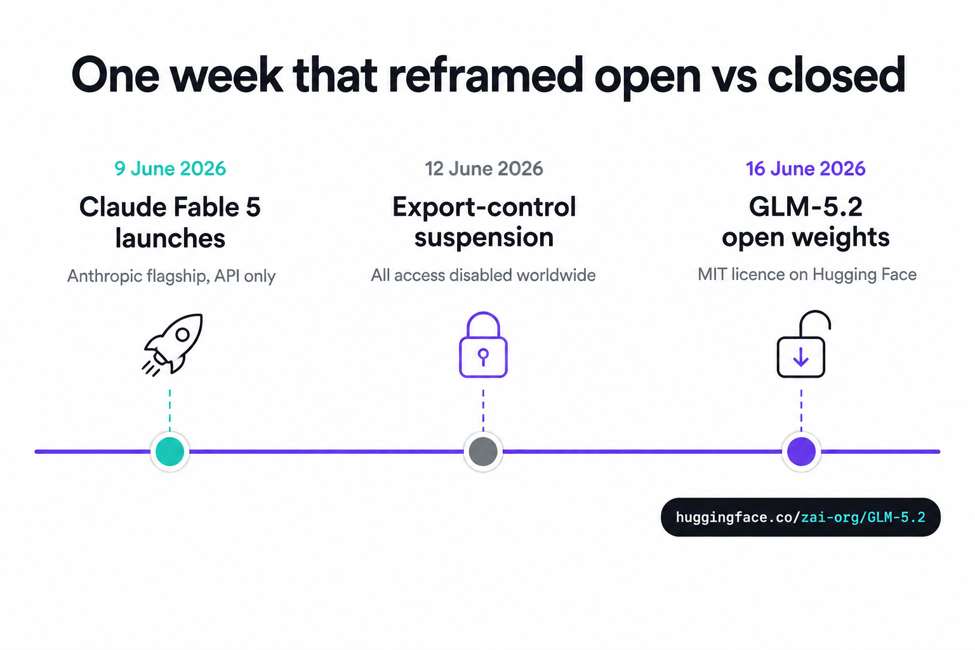
On 12 June 2026, every workflow built on Claude Fable 5 stopped working. No warning. No migration window. A US Commerce Department export-control directive required Anthropic to suspend the model globally. And that was that.

Anthropic had launched Fable 5 only three days earlier, to strong benchmark results. The day after the suspension, Z.ai shipped GLM-5.2; its MIT-licensed open weights hit Hugging Face on 16 June. No government directive can reach weights that are already distributed.

That is why this comparison is trending. GLM-5.2 is genuinely competitive: it posts the top AIME 2026 score, leads all open-weight models on agentic Elo, and sits within a few points of the best closed models on several coding benchmarks. More to the point, it is available right now. Understanding why that distinction exists structurally matters before you build anything critical on a closed API.

image-png-Jun-23-2026-09-13-57-4091-AM

What is GLM-5.2

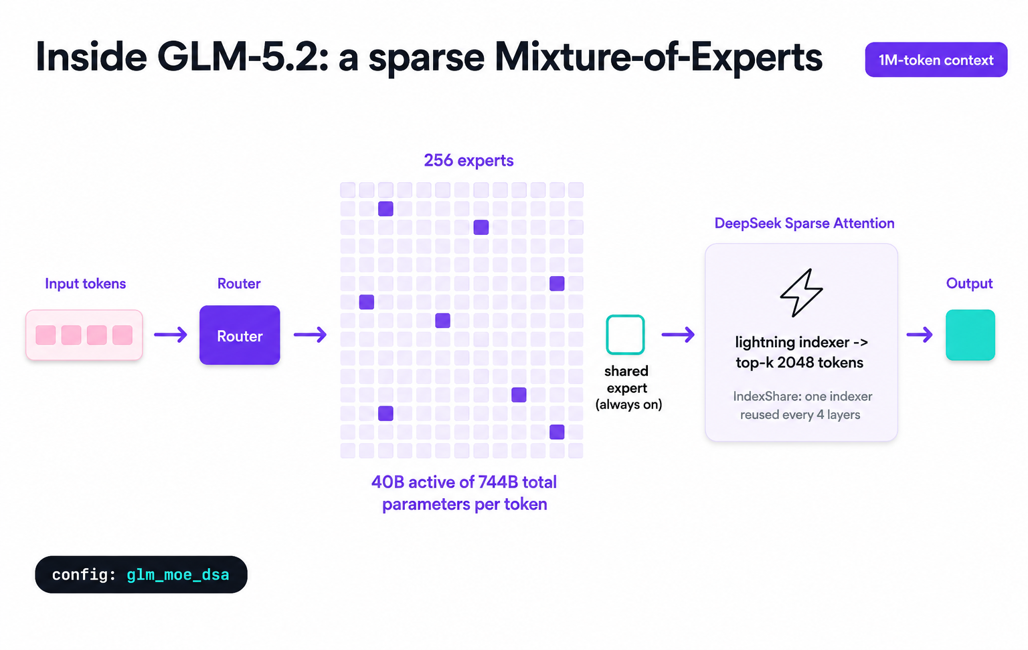
GLM-5.2 is a 744-billion-parameter Mixture-of-Experts model built by Z.ai, the international brand of the Beijing-based company Zhipu AI. Despite its total parameter count, only 40 billion parameters activate per forward pass. The model uses 256 routed experts plus 1 shared expert, with 8 routed experts active per token. That architecture, combined with DeepSeek Sparse Attention and a new technique called IndexShare that reuses a single attention indexer across every four sparse-attention layers, cuts per-token FLOPs at 1M context by 2.9x compared to naive sparse attention.

image-png-Jun-23-2026-09-16-37-3515-AM

The context window is 1 million tokens, a 5x jump from GLM-5.1. Maximum output is 128K tokens per request. It ships with an MIT licence, weights on Hugging Face and ModelScope, and has an official vLLM deployment recipe for 8x NVIDIA H200.

📌

What it is not: a drop-in API replacement for Fable 5. Self-hosting it is an infrastructure decision, not a tutorial step. More on that below.

What Fable 5 Is And Where It Went

Claude Fable 5 is Anthropic's most capable publicly released model, positioned above the Opus class in what Anthropic calls the Mythos tier. Fable 5 and Mythos 5 are the same underlying model. Fable 5 adds safety classifiers that cause cybersecurity, biology, chemistry, and distillation queries to fall back to Claude Opus 4.8. Anthropic reports that fallback occurs in fewer than 5% of sessions.

Anthropic discloses almost nothing about Fable 5's architecture: no parameter count, no layer structure, no training details. The context window is 1M tokens. Output is capped at 128K tokens per request. Pricing at launch was $10 per million input tokens and $50 per million output tokens.

On 12 June 2026, a US Commerce Department export-control directive required Anthropic to suspend both Fable 5 and Mythos 5 for all customers, including foreign-national Anthropic employees, because nationality cannot be screened in real time. The suspension is global. Both models carry mandatory 30-day data retention as Covered Models, with no zero-retention option. There is no self-hosting path: Fable 5 is API-only, and that API is currently unavailable.

Specs And Pricing At a Glance

Attribute GLM-5.2 Claude Fable 5
Maker Z.ai (international brand of Zhipu AI) Anthropic
Released 13 June 2026 (open weights 16 June). 9 June 2026
Architecture Mixture-of-Experts (open weights) Undisclosed (closed)
Total parameters 744B Not disclosed
Active parameters 40B per token Not disclosed
Context window 1M tokens 1M tokens
Licence MIT Proprietary
Self-hosting Yes No (API only)
Input price (per 1M tokens) $1.40 $10.00
Output price (per 1M tokens) $4.40 $50.00
Current availability Available Suspended since 12 June 2026

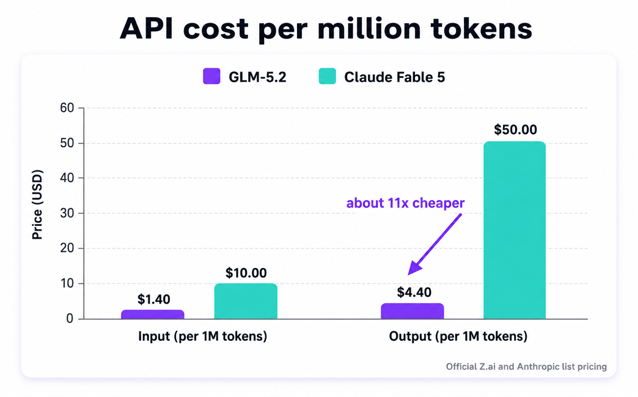
Official Z.ai and Anthropic list pricing. Output token gap is approximately 11x.

image-png-Jun-23-2026-09-18-46-4377-AM

Benchmarks

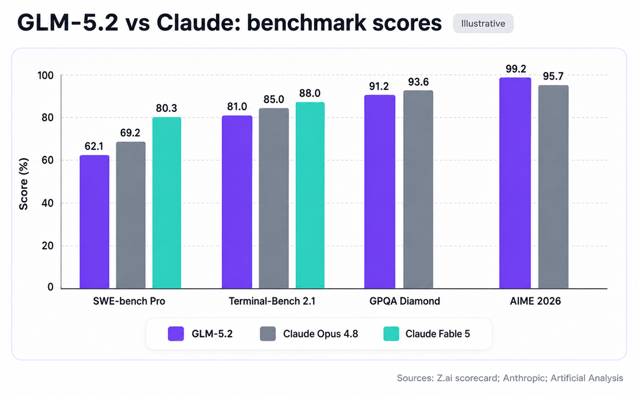
All GLM-5.2 figures are from Z.ai's published scorecard. All Fable 5 figures are from Anthropic's 9 June 2026 benchmark table or Artificial Analysis. Where Fable 5 figures are starred in Anthropic's table, Fable 5 with its safeguards active performs closer to Opus 4.8 because of those fallbacks. Cells marked n/a indicate no comparable public figure was found.

On aggregate intelligence: Artificial Analysis's Intelligence Index (version 4.1, 17 June 2026) placed Fable 5 at 60, Opus 4.8 at 56, GPT-5.5 at 55, and GLM-5.2 at 51. GLM-5.2 is the top-scoring open-weights model on that index. Fable 5 remains the overall leader, though it is currently suspended, which makes Opus 4.8 the most capable accessible Anthropic model. The index is periodically re-versioned, so treat any absolute score as a dated snapshot.

image-png-Jun-23-2026-09-18-22-6802-AM

On coding: the picture is mixed. GLM-5.2 sits within one point of Opus 4.8 on FrontierSWE but trails significantly on repository-scale and ultra-long-horizon tasks.

Coding benchmark GLM-5.2 Opus 4.8 Fable 5 GPT-5.5
SWE-bench Pro 62.1 69.2 80.3 58.6
Terminal-Bench 2.1 81.0 85.0 88.0 84.0
FrontierSWE (Dominance) 74.4 75.1 n/a 72.6
NL2Repo 48.9 69.7 n/a 50.7
SWE-Marathon 13.0 26.0 n/a 12.0
PostTrainBench 34.3 37.2 n/a 28.4

*GLM-5.2 Terminal-Bench is 81.0 on the Terminus-2 harness. The 80.3 and 88.0 Fable 5 figures are from Anthropic's Fable 5/Mythos 5 scorecard.

On reasoning: GLM-5.2 is genuinely competitive and posts the top AIME 2026 score.

Reasoning benchmark GLM-5.2 Opus 4.8 Fable 5 GPT-5.5
GPQA Diamond 91.2 93.6 n/a 93.6
AIME 2026 99.2 95.7 n/a 98.3
HMMT Feb 2026 92.5 96.7 n/a 96.7
HLE (no tools) 40.5 49.8* n/a 41.4*
HLE (with tools) 54.7 57.9* n/a 52.2*

GLM-5.2 figures are scored on HLE's text-only (non-multimodal) question subset for both rows; Opus 4.8 and GPT-5.5 figures marked * are on the full set. Not strictly like-for-like.

On agentic tasks: GLM-5.2 sits close to Opus on per-task scores but trails on harder tool-use benchmarks.

Agentic benchmark GLM-5.2 Opus 4.8 GPT-5.5
MCP-Atlas 76.8 77.8 75.3
Tool-Decathlon 48.2 59.9 55.6

On the GDPval-AA v2 agentic Elo evaluation, GLM-5.2 scores 1524, the highest of any open-weights model and effectively tied with GPT-5.5. Claude Fable 5 ranks first overall.

On human preference, GLM-5.2 ranked first on Design Arena's single-turn HTML web-design evaluation in a June 2026 snapshot, ahead of Fable 5. On Arena.ai's WebDev/Code Arena it placed second overall behind Fable 5.

The pattern is consistent. GLM-5.2 leads on AIME 2026 and on human-preference coding arenas. It sits within one to two points of Opus on several agentic benchmarks. It trails clearly on repository-scale generation, ultra-long-horizon engineering, and aggregate intelligence. Fable 5 is the strongest single model on most individual benchmarks where it was measured, but it cannot currently be accessed.

The Hardware Reality of Self-Hosting GLM-5.2

This is where the conversation changes for infrastructure teams.

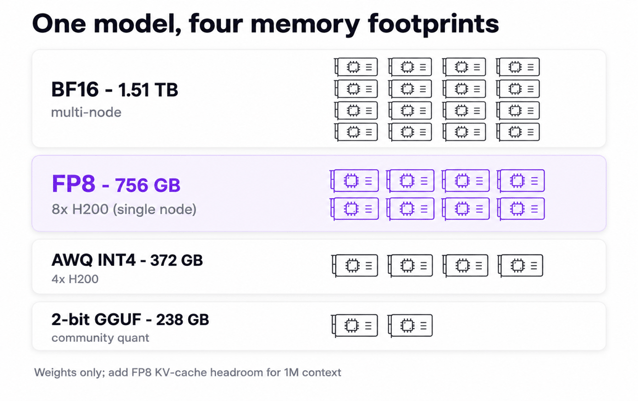
For a Mixture-of-Experts model, only 40 billion of GLM-5.2's parameters activate per forward pass. All 744 billion must reside in GPU memory. Expert routing cannot page weights in and out at inference without prohibitive latency. The rule of thumb: weights occupy approximately parameters x 1 byte in FP8, or x 2 bytes in BF16, plus headroom for the KV cache. At 1M context, the KV cache grows large enough to make an FP8 KV cache effectively mandatory.

Precision Approx. weights size Example NVIDIA node
BF16 ~1.51 TB Multi-node (16x H200-class)
FP8 ~756 GB 8x H200 (141GB each)
AWQ INT4 ~372 GB 4x H200
2-bit GGUF (community) ~238 GB Smaller multi-GPU

Weights only. KV-cache headroom required on top. At 1M context, FP8 KV cache is mandatory.

image-png-Jun-23-2026-09-19-14-4883-AM

The FP8 checkpoint is approximately 756GB on Hugging Face, which fits on an 8x NVIDIA H200 SXM5 node. Each H200 carries 141GB of HBM3e, giving the node roughly 1.13TB of aggregate memory. An 8x NVIDIA H100-80GB node supplies only 640GB, which falls short of the FP8 weight requirement alone, so an H100 deployment requires closer to 16 cards. The clean single-node path is 8x H200, or NVIDIA Blackwell B200/B300 hardware, which adds higher memory capacity, improved FP8 throughput, and more NVLink bandwidth.

API pricing at Z.ai is $1.40 per million input tokens and $4.40 per million output tokens. On output tokens, GLM-5.2 is roughly 11x cheaper than Fable 5's list price. Self-hosting becomes economically interesting somewhere around 2 to 4.5 billion output tokens per month on an 8x H200 node. Below that volume, the API wins on unit economics. Above it, a dedicated cluster can be cheaper. Most teams self-host for data control, tail latency, or fine-tuning, not raw cost.

One further consideration: using Z.ai's hosted API may raise data-sovereignty and government-access concerns for sensitive workloads. China's National Intelligence Law is frequently cited in this context. The data-sovereignty advantage of open weights only fully materialises with self-hosting, in an environment where data does not leave your own infrastructure.

Where Hyperstack Secure Private Cloud Fits

For teams that need to self-host GLM-5.2 without sending data through a third-party API, the infrastructure problem is concrete: a dedicated cluster, single-tenant, with storage designed to handle the model's weight loading and KV-cache requirements at scale.

Our Secure Private Cloud is built for exactly this architecture. It is a dedicated, single-tenant deployment on segregated infrastructure, not a shared-tenancy environment. Data does not move through a public cloud hypervisor shared with other tenants. Access controls and governance are defined as part of the build, not toggled on in a settings panel.

For teams operating in Europe or under GDPR-aligned requirements, our deployments are designed to support GDPR-aligned operations by default. Sovereign build options are available for teams that need in-country or jurisdiction-specific infrastructure, with reduced exposure to the US CLOUD Act where applicable. That matters for non-US AI builders who have just watched one US-controlled API go dark overnight.

On networking, Secure Private Cloud supports RoCE (Ethernet) or InfiniBand fabrics depending on workload scale and performance requirements, with NVIDIA ConnectX-8 SuperNICs where GPU-to-GPU communication bandwidth is the constraint. On storage, we offer local NVMe scratch for high-throughput staging and checkpoint writes, Shared Storage Volumes for persistent datasets across restarts, and Secure Object Storage for durable model artefacts and backups. For distributed inference across multiple nodes, a parallel filesystem is available where shared high-throughput file access is required.

A single 8x NVIDIA H200 node runs one instance of GLM-5.2. Production serving is a different problem: redundancy, throughput across many concurrent requests, and headroom to host more than one model all turn that single node into a fleet. That is the scale Secure Private Cloud is built for. Minimum deployment size is 512 GPUs across 64 systems (eight GPUs per node), on a 12-month contract. This is not a VM you spin up for a test. It is infrastructure sized for teams running production-grade AI workloads at scale, with 24/7 operational coverage, severity-based incident response, and a named Technical Customer Success Manager who knows the stack.

The Dedicated Cloud deployment model goes further: Hyperstack manages the full platform stack, including scheduling and GPU optimisation, and your team consumes compute through our portal and APIs. For teams that want the performance characteristics of a dedicated cluster without running infrastructure operations internally, that is the relevant option.

Ready to Have That Conversation?

If you are building AI workflows and want to understand what sovereign infrastructure actually means for your environment, we are happy to have a straight conversation about it. A quick, genuine discussion about your stack, your compliance posture and what a move would involve.

FAQs

What is GLM-5.2?

GLM-5.2 is an open-weight Mixture of Experts language model from Z.ai featuring one million token context.

What happened to Claude Fable 5?

Claude Fable 5 was globally suspended following a US export control directive, making the API unavailable worldwide.

Is GLM-5.2 better than Claude Fable 5?

Claude Fable 5 outperforms GLM-5.2 overall, but GLM-5.2 remains highly competitive and currently accessible.

Can GLM-5.2 be self-hosted?

Yes, GLM-5.2 supports self-hosting, although running it requires significant GPU resources and specialised infrastructure.

Why are open-weight AI models important?

Open-weight models provide greater control, availability, sovereignty, and flexibility than proprietary API-only alternatives.

Damanpreet Kaur Vohra

Damanpreet Kaur Vohra

calendar 24 Jun 2026

•

Read More
link

SLURM vs Kubernetes for Model Training: How to Choose the Right ...

The team picked Kubernetes. They had containers, they had ...

The team picked Kubernetes. They had containers, they had pipelines, it felt like the right call. Six weeks into a large distributed training run, jobs were getting preempted mid-epoch, checkpoint recovery was unreliable, and the GPU utilisation numbers looked nothing like what the benchmarks had promised. Switching to SLURM mid-project was not an option. Rebuilding the workflow was.

This is the conversation that plays out repeatedly in AI infrastructure teams. Not because one scheduler is wrong. Because each was built for a different set of problems and the wrong choice at the architecture stage costs you weeks later.

The decision matters more than it did when training runs were measured in hours, not days. Training runs are longer, clusters are larger and the cost of instability compounds across both dimensions. Our latest blog covers what each scheduler was actually built to do, where each wins and what the infrastructure needs to support either.

What Each Scheduler Was Built to Do

SLURM (Simple Linux Utility for Resource Management) originated in HPC. It was designed to schedule batch jobs across homogeneous compute clusters, allocate resources at the node and GPU levels with precision and handle the long-running, tightly coupled workloads that HPC teams run. Job definitions are bash scripts. Resource allocation is explicit. The scheduler's mental model is a cluster of mostly identical machines doing mostly predictable work.

Kubernetes was built to orchestrate containerised microservices. Its scheduler thinks in pods, not nodes. It handles dynamic workloads, variable resource demand, and service availability. The cloud-native ecosystem grew around it: Helm, Argo, Kubeflow, Ray and horizontal pod autoscaling. The mental model is a pool of resources being allocated dynamically to heterogeneous services with varying lifespans.

Neither was built for large-scale distributed model training. Both have adapted. The question is how well each adaptation holds up under the actual conditions of a serious training run.

Where SLURM Wins

For large-scale distributed training, SLURM's design assumptions match the workload requirements more closely.

Gang scheduling is the clearest example. A distributed training job needs all participating nodes to start simultaneously. SLURM allocates the full resource block before any part of the job begins. Kubernetes, by default, schedules pods individually. Under resource pressure, pods start at different times and the training job either waits or proceeds with partial allocation. Neither outcome is acceptable for a multi-node all-reduce operation.

SLURM's GPU allocation model is also closer to what large training runs need. Allocation happens at the physical level: specific GPUs on specific nodes, with awareness of NVLink topology, PCIe bandwidth, and NUMA boundaries. Kubernetes allocates GPUs as generic resources. It does not natively understand GPU topology, which means two GPUs allocated to the same pod may have meaningfully different communication latency depending on how they sit on the hardware.

Checkpoint recovery under SLURM is more straightforward. Jobs write to shared filesystems, restart from a defined state, and the scheduler handles re-queuing without container lifecycle complexity. In Kubernetes, checkpoint logic has to account for pod state, persistent volume claims, and restart policies. That overhead is manageable for short jobs. For training runs measured in days, it adds up.

MPI integration is native in SLURM. For workloads using NCCL all-reduce, the process group model aligns with how SLURM distributes work across nodes. Kubernetes MPI operator implementations exist but they add abstraction layers between the scheduler and the communication fabric that can affect performance at scale.

Where Kubernetes Wins

Kubernetes is the better choice when the workload is heterogeneous, the lifecycle is short, or the team needs to run training and serving infrastructure from the same cluster.

MLOps pipelines are the clearest case. A pipeline that preprocesses data, runs a fine-tuning job, evaluates the output, and deploys a model endpoint involves multiple workload types with different resource profiles. Kubernetes handles this natively. SLURM was not designed for long-lived services or event-driven workflows, and retrofitting it for that purpose creates complexity rather than removing it.

GPU fragmentation is a real problem at scale, and Kubernetes handles it better for mixed workloads. Bin-packing algorithms in the Kubernetes scheduler can place smaller jobs across available GPU capacity more efficiently when job sizes vary. SLURM's gang scheduling model assumes homogeneous resource blocks; under mixed workload conditions, that assumption can leave capacity stranded while larger allocations wait for resources.

The ecosystem is one of Kubernetes' strongest advantages. Tools such as Kubeflow, Argo Workflows, Ray on Kubernetes, KServe, MLflow integrations, and service meshes provide a mature foundation for building end-to-end AI platforms. Teams can manage experiment pipelines, model registries, feature services, inference endpoints, and operational workflows within the same environment. For organisations standardising on cloud-native infrastructure, this reduces the number of separate systems that need to be operated and maintained.

Kubernetes also offers significant advantages for platform teams managing shared AI infrastructure. Namespace isolation, RBAC, resource quotas, admission controls, and policy frameworks allow multiple teams to safely share the same cluster while maintaining governance and operational boundaries. This becomes increasingly valuable as AI initiatives expand beyond a single research group and require support for data science, engineering, MLOps, and inference workloads on the same platform.

Another advantage is consistency across the AI lifecycle. The same orchestration platform can run data processing jobs, training workloads, batch inference, online serving, monitoring, and supporting services. While SLURM excels at scheduling large-scale training jobs, Kubernetes enables organisations to consolidate a broader range of workloads onto a common operational model, reducing platform sprawl and simplifying automation.

When Teams Run Both

The hybrid architecture is not a compromise. It reflects a genuine mismatch in what each scheduler is optimised for, applied to workloads that have different requirements by design:

  • The typical split: SLURM owns the training cluster, Kubernetes owns everything else. The reason is not preference. It is that gang scheduling, bare-metal GPU allocation, and MPI-native job distribution are non-negotiable requirements for serious distributed training. No Kubernetes operator fully replicates those guarantees. At the same time, SLURM cannot sensibly manage a model serving endpoint, a feature pipeline or a CI system for ML code. Those workloads need dynamic scaling, container lifecycle management, and ecosystem tooling that SLURM was not built to provide.
  • The operational implication: the infrastructure underneath both schedulers must support the requirements of each. The storage layer needs to be accessible from both environments. The network fabric needs to handle all-reduce traffic from the SLURM cluster without introducing congestion that affects inference latency on the Kubernetes side. The two schedulers run on the same physical hardware, but their performance requirements are not the same, and the infrastructure design has to account for both.

What the Infrastructure Supporting SLURM and Kubernetes Needs

The scheduler choice is the visible decision. The infrastructure underneath is where the constraints live.

Distributed training at scale needs predictable GPU-to-GPU communication latency. A single congestion event on the fabric during an all-reduce operation stalls every participating node. On shared infrastructure, that congestion can come from another tenant's workload. On single-tenant infrastructure, you control the fabric. The difference in training stability is significant, and it compounds across long runs.

Storage requirements are split across workload types. Training jobs need high-throughput NVMe scratch for data staging and checkpoint writes mid-run. Persistent datasets and model artefacts need durable storage that survives node restarts. Parallel file access across multiple nodes, common in both HPC-style SLURM workloads and large distributed training jobs, requires a shared filesystem that can sustain throughput under concurrency without degrading.

Hyperstack Secure Private Cloud is built to run both schedulers on single-tenant, dedicated infrastructure. Under the Managed Platform deployment model, Hyperstack operates the cluster at the orchestrator layer with SLURM and Kubernetes available as scheduler options. The storage stack covers NVMe scratch, Shared Storage Volumes (SSVs), Secure Object Storage and a parallel filesystem. Networking uses RoCE (Ethernet) or InfiniBand fabrics, with NVIDIA ConnectX-8 SuperNICs for deployments where GPU-to-GPU communication bandwidth is the limiting factor.

Run SLURM, Kubernetes or Both on Dedicated Infrastructure

Hyperstack Secure Private Cloud supports both SLURM and Kubernetes under the Managed Platform deployment model on single-tenant, dedicated infrastructure with RoCE or InfiniBand networking, NVMe scratch, SSVs, Secure Object Storage and parallel filesystem. No shared-tenancy noise. No GPU allocation compromises.

Talk to the team about how Secure Private Cloud fits your training architecture.

Similar Reads

FAQ

Can Kubernetes reliably run distributed model training?

Yes, with the right operators and configuration. Kubeflow's PyTorchJob and MPI Operator handle distributed training on Kubernetes. The limitations show at scale: gang scheduling guarantees are weaker than SLURM's, GPU topology awareness requires explicit plugin configuration, and checkpoint recovery adds container lifecycle overhead. For smaller distributed jobs or fine-tuning workloads, Kubernetes is workable. For multi-node pre-training runs measured in days, SLURM's design assumptions are a closer match.

What is gang scheduling and why does it matter for training?

Gang scheduling starts all tasks in a distributed job simultaneously, across all allocated nodes. For all-reduce operations in distributed training, all participating processes need to be running at the same time. If nodes start at different times, the job either waits for the full allocation (wasting GPU time) or proceeds with partial allocation (producing incorrect gradients). SLURM implements gang scheduling natively. Kubernetes requires additional configuration and admission controllers to approximate it.

How does GPU topology awareness differ between SLURM and Kubernetes?

SLURM allocates GPUs with awareness of NVLink connectivity, PCIe topology, and NUMA boundaries. A job can request GPUs that are physically connected via NVLink, which directly affects all-reduce bandwidth. Kubernetes treats GPUs as generic countable resources by default. The NVIDIA GPU Feature Discovery plugin adds topology labels, and the Topology Manager can use them, but the native scheduler does not reason about GPU-to-GPU communication paths the way SLURM does. For large multi-GPU training jobs, this matters.

Is it operationally complex to run SLURM and Kubernetes on the same cluster?

It adds operational surface area, but it is a well-established pattern. The standard approach uses SLURM for the training partition and Kubernetes for serving and pipeline workloads, with shared storage accessible from both. The complexity lives in the storage layer (ensuring volumes are accessible from both schedulers), the network configuration (fabric segmentation where needed), and access control. On a managed infrastructure where the cluster is operated at the orchestrator layer, most of that complexity is handled by the infrastructure provider.

Does SLURM support containerised workloads?

Yes. SLURM supports containers via Singularity/Apptainer and, more recently, native Docker/OCI container support through plugins. Many HPC environments run containerised training jobs under SLURM. The difference from Kubernetes is the execution model: SLURM jobs still run as batch processes with explicit resource allocation, not as pods managed by a control plane. Teams already invested in container workflows do not need to abandon them to use SLURM.

How does checkpoint recovery compare between SLURM and Kubernetes?

In SLURM, a requeued job reads from the last checkpoint written to shared storage and restarts from that state. The process is explicit and script-driven. In Kubernetes, checkpoint recovery involves pod restart policies, persistent volume claims, and init container logic to load state. For a job that runs for 72 hours, SLURM's model is operationally simpler. For a shorter fine-tuning job that runs as part of a larger pipeline, Kubernetes handles the failure and restart within the existing workflow without manual intervention.

What storage setup does distributed training actually need?

Three tiers are typically required. High-throughput NVMe scratch for staging training data locally and writing checkpoints during a run, where latency and write bandwidth matter. Persistent block storage (SSVs) for datasets and artefacts that need to survive node restarts or be accessed across jobs. Durable object storage for long-term retention of model artefacts, logs, and experiment data. For multi-node jobs accessing shared data simultaneously, a parallel filesystem that sustains throughput under concurrent read load is also necessary. The wrong storage configuration is one of the most common causes of training stalls that get misattributed to the scheduler.

When should a team choose Kubernetes over SLURM for training?

When the training workloads are shorter, job sizes vary significantly, the team runs training and serving from the same cluster, or the MLOps tooling investment is already built around the Kubernetes ecosystem. Kubernetes is also the better fit when multi-tenancy, namespace isolation, and dynamic resource allocation across heterogeneous workload types matter more than raw gang scheduling performance. For teams running fine-tuning at scale rather than full pre-training, the Kubernetes ecosystem frequently covers requirements adequately.

Damanpreet Kaur Vohra

Damanpreet Kaur Vohra

calendar 17 Jun 2026

•

Read More
link

Single-Tenant vs Multi-Tenant Cloud: Differences and Best Use ...

The integration is ready. The model performs. The ...

The integration is ready. The model performs. The engineering team is aligned.

Then legal asks, “where does data reside, who can access it and what controls govern that access”. This is when the cloud architecture stops being an engineering decision and becomes a commercial and regulatory one. Procurement reviews stall. InfoSec raises flags. Deals stall on questions whether the infrastructure was never designed to answer.

For most workloads, a multi-tenant cloud is the correct choice. It is fast to provision, DevOps-friendly and cost-efficient at scale. But not every workload fits that model. In this blog, we explore where multi-tenant infrastructure starts to fall short and why some organisations choose single-tenancy.

Single-Tenant vs Multi-Tenant Cloud: Comparison

The table below shows the considerations that matter most when workloads are sensitive, regulated or enterprise-grade.

Factor Single-Tenant Private Cloud Multi-Tenant Cloud
Isolation Fully dedicated, single-tenant Shared across tenants
Performance consistency Deterministic, no oversubscription Variable (noisy-neighbour risk)
Data residency control Jurisdiction-specific deployment Region-level only
Compliance posture Built for regulated workloads Requires additional controls
Audit traceability Access trails scoped per customer Shared log environment
Setup model Bespoke, commissioned build Self-serve, instant
Minimum commitment Long-time Reservation Pay-as-you-go or Reservation
Best for Sensitive, regulated, AI production Dev, test, scale-out workloads

Difference Between Single-Tenant and Multi-Tenant Cloud

Each factor in the comparison above carries equal weight. Below is what each one means when workloads move from development into regulated production.

1. Security and isolation

Multi-tenant cloud separates customers through software-defined controls — hypervisor boundaries, network segmentation and access policies. These controls are mature and, for the majority of workloads, sufficient.

The gap emerges in regulated contexts. When an InfoSec team or data protection officer asks whether data is isolated from other customers, the technically accurate answer in a multi-tenant environment is: logically, yes. That qualifier carries weight in a risk assessment. Logical isolation and physical isolation are not equivalent positions under most compliance frameworks.

Single-tenant private cloud eliminates that qualifier. No shared hardware exists. Cross-tenant exposure is not a risk to manage; it is a condition that does not apply to the deployment.

2. Performance predictability

Shared infrastructure means shared resources. In a multi-tenant environment, throughput is affected by what co-located tenants are running — a problem infrastructure teams refer to as the noisy-neighbour effect. For the majority of workloads, this variance is negligible. A few per cent of benchmark fluctuation is inconsequential for a web application or batch job.

For multi-node distributed AI training, the calculation changes. All-reduce operations, which synchronise gradient updates across nodes. When that throughput varies, training runs destabilise, benchmark results diverge, and planning timelines become unreliable. Experiments are re-run not because the model changed — but because the environment did.

Single-tenant deployments allocate dedicated GPUs, CPU, memory, and networking to a single customer. Resources are not oversubscribed. Performance observed in acceptance testing reflects production behaviour.

3. Compliance and data residency

Multi-tenant cloud providers offer region selection. Workloads can be directed to specific geographies. What cannot typically be specified is the exact physical data centre within that region, which other customers share the underlying infrastructure, or how that arrangement is characterised in a regulatory submission.

Frameworks including DORA, UK PRA SS2/21, and EU AI Act high-risk requirements are increasingly precise about what constitutes adequate controls for financial and AI workloads. A multi-tenant arrangement frequently requires additional compensating controls to satisfy those frameworks — adding cost, extending timelines and introducing negotiation overhead to deployments that should already be in production.

A single-tenant private cloud deployment can be placed in a specific country, in a specific Tier 3+ data centre, with sovereignty positioning that reduces exposure to extraterritorial legislation where applicable. Data residency has a precise answer — not a region-level approximation.

4. Auditability and access governance

In a multi-tenant environment, logs are generated and stored within shared infrastructure contexts. Application and workload logs are accessible. The layer below — physical access records, host-level activity, hardware audit trails — sits outside the customer's scope.

In a single-tenant private cloud, access controls and operational logs are scoped entirely to the customer's deployment. When an auditor asks who accessed the environment, when, and under what authorisation, the answer comes from logs that belong to the customer, from an environment built and operated for them alone.

For teams building toward enterprise procurement, this distinction shifts the InfoSec and legal conversation from an inability to provide evidence to the provision of it.

5. Operational model and commitment

Multi-tenant cloud is self-serve. Compute is provisioned on demand, billed for usage, and released when no longer required. There is no lead time, no minimum commitment, no bespoke build process. For experimentation, prototyping, and development environments without sensitive data requirements, this model is the appropriate one.

Single-tenant private cloud operates on a different model entirely. An environment such as Hyperstack's Secure Private Cloud is designed, built, and validated against specific organisational requirements. The process spans architecture review, data centre selection, security controls configuration, acceptance testing, and formal sign-off before go-live. Minimum deployment is 512 GPUs on a 12-month contract.

The commitment reflects what is being commissioned. This is not a capacity rental. It is a governed, purpose-built environment — one where the operational model, responsibility boundaries, and service commitments are defined before a workload is run.

Which Model Fits Your Workload

Most enterprises operate both models: multi-tenant for experimental and development workloads, single-tenant for production environments where data is sensitive and performance must be deterministic.

If your situation looks like this...

Consider this

Your team is iterating fast on experiments and needs on-demand compute

Multi-Tenant Cloud

Your workload involves personal data subject to GDPR, DORA, or UK PRA

Secure Private Cloud

You're running dev/test environments without sensitive data

Multi-Tenant Cloud

InfoSec or legal needs to know exactly where data sits and who can access it

Secure Private Cloud

You need consistent throughput across multi-node distributed training runs

Secure Private Cloud

You're prototyping an LLM integration before enterprise rollout

Multi-Tenant Cloud

Your client contracts require single-tenant isolation or audit evidence

Secure Private Cloud

Why Choose Hyperstack Secure Private Cloud for Single-Tenant Workloads

Hyperstack operates both models. The public cloud serves multi-tenant workloads with on-demand GPU compute, self-serve provisioning and usage-based billing by the minute. For teams that require speed and flexibility without regulated data requirements, it is the appropriate starting point.

The public cloud serves multi-tenant workloads with on-demand GPU compute, self-serve provisioning and usage-based billing by the minute. Secure Private Cloud addresses a different set of requirements. It is a dedicated, single-tenant deployment commissioned for a specific organisation with jurisdiction-specific region options, high-speed networking fabrics (RoCE Ethernet or InfiniBand, selected according to workload scale and performance requirements), storage configurations designed for AI pipelines at scale and a 24/7 operations model backed by a Network Operations Centre (NOC).

  • Four deployment models are available: Metal Only, Managed Metal, Managed Platform and Dedicated Cloud. Responsibility boundaries across hardware, operating systems, orchestration and workload layers are defined at the contract stage and reflect how much of the stack Hyperstack operates versus the customer. The model exists so that operational accountability is documented, not assumed.
  • Named support roles: Technical Customer Success Manager, 24/7 Support Engineering and an ML Engineer during onboarding that provide defined ownership across delivery, performance and escalation. Severity-based incident response commitments and 14-day advance notice for scheduled maintenance give procurement and legal the contractual-grade assurances that regulated environments require.

For enterprises deploying AI into regulated industries, the operational value is specific: data residency is precise, isolation is physical, auditability is scoped to the deployment and the support model assigns accountability by name. The compliance questions that delay regulated deals have documented answers.

Building AI in a Regulated Environment?

Speak to the Hyperstack team about Secure Private Cloud, single-tenant GPU infrastructure designed for workloads where isolation, residency and auditability are non-negotiable.

FAQs

What is a multi-tenant cloud?

Multi-tenant cloud is a cloud architecture where multiple customers share the same physical infrastructure while remaining logically separated through software-defined controls such as hypervisors, virtual networks and access policies.

What is a single-tenant cloud?

Single-tenant cloud is a dedicated cloud environment where compute, storage and networking resources are allocated exclusively to one organisation with no shared hardware between customers.

What is the difference between single-tenant and multi-tenant cloud?

The primary difference is infrastructure sharing. Multi-tenant cloud shares underlying hardware between customers, while single-tenant cloud provides dedicated infrastructure for a single organisation.

Is multi-tenant cloud secure?

Yes. Multi-tenant cloud is secure for most workloads and uses mature logical isolation mechanisms. However, regulated industries may require physical isolation and dedicated infrastructure controls.

Why do enterprises choose single-tenant cloud?

Enterprises choose single-tenant cloud when workloads require strict isolation, predictable performance, auditability, data sovereignty or compliance with frameworks like GDPR, DORA or UK PRA regulations.

What workloads are best suited for a multi-tenant cloud?

Development environments, AI experimentation, testing, prototyping, burst workloads and non-sensitive applications are generally best suited for multi-tenant cloud infrastructure.

What workloads require single-tenant infrastructure?

Financial services, healthcare AI, regulated enterprise workloads, government systems and production AI environments with sensitive data often require single-tenant infrastructure.

Can multi-tenant cloud meet GDPR requirements?

Yes, but organisations may need additional controls, contractual safeguards and compliance measures depending on the sensitivity of the workload and regulatory interpretation.

Damanpreet Kaur Vohra

Damanpreet Kaur Vohra

calendar 28 May 2026

•

Read More