


.png)
TABLE OF CONTENTS
Key Takeaways
- Hy3-preview is Tencent Hunyuan's flagship open-source MoE model with 295B total parameters and 21B activated per token, plus a 3.8B MTP layer for speculative decoding.
- It supports a 256K context window and three reasoning modes (no_think, low, high), making it ideal for long-context agentic workflows, coding, and STEM reasoning.
- The 600 GB BF16 checkpoint exceeds the 640 GB VRAM of a single 8x H100-80G node, so this guide deploys it across two 8x H100-80G-PCIe-NVLink nodes on Hyperstack's managed Kubernetes service.
- This tutorial uses vLLM with the LeaderWorkerSet API, native multi-node tensor parallelism, and MTP speculative decoding.
- Hyperstack gives you on-demand access to high-performance NVIDIA GPUs without managing infrastructure.
Hy3-preview is the flagship of Tencent Hunyuan's newest open-source family, a sparse Mixture-of-Experts model with 295 billion total parameters and only 21 billion activated per token, plus a dedicated 3.8B Multi-Token Prediction (MTP) layer for speculative decoding. It pairs a Grouped-Query Attention stack (64 query heads over 8 KV heads) with 192 routed experts and top-8 activation to deliver frontier reasoning, coding, and agentic capability whilst keeping per-token compute dramatically lower than dense alternatives. With a native 262,144-token context window, three-tier reasoning (no_think / low / high), and a BF16 checkpoint that occupies roughly 600 GB on disk, Hy3-preview is too large for a single 8×H100-80G node, making it a natural fit for a multi-node Kubernetes deployment across two 8×H100-80G nodes on Hyperstack using vLLM's native multi-node tensor parallelism.
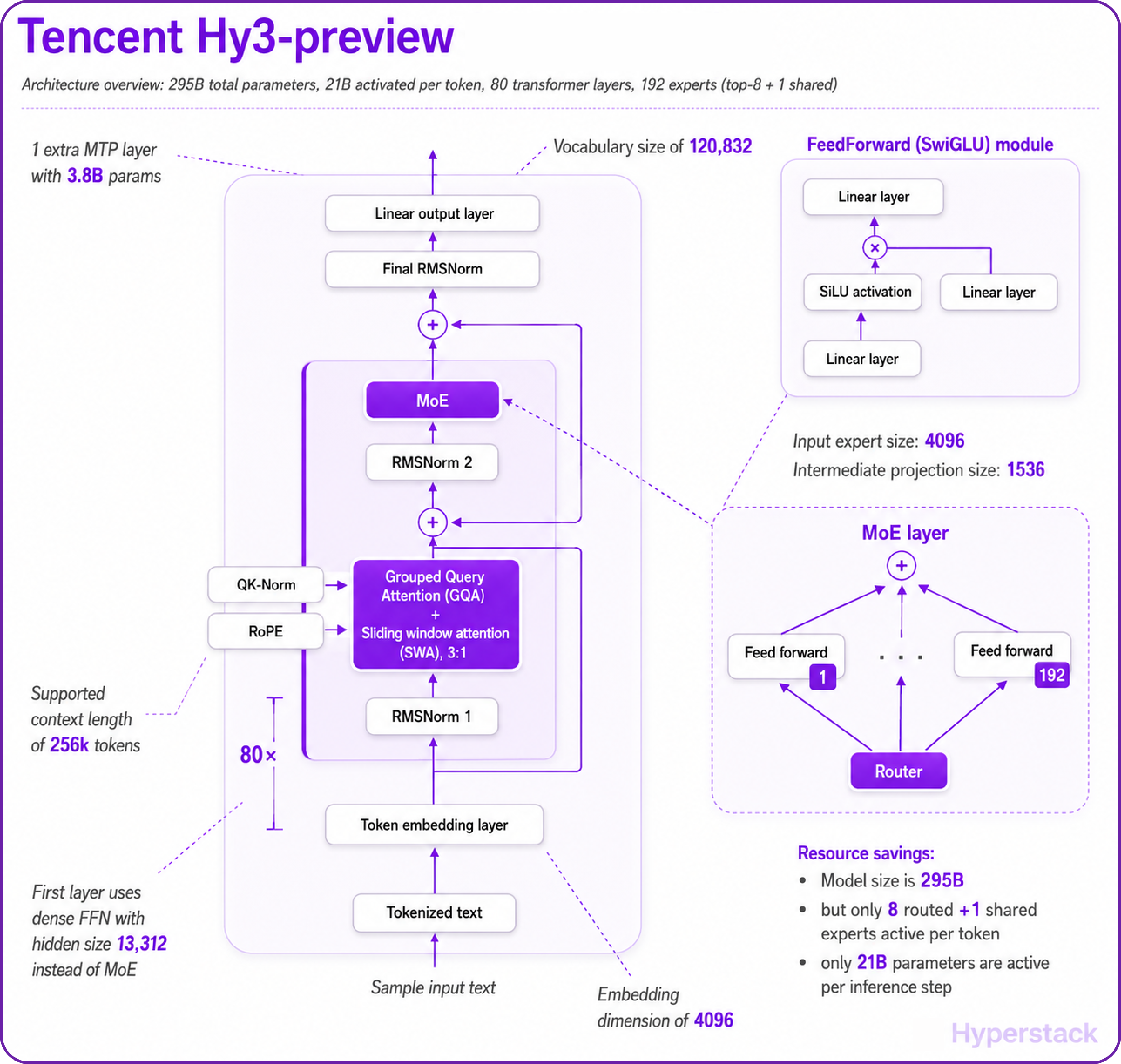
Hy3-preview is the first model trained on Tencent Hunyuan's rebuilt training infrastructure, and the strongest the team has shipped so far. Every layer is optimised for long-context inference cost and agentic throughput. Here is how the architecture works:
- Sparse Mixture-of-Experts Routing: Only 21B of 295B parameters activate per token. The MoE block hosts 192 routed experts plus a shared expert, with top-8 routing per token, giving you the breadth of a near-300B model at the per-token compute footprint of a much smaller dense network.
- Grouped-Query Attention (GQA): 64 attention heads share just 8 KV heads (head dim 128), which materially shrinks the KV cache at long context whilst preserving attention quality, critical for the model's 256K-token context window.
- Dedicated MTP Layer for Speculative Decoding: A separate 3.8B Multi-Token Prediction layer sits on top of the 80 transformer layers and acts as a draft model for vLLM's native speculative decoding pipeline, materially boosting throughput at small batch sizes without requiring an external draft model.
- Three-Tier Reasoning: A single checkpoint serves three workload tiers
no_thinkfor fast direct responses,lowfor light reasoning, andhighfor deep chain-of-thought on math, coding, and complex problems — controlled at request time viachat_template_kwargs.reasoning_effort. - Rebuilt RL Infrastructure: Hy3-preview is the first model trained on Tencent's redesigned reinforcement-learning stack, with substantially larger-scale agentic and coding training tasks than previous Hunyuan releases, the source of its outsized gains on SWE-bench Verified, Terminal-Bench 2.0, BrowseComp, and WideSearch.
- Native Tool Calling and Reasoning Parsers: Built-in
hy_v3tool-call and reasoning parsers ship in both vLLM and SGLang, enabling structured tool invocations and reasoning-content separation without external orchestration logic.
Hy3-preview-Base vs leading open-source MoE base models
Higher is better. Source: Tencent Hunyuan Hy3-preview model card. Activated parameters per token: Hy3 21B, Kimi-K2 32B, DeepSeek-V3 37B, GLM-4.5 32B.
The headline takeaway: with just 21B activated parameters — well under half of DeepSeek-V3's 37B and two-thirds of Kimi-K2's 32B — Hy3-preview-Base leads the field on math (GSM8K 95.37, MATH 76.28) and coding (LiveCodeBench v6 34.86) whilst staying competitive across general knowledge benchmarks. That activated-parameter efficiency is precisely what makes the multi-node H100 deployment economically viable.
Why Multi-Node Kubernetes for Hy3-preview?
Hy3-preview's BF16 checkpoint occupies roughly 600 GB on disk (295B parameters × 2 bytes plus the MTP layer and tokenizer). On a single 8×H100-80G node — 640 GB total VRAM — that leaves essentially no headroom for KV cache, CUDA graphs, or activation memory. The vLLM official recipe is explicit: "Smaller-memory 8-GPU configurations (8×H100 80GB, 8×A100 80GB) do not fit the BF16 weights plus KV cache — use multi-node TP for those."
The recipe lists three production deployment options: a single 8×H200-141G node, a single 8×H20-3e-141G node, or — the path most practitioners can actually access on demand — multi-node Tensor Parallelism across two 8×H100-80G nodes. That is the topology this guide walks through.
Multi-node deployment introduces three operational concerns that single-VM deployments do not have: cross-node scheduling, persistent storage of the 600 GB checkpoint on each node, and coordination of the inference processes across nodes. Kubernetes plus the LeaderWorkerSet API solves all three cleanly:
- Cross-node scheduling is handled by
podAntiAffinityrules that force the leader and worker pods onto different nodes. - Persistent storage uses
hostPathvolumes pointed at Hyperstack's/ephemeralNVMe mount, which provides roughly 6.5 TB per H100 worker node. - Process coordination uses vLLM's native multi-node tensor parallelism with
--nnodesand--node-rankflags — no separate Ray cluster is required, which keeps the manifest simple.
How to Deploy Hy3-preview on Hyperstack
Now, let's walk through the step-by-step process of standing up a 2-node Hyperstack Kubernetes cluster and deploying Hy3-preview across it.
Step 1: Accessing Hyperstack
First, you'll need an account on Hyperstack.
- Go to the Hyperstack website and log in.
- If you are new, create an account and set up your billing information. Our documentation can guide you through the initial setup.
Step 2: Create a Multi-Node Kubernetes Cluster
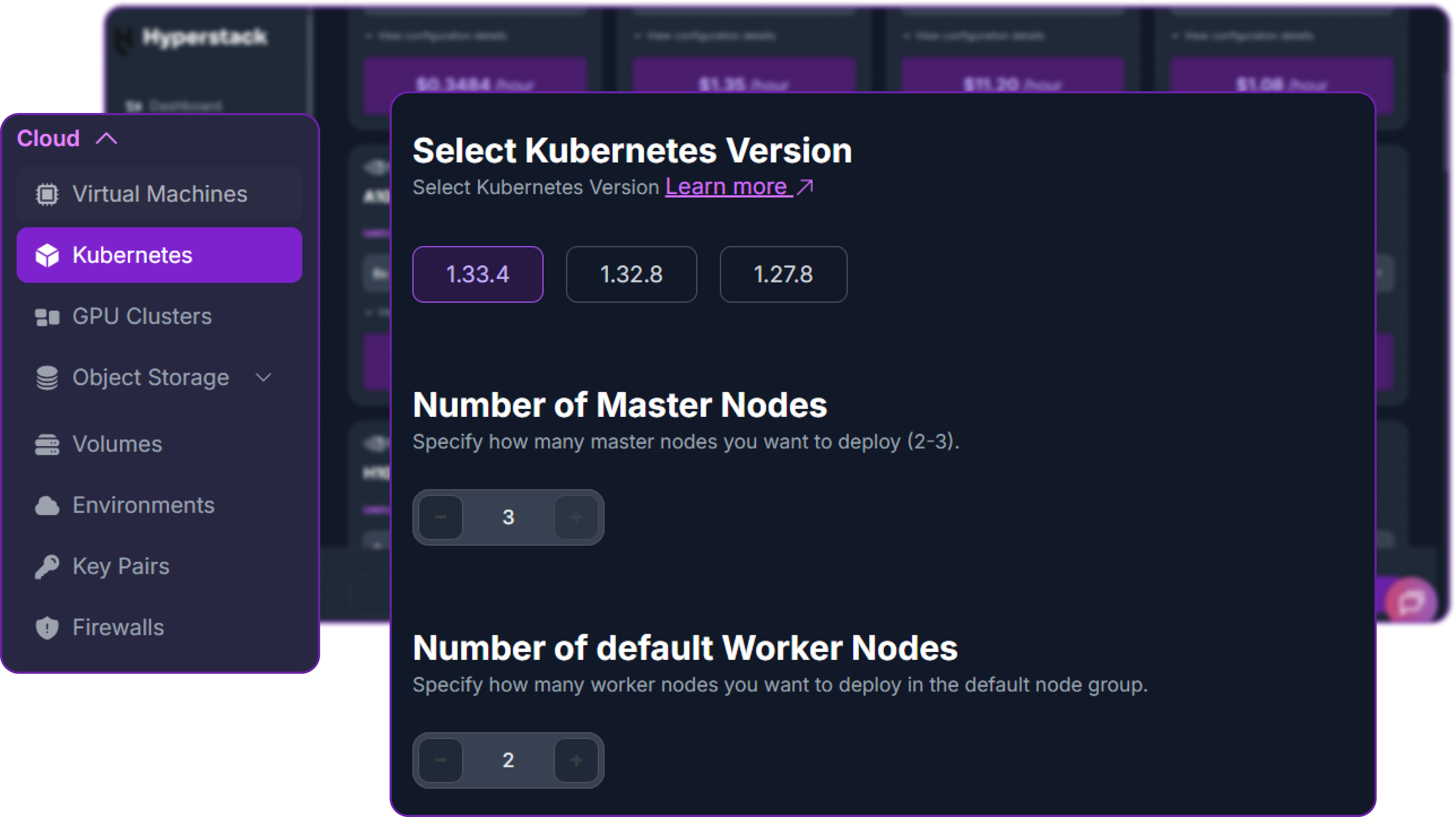
From the Hyperstack dashboard, navigate to the Kubernetes section in the sidebar and create a new cluster. The cluster topology is non-negotiable: Hy3-preview needs both worker nodes to come up successfully.
- Initiate Deployment: Click "Deploy New Cluster" from the Kubernetes dashboard.
- Kubernetes Version: Select 1.33.4. Hyperstack supports 1.33.4, 1.32.8, and 1.27.8 — pick the newest line for the best LeaderWorkerSet compatibility.
- Number of Master Nodes: Set this to 3. Master nodes are free (
n1-cpu-small) and three masters give you proper HA quorum. - Number of default Worker Nodes: Set this to 2. This is the critical choice — Hy3-preview requires both nodes for the multi-node tensor-parallel topology.
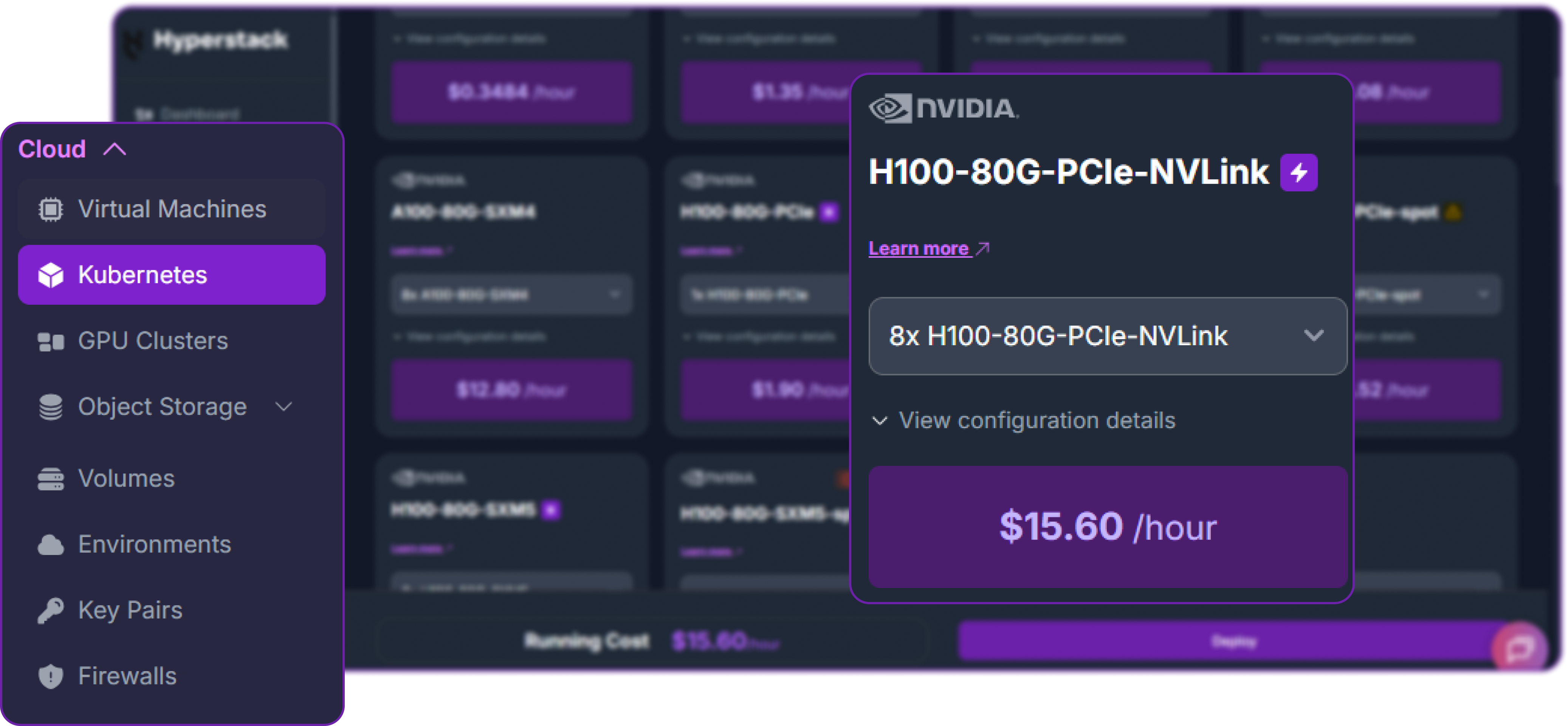
- Worker Flavour: Scroll down to the worker node group and select 8×H100-80G-PCIe-NVLink at $15.60/hr per node. With two worker nodes that brings the total compute cost to roughly $31.20/hr. You'll see this card highlighted in purple in the flavour grid.
- Environment: Choose any environment compatible with the H100 NVLink flavour (e.g.
CANADA-1). - SSH Key: Pick any existing keypair from your account.
- Review and Deploy: Double-check the settings and click "Deploy". The cluster takes 10–15 minutes to provision.
No hibernation for managed K8s: Unlike single VMs, Hyperstack managed Kubernetes clusters do not support hibernation. To stop billing when you're finished, you must either scale the worker count down to 0 or terminate the cluster entirely. Plan your deploy-test-teardown windows accordingly at $31.20/hr.
Step 3: Connect kubectl to Your Cluster
Once the cluster shows Active, download the kubeconfig file from the cluster overview page in the Hyperstack dashboard. On your local machine:
# Place the kubeconfig where kubectl can find it
mkdir -p ~/.kube
mv ~/Downloads/kubeconfig.yaml ~/.kube/hyperstack-hy3.yaml
chmod 600 ~/.kube/hyperstack-hy3.yaml

# Tell kubectl to use it
export KUBECONFIG=~/.kube/hyperstack-hy3.yaml

# Verify the connection — you should see 5 nodes (3 masters + 2 workers)
kubectl get nodes
The expected output shows three masters in Ready control-plane and two workers in Ready worker state:
NAME                       STATUS   ROLES           AGE   VERSION
hy3-cluster-default-0      Ready    worker          12m   v1.33.4
hy3-cluster-default-1      Ready    worker          12m   v1.33.4
hy3-cluster-master-0       Ready    control-plane   16m   v1.33.4
hy3-cluster-master-1       Ready    control-plane   14m   v1.33.4
hy3-cluster-master-2       Ready    control-plane   15m   v1.33.4
Step 4: Verify GPU and Storage Resources
Hyperstack ships every Kubernetes cluster with the NVIDIA GPU Operator already running, so the eight H100 GPUs on each worker node are advertised to the scheduler immediately as nvidia.com/gpu resources. Confirm this:
# Confirm 8 GPUs are visible on each worker node
kubectl get nodes -o custom-columns=NAME:.metadata.name,GPU:.status.allocatable."nvidia\.com/gpu"

# Check the GPU operator pods are healthy
kubectl get pods -n gpu-operator | grep -i nvidia
Expected output:
NAME                       GPU
hy3-cluster-default-0      8
hy3-cluster-default-1      8
hy3-cluster-master-0       <none>
hy3-cluster-master-1       <none>
hy3-cluster-master-2       <none>
The two H100 worker nodes should each report nvidia.com/gpu: 8. The GPU operator pods (device plugin, DCGM exporter, validator) should all be in Running or Completed state.
Storage layout on Hyperstack worker nodes: Each H100 worker has a 100 GB boot disk plus a roughly 6.5 TB NVMe ephemeral disk mounted at /ephemeral on the host. Kubernetes' default ephemeral-storage allocatable lives on the small boot disk and is nowhere near enough for the 600 GB Hy3-preview checkpoint. We will mount /ephemeral directly into our pods via hostPath volumes to bypass the limit.
Step 5: Install the LeaderWorkerSet Controller
LeaderWorkerSet (LWS) is the Kubernetes API that lets us treat a leader pod plus a worker pod as a single coordinated unit. It is the standard pattern for multi-node vLLM deployments and the simplest way to wire up Hy3-preview's two-node TP topology.
# Install the LWS controller from the upstream release
kubectl apply --server-side -f \
  https://github.com/kubernetes-sigs/lws/releases/download/v0.5.1/manifests.yaml

# Wait for the controller to come up (about 30–60 seconds)
kubectl get pod -n lws-system -w
Press Ctrl+C once the lws-controller-manager-* pod reaches Running state.
Step 6: Pre-Download Hy3-preview Weights to Each Worker
The 600 GB Hy3-preview checkpoint takes 25–35 minutes per node to download from Hugging Face. If you let vLLM download on first start, the inference container will time out long before the download completes. The clean solution is a Kubernetes Job with parallelism: 2 that runs once on each worker node, downloads the weights to /ephemeral/hf-cache/hy3-preview, then exits — leaving the weights cached on each node's local NVMe for any future pod that needs them.
Save this manifest as download-hy3.yaml:
apiVersion: batch/v1
kind: Job
metadata:
  name: download-hy3
spec:
  parallelism: 2
  completions: 2
  completionMode: Indexed
  template:
    spec:
      restartPolicy: OnFailure
      affinity:
        podAntiAffinity:
          requiredDuringSchedulingIgnoredDuringExecution:
          - labelSelector:
              matchExpressions:
              - key: job-name
                operator: In
                values: ["download-hy3"]
            topologyKey: kubernetes.io/hostname
      containers:
      - name: downloader
        image: python:3.12-slim
        command:
        - sh
        - -c
        - |
          set -e
          pip install --no-cache-dir -U "huggingface_hub[hf_xet]"
          mkdir -p /cache/hy3-preview
          hf download tencent/Hy3-preview \
            --local-dir /cache/hy3-preview \
            --max-workers 8
          echo "Download complete on $(hostname)"
        resources:
          limits:
            memory: 16Gi
            cpu: "8"
        volumeMounts:
        - mountPath: /cache
          name: hf-cache
      volumes:
      - name: hf-cache
        hostPath:
          path: /ephemeral/hf-cache
          type: DirectoryOrCreate
Apply it and watch the two pods download in parallel:
kubectl apply -f download-hy3.yaml
kubectl get pods -l job-name=download-hy3 -w
The Job creates two pods (one per worker node, enforced by anti-affinity), each downloading independently to its node's /ephemeral/hf-cache/hy3-preview directory. Total time is 25–35 minutes per node — they run in parallel, so the wall-clock wait is the same as a single download.
Why download to each node independently? For multi-node tensor-parallel deployments, vLLM still loads the full checkpoint on each node before sharding it across the local GPU group, so each node needs its own copy. The simpler hostPath-per-node pattern wins on both setup complexity and load time compared with shared NFS mounts.
When both pods reach Completed:
kubectl get jobs download-hy3
# NAME           COMPLETIONS   DURATION   AGE
# download-hy3  2/2           31m        31m

# Delete the Job — the downloaded weights persist on each node's /ephemeral
kubectl delete job download-hy3
Step 7: Deploy Hy3-preview with the LeaderWorkerSet Manifest
Now we deploy the actual inference workload. The manifest below follows vLLM's official 2-node H100 Hy3-preview recipe — multi-node tensor parallelism with --tensor-parallel-size 16, --nnodes 2, and the hy_v3 tool-call and reasoning parsers, plus MTP speculative decoding. Save this as vllm-hy3.yaml:
apiVersion: leaderworkerset.x-k8s.io/v1
kind: LeaderWorkerSet
metadata:
  name: vllm-hy3
spec:
  replicas: 1
  leaderWorkerTemplate:
    size: 2
    restartPolicy: RecreateGroupOnPodRestart
    leaderTemplate:
      metadata:
        labels:
          role: leader
      spec:
        affinity:
          podAntiAffinity:
            requiredDuringSchedulingIgnoredDuringExecution:
            - labelSelector:
                matchExpressions:
                - key: leaderworkerset.sigs.k8s.io/name
                  operator: In
                  values: ["vllm-hy3"]
              topologyKey: kubernetes.io/hostname
        containers:
        - name: vllm-leader
          image: docker.io/vllm/vllm-openai:latest
          securityContext:
            privileged: true
          env:
          - name: HF_HOME
            value: /root/.cache/huggingface
          - name: VLLM_ENGINE_READY_TIMEOUT_S
            value: "3600"
          - name: VLLM_USE_NCCL_SYMM_MEM
            value: "0"
          - name: VLLM_HOST_IP
            valueFrom:
              fieldRef:
                fieldPath: status.podIP
          command:
          - sh
          - -c
          - |
            vllm serve /models/hy3-preview \
              --served-model-name hy3-preview \
              --port 8000 \
              --trust-remote-code \
              --tensor-parallel-size 16 \
              --nnodes 2 \
              --node-rank 0 \
              --master-addr $VLLM_HOST_IP \
              --tool-call-parser hy_v3 \
              --reasoning-parser hy_v3 \
              --enable-auto-tool-choice \
              --speculative-config '{"method":"mtp","num_speculative_tokens":1}' \
              --max-model-len 262144 \
              --gpu-memory-utilization 0.92 \
              --max-num-seqs 256
          resources:
            limits:
              nvidia.com/gpu: "8"
              memory: 1400Gi
            requests:
              cpu: 64
              memory: 1024Gi
          ports:
          - containerPort: 8000
          readinessProbe:
            tcpSocket:
              port: 8000
            initialDelaySeconds: 600
            periodSeconds: 30
          volumeMounts:
          - mountPath: /models/hy3-preview
            name: hf-cache
            subPath: hy3-preview
          - mountPath: /dev/shm
            name: dshm
        volumes:
        - name: hf-cache
          hostPath:
            path: /ephemeral/hf-cache
            type: DirectoryOrCreate
        - name: dshm
          emptyDir:
            medium: Memory
            sizeLimit: 64Gi
    workerTemplate:
      spec:
        affinity:
          podAntiAffinity:
            requiredDuringSchedulingIgnoredDuringExecution:
            - labelSelector:
                matchExpressions:
                - key: leaderworkerset.sigs.k8s.io/name
                  operator: In
                  values: ["vllm-hy3"]
              topologyKey: kubernetes.io/hostname
        containers:
        - name: vllm-worker
          image: docker.io/vllm/vllm-openai:latest
          securityContext:
            privileged: true
          env:
          - name: HF_HOME
            value: /root/.cache/huggingface
          - name: VLLM_ENGINE_READY_TIMEOUT_S
            value: "3600"
          - name: VLLM_USE_NCCL_SYMM_MEM
            value: "0"
          - name: VLLM_HOST_IP
            valueFrom:
              fieldRef:
                fieldPath: status.podIP
          command:
          - sh
          - -c
          - |
            vllm serve /models/hy3-preview \
              --served-model-name hy3-preview \
              --headless \
              --trust-remote-code \
              --tensor-parallel-size 16 \
              --nnodes 2 \
              --node-rank 1 \
              --master-addr $LWS_LEADER_ADDRESS \
              --tool-call-parser hy_v3 \
              --reasoning-parser hy_v3 \
              --enable-auto-tool-choice \
              --speculative-config '{"method":"mtp","num_speculative_tokens":1}' \
              --max-model-len 262144 \
              --gpu-memory-utilization 0.92 \
              --max-num-seqs 256
          resources:
            limits:
              nvidia.com/gpu: "8"
              memory: 1400Gi
            requests:
              cpu: 64
              memory: 1024Gi
          volumeMounts:
          - mountPath: /models/hy3-preview
            name: hf-cache
            subPath: hy3-preview
          - mountPath: /dev/shm
            name: dshm
        volumes:
        - name: hf-cache
          hostPath:
            path: /ephemeral/hf-cache
            type: DirectoryOrCreate
        - name: dshm
          emptyDir:
            medium: Memory
            sizeLimit: 64Gi
---
apiVersion: v1
kind: Service
metadata:
  name: vllm-hy3-leader
spec:
  ports:
  - name: http
    port: 8000
    protocol: TCP
    targetPort: 8000
  selector:
    leaderworkerset.sigs.k8s.io/name: vllm-hy3
    role: leader
  type: ClusterIP
The most important flags in this manifest, all taken directly from vLLM's official multi-node Hy3-preview recipe:
--tensor-parallel-size 16: Total TP size across both nodes (8 GPUs per node × 2 nodes). Each transformer layer is sharded across all 16 GPUs.--nnodes 2: Tells vLLM that the deployment spans two physical nodes.--node-rank 0/--node-rank 1: Identifies the leader (rank 0) and worker (rank 1). Only the leader serves the API; the worker stays headless.--master-addr: Points to the leader pod's IP for NCCL coordination. On the leader we use the pod's own IP ($VLLM_HOST_IP); on the worker we use$LWS_LEADER_ADDRESS, which the LWS controller injects automatically with the leader's hostname.--headless: On the worker only — disables the API server on that pod, since only the leader exposes/v1/chat/completions.--tool-call-parser hy_v3and--reasoning-parser hy_v3: Tencent's official structured-output parsers, required for tool calling and reasoning-content separation.--speculative-config '{"method":"mtp","num_speculative_tokens":1}': Enables Hy3-preview's dedicated 3.8B MTP layer as a draft model, materially improving token throughput at small batch sizes.--max-model-len 262144: Sets the maximum context window to the full 256K supported by the model. Drop this if you don't need long context — every halving frees a substantial slice of KV-cache memory.VLLM_USE_NCCL_SYMM_MEM=0: Disables NCCL symmetric memory; required for the multi-node H100 path per the vLLM recipe environment overrides.securityContext.privileged: true+--ipc=hostequivalent: Required for cross-node InfiniBand/NCCL communication.
Apply the manifest:
kubectl apply -f vllm-hy3.yaml
kubectl get pods -w
The two pods (vllm-hy3-0 leader, vllm-hy3-0-1 worker) will go through Pending → ContainerCreating → Running over the next few minutes. Inside each running container, vLLM begins loading Hy3-preview from /models/hy3-preview and establishing NCCL communication across the two nodes. The full bring-up — image pull, model load, and NCCL handshake — typically takes 12–20 minutes the first time.
Step 8: Verify the Deployment
Whilst the deployment comes up, monitor it from a second terminal:
# Check pods are on different nodes (anti-affinity enforced)
kubectl get pods -o wide

# Stream leader logs
kubectl logs -f vllm-hy3-0

# Stream worker logs (in another terminal)
kubectl logs -f vllm-hy3-0-1
In the leader logs, look for this sequence in order:
vLLM API server version 0.20.x— vLLM has startedInitializing distributed environment with master_addr=...— multi-node coordination startingNCCL INFO Connected all rings— cross-node NCCL handshake successfulLoading model from /models/hy3-preview...Loading safetensors checkpoint shards: 100% CompletedLoading speculative config (MTP)...— MTP layer loaded for speculative decodingAvailable KV cache memory: ...Application startup complete.INFO: Uvicorn running on http://0.0.0.0:8000— the success line
The worker logs should show the same model loading sequence and end with the worker registering as rank 8 through 15 on the global tensor-parallel group, then quietly serving requests forwarded by the leader.
Step 9: Smoke Test the API
Once the leader logs reach Application startup complete., port-forward the service to your laptop:
kubectl port-forward svc/vllm-hy3-leader 8000:8000In a second terminal, send a request to verify the deployment is serving:
# Test the API endpoint from your local terminal
curl http://localhost:8000/v1/chat/completions \
  -H "Content-Type: application/json" \
  -H "Authorization: Bearer EMPTY" \
  -d '{
    "model": "hy3-preview",
    "messages": [{"role": "user", "content": "Reply with one word: HUNYUAN"}],
    "max_tokens": 20,
    "temperature": 0.9,
    "top_p": 1.0
  }'
A successful response looks like this:
{
  "id": "chatcmpl-7c2a91f3b8e64d1a",
  "object": "chat.completion",
  "model": "hy3-preview",
  "choices": [
    {
      "index": 0,
      "message": {
        "role": "assistant",
        "content": "HUNYUAN",
        "reasoning_content": null
      },
      "finish_reason": "stop"
    }
  ],
  "usage": {"prompt_tokens": 14, "completion_tokens": 3, "total_tokens": 17}
}
The "reasoning_content" field is null because no_think mode is the default and returns directly without explicit chain-of-thought. Hy3-preview is now successfully deployed across two nodes on Hyperstack Kubernetes.
Tencent recommends the following sampling parameters for Hy3-preview across all reasoning modes:
# All reasoning modes (no_think, low, high)
temperature=0.9, top_p=1.0
Step 10: Tear Down When Done
When you've finished testing, delete the deployment and tear down the cluster — Hyperstack managed Kubernetes does not support hibernation, and the cluster keeps billing whilst it's running.
# Stop the inference workload
kubectl delete -f vllm-hy3.yaml
Then in the Hyperstack dashboard, scale the cluster's worker count to 0 or terminate the cluster entirely. Either action stops the GPU billing immediately.
Switching Between Reasoning Modes
Now that the vLLM server is running, we can interact with it from Python using the standard OpenAI client. First, install the library:
# Install the OpenAI Python client library to interact with the vLLM server
pip3 install openai
Instantiate an OpenAI-compatible client pointed at the local port-forwarded vLLM server. The api_key can be any non-empty placeholder because vLLM does not enforce authentication by default:
from openai import OpenAI

# Create an OpenAI-compatible client that points to the local port-forwarded vLLM server
client = OpenAI(
    base_url="http://localhost:8000/v1",  # Local API endpoint exposing OpenAI-style routes
    api_key="EMPTY",                      # Placeholder key; vLLM does not enforce API keys
)
Hy3-preview's three reasoning tiers are controlled at request time via chat_template_kwargs.reasoning_effort. no_think is the default and is best for fast factual responses; low is intended for everyday reasoning tasks; high is for the hardest problems and produces explicit chain-of-thought traces in message.reasoning_content.
no_think mode (default) — fast, intuitive responses with no reasoning trace:
# no_think mode — fast intuitive response, no reasoning trace
chat_response = client.chat.completions.create(
    model="hy3-preview",
    messages=[{"role": "user", "content": "What is 17 * 19? Return only the integer."}],
    max_tokens=50,
    temperature=0.9,
    top_p=1.0,
    extra_body={"chat_template_kwargs": {"reasoning_effort": "no_think"}},
)

print(chat_response.choices[0].message.content)
# 323
low mode — light reasoning for everyday multi-step questions:
# low mode — moderate reasoning effort
chat_response = client.chat.completions.create(
    model="hy3-preview",
    messages=[{
        "role": "user",
        "content": "A train travels at 80 km/h for 2.5 hours, then 60 km/h for 1.5 hours. "
                   "What is the average speed for the entire journey?",
    }],
    max_tokens=800,
    temperature=0.9,
    top_p=1.0,
    extra_body={"chat_template_kwargs": {"reasoning_effort": "low"}},
)

print("Reasoning:", chat_response.choices[0].message.reasoning_content)
print("Answer:   ", chat_response.choices[0].message.content)
high mode — deep chain-of-thought for math, coding, and complex reasoning. The reasoning trace appears in message.reasoning_content, the final answer in message.content:
# high mode — deep chain-of-thought reasoning
chat_response = client.chat.completions.create(
    model="hy3-preview",
    messages=[{
        "role": "user",
        "content": "Prove that the sum of cubes of three consecutive integers is divisible by 9."
    }],
    max_tokens=8000,
    temperature=0.9,
    top_p=1.0,
    extra_body={
        "chat_template_kwargs": {
            "reasoning_effort": "high",
            "interleaved_thinking": True,  # useful when tools are also registered
        },
    },
)

print("Reasoning:", chat_response.choices[0].message.reasoning_content)
print("Answer:   ", chat_response.choices[0].message.content)
Multi-Agent System with Hy3-preview
Hy3-preview's combination of three reasoning modes, native hy_v3 tool calling, and 256K context makes it an unusually clean substrate for multi-agent systems. Rather than running multiple different models — each with its own deployment, latency, and quirks — we use a single Hy3-preview deployment with different system prompts, tool sets, and reasoning-effort levels per agent role.
The example below builds a four-agent code-review pipeline that takes a piece of source code, analyses it from multiple specialist angles in parallel, and produces a synthesised review. The four agents are:
- Coordinator — routes the input and assembles the final report. Uses
no_thinkfor speed. - Static Analyser — reads the code, runs a linter, and reports correctness issues. Uses
highreasoning. - Security Auditor — checks for vulnerabilities, unsafe patterns, and secret leaks. Uses
highreasoning. - Style & Documentation Reviewer — checks naming, formatting, and docstring coverage. Uses
lowreasoning.
All four agents share the same backend — our two-node Hy3-preview deployment — but they specialise via system prompts, tool definitions, and reasoning effort. This is exactly the workload pattern Hy3-preview was designed for: large concurrent context, tool-calling-heavy, and a mix of latency-sensitive and reasoning-heavy turns within a single session.
Setting Up the Shared Client and Tools
Start with the OpenAI client and a single shared tool — a sandboxed shell — that any agent can invoke. In a real deployment you'd register more specialised tools (a linter wrapper, a secret-scanner, a docstring checker) but the shell is enough to demonstrate the pattern end-to-end.
import json, os, subprocess, textwrap
from openai import OpenAI

client = OpenAI(base_url="http://localhost:8000/v1", api_key="EMPTY")
WORKSPACE = "/tmp/hy3_review_workspace"
os.makedirs(WORKSPACE, exist_ok=True)

# A single sandboxed shell tool that all specialist agents can call.
shell_tool = [{
    "type": "function",
    "function": {
        "name": "run_shell",
        "description": "Run a shell command inside the review workspace. Returns stdout+stderr.",
        "parameters": {
            "type": "object",
            "properties": {"command": {"type": "string"}},
            "required": ["command"],
        },
    },
}]

def run_shell(command, timeout=30):
    proc = subprocess.run(command, shell=True, cwd=WORKSPACE,
                          capture_output=True, text=True, timeout=timeout)
    return (proc.stdout + proc.stderr).strip()
Defining Each Specialist Agent
Each agent is a thin function that wraps a single chat completion with its own system prompt and reasoning-effort level. The shared agent loop (defined next) iterates the tool-call cycle until the agent stops issuing tool calls.
def agent_step(messages, system_prompt, reasoning_effort, tools=None, max_tokens=2048):
    """Single chat-completion call with role-specific system prompt and reasoning."""
    full_messages = [{"role": "system", "content": system_prompt}] + messages
    extra_body = {"chat_template_kwargs": {"reasoning_effort": reasoning_effort}}
    if tools:
        extra_body["chat_template_kwargs"]["interleaved_thinking"] = True
    resp = client.chat.completions.create(
        model="hy3-preview",
        messages=full_messages,
        tools=tools or [],
        tool_choice="auto" if tools else "none",
        max_tokens=max_tokens,
        temperature=0.9,
        top_p=1.0,
        extra_body=extra_body,
    )
    return resp.choices[0].message

def tool_loop(initial_user_msg, system_prompt, reasoning_effort, max_steps=10):
    """Run a specialist agent until it stops issuing tool calls."""
    messages = [{"role": "user", "content": initial_user_msg}]
    for _ in range(max_steps):
        msg = agent_step(messages, system_prompt, reasoning_effort, tools=shell_tool)
        messages.append(msg)
        if not msg.tool_calls:
            return msg.content
        for tc in msg.tool_calls:
            args = json.loads(tc.function.arguments)
            output = run_shell(args["command"])
            messages.append({"role": "tool", "tool_call_id": tc.id, "content": output})
    return "step limit reached"
Now the four role-specific system prompts. Each is deliberately narrow — that's how single-model multi-agent systems get specialisation without fine-tuning:
SYS_ANALYSER = """You are a static-analysis specialist. Read the file in the workspace,
run pyflakes or python -m py_compile, and identify correctness bugs and dead
code. Return a numbered list of findings, each with line number and severity
(blocker / major / minor). Be terse — no preamble."""

SYS_SECURITY = """You are a security auditor. Scan the file for: hardcoded secrets,
unsafe deserialisation, SQL injection, command injection, path traversal,
insecure defaults, and crypto misuse. Use grep through the workspace as needed.
Return a numbered list of findings with CWE IDs where applicable."""

SYS_STYLE = """You are a style and documentation reviewer. Check naming conventions,
docstring coverage, type-hint coverage, and PEP-8 compliance. Run pycodestyle
if available. Return a numbered list of findings, max 8 items, prioritised by
impact on readability."""

SYS_COORDINATOR = """You are the coordinator for a code-review pipeline. You will be
given findings from three specialists (static analyser, security auditor, style
reviewer). Synthesise them into a single review with: (1) top three blockers,
(2) prioritised fix list, (3) one-line overall verdict (ship / fix / reject).
Be concise, no repetition across sections."""
Wiring Them Together: The Pipeline
The coordinator is what makes this a multi-agent system rather than three independent runs. It dispatches the specialists in parallel, collects their outputs, and produces a single synthesised review using high reasoning for the synthesis turn:
from concurrent.futures import ThreadPoolExecutor

def review_pipeline(filename):
    """Run the full multi-agent review pipeline on a single file."""
    user_msg = f"Review {filename} in the workspace."

    # Stage 1: Run the three specialists in parallel.
    specialists = [
        ("Static Analyser", SYS_ANALYSER, "high"),
        ("Security Auditor", SYS_SECURITY, "high"),
        ("Style Reviewer",   SYS_STYLE,    "low"),
    ]
    with ThreadPoolExecutor(max_workers=3) as ex:
        futures = {ex.submit(tool_loop, user_msg, sysp, eff): name
                   for name, sysp, eff in specialists}
        findings = {name: f.result() for f, name in
                    [(f, futures[f]) for f in futures]}

    # Stage 2: Coordinator synthesises the findings with high reasoning.
    synthesis_prompt = textwrap.dedent(f"""\
        Three specialists reviewed {filename}. Their findings are below.
        Produce a unified review.

        --- STATIC ANALYSER ---
        {findings['Static Analyser']}

        --- SECURITY AUDITOR ---
        {findings['Security Auditor']}

        --- STYLE REVIEWER ---
        {findings['Style Reviewer']}
    """)
    coordinator_msg = agent_step(
        [{"role": "user", "content": synthesis_prompt}],
        SYS_COORDINATOR,
        reasoning_effort="high",
        tools=None,
        max_tokens=2000,
    )
    return {
        "specialists": findings,
        "reasoning": coordinator_msg.reasoning_content,
        "final": coordinator_msg.content,
    }
Running the Pipeline End-to-End
Seed the workspace with a deliberately problematic file — one that has correctness bugs, a security issue, and style problems — then run the pipeline:
# Seed the workspace with a file that has issues across all three dimensions.
sample = textwrap.dedent('''
    import os, pickle, sqlite3

    DB_PASSWORD = "p@ssw0rd123"   # hardcoded secret

    def load_user(blob):
        return pickle.loads(blob)  # unsafe deserialisation

    def get_user(name):
        conn = sqlite3.connect("users.db")
        q = "SELECT * FROM users WHERE name = '" + name + "'"  # SQL injection
        return conn.execute(q).fetchall()

    def UnusedHelper(x):       # bad name + unused
        y = x + 1
        return
''')
open(f"{WORKSPACE}/sample.py", "w").write(sample)

# Run the full pipeline.
result = review_pipeline("sample.py")
print("=== COORDINATOR REASONING (chain-of-thought) ===")
print(result["reasoning"][:1500], "...\n")
print("=== FINAL UNIFIED REVIEW ===")
print(result["final"])
A representative output looks like this:
=== COORDINATOR REASONING (chain-of-thought) ===
Cross-referencing the three reports. Both the static analyser and the security
auditor flagged sample.py:6 (pickle.loads on untrusted input) — that's a
blocker. The auditor also raised the SQL injection on line 11 (CWE-89) and
the hardcoded secret on line 4 (CWE-798). The style reviewer added the
PascalCase function name and the unused variable, which are minor compared
with the security issues. Ordering: deserialisation -> SQLi -> secret -> naming...

=== FINAL UNIFIED REVIEW ===
Top blockers
1. Unsafe pickle.loads on attacker-controllable bytes (line 6) — RCE via
   crafted payload. Replace with a schema-validated JSON parser.
2. SQL injection in get_user (line 11) — concatenated query string. Switch
   to a parameterised query: conn.execute("SELECT * FROM users WHERE name=?",
   (name,)).
3. Hardcoded credential DB_PASSWORD (line 4) — load from environment or a
   secrets manager.

Prioritised fix list
- Fix #1, #2, #3 above before merge.
- Rename UnusedHelper -> unused_helper (PEP-8) and remove it if truly unused.
- Add type hints and a module docstring.

Verdict: REJECT — must fix the three blockers before this can be re-reviewed.
What just happened across the cluster: three specialists ran in parallel against the same Hy3-preview leader endpoint, each issuing their own tool-call loops with different reasoning-effort levels. The coordinator then synthesised their outputs with high reasoning for the final pass. Across the four agents, this single review consumed roughly 30,000–60,000 tokens of context — well within the 256K window — and finished in well under a minute end-to-end thanks to MTP speculative decoding.
This same pattern scales naturally: add a fourth specialist for performance review, swap the shell tool for a real linter MCP server, or chain multiple coordinator passes for hierarchical review of an entire pull request. The key property — that one Hy3-preview deployment can serve every role — is what makes the multi-agent pattern economically viable on a $31.20/hr two-node H100 cluster.
Why Deploy Hy3-preview on Hyperstack Kubernetes?
Hyperstack is a cloud platform purpose-built to accelerate AI and machine learning workloads, and Hy3-preview's multi-node MoE pipeline is exactly the kind of GPU-bound, memory-sensitive deployment Hyperstack is engineered for:
nvidia.com/gpu resources to the scheduler./ephemeral. This is what makes the 600 GB Hy3-preview checkpoint deployment possible without external NFS or block storage.LeaderWorkerSet, Job and Service manifests in this guide work identically on any conformant cluster./ephemeral-resident model cache and you can spin up a fresh cluster, redeploy Hy3-preview and be serving traffic within an hour.hy_v3 tool-call and reasoning parsers, and the recommended multi-node TP topology all work out of the box on Hyperstack. The deployment in this guide follows vLLM's official multi-node Hy3-preview recipe with no Hyperstack-specific modifications.
FAQs
What is Hy3-preview?
Hy3-preview is the flagship of Tencent Hunyuan's newest open-source family — a 295 billion-parameter Mixture-of-Experts model with 21 billion active parameters per token, plus a dedicated 3.8B MTP layer for speculative decoding. It ships with 192 routed experts (top-8 activated), Grouped-Query Attention, a native 256K-token context window, and three reasoning modes (no_think, low, high). Tencent reports strong results on FrontierScience-Olympiad, IMOAnswerBench, SWE-bench Verified, Terminal-Bench 2.0, BrowseComp, and WideSearch.
What hardware do I need to deploy Hy3-preview?
Hy3-preview's roughly 600 GB BF16 checkpoint requires either a single 8×H200-141G or 8×H20-3e-141G node, a single 8-GPU AMD MI300X/MI325X (192 GB) or MI350X/MI355X (288 GB) node, or a multi-node deployment across two 8×H100-80G nodes — the topology this guide covers. On Hyperstack the H100 multi-node path is the most cost-effective and is available on demand.
Why is Hy3-preview deployed across two nodes instead of one?
A single 8×H100-80G node has only 640 GB of total VRAM. Hy3-preview's BF16 weights occupy about 600 GB, leaving essentially no headroom for KV cache, CUDA graphs, or activation memory. The vLLM official recipe handles this with multi-node tensor parallelism: --tensor-parallel-size 16 shards every transformer layer across all 16 GPUs, with NCCL handling the cross-node communication.
Does Hy3-preview support all three reasoning modes on a self-hosted deployment?
Yes. All three modes — no_think, low, and high — are controlled at request time via chat_template_kwargs.reasoning_effort, and all three work out of the box with the manifest in this guide. no_think is the default and produces direct responses; low and high populate message.reasoning_content with explicit chain-of-thought.
Can I use a smaller context window to free up GPU memory?
Yes. The --max-model-len 262144 value in the manifest sets the full 256K context. You can drop it to --max-model-len 65536 or even 32768 for typical chat workloads, which leaves much more memory headroom for KV cache and concurrent requests. Only keep the full 256K if you actually need it for long-context agentic workflows.
Does Hy3-preview support tool calling?
Yes, natively. Pass --tool-call-parser hy_v3 --enable-auto-tool-choice to vLLM (already included in the manifest) and the model will autonomously decide when to invoke tools you provide via the OpenAI tools API. Combined with low or high reasoning and interleaved_thinking: true, this enables the multi-step agentic workflows showcased in the multi-agent code-review pipeline above.
Which inference engines support Hy3-preview?
Tencent officially supports vLLM and SGLang for production deployment, with the hy_v3 tool-call and reasoning parsers shipping for both engines. Tencent also provides a complete training pipeline (full fine-tuning and LoRA, with DeepSpeed ZeRO and LLaMA-Factory integration) and the AngelSlim toolkit for model compression including low-bit quantisation and speculative-sampling-aware compression.
What licence does Hy3-preview ship under?
Hy3-preview is released under the Tencent Hy Community License Agreement. Both the instruct model (tencent/Hy3-preview) and the pre-trained base model (tencent/Hy3-preview-Base) are available on Hugging Face, ModelScope, and GitCode. Refer to the LICENSE file in the model repository for the full terms before commercial deployment.
Subscribe to Hyperstack!
Enter your email to get updates to your inbox every week



