


.png)
TABLE OF CONTENTS
NVIDIA H100 SXM GPUs On-Demand
Key Takeaways
-
Qwen3-Coder-Next is an open-weight agentic model designed specifically for efficient coding agents and local development
-
It utilizes a unique Mixture-of-Experts (MoE) architecture with only 3B active parameters, delivering high performance with low inference costs
-
The model supports a massive 256k context window, allowing it to handle extensive repositories and complex scaffolding templates
-
Despite its efficiency, the 80B total parameter count requires high-memory GPU infrastructure to load the full weights
-
The tutorial walks through deploying Qwen3-Coder-Next on Hyperstack using GPU-powered virtual machines
-
Docker is used to create a consistent environment using the vLLM-OpenAI image
-
vLLM is configured with specific flags for tensor parallelism and tool-call parsers to enable agentic capabilities
-
Proper memory allocation and ephemeral storage caching are implemented to ensure stable performance and fast startup
-
A Python-based test script confirms the model's ability to autonomously call tools and execute functions
-
Once deployed, the model is ready for integration into IDEs like Cline, Claude Code, and custom engineering pipelines
-
Hyperstack simplifies the deployment of memory-intensive models like Qwen3 without the need to manage physical hardware
What is Qwen3-Coder-Next?
Qwen3-Coder-Next is the latest open-weight language model from the Qwen Team, built specifically for coding agents and local development. Unlike traditional dense models, it utilizes a Mixture-of-Experts (MoE) architecture. While it boasts a massive 80B total parameter count, it only activates 3B parameters per token. This unique design allows it to deliver performance comparable to models with 10–20x more active parameters while remaining highly efficient for inference and agent deployment.
Qwen3-Coder-Next Features
The latest version of Qwen3-Coder-Next comes with significant enhancements, including:
- Super Efficient MoE Architecture: With only 3B activated parameters (out of 80B total), it offers exceptional speed and cost-effectiveness without sacrificing deep reasoning capabilities.
- Advanced Agentic Capabilities: Excelling at long-horizon reasoning and complex tool usage, it is designed to recover from execution failures and handle dynamic coding tasks robustly.
- Massive Context Integration: Features a 256k context window and adaptability to scaffolding frameworks like Claude Code, Cline, and Trae, ensuring seamless integration into modern IDEs.
- High-Performance Tool Use: Optimized for tool calling with specific parsers, making it an ideal engine for autonomous software engineering agents.
How to Deploy Qwen3-Coder-Next on Hyperstack
Now, let's walk through the step-by-step process of deploying the necessary infrastructure.
Step 1: Accessing Hyperstack
First, you'll need an account on Hyperstack.
- Go to the Hyperstack website and log in.
- If you are new, create an account and set up your billing information. Our documentation can guide you through the initial setup.
Step 2: Deploying a New Virtual Machine
From the Hyperstack dashboard, we will launch a new GPU-powered VM.
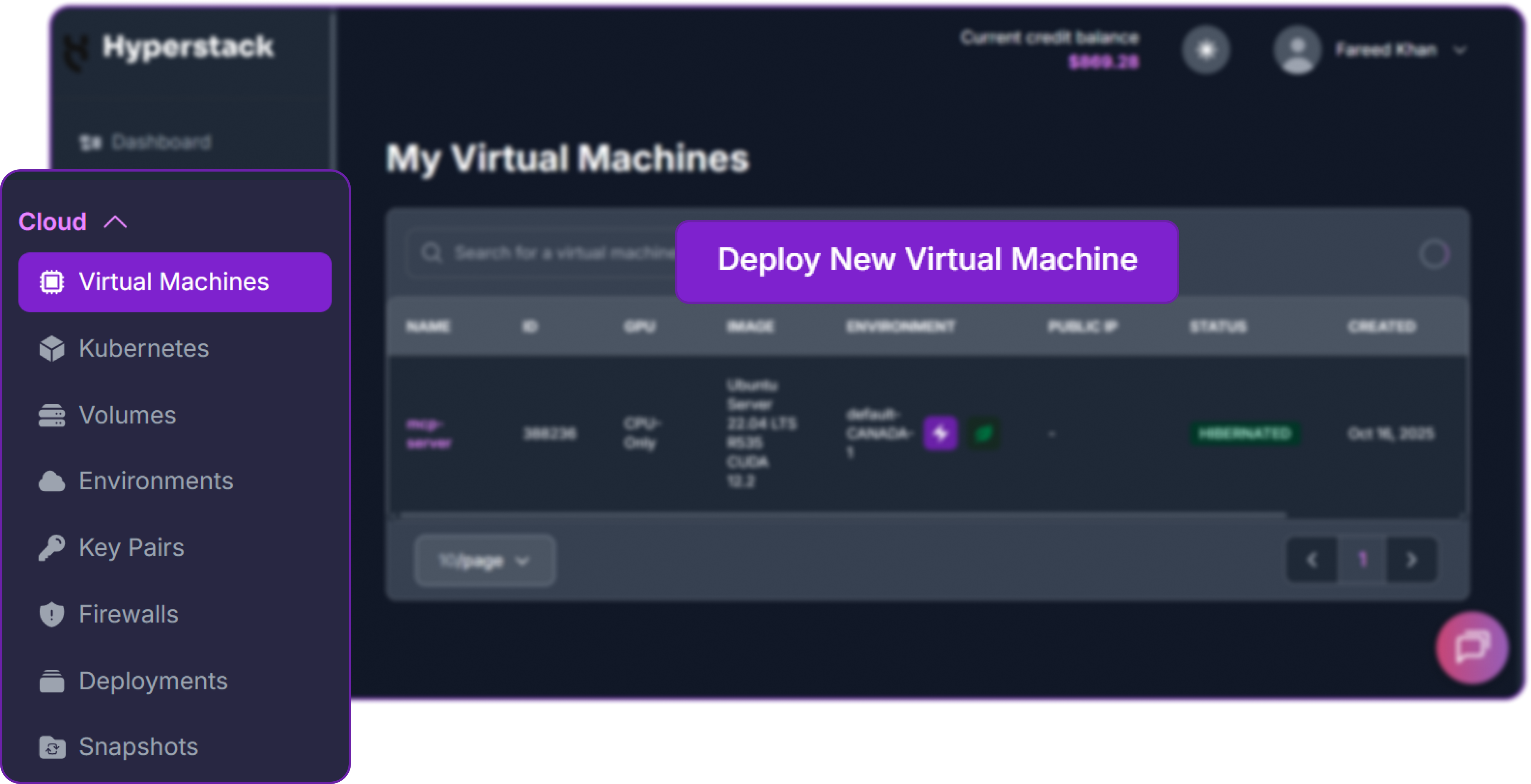
- Initiate Deployment: Look for the "Deploy New Virtual Machine" button on the dashboard and click it.
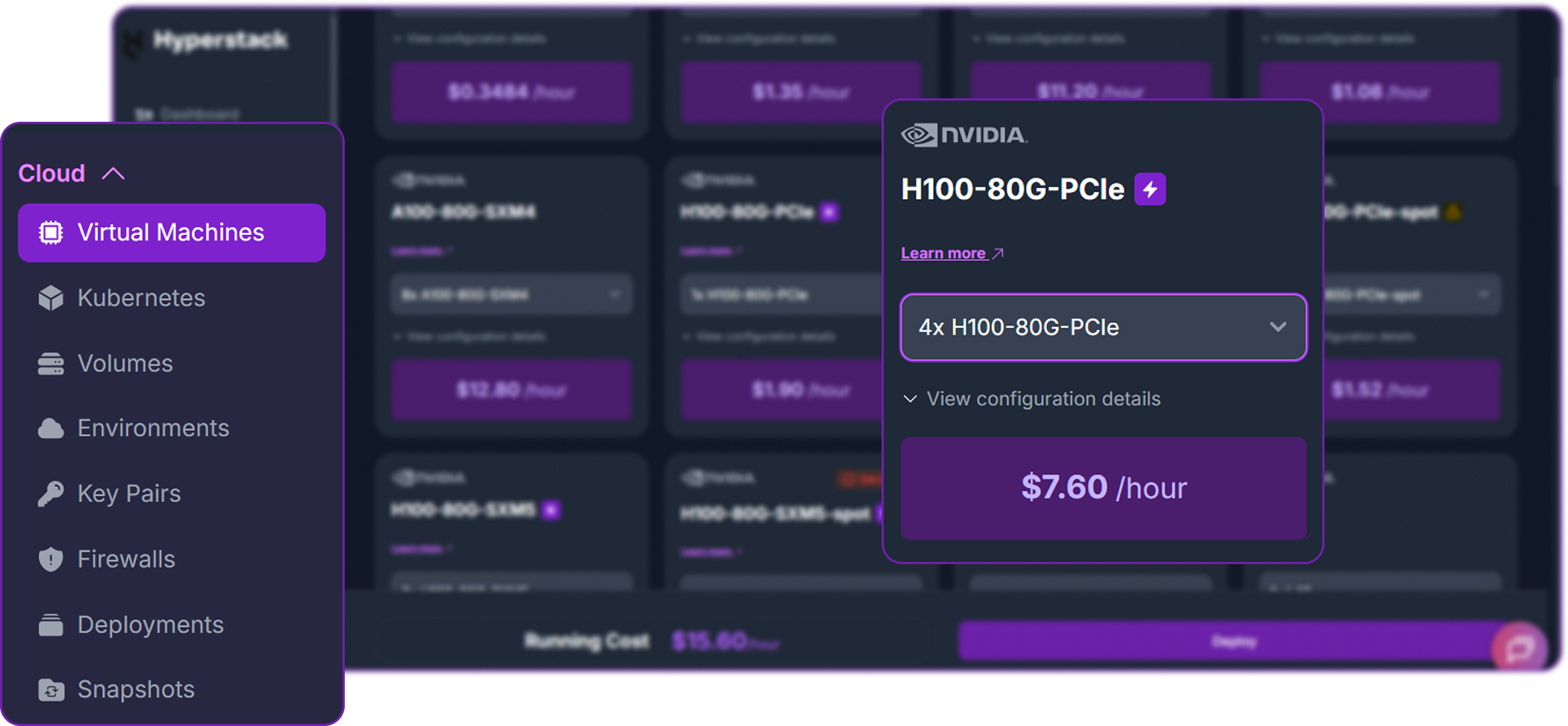
- Select Hardware Configuration: For Qwen3-Coder-Next, efficient inference with tensor parallelism is key. Choose the "4xH100-80G-PCIe" flavour to ensure sufficient VRAM and memory bandwidth.
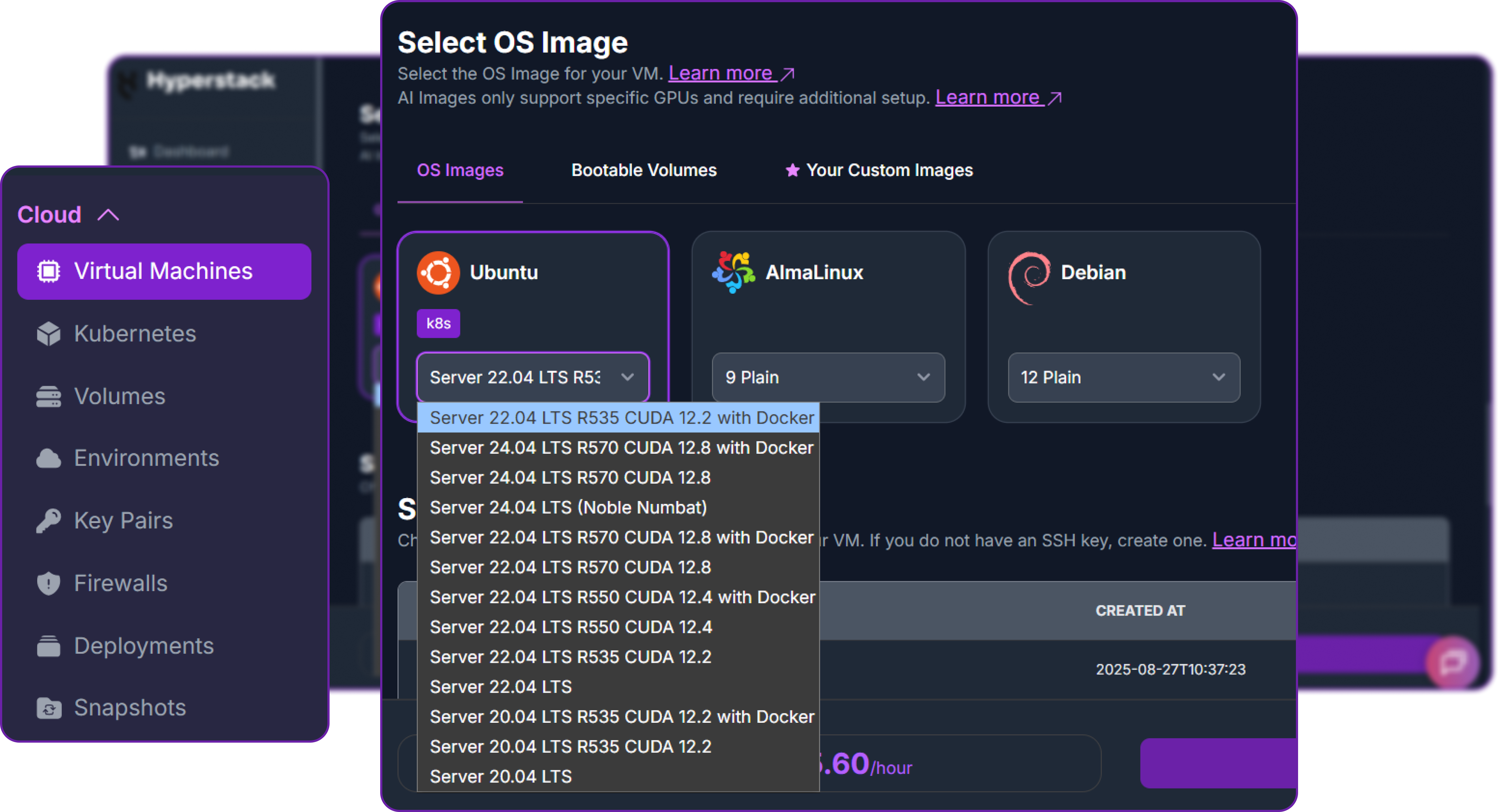
- Choose the Operating System: Select the "Ubuntu Server 22.04 LTS R535 CUDA 12.2 with Docker" image. This provides a ready-to-use environment with all necessary drivers.
- Select a Keypair: Choose an existing SSH keypair from your account to securely access the VM.
- Network Configuration: Ensure you assign a Public IP to your Virtual Machine. This is crucial for remote management and connecting your local development tools.
- Review and Deploy: Double-check your settings and click the "Deploy" button.
Step 3: Accessing Your VM
Once your VM is running, you can connect to it.
-
Locate SSH Details: In the Hyperstack dashboard, find your VM's details and copy its Public IP address.
-
Connect via SSH: Open a terminal on your local machine and use the following command, replacing the placeholders with your information.
# Connect to your VM using your private key and the VM's public IP
ssh -i [path_to_your_ssh_key] ubuntu@[your_vm_public_ip]
Here you will replace [path_to_your_ssh_key] with the path to your private SSH key file and [your_vm_public_ip] with the actual IP address of your VM.
Once connected, you should see a welcome message indicating you're logged into your Hyperstack VM.
Now that we are inside the VM, we will use Docker to launch the vLLM server.
Step 4: Create a Model Cache Directory
We'll create a directory on the VM's high-speed ephemeral disk. Storing the model here ensures faster loading times on startup.
# Create a directory for the Hugging Face model cache
sudo mkdir -p /ephemeral/hug

# Grant full read/write permissions to the directory
sudo chmod -R 0777 /ephemeral/hug
This command creates a folder named hug inside the /ephemeral disk and sets its permissions so that the Docker container can read and write the model files.
Step 5: Launch the vLLM Server
We will use the vllm-openai Docker image. Note that we are using specific flags like --tool-call-parser to enable the advanced agentic features of Qwen3.
# Pull the latest vLLM image
docker pull vllm/vllm-openai:latest

# Launch the vLLM container for Qwen3-Coder-Next
docker run -d \
  --gpus all \
  --ipc=host \
  --network host \
  --name vllm_qwen3 \
  --restart always \
  -v /ephemeral/hug:/root/.cache/huggingface \
  vllm/vllm-openai:latest \
  --model Qwen/Qwen3-Coder-Next \
  --tensor-parallel-size 4 \
  --enable-auto-tool-choice \
  --tool-call-parser qwen3_coder \
  --gpu-memory-utilization 0.90 \
  --host 0.0.0.0 \
  --port 8000
This command instructs Docker to:
--gpus all: Use all available NVIDIA GPUs.--network host: Expose the container's ports directly on the VM's network for simpler access.-v /ephemeral/hug:/root/.cache/huggingface: Mount our cache directory to persist the downloaded model.--model ...: Specifies the Qwen/Qwen3-Coder-Next model.--tensor-parallel-size 4: Splits the model across 4 GPUs for optimal distribution.--enable-auto-tool-choice: Allows the model to decide when to call tools.--tool-call-parser qwen3_coder: Uses the specific parser required for Qwen3's agentic functions.--gpu-memory-utilization 0.90: Allocates 90% of VRAM to the model weights and KV cache.
Step 6: Verify the Deployment
First, check the container logs to monitor the model loading process. This may take several minutes.
docker logs -f vllm_qwen3
The process is complete when you see the line: INFO: Uvicorn running on http://0.0.0.0:8000.
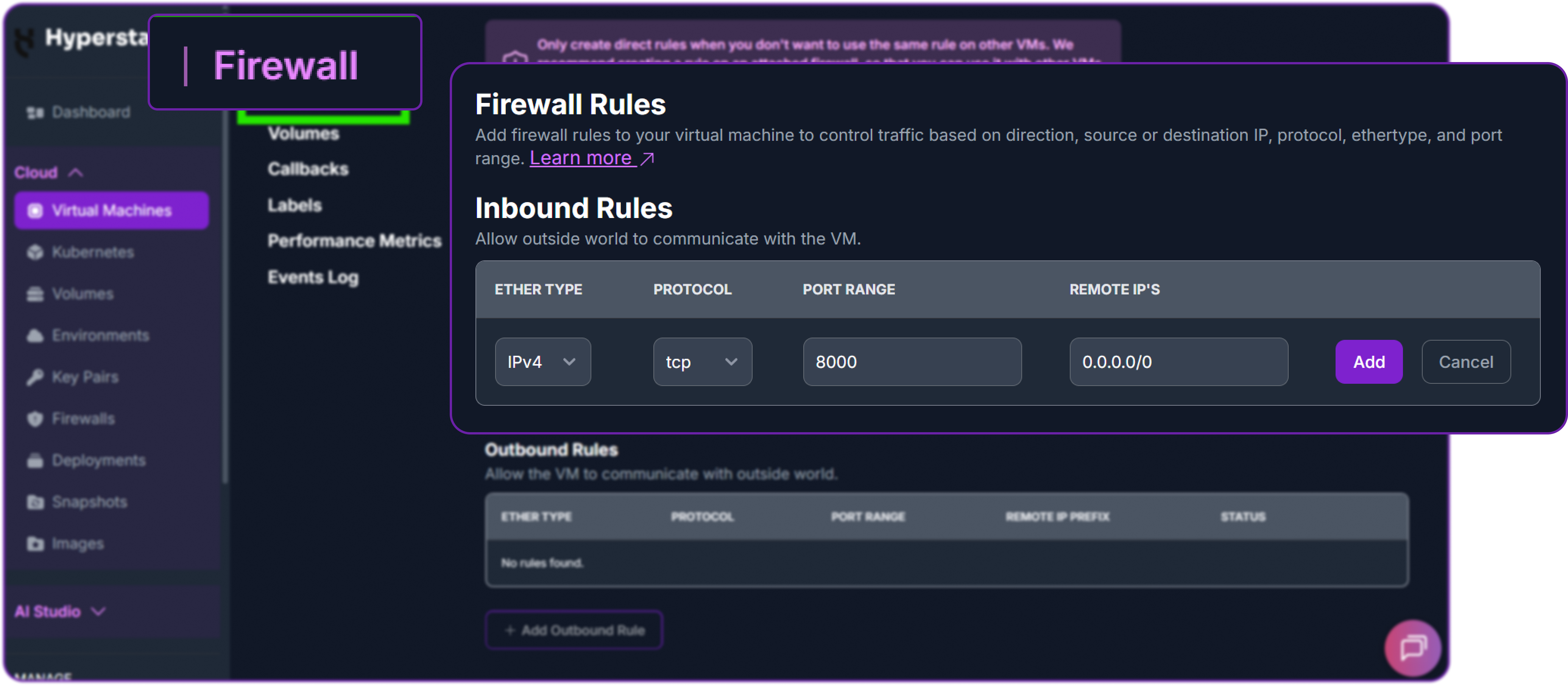
Next, add a firewall rule in your Hyperstack dashboard to allow inbound TCP traffic on port 8000. This is essential for external access.
Finally, test the API from your local machine (not the VM) by replacing the IP address with your VM's IP address.
# Test the API endpoint from your local terminal
curl http://<YOUR_VM_PUBLIC_IP>:8000/v1/chat/completions \
  -H "Content-Type: application/json" \
  -H "Authorization: Bearer EMPTY" \
  -d '{
    "model": "Qwen/Qwen3-Coder-Next",
    "messages": [
      {"role": "user", "content": "Hello!"}
    ],
    "max_tokens": 200
  }'
You can see that we have a successful response as a JSON object containing the model reply:
{
  "id": "chatcmpl-98f4b9baaeb1613d",
  "object": "chat.completion",
  "created": 1770201723,
  "model": "Qwen/Qwen3-Coder-Next",
  "choices": [
    {
      "index": 0,
      "message": {
        "role": "assistant",
        "content": "Hi there! 😊 How can I help you today?",
        ...
      },
      "finish_reason": "stop"
    }
  ],
  ...
}Note that to achieve optimal performance, Qwen team recommends using the following sampling parameters:
# Recommended sampling configuration
temperature = 1.0
top_p = 0.95
top_k = 40
You can see that our model is responding correctly to our query which means Qwen/Qwen3-Coder-Next is successfully deployed on Hyperstack.
Step 7: Hibernating Your VM (OPTIONAL)
When you are finished with your current workload, you can hibernate your VM to avoid incurring unnecessary costs:
- In the Hyperstack dashboard, locate your Virtual machine.
- Look for a "Hibernate" option.
- Click to hibernate the VM, which will stop billing for compute resources while preserving your setup.
Agentic Coding with Qwen3-Coder-Next
Qwen3 supports tool use, allowing it to call user-defined functions during chat interactions. We will be working with OpenAI's Python client to demonstrate how to set up and use tool calls with the Qwen3-Coder-Next model. Let's install the OpenAI Python client first if you haven't done so already.
pip3 install openai
Next, we have to define a function and describe it to the model. In this example, we define a simple function that squares a number.
# Define a function that takes a number as input and returns its square
def square_the_number(num: float) -> float:
    return num ** 2  # Return the square of the input number
This function is simply squaring the input number. Next, we describe this function to the model so it can use it when needed.
# Define a list of tools for the LLM to use
tools = [
    {
        "type": "function",  # Specify the tool type as a function
        "function": {
            "name": "square_the_number",  # Name of the function
            "description": "output the square of the number.",  # Description for the LLM
            "parameters": {
                "type": "object",  # Parameters are defined as an object
                "required": ["input_num"],  # 'input_num' is required
                "properties": {
                    'input_num': {
                        'type': 'number',  # Type of the parameter is number
                        'description': 'input_num is a number that will be squared'
                    }
                },
            }
        }
    }
]
The tool definition is a list containing a single dictionary that describes the function, its parameters, and their types. Let's understand what each part means:
-
type:functionindicates that this tool is a function.name: The name of the function that the model can call.description: Provides a brief explanation of what the function does, as it will be shown to the model.parameters: Defines the expected input for the function, including required fields and their types.input_num: Defined as a number that the model will provide when calling the function.properties: Describes the individual parameters, including their types and descriptions.
Now, we can set up the OpenAI client to interact with the local endpoint and use the defined tool.
from openai import OpenAI  # Import the OpenAI client

# Initialize the OpenAI client with a custom endpoint and API key
client = OpenAI(
    base_url='http://localhost:8000/v1',  # Set the base URL for the API
    api_key="EMPTY"  # Use an empty API key (for local endpoints)
)
We are setting the base_url to point to our local server where Qwen3 is running. The api_key is set to "EMPTY" since we are using a local instance that does not require authentication.
Let's prepare a message to send to the model, asking it to square the number 1024.
# Define the messages to send to the LLM
messages = [{'role': 'user', 'content': 'square the number 1024'}]

# Create a chat completion request to the LLM
completion = client.chat.completions.create(
    messages=messages,  # Pass the user messages
    model="Qwen/Qwen3-Coder-Next",  # Specify the model to use
    tools=tools,  # Pass the defined tools
)

# Print the first choice from the completion response
print(completion.choices[0])
We get the following output:
Choice(
  finish_reason='tool_calls',
  index=0,
  logprobs=None,
  message=ChatCompletionMessage(
    content=None,
    refusal=None,
    role='assistant',
    annotations=None,
    audio=None,
    function_call=None,
    tool_calls=[
      ChatCompletionMessageFunctionToolCall(
        id='chatcmpl-tool-9ef4c45bc6375d0b',
        function=Function(
          arguments='{"input_num": 1024}',
          name='square_the_number'
        ),
        type='function'
      )
    ],
    reasoning=None,
    reasoning_content=None
  ),
  stop_reason=None,
  token_ids=None
)
You can see that after sending the request, model decides to call the function. We can then extract the tool call and execute the function:
# Extract the tool call from the completion response
import json

tool_call = completion.choices[0].message.tool_calls[0]
args = json.loads(tool_call.function.arguments)

# Execute the function with the provided argument
result = square_the_number(num=args['input_num'])

# print the result of the function execution
print(f"Result of squaring the number: {result}")

# It prints -> Result of squaring the number: 1048576
This confirms that our model successfully used the defined function to square the number 1024, resulting in 1048576.
Why Deploy Qwen3-Coder-Next on Hyperstack?
Hyperstack is a cloud platform designed to accelerate AI and machine learning workloads. Here's why it's an excellent choice for deploying Qwen3-Coder-Next:
- Availability: Hyperstack provides access to the latest and most powerful GPUs such as the NVIDIA H100 on-demand, specifically designed to handle large language models.
- Ease of Deployment: With pre-configured environments and one-click deployments, setting up complex AI models becomes significantly simpler on our platform.
- Scalability: You can easily scale your resources up or down based on your computational needs.
- Cost-Effectiveness: You pay only for the resources you use with our cost-effective cloud GPU pricing.
- Integration Capabilities: Hyperstack provides easy integration with popular AI frameworks and tools.
FAQs
What is Qwen3-Coder-Next?
Qwen3-Coder-Next is an open-weight model from the Qwen Team, designed for agentic coding and local development. It utilizes a Mixture-of-Experts (MoE) architecture to achieve high performance with high efficiency.
What is the context window of Qwen3-Coder-Next?
The model supports a massive 256k context window natively, allowing it to process entire repositories, long files, and complex multi-file edits without losing context.
Does Qwen3-Coder-Next support "thinking" mode?
No, Qwen3-Coder-Next supports only non-thinking mode and does not generate <think></think> blocks. It is optimized for direct instruction following and tool use.
What hardware is required for Qwen3-Coder-Next?
While efficient (3B active params), the model has 80B total parameters. It requires significant VRAM to load the full weights, making the 4xH100 configuration on Hyperstack an ideal choice.
What are the main use cases for this model?
Qwen3-Coder-Next is perfectly suited for building autonomous coding agents, integrating with IDEs like Claude Code or Cline, and performing complex software engineering tasks locally or in the cloud.
Subscribe to Hyperstack!
Enter your email to get updates to your inbox every week



