


.png)
TABLE OF CONTENTS
Key Takeaways
- DeepSeek-V4 is a series of Mixture-of-Experts (MoE) language models featuring two variants: DeepSeek-V4-Flash (284B total / 13B activated) and DeepSeek-V4-Pro (1.6T total / 49B activated).
- Both models support a 1 million token context window, making them ideal for processing massive codebases, long documents, and complex multi-step tasks.
- DeepSeek-V4 uses a Hybrid Attention Architecture combining Compressed Sparse Attention (CSA) and Heavily Compressed Attention (HCA), dramatically reducing long-context inference costs.
- V4-Pro's 960 GB FP4+FP8 checkpoint exceeds the 640 GB VRAM of a single 8x H100-80G node, so this guide deploys it across two 8x H100-80G-PCIe-NVLink worker nodes using Hyperstack's managed Kubernetes service.
- This tutorial walks through deploying DeepSeek-V4-Pro on Hyperstack Kubernetes using vLLM with the LeaderWorkerSet API, hybrid Data + Expert Parallelism, and DeepSeek's recommended FP8 KV cache configuration.
- Hyperstack gives you on-demand access to high-performance NVIDIA GPUs without managing infrastructure.
DeepSeek-V4-Pro is the flagship of DeepSeek's V4 preview family — a sparse Mixture-of-Experts model with 1.6 trillion total parameters and only 49 billion activated per token. It pairs a brand-new hybrid attention stack (Compressed Sparse Attention + Heavily Compressed Attention) with Manifold-Constrained Hyper-Connections to reach 27% of V3.2's per-token inference FLOPs and 10% of V3.2's KV cache at full 1M context. With a native 1,048,576-token context window, three-tier reasoning (Non-think / Think High / Think Max), and an FP4+FP8 mixed checkpoint that occupies roughly 960 GB on disk, V4-Pro delivers frontier coding performance (80.6 on SWE-Bench Verified, 93.5 on LiveCodeBench v6) but is too large for a single 8-GPU node — making it a natural fit for a multi-node Kubernetes deployment across two 8x H100-80G nodes on Hyperstack.
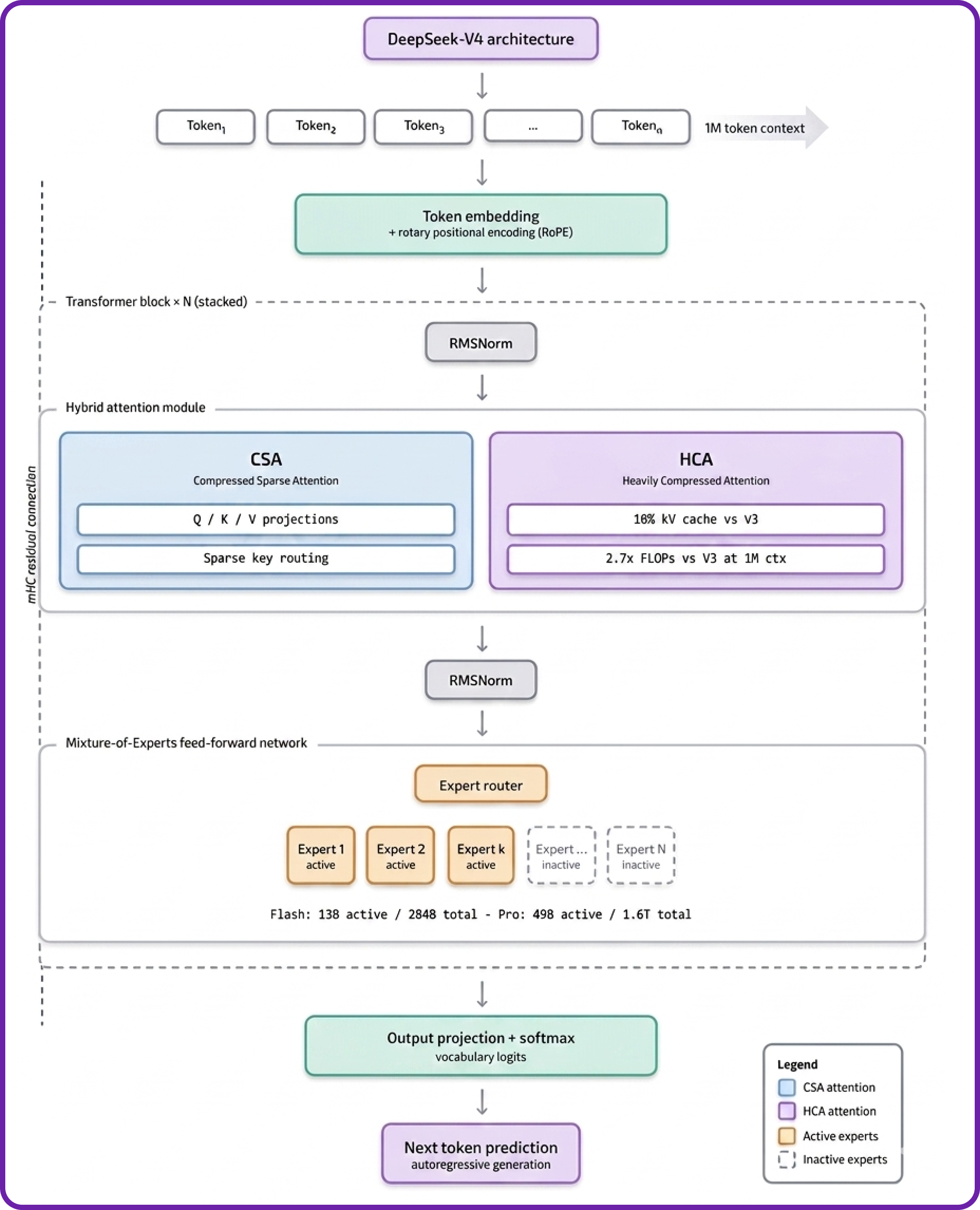
DeepSeek-V4-Pro is built on a substantially redesigned architecture compared with V3.2, with every layer optimised for long-context inference cost. Here is how the architecture works:
- Hybrid Sparse Attention (CSA + HCA): Compressed Sparse Attention handles short-range token interactions whilst Heavily Compressed Attention covers long-range dependencies, giving 1M-token context at roughly 10% of V3.2's KV cache footprint.
- Sparse MoE Routing with FP4 Experts: Only 49B of 1.6T parameters activate per token, and the MoE expert weights are stored directly in FP4 — a more aggressive quantisation than V3 — whilst the attention, normalisation, and router parameters stay in FP8.
- Manifold-Constrained Hyper-Connections (mHC): Constrains residual connections to a low-rank manifold, which materially reduces redundant compute in deep layers without sacrificing capacity.
- Three-Tier Reasoning: A single model serves three workload tiers — Non-think for fast intuitive responses, Think High for explicit chain-of-thought, and Think Max for the hardest problems — controlled at request time via
chat_template_kwargs.reasoning_effort. - Muon Optimiser Pre-Training: Pre-trained on 32T+ tokens using the Muon optimiser, which converges faster than AdamW on MoE objectives and is the backbone of V4-Pro's strong reasoning behaviour.
- MTP Speculative Decoding: Multi-Token Prediction generates multiple tokens per forward pass, materially improving throughput at small batch sizes when paired with vLLM's speculative decoding configuration.
DeepSeek-V4-Pro Features
V4-Pro goes well beyond chat. Its design targets the failure modes that show up in real, long-running engineering work:
- Frontier Coding Performance: 80.6 on SWE-Bench Verified (within 0.2 points of Claude Opus 4.6), 93.5 on LiveCodeBench v6 (ahead of Gemini 3.1 Pro at 91.7), and 67.9 on Terminal-Bench 2.0 — competitive with or ahead of leading closed models.
- Three Reasoning Modes: Non-think for fast, intuitive responses; Think High for explicit chain-of-thought on planning and debugging; Think Max for maximum reasoning effort on the hardest problems (requires
--max-model-len >= 393216). - Long-Horizon Agentic Workflows: Hybrid attention plus 1M context means full-codebase analysis, multi-hour autonomous engineering runs, and persistent background agents are all viable in a single inference session.
- Native Tool Calling: Built-in
deepseek_v4tool-call parser with--enable-auto-tool-choicelets the model invoke tools mid-reasoning without external orchestration logic. - MTP Speculative Decoding: Draft-and-verify decoding using the model's own MTP head improves token throughput significantly at small batch sizes.
- Anthropic-Compatible Hosted API: DeepSeek officially exposes an Anthropic Messages API endpoint, so V4-Pro integrates directly with Claude Code, OpenClaw, OpenCode, and any other Anthropic-compatible coding agent.
DeepSeek-V4-Pro vs leading models on coding & agentic benchmarks
Higher is better. Source: DeepSeek-V4-Pro model card.
Why Multi-Node Kubernetes for V4-Pro?
Unlike its smaller V4-Flash sibling, V4-Pro's ~960 GB FP4+FP8 mixed-precision checkpoint exceeds the 640 GB total VRAM of a single 8x H100-80G node. The vLLM official recipe lists three production deployment options: a single 8x B300 node, a single 8x H200-141G node, or — the path most practitioners can actually access on demand — multi-node hybrid Data + Expert Parallelism across two 8x H100-80G nodes. That is the topology this guide walks through.
Multi-node deployment introduces three operational concerns that single-VM deployments do not have: cross-node scheduling, persistent storage of the 960 GB checkpoint on each node, and coordination of the inference processes across nodes. Kubernetes plus the LeaderWorkerSet API solves all three cleanly:
- Cross-node scheduling is handled by
podAntiAffinityrules that force the leader and worker pods onto different nodes. - Persistent storage uses
hostPathvolumes pointed at Hyperstack's/ephemeralNVMe mount, which provides roughly 6.5 TB per H100 worker node. - Process coordination is handled by vLLM's native data-parallel deployment with hybrid load balancing — no separate Ray cluster is required for V4-Pro's DEP topology, which keeps the manifest simple.
How to Deploy DeepSeek-V4-Pro on Hyperstack
Now, let's walk through the step-by-step process of standing up a 2-node Hyperstack Kubernetes cluster and deploying V4-Pro across it.
Step 1: Accessing Hyperstack
First, you'll need an account on Hyperstack.
- Go to the Hyperstack website and log in.
- If you are new, create an account and set up your billing information. Our documentation can guide you through the initial setup.
Step 2: Create a Multi-Node Kubernetes Cluster
From the Hyperstack dashboard, navigate to the Kubernetes section in the sidebar and create a new cluster. The cluster topology is non-negotiable: V4-Pro needs both worker nodes to come up successfully.
- Initiate Deployment: Click "Deploy New Cluster" from the Kubernetes dashboard.
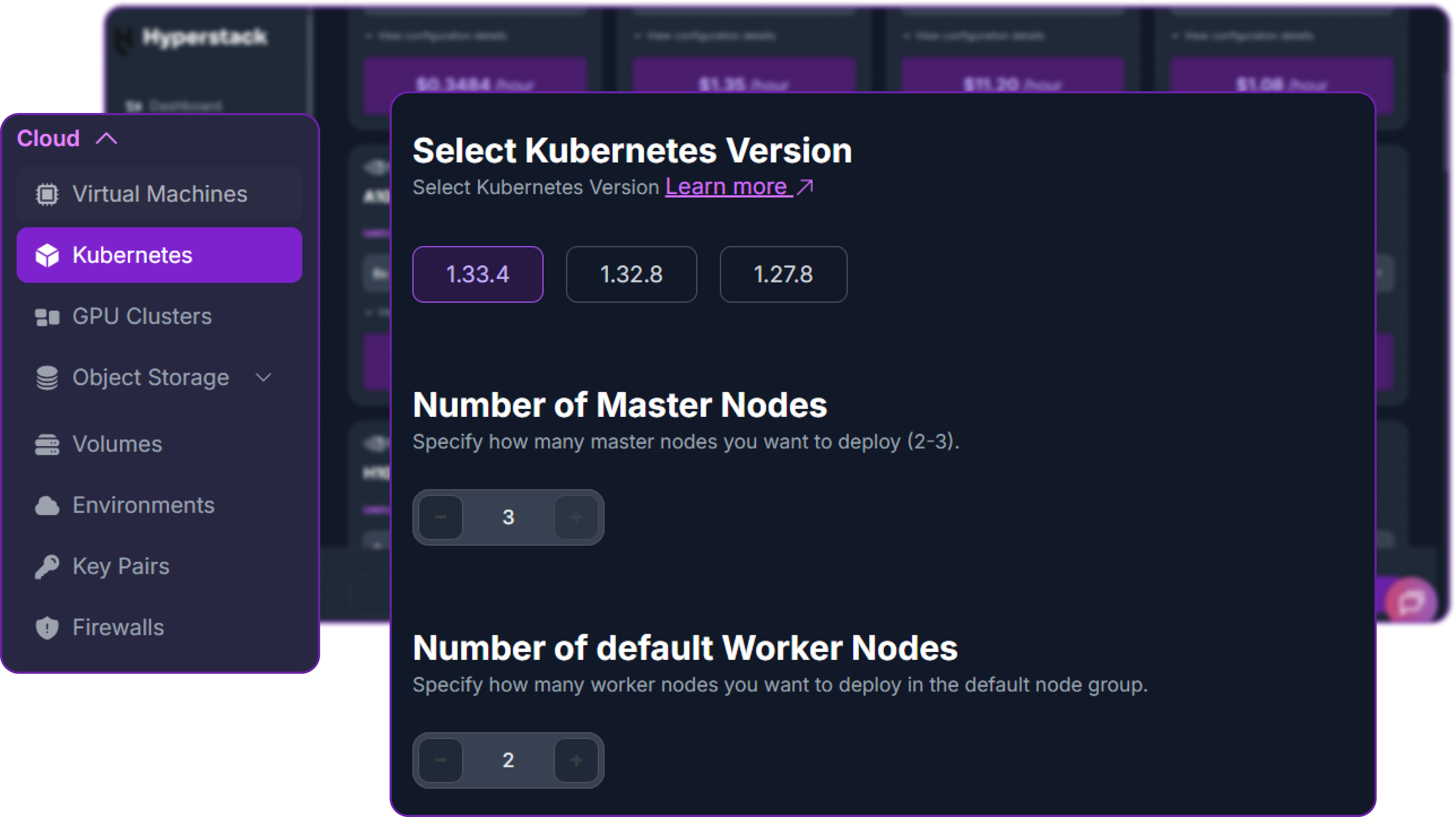
- Kubernetes Version: Select 1.33.4. Hyperstack supports 1.33.4, 1.32.8, and 1.27.8 — pick the newest line for the best LeaderWorkerSet compatibility.
- Number of Master Nodes: Set this to 3. Master nodes are free (
n1-cpu-small) and three masters give you proper HA quorum. - Number of default Worker Nodes: Set this to 2. This is the critical choice — V4-Pro requires both nodes for the hybrid Data + Expert Parallel topology.
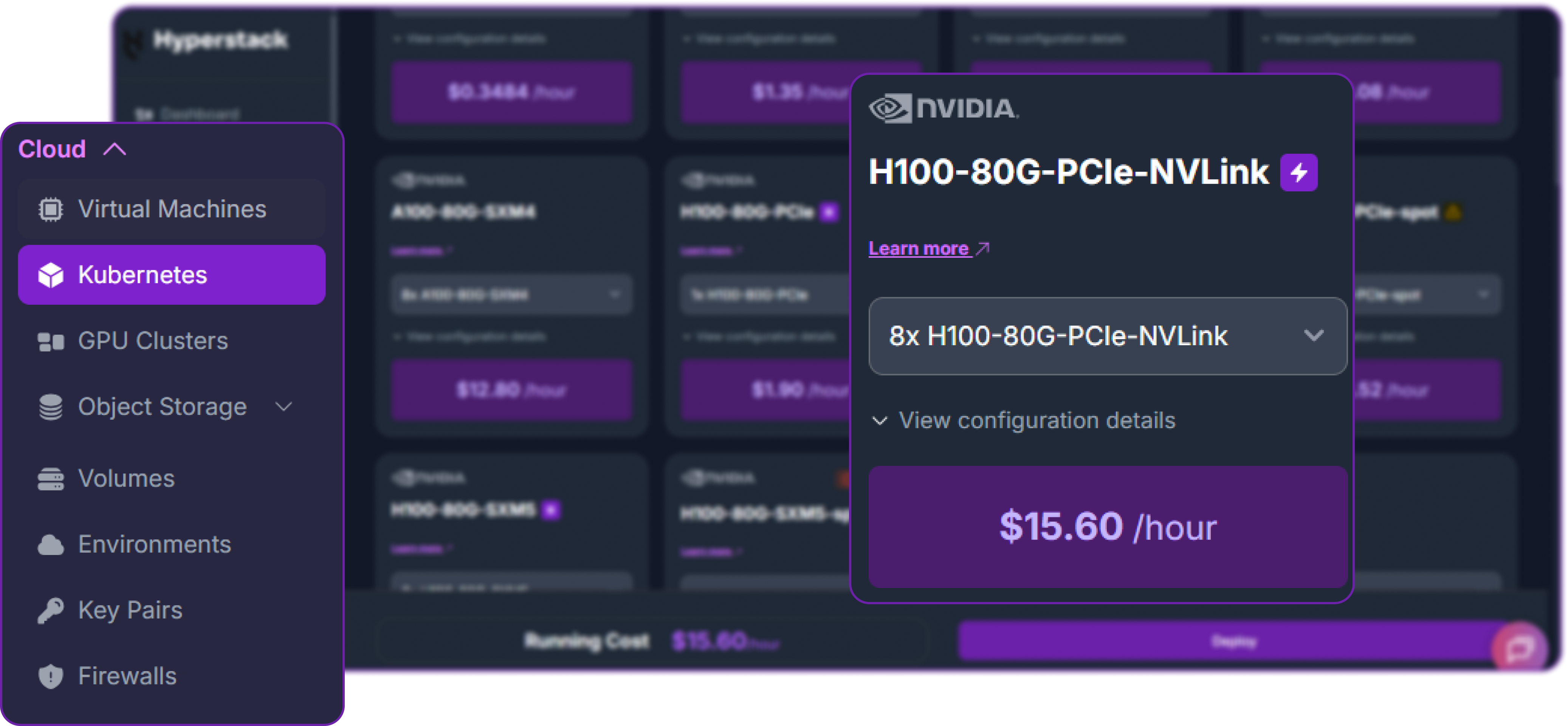
- Worker Flavour: Scroll down to the worker node group and select 8x H100-80G-PCIe-NVLink at $15.60/hr per node. With two worker nodes that brings the total compute cost to roughly $31.20/hr. You'll see this card highlighted in purple in the flavour grid.
- Environment: Choose any environment compatible with the H100 NVLink flavour (e.g.
CANADA-1). - SSH Key: Pick any existing keypair from your account.
- Review and Deploy: Double-check the settings and click "Deploy". The cluster takes 10–15 minutes to provision.
No hibernation for managed K8s: Unlike single VMs, Hyperstack managed Kubernetes clusters do not support hibernation. To stop billing when you're finished, you must either scale the worker count down to 0 or terminate the cluster entirely. Plan your deploy-test-teardown windows accordingly at $31.20/hr.
Step 3: Connect kubectl to Your Cluster
Once the cluster shows Active, download the kubeconfig file from the cluster overview page in the Hyperstack dashboard. On your local machine:
# Place the kubeconfig where kubectl can find it
mkdir -p ~/.kube
mv ~/Downloads/kubeconfig.yaml ~/.kube/hyperstack-v4pro.yaml
chmod 600 ~/.kube/hyperstack-v4pro.yaml

# Tell kubectl to use it
export KUBECONFIG=~/.kube/hyperstack-v4pro.yaml

# Verify the connection — you should see 5 nodes (3 masters + 2 workers)
kubectl get nodes
The expected output shows three masters in Ready control-plane and two workers in Ready worker state:
NAME                       STATUS   ROLES           AGE   VERSION
v4pro-cluster-default-0    Ready    worker          12m   v1.33.4
v4pro-cluster-default-1    Ready    worker          12m   v1.33.4
v4pro-cluster-master-0     Ready    control-plane   16m   v1.33.4
v4pro-cluster-master-1     Ready    control-plane   14m   v1.33.4
v4pro-cluster-master-2     Ready    control-plane   15m   v1.33.4
Step 4: Verify GPU and Storage Resources
Hyperstack ships every Kubernetes cluster with the NVIDIA GPU Operator already running, so the eight H100 GPUs on each worker node are advertised to the scheduler immediately as nvidia.com/gpu resources. Confirm this:
# Confirm 8 GPUs are visible on each worker node
kubectl get nodes -o custom-columns=NAME:.metadata.name,GPU:.status.allocatable."nvidia\.com/gpu"

# Check the GPU operator pods are healthy
kubectl get pods -n gpu-operator | grep -i nvidia
The two H100 worker nodes should each report nvidia.com/gpu: 8. The GPU operator pods (device plugin, DCGM exporter, validator) should all be in Running or Completed state.
Storage layout on Hyperstack worker nodes: Each H100 worker has a 100 GB boot disk plus a roughly 6.5 TB NVMe ephemeral disk mounted at /ephemeral on the host. Kubernetes' default ephemeral-storage allocatable lives on the small boot disk and is nowhere near enough for the 960 GB V4-Pro checkpoint. We will mount /ephemeral directly into our pods via hostPath volumes to bypass the limit.
Step 5: Install the LeaderWorkerSet Controller
LeaderWorkerSet (LWS) is the Kubernetes API that lets us treat a leader pod plus a worker pod as a single coordinated unit. It is the standard pattern for multi-node vLLM deployments and the simplest way to wire up V4-Pro's two-node DEP topology.
# Install the LWS controller from the upstream release
kubectl apply --server-side -f \
  https://github.com/kubernetes-sigs/lws/releases/download/v0.5.1/manifests.yaml

# Wait for the controller to come up (about 30–60 seconds)
kubectl get pod -n lws-system -w
Press Ctrl+C once the lws-controller-manager-* pod reaches Running state.
Step 6: Pre-Download V4-Pro Weights to Each Worker
The 960 GB V4-Pro checkpoint takes 30–45 minutes per node to download from Hugging Face. If you let vLLM download on first start, the inference container will time out long before the download completes. The clean solution is a Kubernetes Job with parallelism: 2 that runs once on each worker node, downloads the weights to /ephemeral/hf-cache/v4-pro, then exits — leaving the weights cached on each node's local NVMe for any future pod that needs them.
Save this manifest as download-v4pro.yaml:
apiVersion: batch/v1
kind: Job
metadata:
  name: download-v4pro
spec:
  parallelism: 2
  completions: 2
  completionMode: Indexed
  template:
    spec:
      restartPolicy: OnFailure
      affinity:
        podAntiAffinity:
          requiredDuringSchedulingIgnoredDuringExecution:
          - labelSelector:
              matchExpressions:
              - key: job-name
                operator: In
                values: ["download-v4pro"]
            topologyKey: kubernetes.io/hostname
      containers:
      - name: downloader
        image: python:3.12-slim
        command:
        - sh
        - -c
        - |
          set -e
          pip install --no-cache-dir -U "huggingface_hub[hf_xet]"
          mkdir -p /cache/v4-pro
          hf download deepseek-ai/DeepSeek-V4-Pro \
            --local-dir /cache/v4-pro \
            --max-workers 8
          echo "Download complete on $(hostname)"
        resources:
          limits:
            memory: 16Gi
            cpu: "8"
        volumeMounts:
        - mountPath: /cache
          name: hf-cache
      volumes:
      - name: hf-cache
        hostPath:
          path: /ephemeral/hf-cache
          type: DirectoryOrCreate
Apply it and watch the two pods download in parallel:
kubectl apply -f download-v4pro.yaml
kubectl get pods -l job-name=download-v4pro -w
The Job creates two pods (one per worker node, enforced by anti-affinity), each downloading independently to its node's /ephemeral/hf-cache/v4-pro directory. Total time is 30–45 minutes per node — they run in parallel, so the wall-clock wait is the same as a single download.
Why download to each node independently? With pipeline-parallel multi-node deployments, you might use shared NFS storage so both nodes mount one copy of the weights. For V4-Pro's hybrid DEP topology each node loads its own shard of the model regardless, so the simpler hostPath-per-node pattern wins on both setup complexity and load time.
When both pods reach Completed:
kubectl get jobs download-v4pro
# NAME            COMPLETIONS   DURATION   AGE
# download-v4pro  2/2           38m        38m

# Delete the Job — the downloaded weights persist on each node's /ephemeral
kubectl delete job download-v4pro
Step 7: Deploy V4-Pro with the LeaderWorkerSet Manifest
Now we deploy the actual inference workload. The manifest below follows vLLM's official 2-node H100 V4-Pro recipe exactly — hybrid Data + Expert Parallelism with --data-parallel-hybrid-lb, total DP size of 16 (8 per node × 2 nodes), MTP-based speculative decoding, and the DeepGEMM FP8 kernels installed at container startup. Save this as vllm-v4-pro.yaml:
apiVersion: leaderworkerset.x-k8s.io/v1
kind: LeaderWorkerSet
metadata:
  name: vllm-v4-pro
spec:
  replicas: 1
  leaderWorkerTemplate:
    size: 2
    restartPolicy: RecreateGroupOnPodRestart
    leaderTemplate:
      metadata:
        labels:
          role: leader
      spec:
        affinity:
          podAntiAffinity:
            requiredDuringSchedulingIgnoredDuringExecution:
            - labelSelector:
                matchExpressions:
                - key: leaderworkerset.sigs.k8s.io/name
                  operator: In
                  values: ["vllm-v4-pro"]
              topologyKey: kubernetes.io/hostname
        containers:
        - name: vllm-leader
          image: docker.io/vllm/vllm-openai:latest
          env:
          - name: HF_HOME
            value: /root/.cache/huggingface
          - name: VLLM_ENGINE_READY_TIMEOUT_S
            value: "3600"
          - name: VLLM_MEMORY_PROFILER_ESTIMATE_CUDAGRAPHS
            value: "0"
          - name: VLLM_HOST_IP
            valueFrom:
              fieldRef:
                fieldPath: status.podIP
          command:
          - sh
          - -c
          - |
            bash <(curl -fsSL https://raw.githubusercontent.com/vllm-project/vllm/v0.20.0/tools/install_deepgemm.sh) && \
            vllm serve /models/v4-pro \
              --served-model-name DeepSeek-V4-Pro \
              --port 8000 \
              --trust-remote-code \
              --kv-cache-dtype fp8 \
              --block-size 256 \
              --enable-expert-parallel \
              --data-parallel-hybrid-lb \
              --data-parallel-size 16 \
              --data-parallel-size-local 8 \
              --data-parallel-address $VLLM_HOST_IP \
              --max-model-len 800000 \
              --gpu-memory-utilization 0.95 \
              --max-num-seqs 512 \
              --max-num-batched-tokens 512 \
              --no-enable-flashinfer-autotune \
              --compilation-config '{"mode": 0, "cudagraph_mode": "FULL_DECODE_ONLY"}' \
              --tokenizer-mode deepseek_v4 \
              --tool-call-parser deepseek_v4 \
              --enable-auto-tool-choice \
              --reasoning-parser deepseek_v4 \
              --speculative_config '{"method":"mtp","num_speculative_tokens":1}'
          resources:
            limits:
              nvidia.com/gpu: "8"
              memory: 1400Gi
            requests:
              cpu: 64
              memory: 1024Gi
          ports:
          - containerPort: 8000
          readinessProbe:
            tcpSocket:
              port: 8000
            initialDelaySeconds: 600
            periodSeconds: 30
          volumeMounts:
          - mountPath: /models/v4-pro
            name: hf-cache
            subPath: v4-pro
          - mountPath: /dev/shm
            name: dshm
        volumes:
        - name: hf-cache
          hostPath:
            path: /ephemeral/hf-cache
            type: DirectoryOrCreate
        - name: dshm
          emptyDir:
            medium: Memory
            sizeLimit: 64Gi
    workerTemplate:
      spec:
        affinity:
          podAntiAffinity:
            requiredDuringSchedulingIgnoredDuringExecution:
            - labelSelector:
                matchExpressions:
                - key: leaderworkerset.sigs.k8s.io/name
                  operator: In
                  values: ["vllm-v4-pro"]
              topologyKey: kubernetes.io/hostname
        containers:
        - name: vllm-worker
          image: docker.io/vllm/vllm-openai:latest
          env:
          - name: HF_HOME
            value: /root/.cache/huggingface
          - name: VLLM_ENGINE_READY_TIMEOUT_S
            value: "3600"
          - name: VLLM_HOST_IP
            valueFrom:
              fieldRef:
                fieldPath: status.podIP
          command:
          - sh
          - -c
          - |
            bash <(curl -fsSL https://raw.githubusercontent.com/vllm-project/vllm/v0.20.0/tools/install_deepgemm.sh) && \
            vllm serve /models/v4-pro \
              --served-model-name DeepSeek-V4-Pro \
              --headless \
              --trust-remote-code \
              --kv-cache-dtype fp8 \
              --block-size 256 \
              --enable-expert-parallel \
              --data-parallel-hybrid-lb \
              --data-parallel-size 16 \
              --data-parallel-size-local 8 \
              --data-parallel-start-rank 8 \
              --data-parallel-address $LWS_LEADER_ADDRESS \
              --max-model-len 800000 \
              --gpu-memory-utilization 0.95 \
              --max-num-seqs 512 \
              --max-num-batched-tokens 512 \
              --no-enable-flashinfer-autotune \
              --compilation-config '{"mode": 0, "cudagraph_mode": "FULL_DECODE_ONLY"}' \
              --tokenizer-mode deepseek_v4 \
              --tool-call-parser deepseek_v4 \
              --enable-auto-tool-choice \
              --reasoning-parser deepseek_v4 \
              --speculative_config '{"method":"mtp","num_speculative_tokens":1}'
          resources:
            limits:
              nvidia.com/gpu: "8"
              memory: 1400Gi
            requests:
              cpu: 64
              memory: 1024Gi
          volumeMounts:
          - mountPath: /models/v4-pro
            name: hf-cache
            subPath: v4-pro
          - mountPath: /dev/shm
            name: dshm
        volumes:
        - name: hf-cache
          hostPath:
            path: /ephemeral/hf-cache
            type: DirectoryOrCreate
        - name: dshm
          emptyDir:
            medium: Memory
            sizeLimit: 64Gi
---
apiVersion: v1
kind: Service
metadata:
  name: vllm-v4-pro-leader
spec:
  ports:
  - name: http
    port: 8000
    protocol: TCP
    targetPort: 8000
  selector:
    leaderworkerset.sigs.k8s.io/name: vllm-v4-pro
    role: leader
  type: ClusterIP
The most important flags in this manifest, all taken directly from vLLM's official multi-node V4-Pro recipe:
--data-parallel-hybrid-lb: Enables hybrid load balancing across DP ranks, the strategy DeepSeek recommends for MoE models on multi-node H100 setups.--data-parallel-size 16: Total DP size across both nodes (8 per node × 2 nodes).--data-parallel-size-local 8: Per-node DP size, matching the 8 GPUs per H100 worker.--data-parallel-address: Points to the leader pod's IP. On the leader we use the pod's own IP ($VLLM_HOST_IP); on the worker we use$LWS_LEADER_ADDRESS, which the LWS controller injects automatically with the leader's hostname.--data-parallel-start-rank 8: On the worker only — tells vLLM that this node hosts ranks 8 through 15 (the second half of the 16 DP ranks).--headless: On the worker only — disables the API server on that pod, since only the leader exposes/v1/chat/completions.--enable-expert-parallel: Shards MoE expert weights across all 16 GPUs cluster-wide.--kv-cache-dtype fp8and--block-size 256: Required for V4-Pro's hybrid CSA+HCA attention to hit its 10% KV-cache footprint vs V3.2.--max-model-len 800000: The H100-multi-node maximum from the vLLM recipe — leaves enough KV-cache headroom for concurrent requests.--speculative_config: Enables MTP-based speculative decoding for higher throughput at low batch sizes.install_deepgemm.sh: Required first-step inside each container — V4-Pro uses fused FP8 GEMM kernels that aren't bundled in the base vLLM image.
Apply the manifest:
kubectl apply -f vllm-v4-pro.yaml
kubectl get pods -w
The two pods (vllm-v4-pro-0 leader, vllm-v4-pro-0-1 worker) will go through Pending → ContainerCreating → Running over the next few minutes. Inside each running container, install_deepgemm.sh runs (3–5 min), then vLLM begins loading V4-Pro from /models/v4-pro. The full bring-up — image pull, DeepGEMM install, and model load — typically takes 15–25 minutes the first time.
Step 8: Verify the Deployment
Whilst the deployment comes up, monitor it from a second terminal:
# Check pods are on different nodes (anti-affinity enforced)
kubectl get pods -o wide

# Stream leader logs
kubectl logs -f vllm-v4-pro-0

# Stream worker logs (in another terminal)
kubectl logs -f vllm-v4-pro-0-1
In the leader logs, look for this sequence in order:
Cloning DeepGEMM repository...andSuccessfully built deep_gemm...— the FP8 kernel installvLLM API server version 0.20.x— vLLM has startedLoading model from /models/v4-pro...Loading safetensors checkpoint shards: 100% CompletedAvailable KV cache memory: ...Application startup complete.INFO: Uvicorn running on http://0.0.0.0:8000— the success line
The worker logs should show the same DeepGEMM install, then Connected to data-parallel head at <leader-ip>:..., and finally Started worker with rank 8.
Step 9: Smoke Test the API
Once the leader logs reach Application startup complete., port-forward the service to your laptop:
kubectl port-forward svc/vllm-v4-pro-leader 8000:8000In a second terminal, send a Non-think request to verify the deployment is serving:
# Test the API endpoint from your local terminal
curl http://localhost:8000/v1/chat/completions \
  -H "Content-Type: application/json" \
  -H "Authorization: Bearer EMPTY" \
  -d '{
    "model": "DeepSeek-V4-Pro",
    "messages": [{"role": "user", "content": "Reply with one word: PIPELINE"}],
    "max_tokens": 20
  }'
A successful response looks like this:
{
  "id": "chatcmpl-9ab83c6a4e1ab454",
  "object": "chat.completion",
  "model": "DeepSeek-V4-Pro",
  "choices": [
    {
      "index": 0,
      "message": {
        "role": "assistant",
        "content": "PIPELINE",
        "reasoning": null
      },
      "finish_reason": "stop"
    }
  ],
  "usage": {"prompt_tokens": 12, "completion_tokens": 3, "total_tokens": 15}
}
The "reasoning" field is null because Non-think mode returns directly without explicit chain-of-thought. DeepSeek-V4-Pro is now successfully deployed across two nodes on Hyperstack Kubernetes.
DeepSeek recommends the following sampling parameters for V4-Pro across all reasoning modes:
# All reasoning modes (Non-think, Think High, Think Max)
temperature=1.0, top_p=1.0
Step 10: Tear Down When Done
When you've finished testing, delete the deployment and tear down the cluster — Hyperstack managed Kubernetes does not support hibernation, and the cluster keeps billing while it's running.
# Stop the inference workload
kubectl delete -f vllm-v4-pro.yaml
Then in the Hyperstack dashboard, scale the cluster's worker count to 0 or terminate the cluster entirely. Either action stops the GPU billing immediately.
Switching Between Reasoning Modes
Now that the vLLM server is running, we can interact with it from Python using the standard OpenAI client. First, install the library:
# Install the OpenAI Python client library to interact with the vLLM server
pip3 install openai
Instantiate an OpenAI-compatible client pointed at the local port-forwarded vLLM server. The api_key can be any non-empty placeholder because vLLM does not enforce authentication by default:
from openai import OpenAI

# Create an OpenAI-compatible client that points to the local port-forwarded vLLM server
client = OpenAI(
    base_url="http://localhost:8000/v1",  # Local API endpoint exposing OpenAI-style routes
    api_key="EMPTY",                      # Placeholder key; vLLM does not enforce API keys
)
V4-Pro's three reasoning tiers are controlled at request time via chat_template_kwargs. Non-think is the default and is best for fast factual responses; Think High is intended for explicit chain-of-thought on planning or debugging tasks; Think Max is for the hardest problems and requires --max-model-len >= 393216 to avoid truncating reasoning traces (our manifest sets it to 800,000, so we are safe).
Non-think mode (default) — fast, intuitive responses with no reasoning trace:
# Non-think mode — fast intuitive response, no reasoning trace
chat_response = client.chat.completions.create(
    model="DeepSeek-V4-Pro",
    messages=[{"role": "user", "content": "What is 17 * 19? Return only the integer."}],
    max_tokens=50,
    temperature=1.0,
    top_p=1.0,
)

print(chat_response.choices[0].message.content)
# 323
Think High mode — explicit chain-of-thought for complex reasoning. The reasoning trace appears in message.reasoning, the final answer in message.content:
# Think High mode — chain-of-thought planning
chat_response = client.chat.completions.create(
    model="DeepSeek-V4-Pro",
    messages=[{
        "role": "user",
        "content": "Plan a 3-step refactor of a monolithic Flask app into FastAPI microservices."
    }],
    max_tokens=2000,
    temperature=1.0,
    top_p=1.0,
    extra_body={
        "chat_template_kwargs": {
            "thinking": True,
            "reasoning_effort": "high",
        },
    },
)

print("Reasoning:", chat_response.choices[0].message.reasoning)
print("Answer:   ", chat_response.choices[0].message.content)
Think Max mode — maximum reasoning effort, intended for the hardest problems. The reasoning trace can be very long, which is why this mode requires the 384K+ context window:
# Think Max mode — maximum reasoning effort, requires --max-model-len >= 393216
chat_response = client.chat.completions.create(
    model="DeepSeek-V4-Pro",
    messages=[{
        "role": "user",
        "content": "Prove that the sum of cubes of three consecutive integers is divisible by 9."
    }],
    max_tokens=8000,
    temperature=1.0,
    top_p=1.0,
    extra_body={
        "chat_template_kwargs": {
            "thinking": True,
            "reasoning_effort": "max",
        },
    },
)

print("Reasoning:", chat_response.choices[0].message.reasoning)
print("Answer:   ", chat_response.choices[0].message.content)
Agentic Use Case with DeepSeek-V4-Pro
One of the most powerful features of deepseek-ai/DeepSeek-V4-Pro is its long-horizon agentic tool calling. Unlike standard chat where the model just generates text, an agentic workflow lets it:
- Decide when external tools are needed
- Call tools automatically
- Receive tool outputs and continue reasoning
- Complete multi-step tasks autonomously across hundreds of steps
Because we launched vLLM with --tool-call-parser deepseek_v4 --enable-auto-tool-choice, the server emits structured tool calls in the format DeepSeek's agent frameworks expect. For self-contained examples, we'll use a small Python harness with a single filesystem tool — the simplest way to demonstrate V4-Pro's agentic loop end-to-end without pulling in a heavy framework.
import json, os, subprocess
from openai import OpenAI

client = OpenAI(base_url="http://localhost:8000/v1", api_key="EMPTY")
WORKSPACE = "/tmp/agent_workspace"
os.makedirs(WORKSPACE, exist_ok=True)

# Define a single filesystem tool the agent can call
tools = [{
    "type": "function",
    "function": {
        "name": "run_shell",
        "description": "Run a shell command inside the workspace and return stdout/stderr.",
        "parameters": {
            "type": "object",
            "properties": {"command": {"type": "string"}},
            "required": ["command"],
        },
    },
}]

def run_shell(command):
    proc = subprocess.run(command, shell=True, cwd=WORKSPACE,
                          capture_output=True, text=True, timeout=30)
    return proc.stdout + proc.stderr
With the tool defined, the agent loop is just: send the user message, execute any tool calls the model returns, append the tool results, and call the model again until it stops issuing tool calls.
def agent_loop(user_prompt, max_steps=20):
    messages = [{"role": "user", "content": user_prompt}]
    for _ in range(max_steps):
        resp = client.chat.completions.create(
            model="DeepSeek-V4-Pro",
            messages=messages,
            tools=tools,
            tool_choice="auto",
            max_tokens=2048,
            temperature=1.0,
            top_p=1.0,
            extra_body={
                "chat_template_kwargs": {
                    "thinking": True,
                    "reasoning_effort": "high",
                }
            },
        )
        msg = resp.choices[0].message
        messages.append(msg)
        if not msg.tool_calls:
            return msg.content
        for tc in msg.tool_calls:
            args = json.loads(tc.function.arguments)
            output = run_shell(args["command"])
            messages.append({"role": "tool", "tool_call_id": tc.id, "content": output})
    return "step limit reached"
Example: Long-Horizon Refactor
This is the kind of task V4-Pro is genuinely good at — sustained multi-step engineering work where it has to read existing code, plan a change, apply it, run tests, and iterate without losing track. We seed the workspace with a small file and ask the model to refactor it:
# Seed the workspace with a deliberately messy file
open(f"{WORKSPACE}/calc.py", "w").write("""
def calc(a, b, op):
    if op == "add": return a + b
    if op == "sub": return a - b
    if op == "mul": return a * b
    if op == "div": return a / b
""")

print(agent_loop(
    "Refactor calc.py to use a dict-based dispatch table instead of if chains, "
    "add type hints, handle division-by-zero, and add three pytest tests in test_calc.py."
))
What happens internally over the next 10–15 tool calls:
- The model interprets the request and decides it needs to read
calc.pyfirst. - It calls
run_shellwithcat calc.py, sees the existing structure. - It writes a refactored version using a heredoc redirection.
- It writes
test_calc.pywith three test cases (add, mul, division-by-zero). - It calls
pytest test_calc.py -qand reads the output. - If a test fails, it reads the failure, edits the file, and re-runs — this is where V4-Pro's Think High reasoning matters most because it carries the failure context into the next step.
- It returns a summary of changes.
This is a deliberately small case. Combined with V4-Pro's 1M-token context window and MTP speculative decoding, the same loop scales up to multi-hour autonomous engineering runs across full repositories, including the kinds of sustained refactoring workflows DeepSeek benchmarks against on Terminal-Bench 2.0.
Integration with Third-Party Coding Assistants
Because vLLM exposes the OpenAI-compatible /v1/chat/completions endpoint and we enabled the DeepSeek V4 tool-call parser, our locally-hosted V4-Pro plugs into nearly every modern coding assistant. DeepSeek also officially exposes an Anthropic-compatible hosted API at https://api.deepseek.com/anthropic, which makes Claude Code integration dramatically simpler than for most self-hosted models. Below are three of the most useful integrations.
Integrating with Claude Code
DeepSeek's hosted Anthropic-compatible endpoint means Claude Code integration is a single-environment-variable change. Rather than running a translation proxy in front of your in-cluster vLLM endpoint, the simplest path is to point Claude Code at DeepSeek's hosted V4-Pro for heavyweight tasks whilst keeping your self-hosted cluster for high-volume internal workloads.
Set the following environment variables before launching Claude Code:
# Point Claude Code at DeepSeek's hosted Anthropic API
export ANTHROPIC_BASE_URL="https://api.deepseek.com/anthropic"
export ANTHROPIC_AUTH_TOKEN="<your DeepSeek API key>"
export ANTHROPIC_MODEL="deepseek-v4-pro[1m]"

# Use V4-Pro for every Claude Code model tier
export ANTHROPIC_DEFAULT_OPUS_MODEL="deepseek-v4-pro[1m]"
export ANTHROPIC_DEFAULT_SONNET_MODEL="deepseek-v4-pro[1m]"
export ANTHROPIC_DEFAULT_HAIKU_MODEL="deepseek-v4-flash"

# Optional: use Flash for sub-agent tasks, push V4-Pro to maximum reasoning
export CLAUDE_CODE_SUBAGENT_MODEL="deepseek-v4-flash"
export CLAUDE_CODE_EFFORT_LEVEL="max"

# Launch Claude Code
claude
The [1m] suffix on the model string is how you opt into the 1M-token context window via the Anthropic API. Without it, Claude Code falls back to a smaller default.
Environment Variables Overview
| Variable | Description |
|---|---|
| ANTHROPIC_BASE_URL | DeepSeek's Anthropic-compatible endpoint. |
| ANTHROPIC_AUTH_TOKEN | Your DeepSeek API key from platform.deepseek.com. |
| ANTHROPIC_DEFAULT_OPUS_MODEL | The model identifier for the "Opus" tier — the [1m] suffix enables 1M context. |
| CLAUDE_CODE_SUBAGENT_MODEL | Smaller, cheaper model for delegated sub-tasks. |
| CLAUDE_CODE_EFFORT_LEVEL | Default reasoning effort for V4-Pro requests (Non-think / High / Max). |
Self-hosted Claude Code path: if you specifically need Claude Code to talk to your in-cluster vLLM endpoint instead of the hosted API, you'll need a translation proxy that converts Anthropic Messages API requests into OpenAI Chat Completions format. The cleanest pattern is to run that proxy as a separate Service in the same cluster and point ANTHROPIC_BASE_URL at it — but for most workloads, the hosted-API path above is simpler and easier to maintain.
Deployment with OpenClaw
OpenClaw is the self-hosted, open-source autonomous coding agent that DeepSeek explicitly named as a V4 launch partner. Install the CLI and configure it to use DeepSeek's Anthropic-compatible endpoint:
# Install OpenClaw (requires Node.js 22+)
curl -fsSL https://molt.bot/install.sh | bash

# Set your DeepSeek API key
export OPENCLAW_API_KEY="<your DeepSeek API key>"

# Launch the OpenClaw dashboard
openclaw dashboard
Configuring the DeepSeek Provider
To register V4-Pro as an OpenClaw provider, modify ~/.openclaw/openclaw.json:
{
  "models": {
    "providers": {
      "deepseek-v4-pro": {
        "baseUrl": "https://api.deepseek.com/anthropic",
        "apiKey": "<your DeepSeek API key>",
        "api": "anthropic-messages",
        "models": [
          {
            "id": "deepseek-v4-pro[1m]",
            "name": "DeepSeek V4-Pro (1M)",
            "reasoning": true,
            "contextWindow": 1048576
          }
        ]
      }
    }
  }
}
Once configured, launch the OpenClaw TUI with openclaw tui and issue high-level coding instructions. The V4-Pro-backed agent will autonomously plan, edit, and verify changes.
Terminal Workflow with OpenCode
OpenCode is the third officially-supported V4 integration, and it's the most lightweight of the three — a pure terminal coding agent with first-class V4 support since v1.14.24. Install and configure:
# Install OpenCode
npm install -g @opencode-ai/cli@latest

# Launch the interactive session
opencode

# Inside OpenCode, register the DeepSeek provider
/connect deepseek
# (paste your DeepSeek API key when prompted)

# Set V4-Pro as the default model
/model deepseek-v4-pro[1m]
Once connected, you can hand OpenCode multi-step engineering tasks like "Refactor all files in /src to use async/await and add unit tests" and the V4-Pro-backed agent will reason through every step on your local environment.
Why Deploy DeepSeek-V4-Pro on Hyperstack Kubernetes?
Hyperstack is a cloud platform engineered specifically to accelerate AI and machine learning workloads. Here is why it's the right choice for V4-Pro multi-node deployment:
V4-Pro requires 16 GPUs across two nodes. Hyperstack provides on-demand 8x H100-80G-PCIe-NVLink worker nodes at $15.60/hr each — no reservation queue, no waitlist.
Hyperstack Kubernetes ships with the NVIDIA GPU Operator already running on every cluster — no Helm install, no driver setup, no DCGM configuration. GPUs are immediately advertised as
nvidia.com/gpu resources to the scheduler.H100 worker nodes ship with roughly 6.5 TB of NVMe ephemeral storage mounted at
/ephemeral. This is what makes the 960 GB V4-Pro checkpoint deployment possible without external NFS or block storage.Hyperstack uses upstream Kubernetes 1.33.4 with standard APIs and zero proprietary controllers. The
LeaderWorkerSet, Job, and Service manifests in this guide work identically on any conformant cluster.Whilst managed K8s clusters don't hibernate, scaling worker nodes to 0 or terminating the cluster stops GPU billing immediately. Pair this with the
/ephemeral-resident model cache and you can spin up a fresh cluster, redeploy V4-Pro, and be serving traffic within an hour.The official vLLM Docker image, DeepGEMM kernels, and DeepSeek's recommended hybrid DEP topology all work out of the box on Hyperstack. The deployment in this guide follows vLLM's official multi-node V4-Pro recipe with no Hyperstack-specific modifications.

FAQs
What is DeepSeek-V4-Pro?
DeepSeek-V4-Pro is the flagship of DeepSeek's V4 preview family — a 1.6 trillion-parameter Mixture-of-Experts model with 49 billion active parameters per token, hybrid CSA+HCA attention, three-tier reasoning, and a native 1M-token context window. It scores 80.6 on SWE-Bench Verified and 93.5 on LiveCodeBench v6, putting it within striking distance of Claude Opus 4.6 and ahead of Gemini 3.1 Pro on coding benchmarks.
What hardware do I need to deploy V4-Pro?
V4-Pro's roughly 960 GB FP4+FP8 mixed-precision checkpoint requires either a single 8x H200-141G or 8x B300 node (more than 1 TB of total VRAM), or a multi-node deployment across two 8x H100-80G nodes — the topology this guide covers. On Hyperstack the H100 multi-node path is the most cost-effective and is available on demand.
Why is V4-Pro deployed across two nodes instead of one?
A single 8x H100-80G node has only 640 GB of total VRAM, which is not enough for V4-Pro's 960 GB checkpoint. The vLLM official recipe handles this with hybrid Data + Expert Parallelism: 16 DP ranks (8 per node) replicate the dense parameters across nodes whilst the MoE expert weights are sharded fleet-wide via Expert Parallelism.
How long does the first deployment take?
End-to-end first deployment is roughly 60–80 minutes. Cluster provisioning takes 10–15 minutes; the 960 GB download to each node takes 30–45 minutes (in parallel via the Job); DeepGEMM install plus model load takes another 15–25 minutes.
Does V4-Pro support all three reasoning modes on a self-hosted deployment?
Yes. Non-think and Think High modes work out of the box. Think Max requires --max-model-len >= 393216 to avoid truncating the long reasoning traces — the manifest in this guide sets it to 800,000 to support all three modes plus reasonable concurrent request headroom.
Can I use a smaller context window to free up GPU memory?
Yes. The --max-model-len 800000 value in the manifest is the H100-multi-node maximum from the vLLM recipe. You can drop it to --max-model-len 65536 or similar for typical chat workloads, which leaves much more memory headroom for KV cache and concurrent requests. Just don't drop below --max-model-len 393216 if you want Think Max reasoning to work without truncation.
Do I need Ray for V4-Pro multi-node deployment?
No. Unlike multi-node deployments that use tensor + pipeline parallelism (which require Ray to coordinate workers), V4-Pro's hybrid Data + Expert Parallel topology uses vLLM's native ZMQ-based DP coordination. The --data-parallel-address and --data-parallel-start-rank flags handle inter-node synchronisation without any external orchestrator, which keeps the manifest considerably simpler.
Can I integrate V4-Pro with Claude Code, OpenClaw, or OpenCode?
Yes. DeepSeek officially ships an Anthropic-compatible API endpoint at https://api.deepseek.com/anthropic, which makes Claude Code integration a one-line ANTHROPIC_BASE_URL change. OpenClaw and OpenCode both have first-class DeepSeek provider support since their V4-launch releases.
Does V4-Pro support tool calling?
Yes, natively. Pass --tool-call-parser deepseek_v4 --enable-auto-tool-choice to vLLM (already included in the manifest) and the model will autonomously decide when to invoke tools you provide via the OpenAI tools API. Combined with Think High or Think Max reasoning, this enables the multi-step agentic workflows V4-Pro was designed for.
Which inference engines support V4-Pro?
DeepSeek officially recommends vLLM (≥ 0.20.0) for production deployment, with SGLang and LightLLM also supporting V4-Pro. The vLLM recipe page documents specific configurations for B300, H200, and 2x H100 multi-node deployments — the H100 path is what this guide covers.
Subscribe to Hyperstack!
Enter your email to get updates to your inbox every week



