


.png)
TABLE OF CONTENTS
NVIDIA H100 SXM GPUs On-Demand
Key Takeaways
- Kimi K2.6 is an open-weight, native multimodal agentic model purpose-built for long-horizon coding, coding-driven design, and swarm-based task orchestration.
- It uses a Mixture-of-Experts (MoE) architecture with 1T total parameters but only 32B activated per token, giving it frontier-model intelligence at much lower inference cost.
- The model supports a native 256K context window, ships with native INT4 quantisation, and scales horizontally to 300 sub-agents executing 4,000 coordinated steps in a single autonomous run.
- Because the weights are ~595 GB, real-world local deployment requires multiple high-end GPUs — an 8x H100-80G node is the smallest practical configuration for a smoke test, and 8x H200-141G is the official reference setup.
- The tutorial walks through deploying Kimi K2.6 on Hyperstack using a GPU-powered virtual machine, the vLLM serving stack, and the OpenAI-compatible API.
- Hyperstack simplifies deployment by providing instant access to NVIDIA H100 hardware, fast ephemeral storage for the 595 GB model weights, and pre-configured CUDA + Docker images.
Kimi K2.6 is an open-weight, native multimodal agentic model from Moonshot AI, engineered for state-of-the-art coding and autonomous agent workflows. It uses a sparse Mixture-of-Experts architecture with 1 trillion total parameters, of which only 32 billion are activated per forward pass, allowing it to match or beat closed models like GPT-5.4 and Claude Opus 4.6 on coding and agentic benchmarks while staying efficient enough to self-host. With a native 256K-token context window, native INT4 quantisation, and the ability to coordinate up to 300 sub-agents across 4,000 steps, it handles repository-level engineering, hour-long visual analysis, and persistent 24/7 background agents in a single autonomous run.
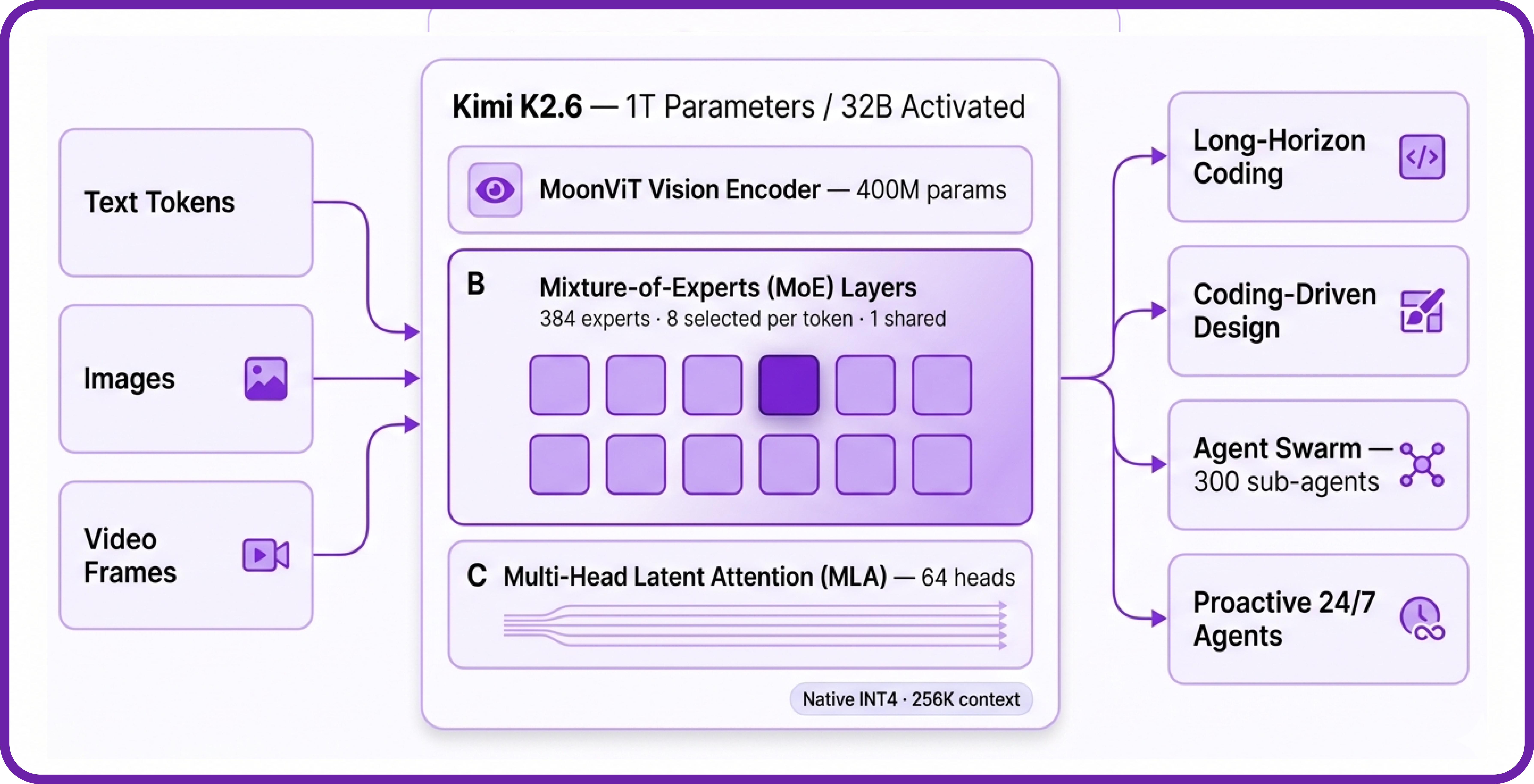
Kimi K2.6 is built on the same architectural foundation as K2.5 with substantial training and post-training upgrades. Here is how the architecture works:
- Sparse MoE Routing: 384 experts in total, with 8 selected per token plus 1 shared expert, so only ~32B of the 1T parameters are active at any moment.
- Multi-Head Latent Attention (MLA): Compresses the key-value cache into a low-rank latent space, drastically reducing memory pressure for long contexts compared with vanilla multi-head attention.
- Native INT4 Quantisation: Weights are released directly in INT4, the same scheme used in K2-Thinking, which is what brings the on-disk size down to ~595 GB and lets the model fit on a single 8-GPU node.
- Preserve Thinking: Retains full reasoning traces across multi-turn interactions, which materially improves performance in coding agent scenarios where context across iterations matters.
- Interleaved Thinking + Multi-Step Tool Calls: The model can reason between tool calls instead of producing one monolithic plan upfront, which is what makes it effective on workflows that span thousands of steps.
- Native Multimodal Fusion (MoonViT): A 400M-parameter vision encoder is integrated directly, so the model accepts images and video frames natively alongside text.
Kimi K2.6 Features
Kimi K2.6 goes well beyond chat. Its design targets the failure modes that show up in real, long-running engineering work:
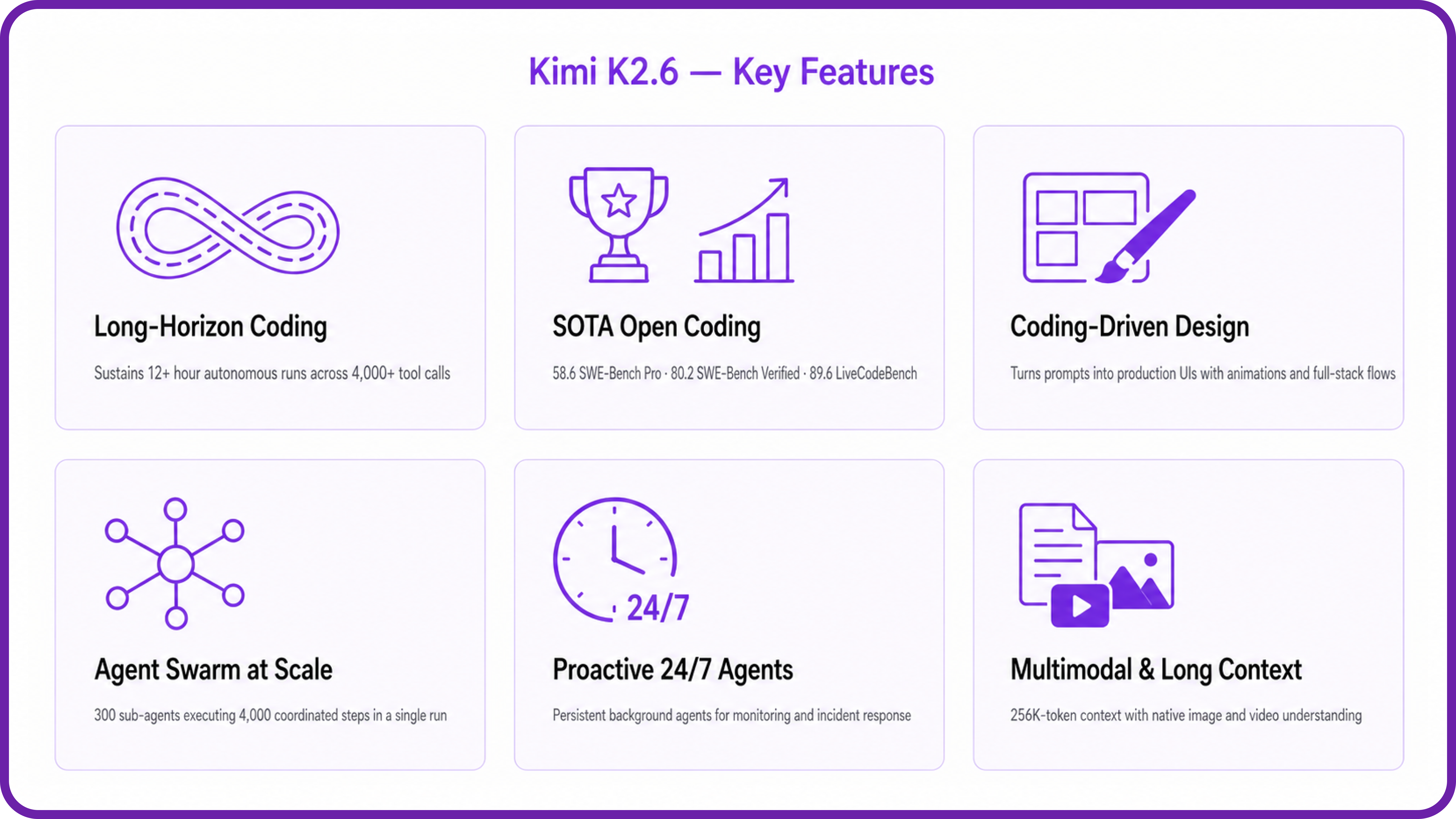
- Long-Horizon Coding: Generalises across Rust, Go, and Python, and across front-end, DevOps, and performance optimisation. In Moonshot's case studies, it sustained autonomous runs of 12 hours or more with 4,000+ tool calls without losing the plot.
- State-of-the-Art Open Coding: Posts 58.6 on SWE-Bench Pro, 80.2 on SWE-Bench Verified, 76.7 on SWE-Bench Multilingual, and 89.6 on LiveCodeBench v6 — competitive with or ahead of leading closed models.
- Coding-Driven Design: Turns plain prompts and visual inputs into production-ready interfaces with structured layouts, scroll-triggered animations, and even basic full-stack flows including authentication and database operations.
- Elevated Agent Swarm: Scales to 300 sub-agents and 4,000 coordinated steps in a single run, decomposing large tasks into parallel domain-specialised subtasks (compared with 100 sub-agents and 1,500 steps in K2.5).
- Proactive 24/7 Agents: Demonstrated 5-day autonomous engineering worklogs powering monitoring, incident response, and system operations as a persistent background agent.
- Multimodal & Long Context: 256K-token context with native image and video understanding through the integrated MoonViT encoder.
Kimi K2.6 vs leading models on coding & agentic benchmarks
Higher is better. Source: Moonshot AI Kimi K2.6 model card.
How to Deploy Kimi K2.6 on Hyperstack
Now, let's walk through the step-by-step process of deploying the necessary infrastructure.
Step 1: Accessing Hyperstack
First, you'll need an account on Hyperstack.
- Go to the Hyperstack website and log in.
- If you are new, create an account and set up your billing information. Our documentation can guide you through the initial setup.
Step 2: Deploying a New Virtual Machine
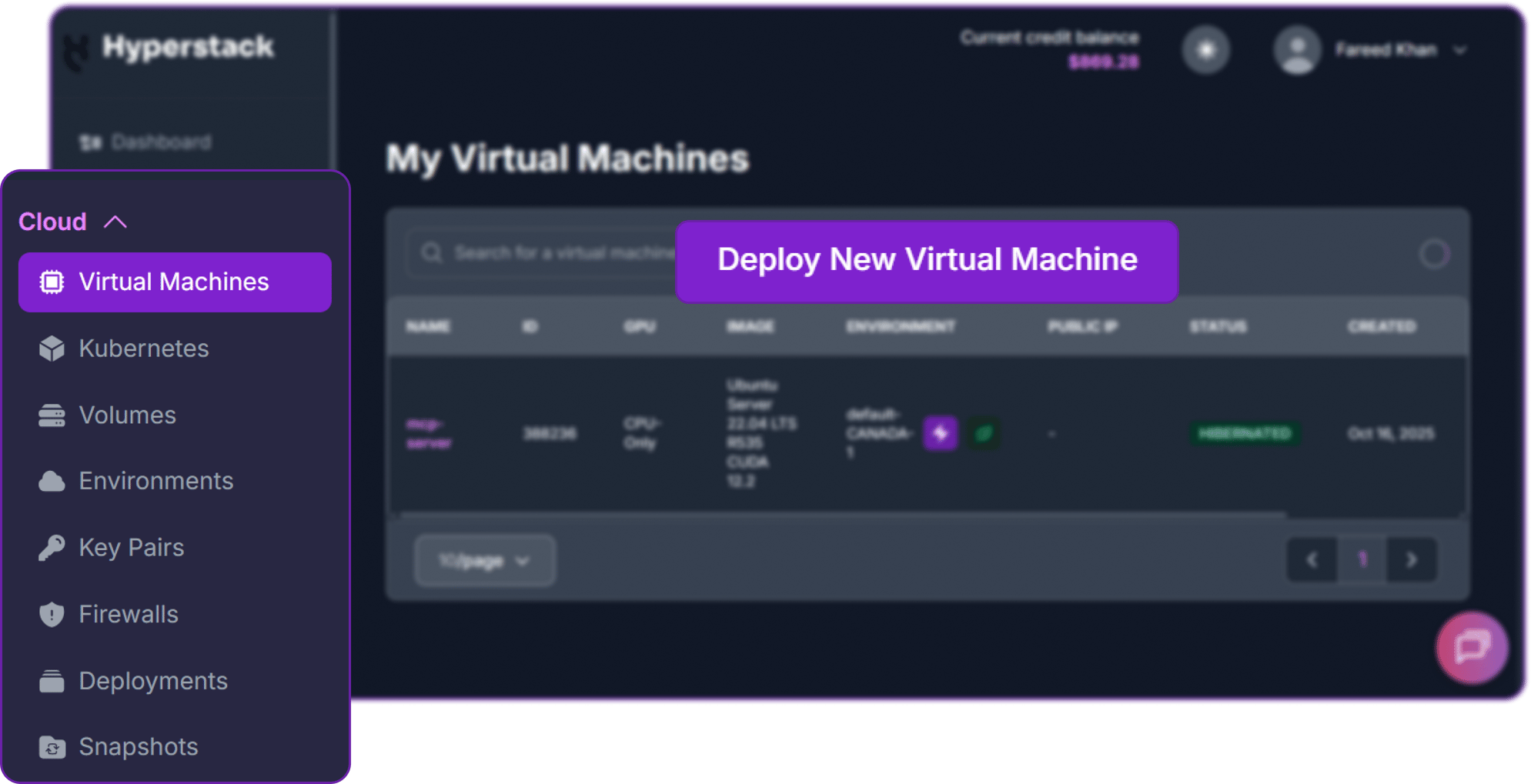
From the Hyperstack dashboard, we will launch a new GPU-powered VM.
- Initiate Deployment: Look for the "Deploy New Virtual Machine" button on the dashboard and click it.
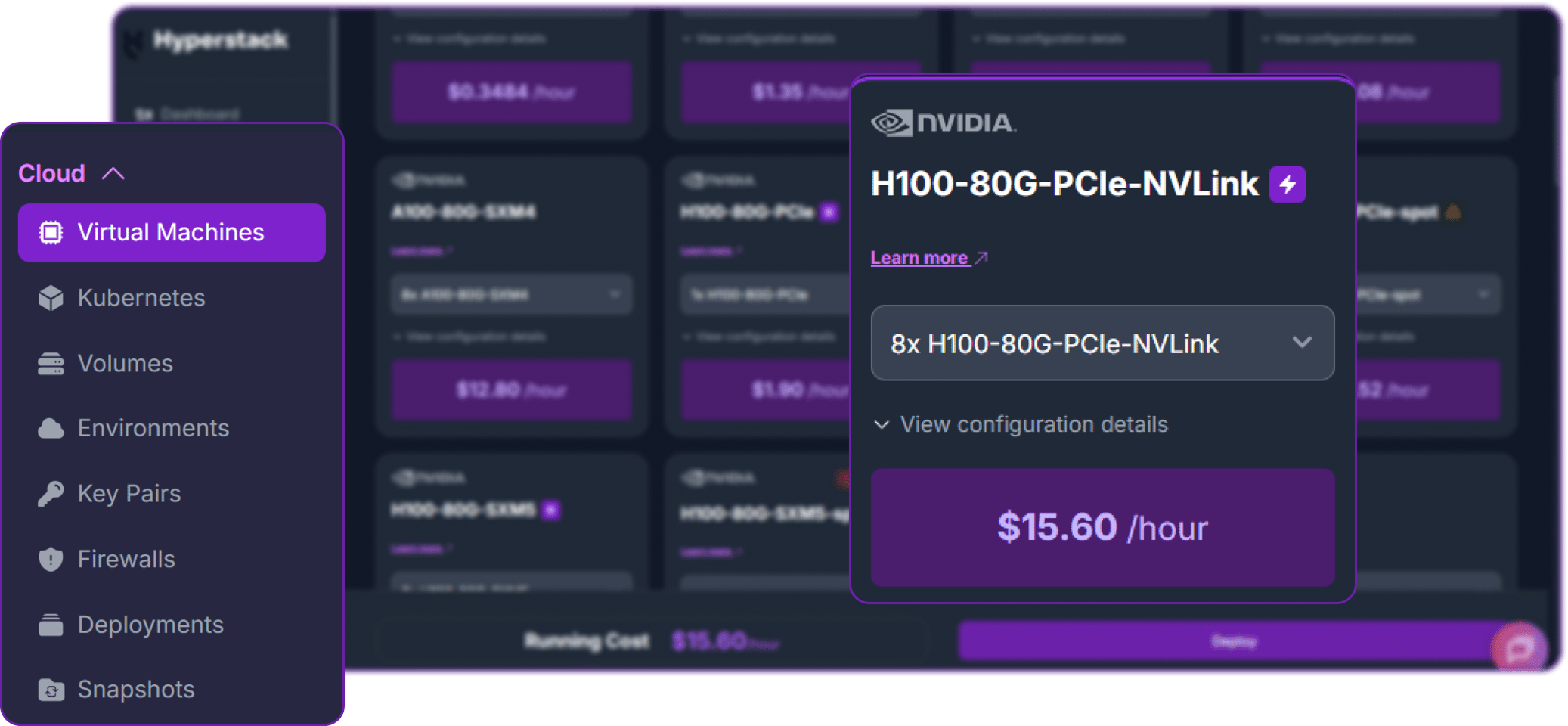
- Select Hardware Configuration: Kimi K2.6 weights are roughly 595 GB on disk after native INT4 quantisation, so you need at least 640 GB of total VRAM. Choose the "8xH100-80G-PCIe" flavour. This is the minimum practical configuration; for production-grade context lengths and concurrency, 8x H200-141G-SXM5 is the official reference setup.
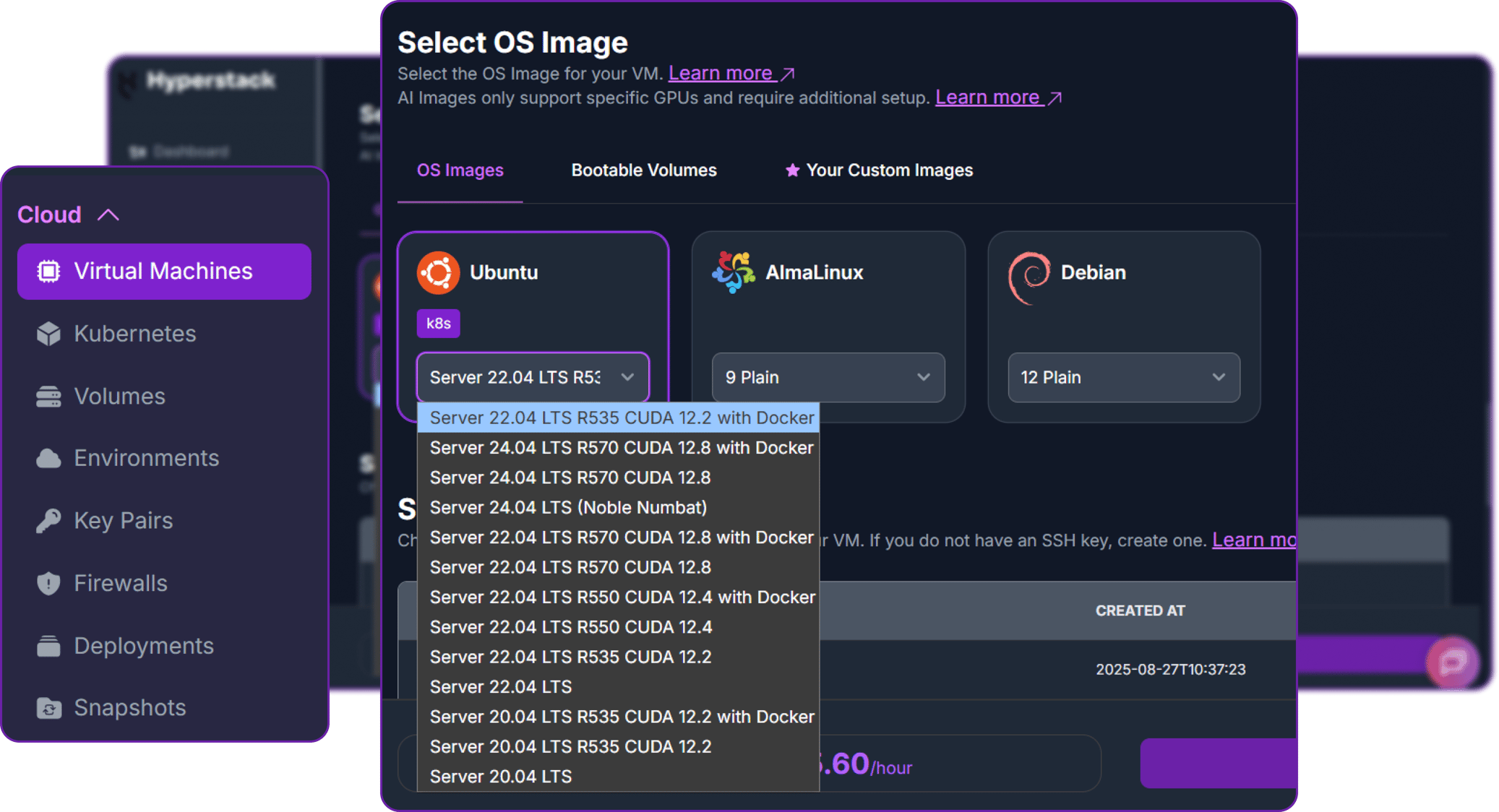
- Choose the Operating System: Select the "Ubuntu Server 22.04 LTS R535 CUDA 12.2 with Docker" image. This provides a ready-to-use environment with all necessary drivers and Docker pre-installed.
- Select a Keypair: Choose an existing SSH keypair from your account to securely access the VM.
- Network Configuration: Ensure you assign a Public IP to your Virtual Machine. This is crucial for remote management and connecting your local development tools.
- Review and Deploy: Double-check your settings and click the "Deploy" button.
Step 3: Accessing Your VM
Once your VM is running, you can connect to it.
-
Locate SSH Details: In the Hyperstack dashboard, find your VM's details and copy its Public IP address.
-
Connect via SSH: Open a terminal on your local machine and use the following command, replacing the placeholders with your information.
# Connect to your VM using your private key and the VM's public IP
ssh -i [path_to_your_ssh_key] ubuntu@[your_vm_public_ip]
Replace [path_to_your_ssh_key] with the path to your private SSH key file and [your_vm_public_ip] with the actual IP address of your VM.
Once connected, you should see a welcome message indicating you're logged into your Hyperstack VM.
Now that we are inside the VM, we will prepare storage, download the model, and use Docker to launch the vLLM server.
Step 4: Create a Model Cache Directory
Kimi K2.6's INT4 weights are roughly 595 GB on disk, which is too large for the root partition on most VM images. We'll place them on the high-speed ephemeral disk, which on this Hyperstack flavour exposes around 6 TB of NVMe-backed storage at /ephemeral.
# Create a directory for the Hugging Face model cache
sudo mkdir -p /ephemeral/hug

# Grant full read/write permissions to the directory
sudo chmod -R 0777 /ephemeral/hug

# Confirm there is enough free space (you should see ~6 TB available on /ephemeral)
df -h /ephemeral
This command creates a folder named hug inside the /ephemeral disk and sets its permissions so that the Docker container can read and write the model files. Storing weights on the ephemeral NVMe disk also dramatically reduces model load time.
Step 5: Pre-Download the Model Weights
The 595 GB download is large enough that it's worth running it once outside Docker so we can monitor progress and recover from interruptions cleanly. We'll use the official Hugging Face CLI.
# Install the Hugging Face Hub CLI with xet support for fast parallel downloads
pip3 install -U "huggingface_hub[hf_xet]"

# Make sure the CLI binary is on PATH (pip installs to ~/.local/bin)
export PATH="$HOME/.local/bin:$PATH"
echo 'export PATH="$HOME/.local/bin:$PATH"' >> ~/.bashrc

# Run the download inside tmux so it survives any SSH disconnect
sudo apt install -y tmux
tmux new -s download

# Inside the tmux session, download the model directly to the ephemeral disk
hf download moonshotai/Kimi-K2.6 \
  --local-dir /ephemeral/hug/kimi-k2.6 \
  --max-workers 8
You can detach from the tmux session at any time with Ctrl+b then d, and reattach later with tmux attach -t download. On a Hyperstack VM with a healthy network path to Hugging Face, the full 595 GB completes in roughly 15 minutes.
Important: Always pass --local-dir /ephemeral/hug/kimi-k2.6. Without it, the CLI defaults to ~/.cache/huggingface on the small root disk and will fail with "No space left on device" partway through the download.
Step 6: Launch the vLLM Server
We will use the latest vllm-openai Docker image. The flags below are deliberately tuned to fit Kimi K2.6 onto an 8x H100-80G node — the model occupies about 71.4 GiB per GPU once sharded, which leaves a tight headroom for KV cache, so we keep max-model-len small and max-num-seqs low for the initial bring-up.
# Pull the latest vLLM OpenAI image from Docker Hub
docker pull vllm/vllm-openai:latest

# Run the container with the specified configuration
docker run -d \
  --gpus all \
  --ipc=host \
  --network host \
  --name vllm_kimi_k26 \
  -v /ephemeral/hug/kimi-k2.6:/models/kimi-k2.6 \
  vllm/vllm-openai:latest \
  /models/kimi-k2.6 \
  --served-model-name Kimi-K2.6 \
  --tensor-parallel-size 8 \
  --trust-remote-code \
  --reasoning-parser kimi_k2 \
  --tool-call-parser kimi_k2 \
  --mm-encoder-tp-mode data \
  --max-model-len 2048 \
  --max-num-seqs 1 \
  --gpu-memory-utilization 0.93 \
  --enforce-eager \
  --host 0.0.0.0 \
  --port 8000
This command instructs Docker to:
--gpus all: Use all 8 NVIDIA H100 GPUs on the host machine.--ipc=host: Share the host's IPC namespace, which is required for high-bandwidth multi-GPU communication.--network host: Expose the container directly on the host network for simpler API access.-v /ephemeral/hug/kimi-k2.6:/models/kimi-k2.6: Mount the pre-downloaded weights from the ephemeral disk into the container.--served-model-name Kimi-K2.6: The friendly name clients will use in the"model"field of API requests.--tensor-parallel-size 8: Shard the model across all 8 GPUs. This is mandatory; the model does not fit otherwise.--mm-encoder-tp-mode data: Tensor-parallel mode for the MoonViT vision encoder, required because K2.6 is natively multimodal.--max-model-len 2048: Caps the context window at 2048 tokens for the initial smoke test. The model supports 256K natively, but each extra token of context consumes scarce KV cache memory on 80 GB GPUs. Increase this gradually once the server is stable.
Step 7: Verify the Deployment
First, follow the container logs to monitor the model loading process. Loading 595 GB of weights and sharding across 8 GPUs takes around 5–10 minutes on PCIe-connected H100s.
docker logs -f vllm_kimi_k26
The process is complete when you see: INFO: Uvicorn running on http://0.0.0.0:8000. On our test deployment, the load step reported "Model loading took 71.37 GiB memory" per GPU and a total init time of about six minutes.
Next, add a firewall rule in your Hyperstack dashboard to allow inbound TCP traffic on port 8000. This is essential for external access. 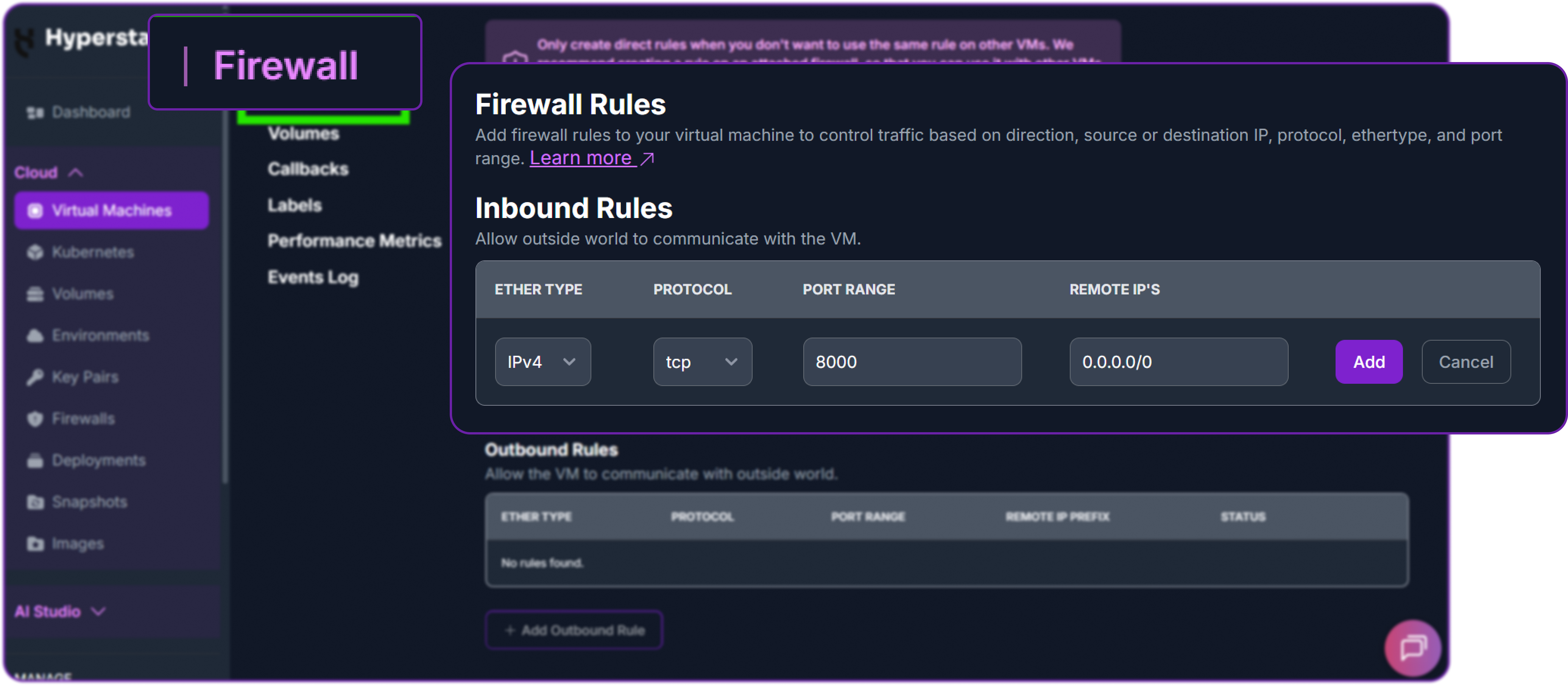
Finally, test the API. Run this from your local machine (not the VM), replacing the IP with your VM's public IP. We pass "thinking": false via chat_template_kwargs to use Instant mode, so the model returns a direct answer without reasoning traces — perfect for a "hello world" health check.
# Test the API endpoint from your local terminal
curl http://<YOUR_VM_PUBLIC_IP>:8000/v1/chat/completions \
  -H "Content-Type: application/json" \
  -H "Authorization: Bearer EMPTY" \
  -d '{
    "model": "Kimi-K2.6",
    "messages": [{"role": "user", "content": "hi"}],
    "max_tokens": 50,
    "chat_template_kwargs": {"thinking": false}
  }'
A successful response looks like this:
{
  "id": "chatcmpl-9ab83c6a4e1ab454",
  "object": "chat.completion",
  "model": "Kimi-K2.6",
  "choices": [
    {
      "index": 0,
      "message": {
        "role": "assistant",
        "content": " Hi! How can I help you today?",
        "reasoning": null
      },
      "finish_reason": "stop"
    }
  ],
  "usage": {"prompt_tokens": 10, "completion_tokens": 10, "total_tokens": 20}
}
The "reasoning" field is null because we used Instant mode. The Kimi K2.6 model is now successfully deployed on Hyperstack.
The Moonshot team recommends the following sampling parameters for Kimi K2.6:
# Thinking mode (default)
temperature=1.0, top_p=0.95

# Instant mode (thinking disabled)
temperature=0.6, top_p=0.95
Step 8: Hibernating Your VM (OPTIONAL)
When you are finished with your current workload, you can hibernate your VM to avoid incurring unnecessary costs:
- In the Hyperstack dashboard, locate your Virtual machine.
- Look for a "Hibernate" option.
- Click to hibernate the VM, which will stop billing for compute resources while preserving your setup.
Switching Between Thinking and Instant Modes
Now that the vLLM server is running, we can interact with it from Python using the standard OpenAI client. First, install the library:
# Install the OpenAI Python client library to interact with the vLLM server
pip3 install openai
Instantiate an OpenAI-compatible client pointed at the local vLLM server. The api_key can be any non-empty placeholder because vLLM does not enforce authentication by default.
from openai import OpenAI

# Create an OpenAI-compatible client that points to a local vLLM server.
client = OpenAI(
    base_url="http://localhost:8000/v1",  # Local API endpoint exposing OpenAI-style routes
    api_key="EMPTY",                      # Placeholder key; vLLM does not enforce API keys
)
Kimi K2.6 ships with thinking mode enabled by default, which is what gives it strong reasoning behaviour but also burns extra tokens. For straightforward tasks like simple code generation or direct factual questions, you can disable thinking via chat_template_kwargs.thinking:
# Define the conversation payload sent to the model.
# Here, the user asks for a short Python script that reverses a string.
messages = [
    {"role": "user", "content": "Write a quick Python script to reverse a string."}
]

# Send a chat completion request — Instant mode (thinking disabled)
chat_response = client.chat.completions.create(
    model="Kimi-K2.6",
    messages=messages,
    max_tokens=500,
    temperature=0.6,
    top_p=0.95,
    extra_body={
        "chat_template_kwargs": {"thinking": False},
    },
)

print("Response:", chat_response.choices[0].message.content)
By setting "thinking": False, the model skips internal reasoning and returns a direct, concise answer:
Response: Here is a quick and efficient Python script to reverse a string using slicing:

```python
def reverse_string(text):
    reversed_text = ""
    for char in text:
        reversed_text = char + reversed_text
    return reversed_text

# Example usage
if __name__ == "__main__":
    user_input = input("Enter a string: ")
    print(reverse_string(user_input))...
To re-enable thinking mode for tasks that benefit from explicit reasoning (debugging, planning, math), simply pass "thinking": True (or omit the flag entirely — thinking is the default). The reasoning trace will appear in the message.reasoning field and the final answer in message.content:
# Thinking mode — same call, just enable thinking
chat_response = client.chat.completions.create(
    model="Kimi-K2.6",
    messages=[{"role": "user", "content": "Which is bigger: 9.11 or 9.9? Think carefully."}],
    max_tokens=500,
    temperature=1.0,
    top_p=0.95,
    extra_body={"chat_template_kwargs": {"thinking": True}},
)

print("Reasoning:", chat_response.choices[0].message.reasoning)
print("Answer:   ", chat_response.choices[0].message.content)
Multimodal Capabilities with Kimi K2.6
Kimi K2.6 is natively multimodal through its integrated MoonViT encoder, so it can analyse images and video frames alongside text in the same request. The image input format is identical to the OpenAI vision API:
# Build a multimodal chat prompt with one user message:
# - an image URL
# - a text question about the image
messages = [
    {
        "role": "user",
        "content": [
            {
                "type": "image_url",
                "image_url": {
                    "url": "https://huggingface.co/moonshotai/Kimi-K2.6/resolve/main/figures/kimi-logo.png"
                }
            },
            {
                "type": "text",
                "text": "Describe this image in detail."
            }
        ]
    }
]

chat_response = client.chat.completions.create(
    model="Kimi-K2.6",
    messages=messages,
    max_tokens=600,
    temperature=0.6,
    top_p=0.95,
)

print("Response:", chat_response.choices[0].message.content)
The model returns a structured description of the image, demonstrating that the MoonViT vision encoder is fully wired through to the language model. You can pass either a public URL or a base64 data URI in the "url" field.
Note on video input: Per the Moonshot model card, chat with video content is currently an experimental feature and is officially supported only on Moonshot's hosted API. Self-hosted vLLM and SGLang deployments accept image inputs reliably; video support varies by inference engine version, so test with short clips first if you depend on it.
Preserve Thinking for Multi-Turn Coding Agents
One of the more underrated additions in Kimi K2.6 is preserve_thinking mode. By default, the assistant's previous reasoning traces are dropped between turns. With preserve_thinking enabled, the full reasoning content is retained across turns, which Moonshot reports materially improves coding-agent performance because the model can continue from its earlier thought process instead of re-deriving it.
It is disabled by default. The example below shows how to enable it on a self-hosted vLLM endpoint:
messages = [
    {"role": "user", "content": "Tell me three random numbers."},
    {
        "role": "assistant",
        "reasoning_content": "I'll start by listing five numbers: 473, 921, 235, 215, 222, and I'll tell you the first three.",
        "content": "473, 921, 235",
    },
    {"role": "user", "content": "What are the other two numbers you have in mind?"},
]

chat_response = client.chat.completions.create(
    model="Kimi-K2.6",
    messages=messages,
    max_tokens=500,
    extra_body={
        "chat_template_kwargs": {
            "thinking": True,
            "preserve_thinking": True,
        }
    },
)

print(chat_response.choices[0].message.content)
Because the prior reasoning trace mentioned 215 and 222, the model's follow-up answer correctly references those exact numbers — something it could not do reliably without preserve_thinking. Moonshot recommends enabling preserve_thinking only when thinking mode itself is enabled.
Agentic Use Case with Kimi K2.6
One of the most powerful features of moonshotai/Kimi-K2.6 is its long-horizon agentic tool calling. Unlike standard chat where the model just generates text, an agentic workflow lets it:
- Decide when external tools are needed
- Call tools automatically
- Receive tool outputs and continue reasoning
- Complete multi-step tasks autonomously across hundreds or thousands of steps
Because we launched vLLM with --tool-call-parser kimi_k2, the server emits structured tool calls in the format Moonshot's agent frameworks expect. The Moonshot team's flagship reference framework is the Kimi Code CLI, but any OpenAI-compatible agent framework works here, including Qwen-Agent, Letta, and the Anthropic-compatible CLIs we cover later.
For self-contained examples, we'll use a small Python harness with a single filesystem tool. It is the simplest way to demonstrate K2.6's agentic loop end-to-end without pulling in a heavy framework.
import json, os, subprocess
from openai import OpenAI

client = OpenAI(base_url="http://localhost:8000/v1", api_key="EMPTY")
WORKSPACE = "/ephemeral/agent_workspace"
os.makedirs(WORKSPACE, exist_ok=True)

# Define a single filesystem tool the agent can call
tools = [{
    "type": "function",
    "function": {
        "name": "run_shell",
        "description": "Run a shell command inside the workspace and return stdout/stderr.",
        "parameters": {
            "type": "object",
            "properties": {"command": {"type": "string"}},
            "required": ["command"],
        },
    },
}]

def run_shell(command):
    proc = subprocess.run(command, shell=True, cwd=WORKSPACE,
                          capture_output=True, text=True, timeout=30)
    return proc.stdout + proc.stderr
With the tool defined, the agent loop is just: send the user message, execute any tool calls the model returns, append the tool results, and call the model again until it stops issuing tool calls.
def agent_loop(user_prompt, max_steps=20):
    messages = [{"role": "user", "content": user_prompt}]
    for _ in range(max_steps):
        resp = client.chat.completions.create(
            model="Kimi-K2.6",
            messages=messages,
            tools=tools,
            tool_choice="auto",
            max_tokens=2048,
            temperature=1.0,
            top_p=0.95,
        )
        msg = resp.choices[0].message
        messages.append(msg)
        if not msg.tool_calls:
            return msg.content
        for tc in msg.tool_calls:
            args = json.loads(tc.function.arguments)
            output = run_shell(args["command"])
            messages.append({"role": "tool", "tool_call_id": tc.id, "content": output})
    return "step limit reached"
Example 1: Long-Horizon Refactor
This is the kind of task K2.6 is genuinely good at — sustained multi-step engineering work where it has to read existing code, plan a change, and apply it without losing track. We seed the workspace with a small file and ask the model to refactor it:
# Seed the workspace with a deliberately ugly file
open(f"{WORKSPACE}/calc.py", "w").write("""
def calc(a, b, op):
    if op == "add": return a + b
    if op == "sub": return a - b
    if op == "mul": return a * b
    if op == "div": return a / b
""")

print(agent_loop(
    "Refactor calc.py to use a dict-based dispatch table instead of if/elif chains, "
    "add type hints, handle division-by-zero, and add three pytest tests in test_calc.py."
))
What happens internally over the next ~10–15 tool calls:
- The model interprets the request and decides it needs to read
calc.pyfirst. - It calls
run_shellwithcat calc.py, sees the existing structure. - It writes a refactored version using a
heredocredirection. - It writes
test_calc.pywith three test cases (add, mul, div-by-zero). - It calls
pytest test_calc.py -qand reads the output. - If a test fails, it reads the failure, edits the file, and re-runs — this is the part where K2.6's preserve-thinking behaviour matters most.
- It returns a summary of changes.
This is a deliberately small case. In Moonshot's published case studies, the same loop scales up to 13-hour autonomous runs that modify 4,000+ lines across 1,000+ tool calls, including a complete overhaul of an 8-year-old open-weight matching engine that achieved a 185% throughput gain.
Example 2: Coding-Driven Design (Build a Website)
Kimi K2.6's "coding-driven design" capability turns a single prompt into a self-contained website. Using the same agent harness:
print(agent_loop(
    "Build a single-page cat-themed website at index.html. Include a hero section, "
    "a description of three cat breeds in cards, a scroll-triggered fade-in animation, "
    "and inline CSS so the file works standalone. Then verify the file exists."
))
The model writes a complete index.html in /ephemeral/agent_workspace with structured layout, embedded CSS, IntersectionObserver-based scroll animations, and a polished hero section — the kind of output that Moonshot benchmarks against Google AI Studio on their internal Kimi Design Bench. Open the file in a browser and you'll see a working, styled page generated end-to-end without manual edits.
Integration with Third-Party Coding Assistants
Because vLLM exposes the OpenAI-compatible /v1/chat/completions endpoint and we enabled the Kimi K2 tool-call parser, our locally-hosted Kimi K2.6 plugs into almost every modern coding assistant. Below are three of the most useful integrations.
Integrating with Kimi Code CLI
Moonshot's official agent framework for K2.6 is the Kimi Code CLI, available at kimi.com/code. It is the framework Moonshot uses to produce the long-horizon coding case studies referenced earlier, so it gets the most out of K2.6's interleaved thinking and multi-step tool-calling design.
By default Kimi Code talks to Moonshot's hosted API, but it can be redirected to your local vLLM endpoint by setting an OpenAI-compatible base URL in its config. The exact config keys vary slightly between Kimi Code releases, so consult the version notes shipped with your install — but conceptually you point its API base at http://<YOUR_VM_PUBLIC_IP>:8000/v1 and use Kimi-K2.6 as the model name.
Integration with Claude Code
Because vLLM also exposes Anthropic-compatible routes (/v1/messages) when configured correctly, you can point Claude Code directly at our local Kimi K2.6 server. Moonshot specifically advertises an Anthropic-compatible API for K2.6, which makes this integration first-class.
Set the following environment variables before launching Claude Code:
# Point Claude Code to the local vLLM server
export ANTHROPIC_BASE_URL="http://localhost:8000"
export ANTHROPIC_API_KEY="dummy"
export ANTHROPIC_AUTH_TOKEN="dummy"

# Use Kimi K2.6 for every Claude Code model tier
export ANTHROPIC_DEFAULT_OPUS_MODEL="Kimi-K2.6"
export ANTHROPIC_DEFAULT_SONNET_MODEL="Kimi-K2.6"
export ANTHROPIC_DEFAULT_HAIKU_MODEL="Kimi-K2.6"

# Launch Claude Code
claude
Environment Variables Overview
| Variable | Description |
|---|---|
| ANTHROPIC_BASE_URL | Points to your vLLM server (default: http://localhost:8000). |
| ANTHROPIC_API_KEY | Required by the client; can be any dummy value for local vLLM. |
| ANTHROPIC_AUTH_TOKEN | Required placeholder for the Claude authentication layer. |
| ANTHROPIC_DEFAULT_OPUS_MODEL | The model identifier (matches --served-model-name from docker run). |
Efficiency Tip: Add these environment variables to your shell profile (e.g., .bashrc or .zshrc) or define them inside ~/.claude/settings.json for a persistent setup.
Performance Warning: Claude Code injects a per-request hash in the system prompt, which can break prefix caching. While fixed in recent vLLM releases, users on older versions should add "CLAUDE_CODE_ATTRIBUTION_HEADER": "0" to the "env" section of their settings.
Once Claude Code launches, verify the connection with a simple prompt. If the model responds correctly, your local agentic coding environment is fully operational and you can leverage Kimi K2.6's long-horizon reasoning capabilities directly for complex development tasks.
Deployment with OpenClaw
Kimi K2.6's reasoning-heavy architecture makes it a strong engine for OpenClaw, the self-hosted open-weight agent featured in Moonshot's own enterprise testimonials (Ollama, Fireworks, and others have noted that K2.6 powers all of the "claws" reliably). Pointing OpenClaw at your local vLLM server gives you a fully autonomous coding environment in your terminal without any external API latency.
# Install OpenClaw (Requires Node.js 22+)
curl -fsSL https://molt.bot/install.sh | bash

# Set a dummy API key for the local vLLM endpoint
export OPENCLAW_API_KEY="EMPTY"

# Launch the OpenClaw Dashboard
openclaw dashboard
Configuring the Local Provider
To bridge OpenClaw to your vLLM container, modify ~/.openclaw/openclaw.json. Merge the following provider block into your existing settings:
{
  "models": {
    "providers": {
      "local-vllm": {
        "baseUrl": "http://localhost:8000/v1",
        "apiKey": "EMPTY",
        "api": "openai-completions",
        "models": [
          {
            "id": "Kimi-K2.6",
            "name": "Kimi-K2.6-Local",
            "reasoning": true,
            "contextWindow": 262144
          }
        ]
      }
    }
  }
}Configuration Tip: The id field must match your --served-model-name from the docker run command (in our case, Kimi-K2.6). The contextWindow here is the model's native maximum (262,144 tokens); the actual usable window is whatever you set --max-model-len to when launching vLLM.
Once configured, launch the OpenClaw TUI with openclaw tui. From here you can issue high-level coding instructions and the K2.6-backed agent will autonomously plan, edit, and verify changes against your local 8x H100 infrastructure.
Why Deploy Kimi K2.6 on Hyperstack?
Hyperstack is a cloud platform engineered specifically to accelerate AI and machine learning workloads. Here is why it's the right choice for Kimi K2.6:
Kimi K2.6 needs 8x H100-80G at minimum. Hyperstack provides on-demand access to NVIDIA H100 nodes purpose-built for trillion-parameter MoE workloads.
The 6 TB ephemeral NVMe disk dowloaded Kimi K2.6's 595 GB weights in roughly 15 minutes — fast enough that you can iterate on multiple model versions in a single afternoon.
The Ubuntu 22.04 + CUDA 12.2 + Docker image removes the entire driver-and-runtime setup phase, so the deployment goes straight from
ssh to docker run.Move from an 8x H100-80G smoke-test node to an 8x H200-141G production node with the same Docker image and the same launch flags.
Pay only when actively serving. Hibernate the VM between batches and your GPU billing stops while the entire setup is preserved.
vLLM, SGLang, KTransformers, Hugging Face — all of the inference engines Moonshot recommends for K2.6 run on Hyperstack with no extra configuration.

FAQs
What is Kimi K2.6?
Kimi K2.6 is Moonshot AI's open-weight, native multimodal agentic model. It uses a Mixture-of-Experts architecture with 1T total parameters and 32B activated, achieving state-of-the-art open-weight performance on long-horizon coding (58.6 on SWE-Bench Pro, 80.2 on SWE-Bench Verified) and agentic benchmarks (54.0 on HLE-Full with tools, 92.5 on DeepSearchQA F1).
What is Kimi K2.6's context window?
Kimi K2.6 supports a native 256K-token context window. The amount you can actually use at inference time depends on the --max-model-len flag and your available GPU memory; on 8x H100-80G with no other tuning you'll typically run shorter contexts (a few thousand tokens) for headroom.
Does Kimi K2.6 support thinking mode?
Yes. Thinking mode is enabled by default and produces explicit reasoning traces in the message.reasoning field. You can disable it for short responses by passing chat_template_kwargs.thinking = False. K2.6 also supports preserve_thinking mode for retaining reasoning across multi-turn coding agent interactions.
What hardware is needed for Kimi K2.6?
The native INT4 weights are roughly 595 GB on disk, so you need at least 640 GB of total GPU memory. The minimum practical configuration is 8x NVIDIA H100-80G; the official reference setup is 8x H200-141G-SXM5 (1128 GB total), which gives the best performance at full context length and concurrent serving.
What are the main use cases of Kimi K2.6?
Kimi K2.6 is best for long-horizon software development, coding-driven design (turning prompts into production-ready front-ends and lightweight full-stack apps), agent swarms with up to 300 sub-agents and 4,000 coordinated steps, and persistent 24/7 background agents for monitoring, incident response, and cross-platform automation.
Which inference engines support Kimi K2.6?
Moonshot officially recommends vLLM (≥ 0.19.1), SGLang (≥ 0.5.10), and KTransformers for CPU+GPU heterogeneous inference. The architecture is identical to K2.5, so any deployment recipe that works for K2.5 works directly for K2.6 with the same flags.
Subscribe to Hyperstack!
Enter your email to get updates to your inbox every week



