


.png)
TABLE OF CONTENTS
NVIDIA H100 SXM GPUs On-Demand
Key Takeaways
- AntAngelMed is the world's first open-source 100B-parameter medical large language model.
- It uses a Mixture-of-Experts architecture with 100B total parameters but only ~6.1B active per token.
- It ranks #1 among open-source models on OpenAI's HealthBench and tops the MedBench leaderboard.
- The model supports a 128K-token context window via YaRN extrapolation.
- The tutorial deploys AntAngelMed on Hyperstack using 8x NVIDIA H100-80G-PCIe in the CANADA-1 region.
- For production clinical workloads, Hyperstack's Secure Private Cloud offers EU-jurisdiction single-tenant infrastructure for GDPR-aligned deployment.
What is AntAngelMed?
AntAngelMed is the world's first open-source 100B-parameter medical large language model, jointly developed by the Health Information Center of Zhejiang Province, Ant Healthcare, and Zhejiang Anzhen'er Medical AI. Built on the Ling-flash-2.0 Mixture-of-Experts architecture, it houses 100B total parameters while activating only 6.1B parameters per token, allowing it to match the performance of dense models several times its active size while delivering inference speeds exceeding 200 tokens per second on H20-class hardware. With a 128K context window, clinical-grade safety alignment via GRPO reinforcement learning, and #1 rankings on HealthBench (open-source category) and the MedBench leaderboard, AntAngelMed sets a new bar for what an openly available medical AI can do.
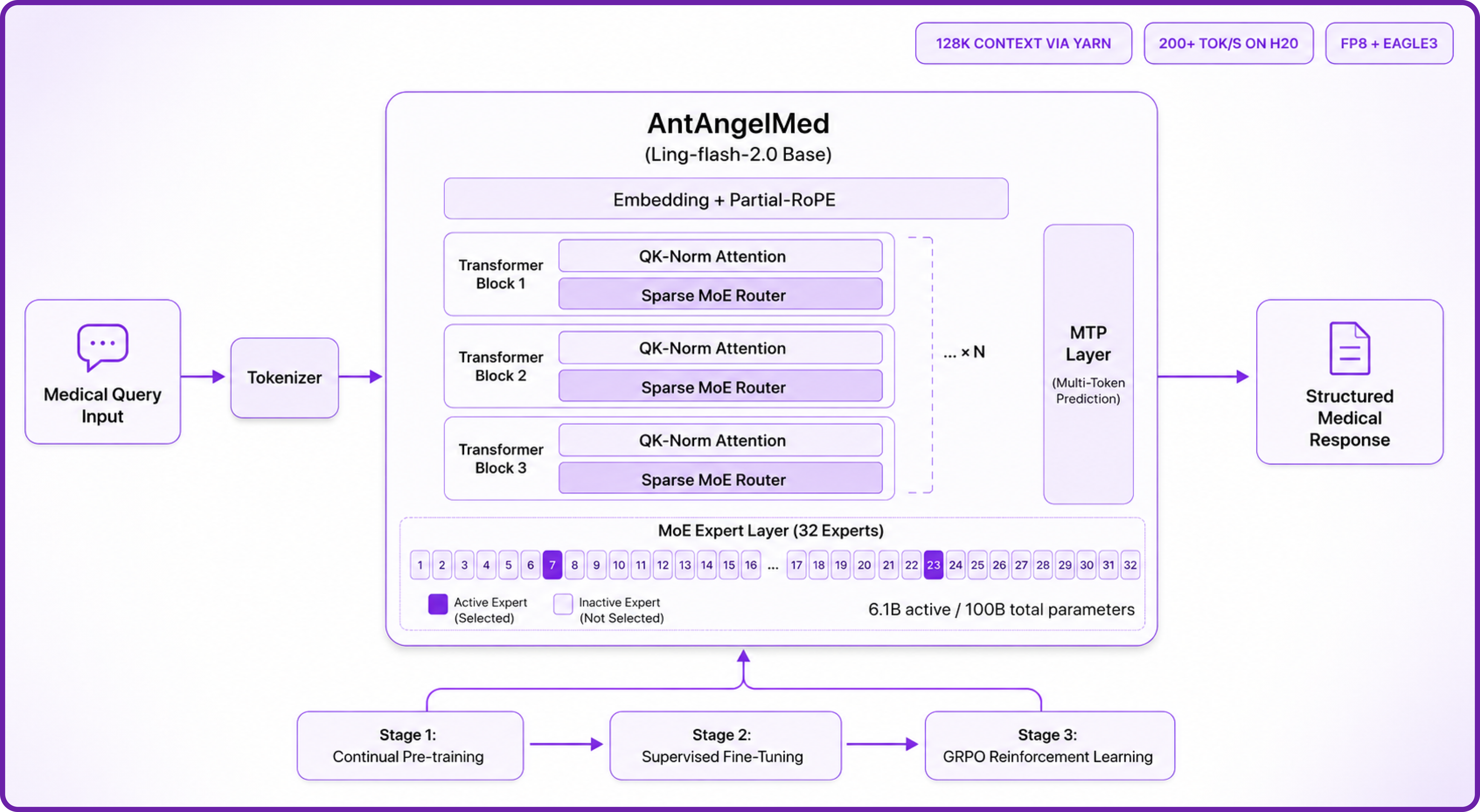
A major reason AntAngelMed performs so strongly on clinical benchmarks is its rigorous three-stage training pipeline combined with a highly efficient sparse MoE architecture. Here is how the design works:
- Sparse MoE Architecture: Built on Ling-flash-2.0's 1/32 activation-ratio Mixture-of-Experts design. Only ~6.1B of the model's 100B parameters activate per token, delivering large-model intelligence at small-model speeds.
- Three-Stage Medical Training: Continual pre-training on large-scale medical corpora (encyclopaedias, peer-reviewed research, clinical text), followed by supervised fine-tuning on multi-source medical instructions, and finally GRPO-based reinforcement learning that shapes empathy, safety boundaries, and evidence-based reasoning.
- Advanced MoE Optimisations: Expert granularity tuning, shared-expert ratios, no auxiliary loss with sigmoid routing, Multi-Token Prediction (MTP) layers, QK-Norm, and Partial-RoPE all combine to push small-activation MoE up to 7x more efficient than a dense model of comparable size.
- Extended Context via YaRN: Native context support extends to 128K tokens through YaRN extrapolation — essential for ingesting long patient histories, multi-document literature reviews, or extended diagnostic conversations.
- Clinical Safety Alignment: GRPO reinforcement learning with task-specific reward models explicitly optimises for empathy, structural clarity, safety boundaries, and reduced hallucinations on complex medical cases.
- FP8 + EAGLE3 Inference Acceleration: Optional FP8 quantisation paired with EAGLE3 speculative decoding delivers throughput gains of 45–94% over standard FP8 across reasoning workloads, with no measurable loss in stability.
AntAngelMed Features
AntAngelMed is more than a general chat model fine-tuned on medical data — it has been engineered end-to-end for clinical reasoning. Key features include:
Production Throughput Gains with FP8 + EAGLE3
Inference throughput improvement of FP8 + EAGLE3 speculative decoding over standard FP8 alone, measured at a concurrency of 32 on reasoning workloads.
Throughput improvement of the FP8 + EAGLE3 configuration relative to the FP8-only baseline, as reported by the AntAngelMed authors on the Hugging Face model card under a concurrency of 32.
- Leading Open-Source Medical Performance: Ranks first among open-source models on OpenAI's HealthBench (with a particularly strong lead on HealthBench-Hard) and #1 overall on the MedBench leaderboard across knowledge, reasoning, language, and safety.
- 6.1B Active / 100B Total Parameters: Matches the performance of ~40B dense models while running roughly 3x faster, thanks to its sparse-activation MoE design.
- Clinical-Grade Safety and Ethics: Explicitly trained to favour evidence-based reasoning, structured responses, and safety disclaimers — reducing hallucination on complex diagnostic queries.
- 128K Context Window: Handles long-form clinical documentation, multi-report synthesis, and extended multi-turn conversations in a single context.
- OpenAI-Compatible API: Deploys cleanly via vLLM and exposes a standard
/v1/chat/completionsendpoint, making integration with existing healthcare applications straightforward. - Bilingual Medical Fluency: Strong performance across English and Chinese medical text, including medical knowledge Q&A, language understanding, and complex clinical reasoning.
Important Considerations Before Deploying a Medical LLM
Before walking through deployment, it is worth pausing on a point that matters more for medical AI than almost any other workload: where your model runs is as important as how well it performs. Medical data is among the most tightly regulated categories of information globally, governed by frameworks such as the EU GDPR, the UK Data Protection Act, the EU AI Act (which classifies clinical-decision-support and diagnostic AI as high-risk when used in a medical-device capacity), and HIPAA in the United States.
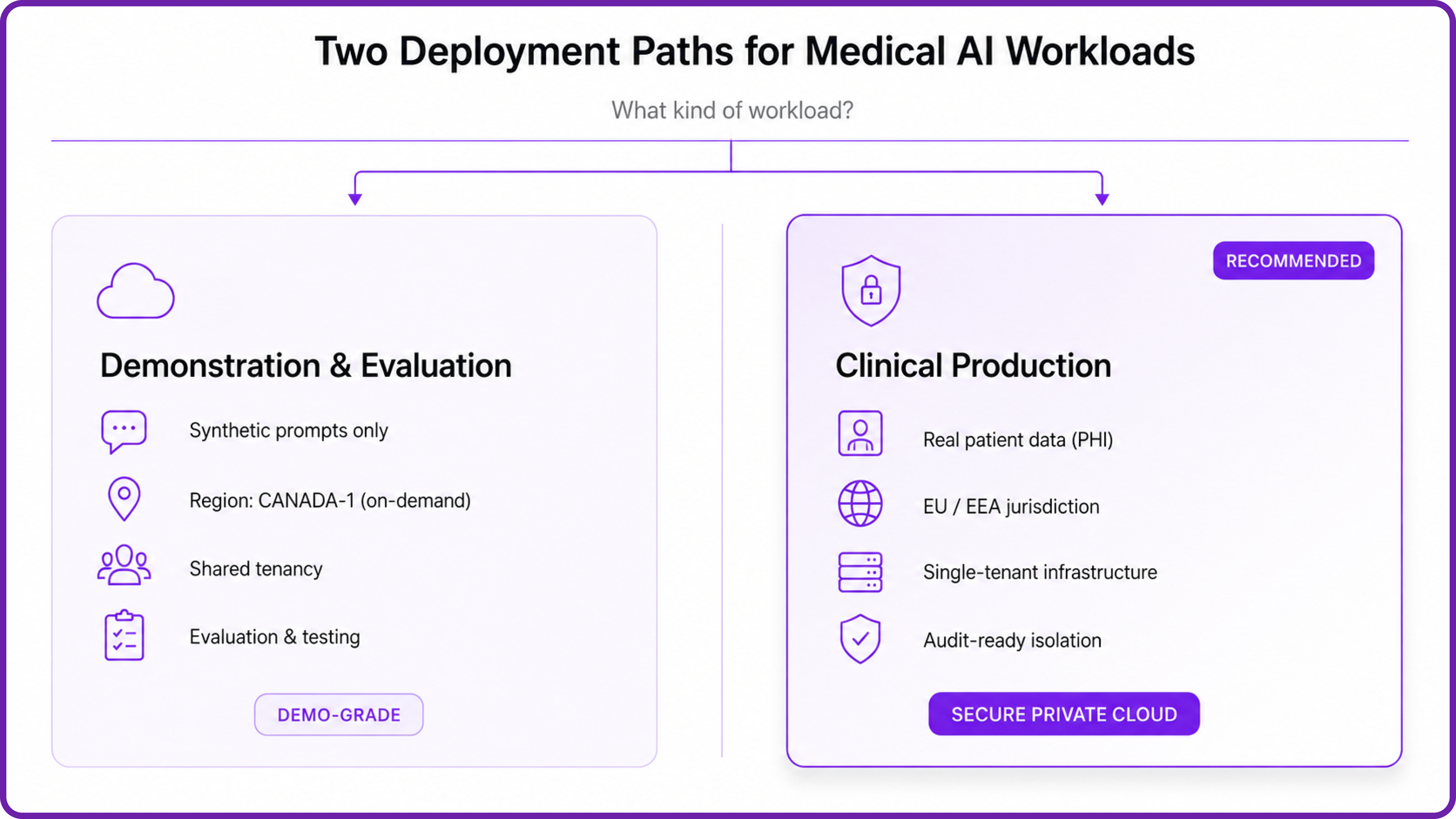
If you intend to use AntAngelMed in any setting that touches real patient data or protected health information, the on-demand deployment shown in this tutorial is a starting point for evaluation, not a production blueprint. For clinical workloads, Hyperstack offers a deployment pattern specifically engineered for regulated industries:
- Secure Private Cloud: Single-tenant, dedicated GPU infrastructure with isolated networking, commissioned per customer and able to be deployed in specific regions and jurisdictions — including EU/EEA jurisdictions for organisations operating under GDPR. No shared GPU memory, no shared VPCs, no noisy neighbours, and clear audit evidence (tenancy models, access logs, control mappings, data residency confirmation) that compliance and legal teams can verify. This is the recommended path for any clinical workload on a 100B-class model like AntAngelMed.
Important Notice for This Tutorial
The walkthrough below uses a standard on-demand GPU VM for demonstration purposes only. All prompts shown are synthetic, generic medical questions — no real patient data, identifiable health information, or protected records are processed at any point. The model and all generated outputs remain within the dedicated GPU VM and are not exposed externally. For any workload involving real clinical data — particularly where EU data residency or audit-grade isolation is required — please contact our team to provision a Secure Private Cloud environment configured for your compliance posture.
How to Deploy AntAngelMed on Hyperstack
With those considerations in place, let's walk through the deployment process step by step.
Step 1: Accessing Hyperstack
First, you'll need an account on Hyperstack.
- Go to the Hyperstack website and log in.
- If you are new, create an account and set up your billing information. Our documentation can guide you through the initial setup.
Step 2: Deploying a New Virtual Machine
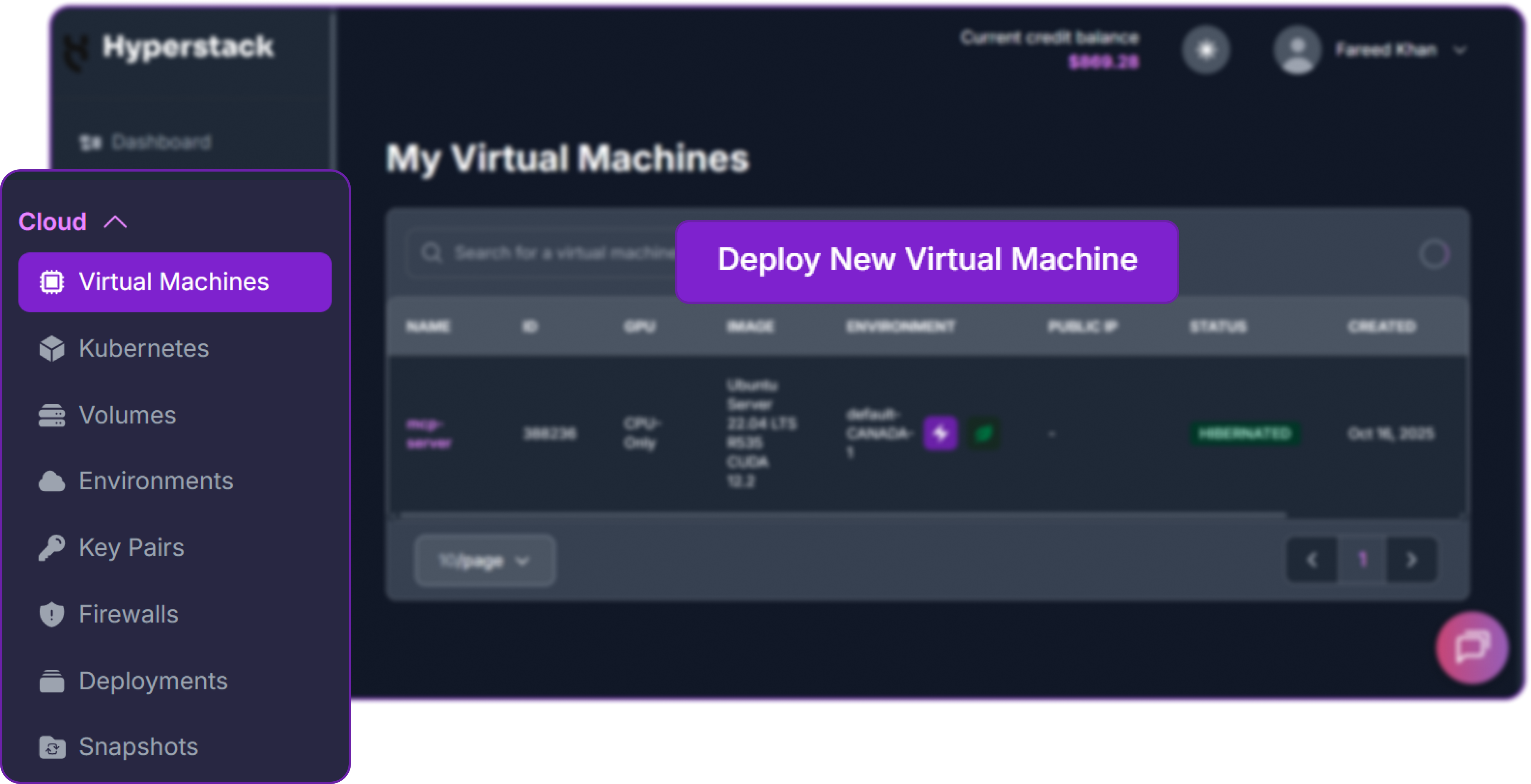
From the Hyperstack dashboard, we will launch a new GPU-powered VM sized appropriately for a 100B-parameter MoE model.
- Initiate Deployment: Click the "Deploy New Virtual Machine" button on the dashboard.
- Select Hardware Configuration: AntAngelMed is approximately 206 GB at BF16, and with KV cache, activations, and headroom for long-context inference, an 8-GPU configuration is recommended. Choose the "8x H100-80G-PCIe" flavour. This gives 640 GB of total GPU memory — comfortable margin for tensor-parallel-size 8 inference at production speeds.

- Select a Region: The 8x H100-80G-PCIe flavour is available in the CANADA-1 region on Hyperstack's on-demand cloud. Choose CANADA-1 for this tutorial. For production clinical workloads that require EU data residency, the appropriate path is a Secure Private Cloud deployment, which Hyperstack provisions in specific regions and jurisdictions including the EU/EEA.
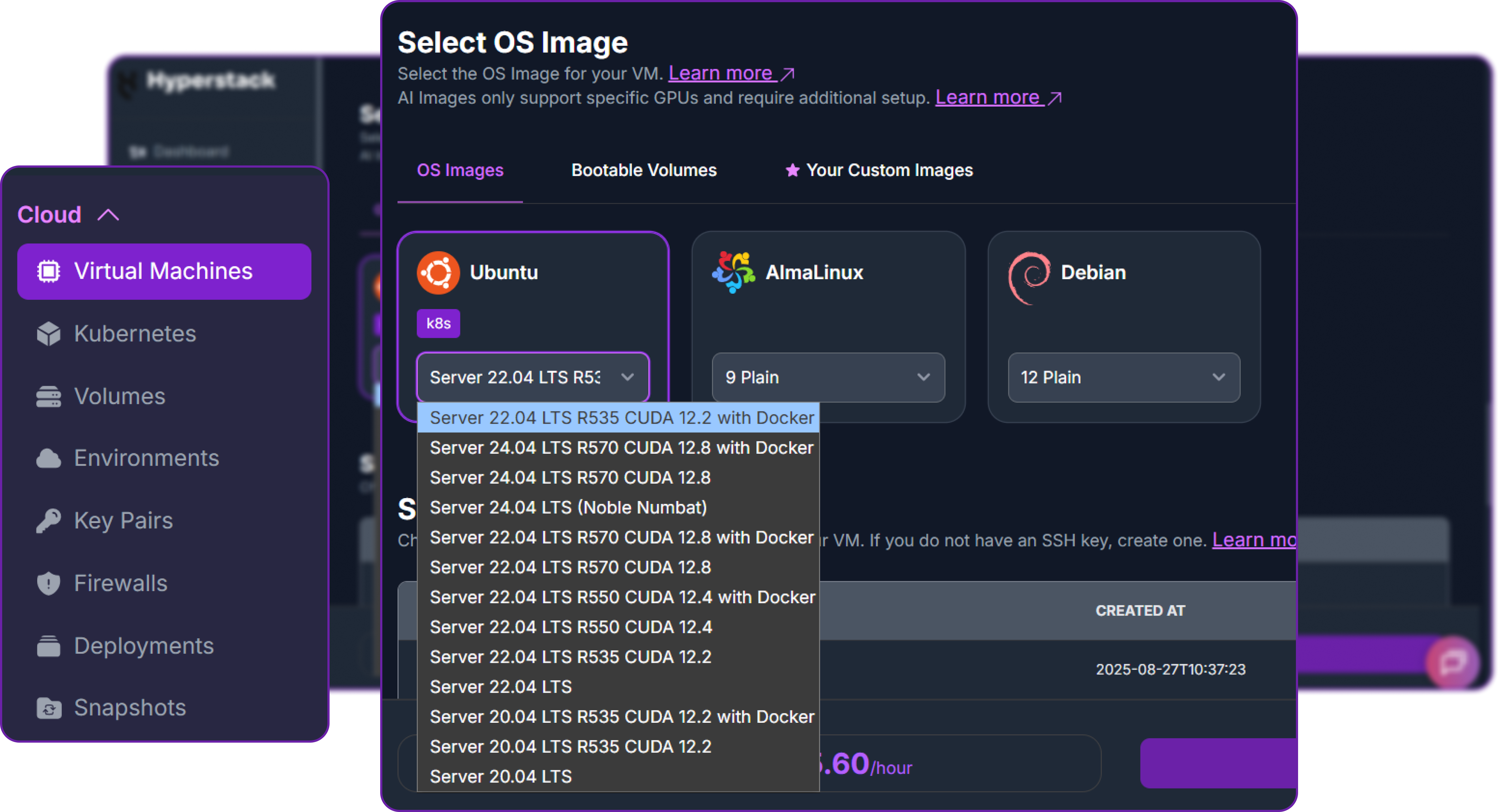
- Choose the Operating System: Select the "Ubuntu Server 22.04 LTS R535 CUDA 12.2 with Docker" image. This provides a ready-to-use environment with all NVIDIA drivers and Docker pre-installed.
- Select a Keypair: Choose an existing SSH keypair from your account to securely access the VM.
- Network Configuration: Ensure you assign a Public IP to your Virtual Machine for remote management.
- Review and Deploy: Double-check your settings and click "Deploy".
Step 3: Accessing Your VM
Once your VM is running, connect to it via SSH.
-
Locate SSH Details: In the Hyperstack dashboard, find your VM's details and copy its Public IP address.
-
Connect via SSH: Open a terminal on your local machine and run:
# Connect to your VM using your private key and the VM's public IP
ssh -i [path_to_your_ssh_key] ubuntu@[your_vm_public_ip]
Replace [path_to_your_ssh_key] with the path to your private SSH key and [your_vm_public_ip] with the IP address of your VM. Once connected, you should see a welcome message confirming you are logged in.
Step 4: Create a Model Cache Directory
AntAngelMed weighs around 206 GB. We'll cache it on the VM's high-speed ephemeral disk so that subsequent container restarts do not re-download the weights.
# Create a directory for the Hugging Face model cache
sudo mkdir -p /ephemeral/hug

# Grant full read/write permissions to the directory
sudo chmod -R 0777 /ephemeral/hug
This creates a folder named hug inside the /ephemeral disk and sets permissions so the Docker container can read and write model files.
Step 5: Launch the vLLM Server
AntAngelMed uses the custom bailing_moe architecture from Ling-flash-2.0, so we need vLLM v0.11.0 or later and the --trust-remote-code flag. We'll pull the official vLLM image and run the model with tensor parallelism across all eight H100s.
# Pull the vLLM OpenAI-compatible image (v0.11.0 recommended by the model authors)
docker pull vllm/vllm-openai:v0.11.0

# Run the container with the AntAngelMed model
docker run -d \
 --gpus all \
 --ipc=host \
 --network host \
 --name vllm_antangelmed \
 -v /ephemeral/hug:/root/.cache/huggingface \
 vllm/vllm-openai:v0.11.0 \
 MedAIBase/AntAngelMed \
 --tensor-parallel-size 8 \
 --dtype bfloat16 \
 --trust-remote-code \
 --max-model-len 32768 \
 --gpu-memory-utilization 0.90 \
 --served-model-name AntAngelMed \
 --host 0.0.0.0 \
 --port 8000
Breakdown of the key flags:
--gpus all: Use all eight NVIDIA H100 GPUs on the host.--ipc=host: Share the host's IPC namespace for efficient multi-GPU communication.--network host: Expose the container directly on the host network for simpler API access.-v /ephemeral/hug:/root/.cache/huggingface: Mount the cache directory so weights persist across container restarts.MedAIBase/AntAngelMed: Load the model directly from Hugging Face.--tensor-parallel-size 8: Shard the model weights across all eight GPUs.--dtype bfloat16: Use BF16 precision, as recommended by the model authors for Nvidia hardware.--trust-remote-code: Required to load the custombailing_moemodelling code.--max-model-len 32768: Sets the maximum context length. Can be raised toward 128K with YaRN if your use case requires it.--gpu-memory-utilization 0.90: Allocate up to 90% of GPU memory for weights and KV cache.--served-model-name AntAngelMed: A clean alias used in API requests.
Step 6: Verify the Deployment
Check the container logs to monitor model loading. The first run will download ~206 GB from Hugging Face, which can take several minutes.
docker logs -f vllm_antangelmed
The server is ready once you see: INFO: Uvicorn running on http://0.0.0.0:8000.
Next, add a firewall rule in your Hyperstack dashboard to allow inbound TCP traffic on port 8000.
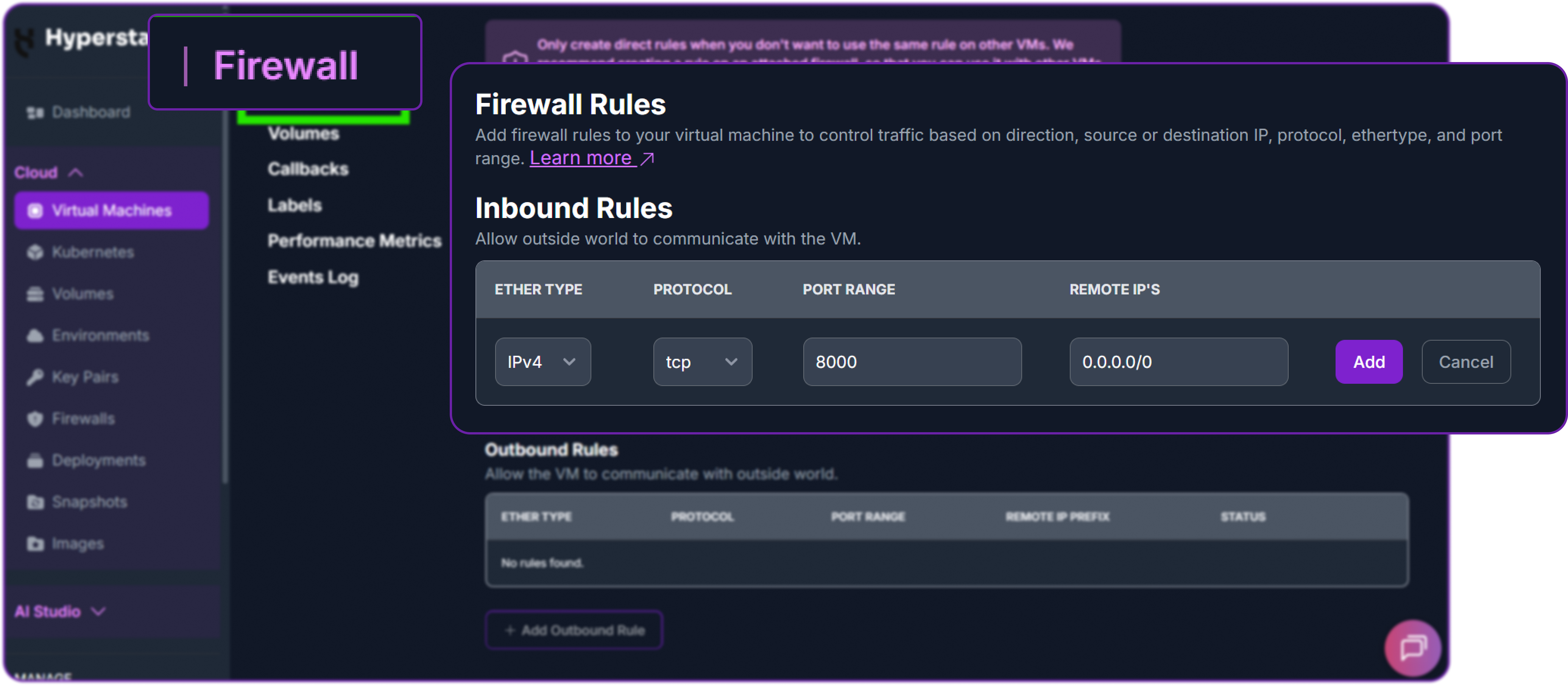
Now test the API from your local machine, replacing the placeholder IP with your VM's public IP.
# Test the API endpoint from your local terminal
curl http://<YOUR_VM_PUBLIC_IP>:8000/v1/chat/completions \
  -H "Content-Type: application/json" \
  -H "Authorization: Bearer EMPTY" \
  -d '{
    "model": "AntAngelMed",
    "messages": [
      {"role": "system", "content": "You are AntAngelMed, a helpful medical assistant."},
      {"role": "user", "content": "What should I do if I have a headache?"}
    ],
    "max_tokens": 800,
    "temperature": 0.6,
    "top_p": 0.95,
    "extra_body": {
        "top_k": 20,
        "repetition_penalty": 1.05
    }
  }'
A successful response returns a JSON object containing the model's structured medical reply:
{
  "id": "chatcmpl-7e8a3b2c1d4f5e6a",
  "object": "chat.completion",
  "created": 1771954823,
  "model": "AntAngelMed",
  "choices": [
    {
      "index": 0,
      "message": {
        "role": "assistant",
        "content": "A headache is a common symptom with many possible causes, ranging from minor (such as tiredness, dehydration, or eye strain) to more serious. Here is some general guidance.\n\n**Self-care measures to try first:**\n- Rest in a quiet, dimly lit room\n- Drink water steadily, as mild dehydration is a frequent trigger\n- Apply a cool compress to the forehead or a warm one to the neck and shoulders\n- Consider an over-the-counter analgesic such as paracetamol or ibuprofen, taken according to the package instructions\n\n**When to seek medical attention:**\nContact a healthcare professional promptly if your headache...",
        ...
      },
      "finish_reason": "stop"
    }
  ],
  ...
}
The response demonstrates exactly the behaviour AntAngelMed was trained for: a structured answer that opens with context, separates self-care from red-flag symptoms, and points the user toward a clinician where appropriate — the kind of safety-aware framing the GRPO stage is designed to reinforce. With this output returning cleanly, MedAIBase/AntAngelMed is successfully deployed on Hyperstack.
Recommended Sampling Parameters
The AntAngelMed authors recommend the following sampling configuration for general medical Q&A:
# Recommended sampling for medical reasoning
temperature=0.6, top_p=0.95, top_k=20,
repetition_penalty=1.05, max_tokens=16384
Step 7: Hibernating Your VM (Optional)
When you are finished with your workload, hibernate the VM to avoid incurring unnecessary costs:
- In the Hyperstack dashboard, locate your Virtual Machine.
- Click the "Hibernate" option.
- This stops billing for compute resources while preserving your setup, so you can resume quickly later.
Using AntAngelMed via the OpenAI-Compatible API
Now that the vLLM server is running, we can interact with AntAngelMed using the standard OpenAI Python client. First, install the library locally:
# Install the OpenAI Python client to interact with the vLLM server
pip3 install openai
Then instantiate an OpenAI-compatible client pointing at our vLLM endpoint. vLLM does not enforce an API key by default, so we pass a placeholder.
from openai import OpenAI

# Create an OpenAI-compatible client that points to the local vLLM server.
client = OpenAI(
    base_url="http://localhost:8000/v1",  # Local API endpoint exposing OpenAI-style routes
    api_key="EMPTY",                      # Placeholder key; vLLM does not enforce API keys by default
)
All of the prompts in the examples below are synthetic and general — standard medical-education queries, not real patient interactions. This matches the demonstration posture set out at the beginning of this guide.
Example 1: General Medical Q&A
We'll start with the same prompt used in the model authors' Hugging Face example — a generic question about headache management. This is exactly the kind of self-care guidance use case where AntAngelMed's training shines.
# Define the conversation payload with a system role and a generic user question.
messages = [
    {"role": "system", "content": "You are AntAngelMed, a helpful medical assistant."},
    {"role": "user", "content": "What should I do if I have a headache?"}
]

# Send the chat completion request using the recommended sampling parameters.
chat_response = client.chat.completions.create(
    model="AntAngelMed",                  # Served model name from the vLLM container
    messages=messages,
    max_tokens=800,
    temperature=0.6,
    top_p=0.95,
    extra_body={
        "top_k": 20,
        "repetition_penalty": 1.05,
    },
)

print("AntAngelMed response:", chat_response.choices[0].message.content)
This is the kind of response we get back from the model:
AntAngelMed response:
A headache is a common symptom that can stem from many different causes,
most of which are minor and resolve on their own. The right next step
depends on how severe the pain is, how long it has lasted, and what other
symptoms (if any) are present.

**General self-care steps to try first:**
- Rest in a quiet, dimly lit room and try to relax your shoulders and jaw
- Drink water steadily — mild dehydration is one of the most frequent triggers
- Apply a cool compress to the forehead, or a warm compress to the neck and shoulders if the pain feels tension-related
- Consider an over-the-counter analgesic such as paracetamol or ibuprofen,
  taken strictly according to the package instructions
- Note possible triggers (skipped meals, screen time, poor sleep, caffeine
  withdrawal, stress) so you can address them

**When to seek medical attention:**
You should contact a healthcare professional promptly if your headache:
- Comes on suddenly and severely ("thunderclap" headache)
- Is accompanied by fever, neck stiffness, confusion, vision changes,
  weakness, slurred speech, or seizures
- Follows a head injury
- Worsens despite rest and over-the-counter treatment, or recurs frequently
- Disrupts your daily activities or sleep

**Important note:**
This information is for general educational purposes only and does not
replace professional medical advice. If you are unsure or concerned about
your symptoms, please consult a qualified healthcare provider.
Notice how the response is structured cleanly into self-care guidance, escalation criteria, and a safety disclaimer. That structure is not accidental — it is a direct consequence of the GRPO stage of training, where the model was rewarded for empathetic, structurally clear, evidence-based answers that respect safety boundaries. This is the behaviour you want from a medical assistant: useful first-line information, paired with clear signals about when human clinical judgement is required.
Example 2: Medical Education and Concept Explanation
AntAngelMed is equally strong on medical-knowledge questions, which is the kind of workload that powers patient-education portals, internal training tools, and clinical documentation helpers.
# A general medical-education question, no patient data involved.
messages = [
    {"role": "system", "content": "You are AntAngelMed, a helpful medical assistant."},
    {"role": "user", "content": "Explain the difference between Type 1 and Type 2 diabetes in simple terms."}
]

chat_response = client.chat.completions.create(
    model="AntAngelMed",
    messages=messages,
    max_tokens=800,
    temperature=0.6,
    top_p=0.95,
    extra_body={"top_k": 20, "repetition_penalty": 1.05},
)

print("AntAngelMed response:", chat_response.choices[0].message.content)
The model returns a clear, well-organised explanation:
AntAngelMed response:
Type 1 and Type 2 diabetes are both long-term conditions in which the body
has difficulty managing blood sugar (glucose), but their underlying causes
and typical treatments are quite different.

**Type 1 Diabetes**
- An autoimmune condition: the body's immune system mistakenly attacks the
  insulin-producing cells in the pancreas
- As a result, the pancreas produces little or no insulin
- Usually diagnosed in childhood or adolescence, though it can occur at any age
- Requires lifelong insulin therapy (injections or a pump)
- Not caused by diet or lifestyle

**Type 2 Diabetes**
- The body either does not produce enough insulin or its cells become
  resistant to insulin's effects
- Strongly associated with factors such as excess body weight, physical
  inactivity, family history, and increasing age
- Typically develops in adulthood, although it is increasingly diagnosed
  in younger people
- Often managed initially with lifestyle changes (diet, exercise, weight
  management) and oral medications, with insulin added later if needed

**Key distinction:**
Type 1 is primarily an autoimmune condition affecting insulin production,
whereas Type 2 is largely a metabolic condition affecting how the body
uses insulin. Both require ongoing medical care to prevent complications.

If you or someone you know has been diagnosed with either type, a qualified
healthcare provider can build a personalised management plan.
Again, the structure is consistent: clear categorisation, plain-language framing, balanced coverage, and a closing pointer toward professional care. For applications like patient-facing FAQ tools, internal medical reference, or onboarding content for non-clinical staff, this is precisely the tone and format you want at scale.
Example 3: Disabling Verbose Reasoning for Lower-Latency Responses
For lighter-weight queries where you don't need the model to lay out its reasoning in detail, you can request a more concise output style. This reduces output tokens and improves end-to-end latency.
# A short, factual medical-knowledge question.
messages = [
    {"role": "system", "content": "You are AntAngelMed. Answer concisely and factually."},
    {"role": "user", "content": "What is the normal resting heart rate range for a healthy adult?"}
]

chat_response = client.chat.completions.create(
    model="AntAngelMed",
    messages=messages,
    max_tokens=200,
    temperature=0.6,
    top_p=0.95,
    extra_body={"top_k": 20, "repetition_penalty": 1.05},
)

print("AntAngelMed response:", chat_response.choices[0].message.content)
And the response:
AntAngelMed response:
The normal resting heart rate for a healthy adult is typically between
60 and 100 beats per minute. Well-trained athletes may have resting rates
as low as 40–60 bpm, which is generally considered healthy for them.
Rates persistently above or below the normal range should be discussed
with a healthcare professional.
Short, accurate, and still framed with the appropriate caveat — useful for chatbot interfaces or low-latency API tiers serving high request volumes.
A Final Word on Data Handling
Everything shown above runs entirely inside your Hyperstack VM. The model weights are pulled to local storage, inference happens on-instance, and API responses are served back over your VM's network — no inference traffic is routed through Hyperstack-managed inference services, and no data leaves your instance unless your own application sends it elsewhere. For workloads that require stronger guarantees — EU/EEA data residency, dedicated single-tenant infrastructure, audit-ready isolation evidence — please talk to our team about a Secure Private Cloud deployment configured for your compliance posture.
Why Deploy AntAngelMed on Hyperstack?
Hyperstack is a cloud platform purpose-built to accelerate AI and machine learning workloads — and it is particularly well suited to medical AI:
Dedicated, single-tenant GPU infrastructure commissioned in EU/EEA jurisdictions for organisations operating under GDPR and the EU AI Act. The right path for any clinical workload involving real patient data, with audit-ready tenancy and data-residency evidence built in.
On-demand access to NVIDIA H100 and other top-tier accelerators — the right hardware for serving 100B-class medical models at production throughput, with billing accurate to the minute.
All Hyperstack regions run in Tier 3 certified data centres with concurrent maintainability and 99.982% annual uptime, independently audited and SOC 2 Type II certified for security, availability, and data integrity.
Pre-configured CUDA and Docker images remove most of the setup overhead, so you spend time on the model and not on the platform.
Pay only for what you use with our GPU pricing, plus hibernation to pause billing on idle workloads.

FAQs
What is AntAngelMed?
AntAngelMed is the world's first open-source 100B-parameter medical language model, built on the Ling-flash-2.0 MoE architecture with ~6.1B active parameters per token. It ranks first among open-source models on OpenAI's HealthBench and tops the MedBench leaderboard for Chinese medical AI.
What hardware is required to deploy AntAngelMed?
The BF16 model is approximately 206 GB. We recommend 8x NVIDIA H100-80G-PCIe on Hyperstack (available in the CANADA-1 region), which provides comfortable headroom for tensor-parallel-size 8 inference and long-context KV cache. An INT4 quantised version can run on smaller setups if memory is constrained.
What is AntAngelMed's context window?
AntAngelMed natively supports up to 128K tokens via YaRN extrapolation, making it suitable for long-form clinical documentation, multi-document literature review, and extended diagnostic conversations.
Is it safe to deploy a medical LLM on a public cloud?
For real clinical workloads, deployment design matters as much as the model itself. We recommend running AntAngelMed in a Secure Private Cloud deployment, which provides single-tenant dedicated infrastructure and can be commissioned in EU/EEA jurisdictions for GDPR-aligned data residency. The model and its outputs stay within your dedicated environment and are not exposed externally. For evaluation and synthetic-prompt experimentation, the on-demand tutorial above is a suitable starting point.
What are the main use cases for AntAngelMed?
Strong fits include medical knowledge Q&A, patient-education content generation, clinical documentation assistance, internal training tools for non-clinical staff, and research support — with the important caveat that any clinical-decision-support use must be designed in line with applicable regulations such as the EU AI Act.
How fast is inference on H100 hardware?
The model authors report over 200 tokens per second on H20-class hardware, with the sparse MoE design delivering roughly 3x the throughput of a comparable 36B dense model. H100 deployments with tensor parallelism deliver strong real-world throughput for production medical applications.
Subscribe to Hyperstack!
Enter your email to get updates to your inbox every week



