


.png)
TABLE OF CONTENTS
NVIDIA H100 SXM GPUs On-Demand
Key Takeaways
- GLM-5.2 is an open-weight (MIT) reasoning and coding model from Z.ai, a 753B-parameter Mixture-of-Experts model (roughly 40B parameters active per token) with a one-million-token context window, served on Hyperstack AI Studio with no GPU to rent or weights to download.
- The text API is OpenAI-compatible, so existing tools work by changing the base URL, key and model name. Authentication uses an api_key header, not a Bearer token.
- Use the Playground for quick experiments and prompt tuning, then move to the API for production, with both routes reaching exactly the same model.
- GLM-5.2 streams replies, calls your functions as tools, runs multi-step agentic loops, and returns strict JSON via response_format.
- Reasoning tokens are billed as output, so set reasoning_effort to none for fewer tokens on simple calls. Pricing is $0.97 per million input and $3.06 per million output tokens.
Hyperstack AI Studio now serves GLM-5.2, the latest open-weight model from Z.ai (formerly Zhipu AI). It is a reasoning and coding model with a one million token context window, and it is available through the same serverless API and point-and-click Playground you already use for every other model on the platform. There is no GPU to provision, no weights to download and no server to keep warm. You send a list of messages, and you get back a reply.
There are two ways to use it. The Playground is the fastest way to try it by hand, and the API is how you put GLM-5.2 into a product, a coding assistant or an automated pipeline. This guide covers both, with a heavy focus on the API. Every code block in the API section was run against the live endpoint, and the output shown beneath it is the real response.
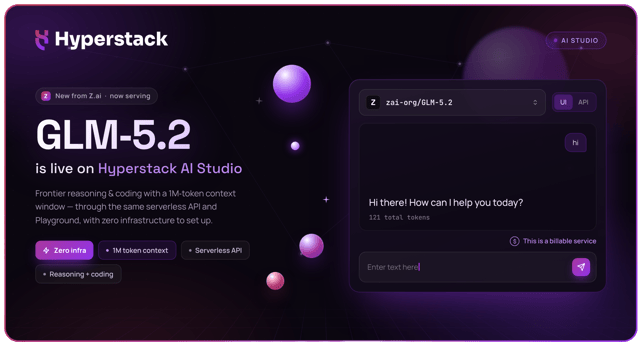
Hyperstack describes AI Studio as a way to run open models through serverless APIs with zero infrastructure setup. GLM-5.2 is a strong example of that promise, so let us look at what the model is, then build with it.
What is GLM-5.2?
GLM-5.2 is the flagship model in the GLM-5 series, built for long-horizon, agentic tasks such as multi-step coding and tool use. It is a sparse Mixture-of-Experts model with 753 billion total parameters, released by Z.ai under a permissive MIT licence. Z.ai positions it as a model that plans, calls tools and works through long tasks rather than answering a single prompt in isolation, as described in the official release notes.
On Hyperstack it is hosted as a third-party model, so you reach it by name through the standard API. The key facts are below, and every figure in this table comes straight from the base models endpoint.
| Attribute | Value |
|---|---|
model name |
zai-org/GLM-5.2 |
| Creator | Z.ai (formerly Zhipu AI) |
| Type | Text-to-text language model, reasoning and tool use |
| Parameters | 753B total, ~40B active per token (sparse MoE) |
| Context window | 1,048,576 tokens (one million) |
| Licence | MIT (open weights) |
| Price on Hyperstack | $0.97 / 1M input tokens, $3.06 / 1M output tokens |
| Access | Serverless API and Playground, billed per token |
For the full catalogue of models on the platform, see the docs on the models overview and the model ranking page, which scores models on public benchmarks.
How chat completions work on AI Studio
The text API is OpenAI-compatible. You send a POST request to /chat/completions with a model and a list of messages, and the reply comes back synchronously in the choices array. Anything built for the OpenAI Chat Completions format works here by changing the base URL, the API key and the model name. Two details are specific to Hyperstack and worth knowing before you write any code:
- Authentication uses an
api_keyrequest header, with noBearerprefix. - GLM-5.2 is a reasoning model, so each reply carries a separate
reasoning_contentfield alongside the finalcontent, and theusageblock reports the exact tokens and anestimated_cost.
The full request and response schema is documented in the chat completions reference. Let us look at the Playground first, then spend the rest of the guide on the API.
Option A: The AI Studio Playground (UI)
The Text Playground lets you chat with GLM-5.2 without writing any code. You pick the model, type a prompt, adjust a few settings such as temperature and maximum tokens, then read the reply with its token usage shown alongside. It is the quickest way to get a feel for the model before you reach for the API. Sign in at the Hyperstack console to try it.
Step 1: Sign in to the console
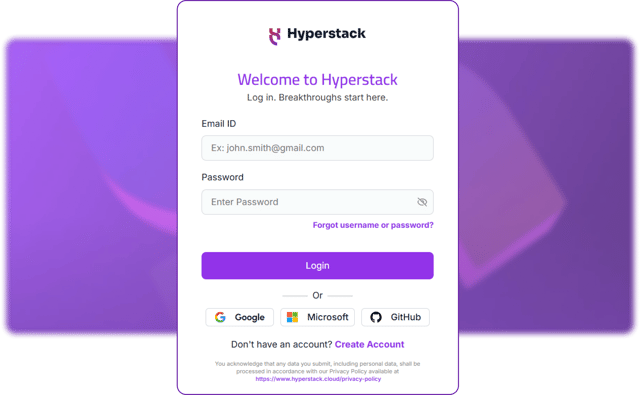
The Playground lives inside the Hyperstack console. Signing in takes a moment:
- Use your email and password, or sign in with Google, Microsoft or GitHub.
- If you are new, create an account first.
- The same login also issues your API key, so the Playground and the API share one account and one balance.
Step 2: Open the Text Playground
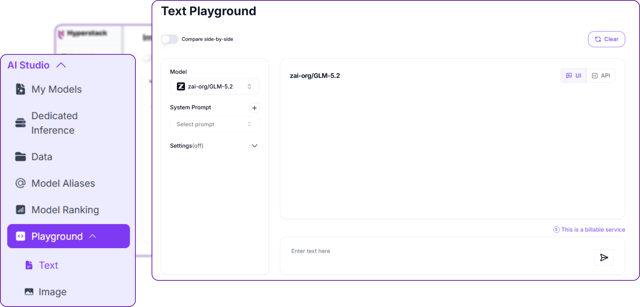
In the AI Studio sidebar, open Playground and choose Text. This opens the Text Playground, which has three parts:
- A model selector on the left, with an optional system prompt and a settings panel.
- A chat panel on the right, where the conversation appears.
- Access to the text-to-text models, the family GLM-5.2 belongs to.
Step 3: Choose GLM-5.2 and send a prompt
Pick the model, then send your first message:
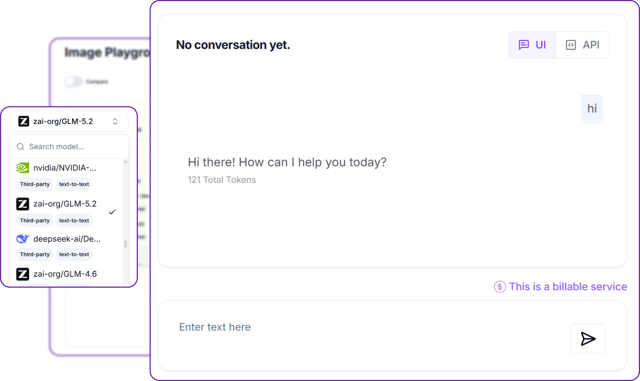
- Open the model dropdown and select
zai-org/GLM-5.2. The search box filters the list, and each entry is tagged with its provider and task, here Third-party and text-to-text. - It is the same list the API serves, so a model you can pick here is a model you can call in code.
- Type a message in the box and send it. The reply appears with its token count beneath, here 121 tokens for a short greeting, because GLM-5.2 reasons before it answers.
- The UI / API toggle on each result turns the exchange into the matching API request.
Step 4: Adjust the parameters
Open the settings to reveal the same controls the API exposes. Each one maps directly to a keyword argument you will meet in the API section:
- System Prompt sets how the assistant behaves, the same as a system message in the API.
- Max Tokens caps the length of the reply.
- Temperature and Top P control how random or focused the output is.
- Top K and the presence and repetition penalties shape word choice and reduce repetition.
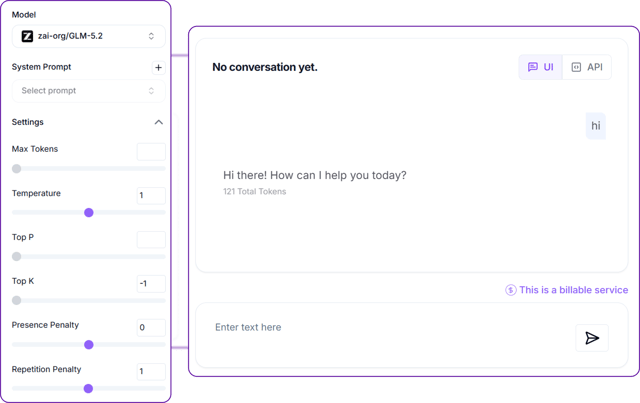
When a prompt behaves the way you want, flip the UI / API toggle to copy the exact request, then carry it into code. The rest of this guide shows the API in depth.
Option B: The GLM-5.2 API
This is where the model earns its place in a product. With a single API key you can hold conversations, stream replies, call your own functions, run agentic loops and force structured JSON, all against the one million token context. The rest of this guide builds a tiny client and then exercises each capability. Every snippet below was run as shown.
Step 1: Get an API key and set up the client
Generate a key in the console, then keep it out of your source code. The only dependency is requests. Start by reading the key from the environment and pinning a couple of constants:
import os
import requests

BASE_URL = "https://console.hyperstack.cloud/ai/api/v1"
API_KEY = os.environ["HYPERSTACK_API_KEY"]   # read the key from the environment, never hard-code it
MODEL = "zai-org/GLM-5.2"
That sets the base URL, reads your key from the environment, and pins the model to zai-org/GLM-5.2. Next, one small helper wraps the request so every example stays short:
# One small helper covers every example below. The API is OpenAI-compatible, so the
# request body is the familiar {model, messages, ...} shape and the reply comes back
# in choices[0].message.
def chat(messages, **params):
    response = requests.post(
        f"{BASE_URL}/chat/completions",
        headers={"api_key": API_KEY, "Content-Type": "application/json"},  # api_key header, no "Bearer"
        json={"model": MODEL, "messages": messages, **params},
        timeout=180,
    )
    response.raise_for_status()
    return response.json()
Because the API is OpenAI-compatible, the body is just model, messages and any extra parameters. Note the authentication header is api_key, with no Bearer prefix. Every example below calls this chat helper.
New to the platform? The getting started guide walks through creating an account, generating a key and making a first call.
Step 2: Your first chat completion
A conversation is a list of messages, each with a role and a content field. A system message sets the behaviour and a user message asks the question:
# A conversation is just a list of messages, each with a role and content.
result = chat(
    [
        {"role": "system", "content": "You are a concise assistant."},
        {"role": "user", "content": "In one sentence, what is a cloud GPU platform?"},
    ],
    max_tokens=512,
    temperature=0.6,
)
The reply text lives in choices[0].message.content, and the usage block reports the tokens billed and an estimated_cost:
# The reply text is in choices[0].message.content; usage reports the tokens and cost.
message = result["choices"][0]["message"]
print(message["content"])
print("usage:", result["usage"])
This prints the reply and its usage:
A cloud GPU platform is an on-demand service that provides remote, scalable access to high-performance graphics processing units over the internet for compute-intensive tasks like AI training and 3D rendering.
usage: {'completion_tokens': 434, 'estimated_cost': 0.0013304999999999997, 'prompt_tokens': 30, 'prompt_tokens_details': None, 'reasoning_tokens': 0, 'total_tokens': 464}
Step 3: See the reasoning, and control it
GLM-5.2 thinks before it answers. That working is returned separately in reasoning_content, while the final answer stays in content, so you can show it or hide it as you wish:
# GLM-5.2 thinks before it answers. The working is returned in a separate
# reasoning_content field, while the final answer stays in content.
result = chat([{"role": "user", "content": "If a server costs 1.90 per hour, what is 18 hours?"}],
              max_tokens=600, temperature=0)

message = result["choices"][0]["message"]
print("REASONING (excerpt):", message["reasoning_content"][:150], "...")
print("ANSWER            :", message["content"])
print("tokens with reasoning:", result["usage"]["total_tokens"])
The model reasons first, then answers:
REASONING (excerpt): 1.  **Identify the core question:** The user wants to know the total cost of running a server for 18 hours at a rate of $1.90 per hour.
2.  **Identify ...
ANSWER            : 18 hours of running the server would cost **$34.20**.

Here is the math:
$1.90/hour × 18 hours = $34.20
tokens with reasoning: 281
Reasoning costs tokens, and they are billed as output. For simple or latency-sensitive calls, switch the thinking step off with reasoning_effort set to none:
# For simple or latency-sensitive calls, switch the thinking step off with
# reasoning_effort="none". The answer is the same, for far fewer tokens.
fast = chat([{"role": "user", "content": "If a server costs 1.90 per hour, what is 18 hours?"}],
            max_tokens=600, temperature=0, reasoning_effort="none")

print("ANSWER (no thinking)   :", fast["choices"][0]["message"]["content"])
print("tokens without reasoning:", fast["usage"]["total_tokens"])
The answer is the same, for a fraction of the tokens:
ANSWER (no thinking)   : 18 hours of server time at $1.90 per hour would cost **$34.20**.

Here is the math:
1.90 × 18 = 34.20
tokens without reasoning: 62Trade thinking for speed. Leave reasoning on for hard problems, planning and code. Set reasoning_effort to none for classification, extraction, short replies and anything where latency matters.
Step 4: Stream the reply token by token
For chat interfaces, set stream to true to receive the reply as Server-Sent Events as it is generated, rather than waiting for the whole response. Each event carries a small delta, and the final event carries usage only, which is why the loop skips chunks with an empty choices list:
import json

# Set stream=True to receive the reply as Server-Sent Events as it is generated.
with requests.post(
    f"{BASE_URL}/chat/completions",
    headers={"api_key": API_KEY, "Content-Type": "application/json"},
    json={"model": MODEL, "reasoning_effort": "none", "stream": True, "max_tokens": 200, "temperature": 0.3,
          "messages": [{"role": "user", "content": "Name three UK cities, comma separated."}]},
    stream=True, timeout=180,
) as response:
    for line in response.iter_lines(decode_unicode=True):
        if not line or not line.startswith("data:"):
            continue
        data = line[len("data:"):].strip()
        if data == "[DONE]":
            break
        chunk = json.loads(data)
        if not chunk["choices"]:          # the final event carries usage only, no choices
            continue
        print(chunk["choices"][0]["delta"].get("content", ""), end="", flush=True)
print()
The tokens arrive in order and assemble into:
London, Manchester, EdinburghStep 5: Call your own functions (tool calling)
Tool calling is what turns the model into something that can act. The pattern is a short round trip: you describe your functions, the model decides when to call one, you run it, and the model answers from the result. Take it one piece at a time.
First, describe the tool as a JSON schema. This is all the model sees, a name, a description and typed parameters:
import json

# 1) Describe the tool as a JSON schema. This is the standard OpenAI function-calling format,
#    and it is all the model sees: a name, a description, and typed parameters.
tools = [{
    "type": "function",
    "function": {
        "name": "get_weather",
        "description": "Get the current weather for a city.",
        "parameters": {
            "type": "object",
            "properties": {"city": {"type": "string"}},
            "required": ["city"],
        },
    },
}]
Next, the real Python function the tool maps to:
# 2) The real Python function the tool maps to. In production this would call a weather service;
#    here a small lookup keeps the example self-contained.
def get_weather(city):
    table = {"London": {"temp_c": 12, "sky": "light rain"}}
    return table.get(city, {"temp_c": 20, "sky": "clear"})
Now make the first call. The model reads the question and decides, on its own, to call the tool:
# 3) First call: the model reads the question and decides, on its own, to call the tool.
messages = [{"role": "user", "content": "What is the weather in London? One sentence."}]
first = chat(messages, tools=tools, temperature=0)

call = first["choices"][0]["message"]["tool_calls"][0]
print("model requested:", call["function"]["name"], call["function"]["arguments"])
It returns a tool call rather than prose:
model requested: get_weather {"city": "London"}Run the requested function, then hand the result back to the conversation as a tool message tied to the call id:
# 4) Run the requested function with the model's arguments, then hand the result
#    back to the conversation as a "tool" message tied to the call id.
args = json.loads(call["function"]["arguments"])
messages.append(first["choices"][0]["message"])
messages.append({"role": "tool", "tool_call_id": call["id"], "content": json.dumps(get_weather(**args))})
Finally, call again. With the result in hand, the model writes the natural-language answer:
# 5) Second call: with the tool result in hand, the model writes the final answer.
final = chat(messages, tools=tools, temperature=0)
print("final answer:", final["choices"][0]["message"]["content"])final answer: The current weather in London is light rain with a temperature of 12°C.Step 6: Build an agentic loop
Because the model can call tools, you can let it work through a multi-step task on its own. You keep calling the API and running whatever tools it asks for. Start with two tools the agent can chain together, one to list GPUs and one to price a GPU:
import json

# Two tools the agent can chain together on its own: one lists GPUs, one prices a GPU.
PRICES = {"H100": 1.90, "A100": 1.35, "L40": 1.00, "RTX-A6000": 0.50}
def list_available_gpus():      return {"gpus": list(PRICES)}
def get_gpu_hourly_price(gpu):  return {"gpu": gpu, "usd_per_hour": PRICES.get(gpu)}
DISPATCH = {"list_available_gpus": list_available_gpus, "get_gpu_hourly_price": get_gpu_hourly_price}

tools = [
    {"type": "function", "function": {"name": "list_available_gpus",
        "description": "List the GPU models available to rent.",
        "parameters": {"type": "object", "properties": {}}}},
    {"type": "function", "function": {"name": "get_gpu_hourly_price",
        "description": "Get the hourly USD price for one GPU model.",
        "parameters": {"type": "object", "properties": {"gpu": {"type": "string"}}, "required": ["gpu"]}}},
]
The agentic loop follows the same pattern: each round, run whatever tools the model requests and feed the results back, until it stops asking and returns a final answer:
# The agent loop: keep calling the model and running whatever tools it asks for,
# until it stops asking and returns a final answer.
messages = [
    {"role": "system", "content": "You are a precise assistant. Answer concisely and formally."},
    {"role": "user", "content":
        "Of the GPUs you can rent, find the cheapest per hour and tell me what 24 hours would cost on it."},
]

for step in range(1, 8):
    reply = chat(messages, tools=tools, temperature=0)["choices"][0]["message"]
    messages.append(reply)
    if not reply.get("tool_calls"):           # no more tools requested: the model is done
        print("FINAL:", reply["content"])
        break
    for tc in reply["tool_calls"]:            # run every tool the model asked for this round
        args = json.loads(tc["function"]["arguments"] or "{}")
        result = DISPATCH[tc["function"]["name"]](**args)
        print(f"step {step}: {tc['function']['name']}({args}) -> {result}")
        messages.append({"role": "tool", "tool_call_id": tc["id"], "content": json.dumps(result)})
Given one question that needs both tools, GLM-5.2 lists the options, prices each one, then concludes, with no further prompting:
step 1: list_available_gpus({}) -> {'gpus': ['H100', 'A100', 'L40', 'RTX-A6000']}
step 2: get_gpu_hourly_price({'gpu': 'H100'}) -> {'gpu': 'H100', 'usd_per_hour': 1.9}
step 2: get_gpu_hourly_price({'gpu': 'A100'}) -> {'gpu': 'A100', 'usd_per_hour': 1.35}
step 2: get_gpu_hourly_price({'gpu': 'L40'}) -> {'gpu': 'L40', 'usd_per_hour': 1.0}
step 2: get_gpu_hourly_price({'gpu': 'RTX-A6000'}) -> {'gpu': 'RTX-A6000', 'usd_per_hour': 0.5}
FINAL: The cheapest rentable GPU is the **RTX-A6000** at **$0.50/hour**. Renting it for 24 hours would cost **$12.00**.
This is the same pattern that powers coding assistants and autonomous agents, and it is exactly the long-horizon work GLM-5.2 was built for.
Step 7: Force structured JSON output
When the model feeds another system, you usually want strict JSON rather than prose. First, describe the shape you want as a JSON schema:
# Describe the exact shape you want back as a JSON schema.
schema = {
    "type": "object",
    "properties": {
        "product": {"type": "string"},
        "price_usd": {"type": "number"},
        "in_stock": {"type": "boolean"},
    },
    "required": ["product", "price_usd", "in_stock"],
    "additionalProperties": False,
}
Then pass it through response_format. The reply is guaranteed to match the schema, which is ideal for extraction and data pipelines:
# Pass the schema through response_format and the reply is guaranteed to match it.
result = chat(
    [{"role": "user", "content": "Extract product, price_usd and in_stock from: "
                                 "'The Aurora desk lamp is $49.99 and currently in stock.'"}],
    response_format={"type": "json_schema",
                     "json_schema": {"name": "product", "schema": schema, "strict": True}},
    max_tokens=400, temperature=0,
)
print(result["choices"][0]["message"]["content"])
The output is valid, schema-conforming JSON, ready to parse:
{
  "product": "Aurora desk lamp",
  "price_usd": 49.99,
  "in_stock": true
}
Step 8: The parameters at a glance
GLM-5.2 accepts the standard Chat Completions parameters. The most useful ones are summarised below; the full set lives in the chat completions reference.
| Parameter | Type | What it does |
|---|---|---|
model |
string | The model ID, zai-org/GLM-5.2 |
messages |
array | The conversation, with system, user, assistant and tool roles |
max_tokens |
integer | Upper bound on generated tokens, reasoning included |
temperature |
number | Randomness, from 0 for deterministic to higher for variety |
top_p |
number | Nucleus sampling, an alternative to temperature |
stream |
boolean | Stream the reply as Server-Sent Events |
tools |
array | Function schemas the model is allowed to call |
tool_choice |
string or object | auto, none, or a named function |
response_format |
object | json_object or json_schema for structured output |
reasoning_effort |
string | Set to none to switch the reasoning step off |
seed |
integer | Steer toward reproducible output |
What it costs, and how to track it
GLM-5.2 is billed per token, at $0.97 per million input tokens and $3.06 per million output tokens on Hyperstack, as listed on the base models endpoint and your console billing view. There is nothing to pay when the model is idle, and reasoning tokens count as output tokens, which is the other reason reasoning_effort is a useful lever.
You never have to guess the bill. Every response includes a usage block with the exact token counts and an estimated_cost in US dollars, so you can measure cost per request as you build. The calls in this guide are a good illustration, and they show why reasoning_effort matters:
| Example from this guide | Total tokens | Note |
|---|---|---|
| A reply with reasoning on (Step 2) | 464 | costs $0.00133, reported in the response |
| A reasoned answer (Step 3) | 281 | reasoning left on |
| The same question, reasoning off | 62 | about 4.5 times fewer tokens for the same answer |
Keep costs down. Switch reasoning off for simple calls, set a sensible max_tokens, and reuse the long context rather than resending history where you can. Read the live estimated_cost on each response to see the effect immediately.
For how billing works across the platform, including per-token inference and fine-tuning, see the AI Studio billing documentation.
Why run GLM-5.2 on Hyperstack AI Studio?
Hyperstack AI Studio turns a 753-billion-parameter model into a single API call, with none of the infrastructure work that would otherwise come with it.
Serverless API or self-hosting on a GPU?
Both routes have their place. Because GLM-5.2 has open weights under an MIT licence, you can run it yourself on a GPU cluster for full control. The serverless API removes that operational work entirely. The cards below sum up the trade-off.
If you would rather run open models on your own GPUs, Hyperstack also offers on-demand NVIDIA GPUs by the hour.
Use GLM-5.2 in the tools you already have
Because the API is OpenAI-compatible, GLM-5.2 drops into many developer tools by pointing them at the Hyperstack base URL and your key. This is a quick way to put the model behind a coding assistant or an automation without writing a client at all. The integrations documentation has step-by-step guides, including:
- Claude Code and Cursor for coding assistance in the editor
- OpenCode for an open-source terminal coding agent
- n8n for low-code automation and workflows
- LiteLLM as a drop-in proxy for any OpenAI-style client
In each case you set the model to zai-org/GLM-5.2 and the rest works as it would with any other Chat Completions provider.
Start building with GLM-5.2 on Hyperstack AI Studio
Call a one million token, open-weight reasoning model from one serverless API. No infrastructure to manage, and you pay only for the tokens you use.
Get Started on Hyperstack →FAQs
What is GLM-5.2?
GLM-5.2 is an open-weight large language model from Z.ai (formerly Zhipu AI), built for reasoning, coding and agentic tool use, with a one million token context window and an MIT licence. On Hyperstack it is hosted as the model zai-org/GLM-5.2 and reached through the chat completions API.
How do I call GLM-5.2 on Hyperstack AI Studio?
Send a POST request to https://console.hyperstack.cloud/ai/api/v1/chat/completions with an api_key header, a model of zai-org/GLM-5.2 and a list of messages. The API is OpenAI-compatible, so existing SDKs and tools work by changing the base URL, key and model name.
Is the API OpenAI-compatible?
Yes. It follows the Chat Completions format, including messages, stream, tools and response_format. The one difference to remember is authentication, which uses an api_key header rather than a Bearer token.
Can I turn the reasoning off?
Yes. GLM-5.2 returns its working in a separate reasoning_content field, and you can switch the reasoning step off by setting reasoning_effort to none. That lowers latency and token cost for simple requests.
Does GLM-5.2 support tool calling and structured output?
Both. It calls functions you describe as JSON schemas through the tools parameter, which is the basis for the agentic loop in this guide, and it returns strict JSON when you pass a schema through response_format.
How much does GLM-5.2 cost?
On Hyperstack it is billed per token, at $0.97 per million input tokens and $3.06 per million output tokens. Every response includes a usage block with the exact tokens and an estimated cost, and you pay nothing while the model is idle. See the billing documentation for details.
Should I use the Playground or the API?
Use both. The Playground is best for quick, visual experiments and prompt tuning, and the API is best for production and automation. They reach the same model, so you can prototype in one and ship with the other.
Subscribe to Hyperstack!
Enter your email to get updates to your inbox every week



