


.png)
TABLE OF CONTENTS
NVIDIA H100 SXM GPUs On-Demand
Key Takeaways
- DiffusionGemma is an open-weights, diffusion-based language model from Google DeepMind, built on the 26B-A4B Mixture-of-Experts Gemma 4 architecture.
- Instead of generating text one token at a time, it denoises a 256-token canvas in parallel using discrete diffusion.
- It reaches over 1,000 tokens per second on a single NVIDIA H100, roughly 4x the throughput of a comparable autoregressive model, by shifting the bottleneck from memory bandwidth to compute.
- It carries 25.2B total parameters with only 3.8B active during inference, supports a 256K-token context window, and is multimodal, taking text, image, and video input to produce text output.
- The tutorial deploys DiffusionGemma on Hyperstack using a single NVIDIA H100-80G-PCIe with vLLM, exposing an OpenAI-compatible API with the Entropy-Bounded diffusion sampler.
- Quantised to NVFP4, the model needs only about 13 to 18 GB, with FP8 around 26 GB, so it also fits cheaper single GPUs, and an NVIDIA NIM container is available as an alternative deployment.
What is DiffusionGemma?
DiffusionGemma is an open-weights, diffusion-based language model built by Google DeepMind on the 26B-A4B Mixture-of-Experts Gemma 4 architecture. Instead of generating text one token at a time, DiffusionGemma generates a whole block of tokens in parallel using discrete diffusion. It carries 25.2B total parameters while activating only 3.8B parameters during inference. It accepts interleaved text, image, and video input to produce text output, and it ships under the Apache 2.0 license. The headline result is speed. By denoising a 256-token canvas in parallel, DiffusionGemma reaches over 1,000 tokens per second on a single NVIDIA H100, which is roughly 4x the throughput of a comparable autoregressive model.
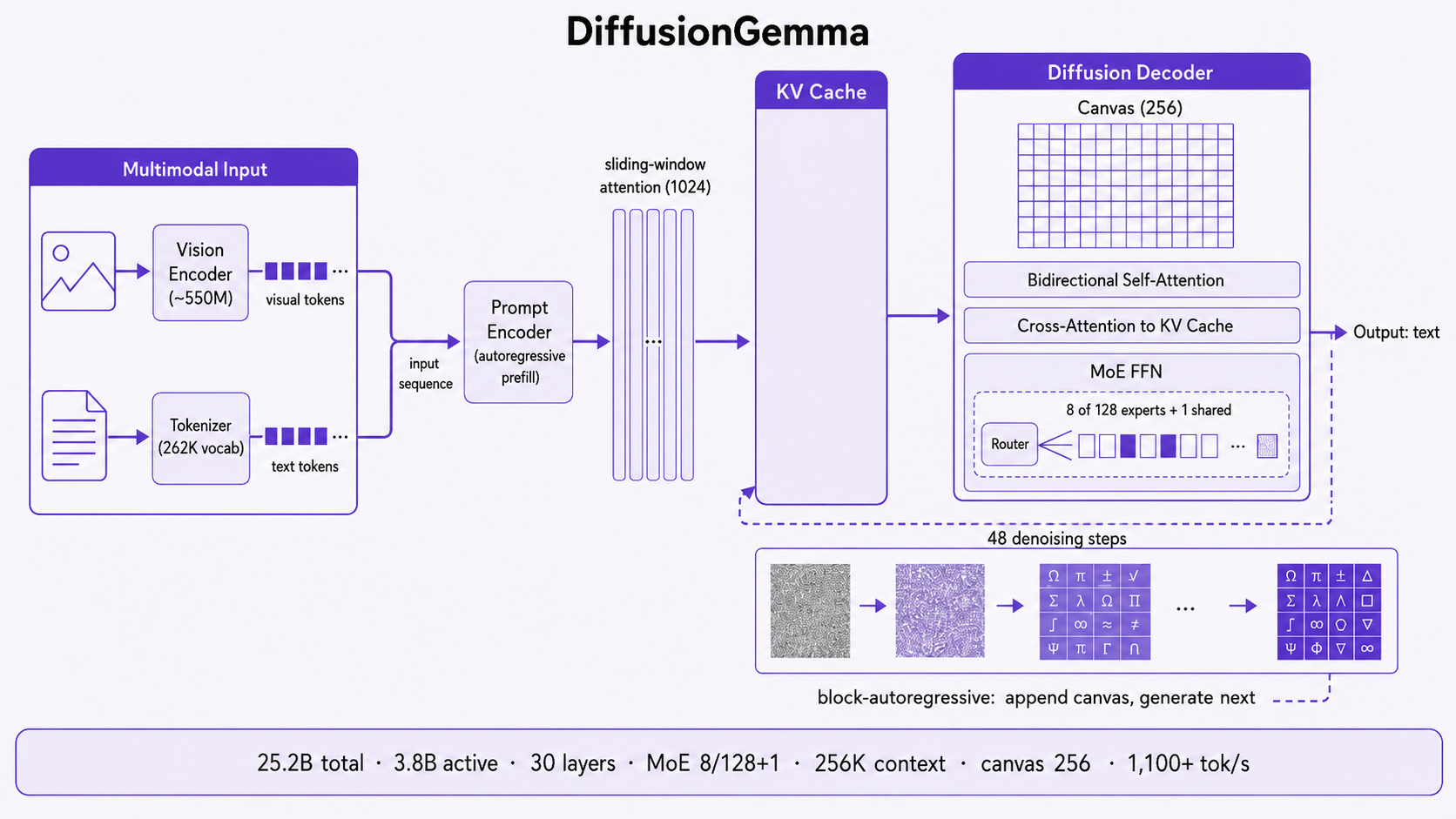
In this tutorial, we will deploy DiffusionGemma 26B-A4B-it on a single Hyperstack NVIDIA H100 GPU using vLLM, expose an OpenAI-compatible API, and then measure its throughput so you can see the diffusion speed advantage on real hardware. Every step includes the exact command and the output you should expect. By the end, you will have a high-throughput text generation endpoint running on your own VM.
How DiffusionGemma Works: Discrete Diffusion
A standard causal language model is autoregressive. It produces text one token at a time, and every new token has to wait for the previous one to finish. That sequential dependency is the reason most large language models are bottlenecked by memory bandwidth rather than raw compute, because each step reads the entire model and KV cache just to emit a single token.
DiffusionGemma takes a different route. It uses an encoder-decoder architecture with block-autoregressive multi-canvas sampling. The encoder runs in a prefill capacity, processing the prompt and building the KV cache. The decoder then applies bidirectional attention over a block of tokens called a canvas (256 tokens wide), accessing the cached prompt context through cross-attention. Rather than emitting one token, the model starts the canvas as noise and iteratively denoises it in parallel, committing roughly 15 to 20 tokens per forward pass. Once a canvas is fully denoised, it is appended to the KV cache and the model moves on to the next canvas. This block-by-block denoising is what unlocks high decoding speed.
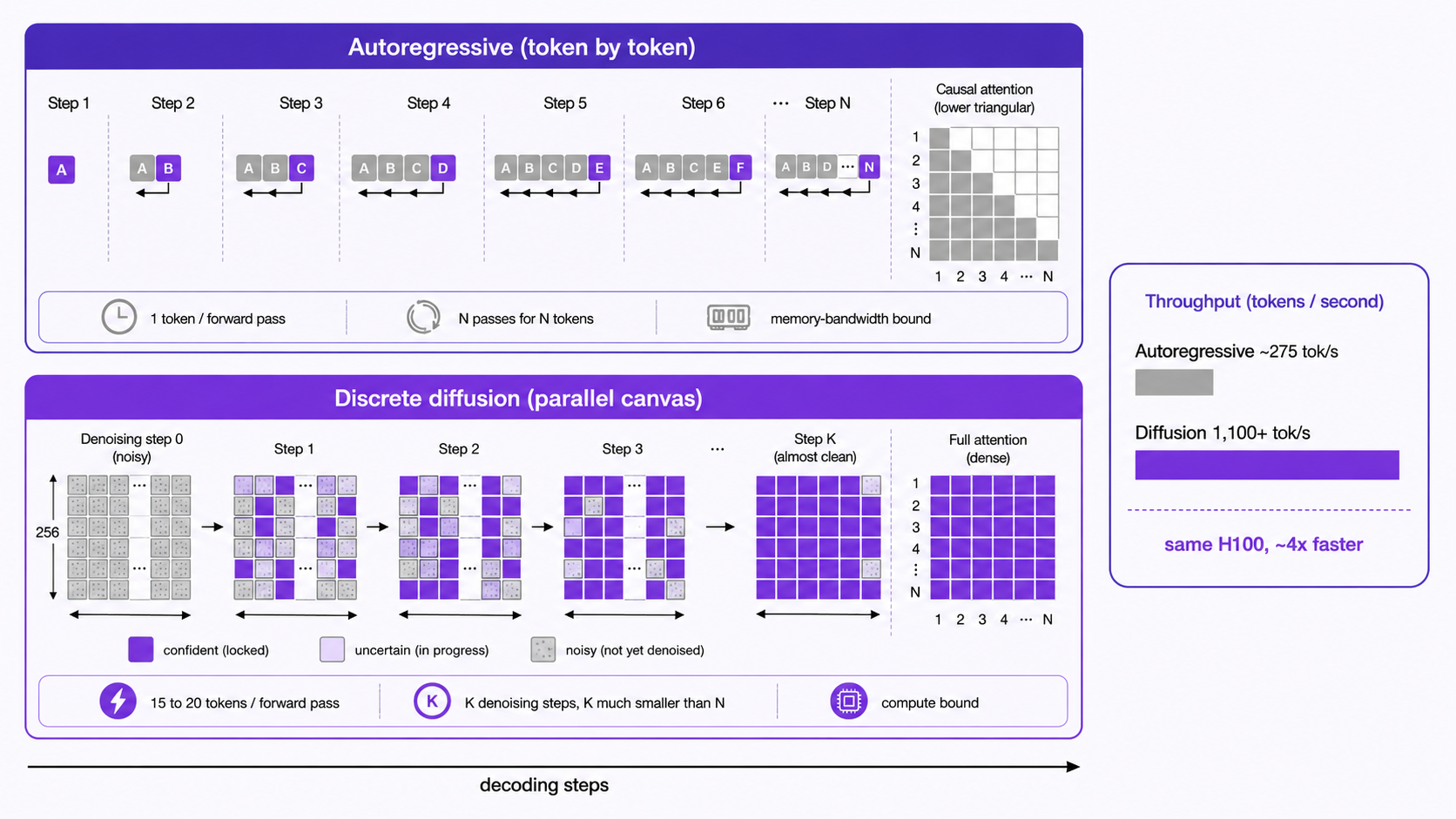
Several architectural choices come together to make this work efficiently:
- Discrete Text Diffusion: Generation shifts from token-by-token autoregression to block-autoregressive multi-canvas sampling. The model denoises blocks of tokens in parallel, which significantly increases decoding speed.
- Encoder-Decoder Design: An autoregressive encoder processes and caches the prompt context, paired with a decoder that applies bidirectional attention over the generation canvas.
- Sparse Mixture-of-Experts: DiffusionGemma activates 8 experts out of 128 total, plus 1 shared expert, so it delivers strong reasoning while keeping a low memory footprint suitable for a single accelerator.
- Multimodal Input Processing: It handles interleaved text, image (at variable aspect ratio and resolution), and video inputs, returning text output.
- Thinking Mode: A built-in reasoning mode lets the model think step by step before answering, with configurable thinking control tokens.
- Optimised for Small-Batch Inference: The model is engineered for low-latency, high-speed generation on a single capable GPU, which is exactly the deployment we build in this guide.
The Throughput Advantage
This is what DiffusionGemma is famous for. Because the model denoises 256 tokens in parallel rather than walking through them one by one, it moves the bottleneck from memory bandwidth to compute. A modern GPU like the NVIDIA H100 has an enormous amount of compute that sits idle during sequential decoding, and diffusion sampling puts that compute to work across the whole canvas at once.
The numbers are striking. In low batch size settings on a single NVIDIA H100 at FP8, DiffusionGemma exceeds 1,100 tokens per second. Google reports up to 4x faster token generation than autoregressive decoding, with 700+ tokens per second even on a consumer NVIDIA RTX 5090 at NVFP4. The model also performs adaptive inference-time computation, so simpler prompts and structured tasks like code require fewer denoising steps and run even faster.
Single NVIDIA H100 Generation Speed
Sustained text generation throughput on one NVIDIA H100 in a low batch size setting, comparing DiffusionGemma's parallel canvas denoising against a comparable autoregressive model decoding one token at a time.
Throughput figures as reported by Google DeepMind and NVIDIA for DiffusionGemma 26B-A4B on a single NVIDIA H100 in low batch size settings. The autoregressive bar is a representative single-GPU, single-stream baseline for a similarly sized model.
Want to push tokens per second even further on the same GPU? Read our guides on 7 LLM Inference Techniques to Reduce Latency and Boost Performance and Tips to Run Cost-Efficient Inference Workloads.
DiffusionGemma Features
DiffusionGemma is more than a fast decoder. It carries the full capability set of the Gemma 4 family into a diffusion model:
- High-Speed Parallel Generation: Parallel denoising of a 256-token canvas keeps latency low, unlocking per-user generation speeds above 1,100 tokens per second on a single NVIDIA H100 at FP8.
- Adaptive Inference-Time Compute: Simpler prompts and structured tasks need fewer denoising steps, so the effective tokens-per-second rate rises with easier work.
- 256K Context Window: Context windows of up to 256K tokens support long documents, large codebases, and extended multi-turn conversations.
- Multimodal Understanding: Object detection, document and PDF parsing, screen and UI understanding, chart comprehension, multilingual OCR, handwriting recognition, and video understanding through frame sequences.
- Thinking Mode and Function Calling: A built-in step-by-step reasoning mode and native structured tool use for agentic workflows.
- Multilingual Coverage: Out-of-the-box support for 35+ languages, pre-trained on 140+ languages.
- OpenAI-Compatible Serving: Deploys cleanly through vLLM, SGLang, and NVIDIA NIM, exposing a standard
/v1/chat/completionsendpoint that drops into existing applications.
It is worth being precise about the trade-off. DiffusionGemma is built for speed, and on pure accuracy benchmarks it sits a little behind the autoregressive Gemma 4 26B A4B model it is derived from. The point is that it stays competitive on quality while delivering several times the throughput, which is the right balance for high-volume generation, chat, and code workloads.
Higher is better. Source: DiffusionGemma 26B-A4B-it model card (Google DeepMind). DiffusionGemma stays close on quality while running several times faster.
How to Deploy DiffusionGemma on Hyperstack
Now, let us walk through the deployment step by step. The whole point of DiffusionGemma is that it fits on a single GPU, so the setup is refreshingly simple.
If you want to scale this across multiple GPUs later, see our guide on How to Run Distributed Inference with vLLM on NVIDIA H100 GPUs. For this tutorial, a single NVIDIA H100 is all we need.
Step 1: Accessing Hyperstack
First, you will need an account on Hyperstack.
- Go to the Hyperstack website and log in.
- If you are new, create an account and set up your billing information. Our documentation can guide you through the initial setup.
Step 2: Deploying a New Virtual Machine
From the Hyperstack dashboard, we will launch a new GPU-powered VM.
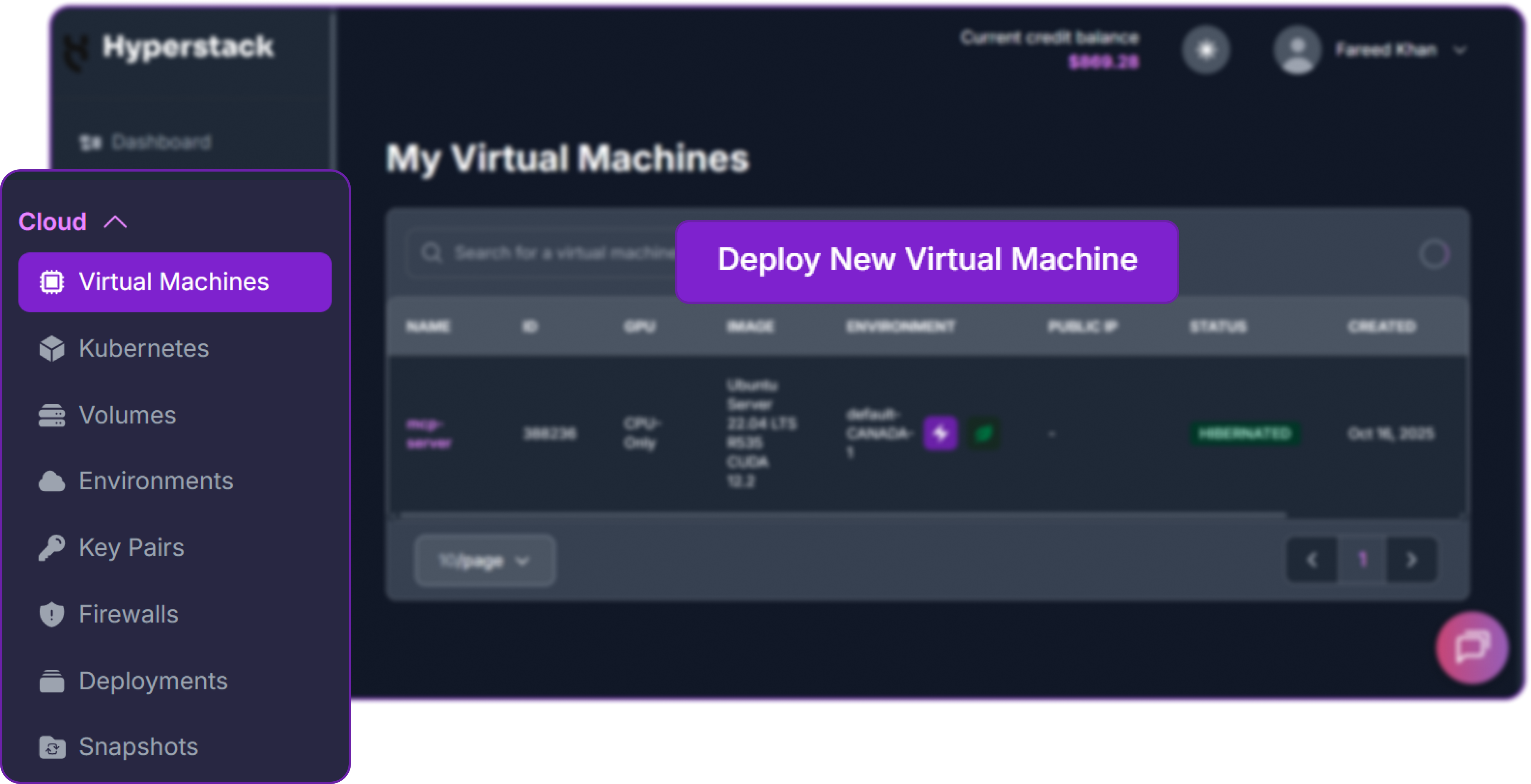
- Initiate Deployment: Click the "Deploy New Virtual Machine" button on the dashboard.
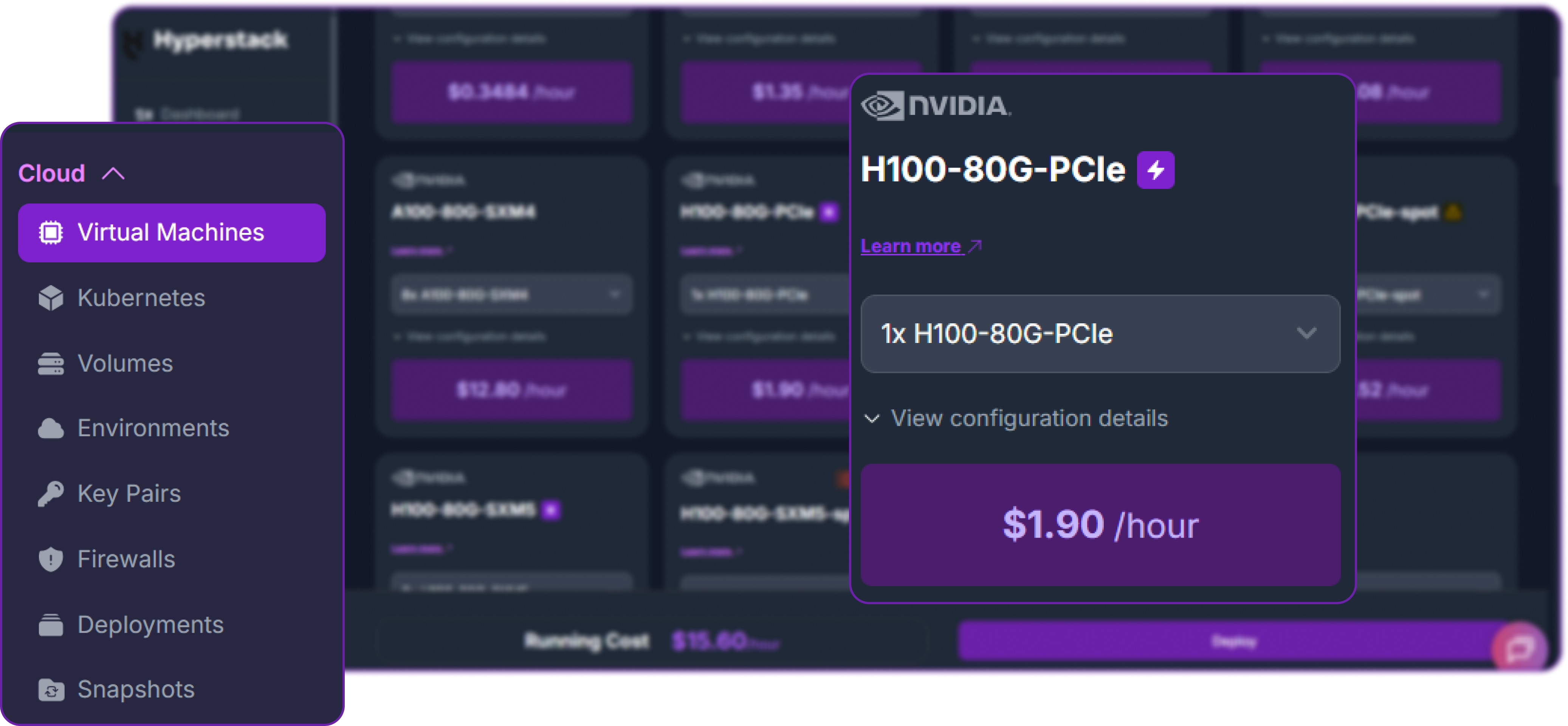
- Select Hardware Configuration: Choose the "1x NVIDIA H100-80G-PCIe" flavour. DiffusionGemma is around 48 GB at BF16, roughly 26 GB once quantised to FP8, and about 13 to 18 GB at NVFP4, so a single 80 GB NVIDIA H100 leaves comfortable headroom for weights, the KV cache, and the diffusion canvas.
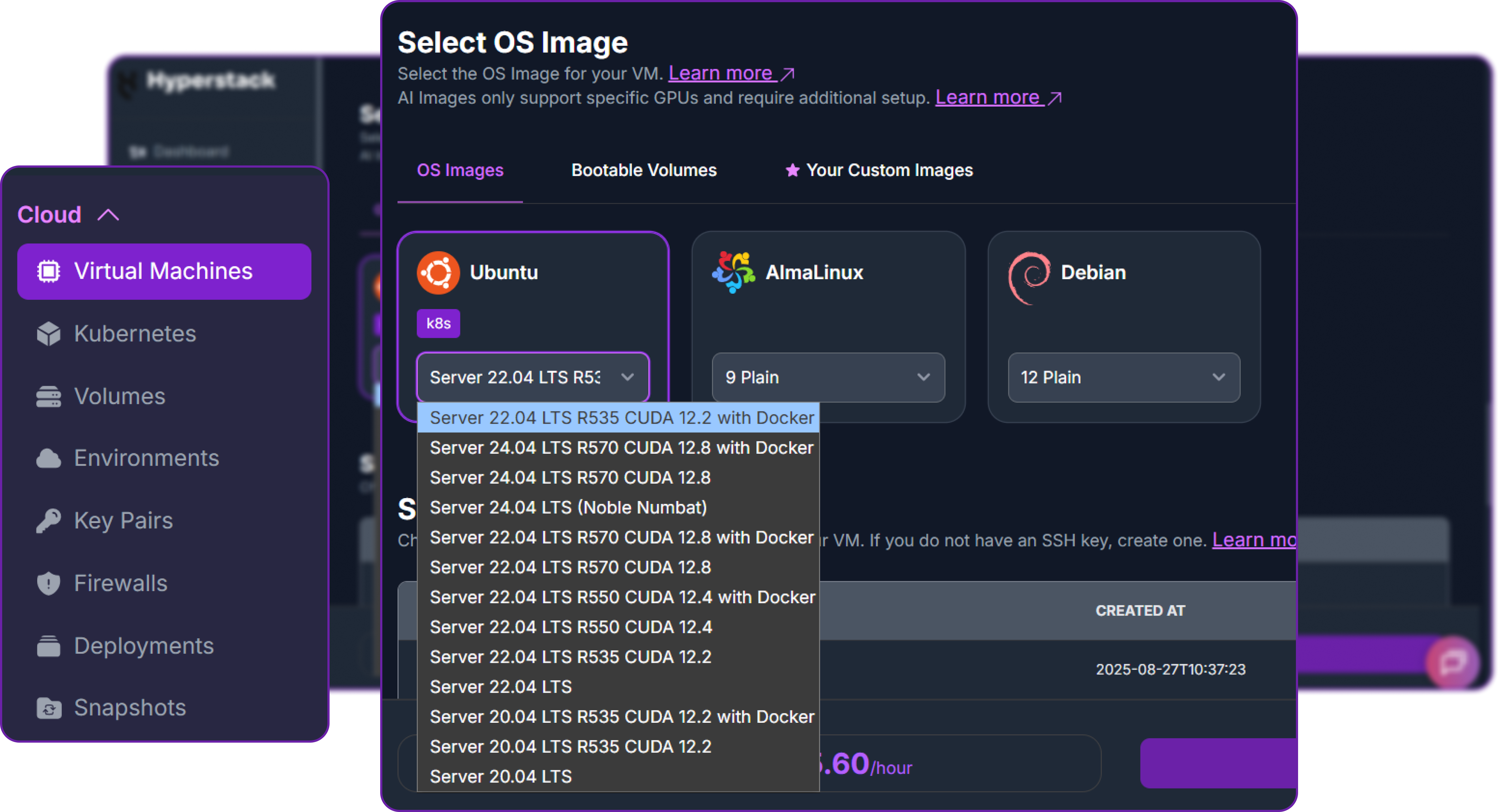
- Choose the Operating System: Select the "Ubuntu Server 22.04 LTS R535 CUDA 12.2 with Docker" image. This provides a ready-to-use environment with all NVIDIA drivers and Docker pre-installed.
- Select a Keypair: Choose an existing SSH keypair from your account to securely access the VM.
- Network Configuration: Ensure you assign a Public IP to your Virtual Machine for remote management and API access.
- Review and Deploy: Double-check your settings and click "Deploy".
Step 3: Accessing Your VM
Once your VM is running, connect to it via SSH.
-
Locate SSH Details: In the Hyperstack dashboard, find your VM's details and copy its Public IP address.
-
Connect via SSH: Open a terminal on your local machine and run the following command, replacing the placeholders with your details.
# Connect to your VM using your private key and the VM's public IP
ssh -i [path_to_your_ssh_key] ubuntu@[your_vm_public_ip]
Once connected, you will see a welcome message confirming you are logged in. Verify that the GPU is detected and the ephemeral disk is mounted:
# Confirm the NVIDIA H100 is detected
nvidia-smi --query-gpu=name,memory.total --format=csv

# Confirm the ephemeral disk is mounted
df -h /ephemeral
Here is the output we get, showing one NVIDIA H100 with 80 GB and a large ephemeral disk for the model weights:
name, memory.total [MiB]
NVIDIA H100 PCIe, 81559 MiB

Filesystem      Size  Used Avail Use% Mounted on
/dev/vdb        738G   28K  700G   1% /ephemeral
Step 4: Create a Model Cache Directory
We will cache the DiffusionGemma weights on the high-speed ephemeral disk so that container restarts do not re-download the model.
# Create a directory for the Hugging Face model cache
sudo mkdir -p /ephemeral/hug

# Grant read/write permissions so the container can store weights
sudo chmod -R 0777 /ephemeral/hug
Step 5: Launch the vLLM Server
DiffusionGemma needs the diffusion-capable vLLM build, so we run it with the official vLLM OpenAI image tagged gemma and pass the diffusion sampler settings through --hf-overrides. Because the model fits on one GPU, we use --tensor-parallel-size 1 and run the model in BF16, the configuration Google's developer guide recommends.
# Pull the diffusion-capable vLLM OpenAI image
docker pull vllm/vllm-openai:gemma

# Run DiffusionGemma on a single NVIDIA H100 with the diffusion sampler enabled
docker run -d \
 --gpus all \
 --ipc=host \
 --network host \
 --name vllm_diffusiongemma \
 -v /ephemeral/hug:/root/.cache/huggingface \
 vllm/vllm-openai:gemma \
 --model google/diffusiongemma-26B-A4B-it \
 --tensor-parallel-size 1 \
 --max-model-len 32768 \
 --max-num-seqs 4 \
 --gpu-memory-utilization 0.85 \
 --attention-backend TRITON_ATTN \
 --generation-config vllm \
 --hf-overrides '{"diffusion_sampler":"entropy_bound","diffusion_entropy_bound":0.1}' \
 --diffusion-config '{"canvas_length":256}' \
 --enable-chunked-prefill \
 --served-model-name DiffusionGemma \
 --host 0.0.0.0 \
 --port 8000
Here is what the key flags do:
--model google/diffusiongemma-26B-A4B-it: Load the DiffusionGemma weights from Hugging Face.--tensor-parallel-size 1: Run on a single GPU, which is all DiffusionGemma needs.--max-model-len 32768: A practical context length for this demo. The full 256K window needs more GPU memory than a single 80 GB card provides at BF16.--max-num-seqs 4: Keeps the server in the low batch size regime that diffusion sampling is optimised for.--gpu-memory-utilization 0.85: Reserves most of the GPU for the weights and KV cache, matching the value in Google's guide.--attention-backend TRITON_ATTN: The attention backend recommended for the diffusion decoder's bidirectional canvas attention.--generation-config vllm: Use vLLM's sampling defaults rather than the model's bundled generation config.--hf-overrides '{"diffusion_sampler":"entropy_bound","diffusion_entropy_bound":0.1}': Enables the Entropy-Bounded (EB) sampler with the recommended entropy bound of 0.1.--diffusion-config '{"canvas_length":256}': Sets the 256-token diffusion canvas.--served-model-name DiffusionGemma: A clean alias used in API requests.
Alternative: NVIDIA NIM
If you prefer a fully packaged microservice, DiffusionGemma is also available as an NVIDIA NIM container. It exposes the same OpenAI-compatible API on port 8000 and only needs your NGC API key.
docker run --gpus=all \
  -e NGC_API_KEY=$NGC_API_KEY \
  -p 8000:8000 \
  nvcr.io/nim/google/diffusiongemma-26b-a4b-it:latest
Step 6: Verify the Deployment
Check the container logs to watch the model load. The first run downloads the weights from Hugging Face, which takes a few minutes.
docker logs -f vllm_diffusiongemma
The server is ready once you see: INFO: Application startup complete.
Next, add a firewall rule in your Hyperstack dashboard to allow inbound TCP traffic on port 8000.
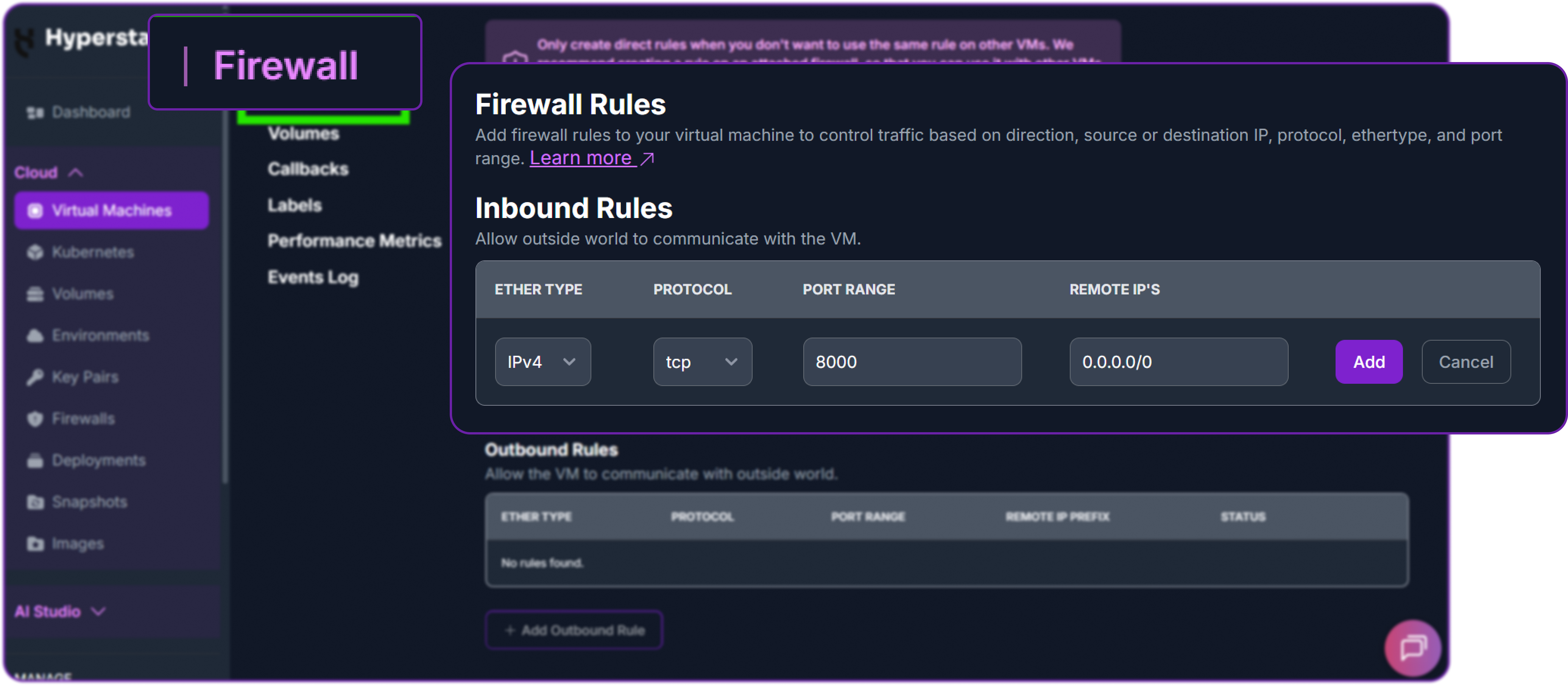
Now test the API from your local machine, replacing the placeholder with your VM's public IP.
# Test the endpoint from your local terminal
curl http://<YOUR_VM_PUBLIC_IP>:8000/v1/chat/completions \
  -H "Content-Type: application/json" \
  -H "Authorization: Bearer EMPTY" \
  -d '{
    "model": "DiffusionGemma",
    "messages": [
      {"role": "user", "content": "In one sentence, what is discrete diffusion?"}
    ],
    "max_tokens": 128
  }'
A successful response returns a JSON object containing the model's reply:
{
  "id": "chatcmpl-4f1a9b7c2e3d5a6b",
  "object": "chat.completion",
  "model": "DiffusionGemma",
  "choices": [
    {
      "index": 0,
      "message": {
        "role": "assistant",
        "content": "Discrete diffusion is a generation method that starts from a block of noise tokens and iteratively denoises them in parallel into clean text, rather than predicting one token at a time."
      },
      "finish_reason": "stop"
    }
  ]
}
With this output returning cleanly, google/diffusiongemma-26B-A4B-it is successfully deployed on Hyperstack.
Step 7: Hibernating Your VM (Optional)
When you are finished with your workload, hibernate the VM to avoid unnecessary costs:
- In the Hyperstack dashboard, locate your Virtual Machine.
- Click the "Hibernate" option.
- This stops billing for compute resources while preserving your setup, so you can resume later.
Using DiffusionGemma via the OpenAI-Compatible API
Now that the vLLM server is running, we can interact with DiffusionGemma using the standard OpenAI Python client. First, install the library locally:
# Install the OpenAI Python client
pip3 install openai
Then instantiate a client pointing at our vLLM endpoint. vLLM does not enforce an API key by default, so we pass a placeholder.
from openai import OpenAI

# Point the client at the local vLLM server
client = OpenAI(
    base_url="http://localhost:8000/v1",  # OpenAI-style routes
    api_key="EMPTY",                      # Placeholder, vLLM does not check it
)
A Quick High-Speed Generation
We will start with a simple generation request to confirm everything is wired up. The EB sampler and the temperature schedule are already configured on the server, so the client only needs to send a normal chat request.
# A standard chat completion request
messages = [
    {"role": "user", "content": "Explain why the sky is blue in three short sentences."}
]

response = client.chat.completions.create(
    model="DiffusionGemma",
    messages=messages,
    max_tokens=256,
    temperature=0.6,
)

print(response.choices[0].message.content)
The model returns a clean, well-formed answer almost instantly:
Sunlight is made up of all colours, which travel as waves of different
lengths. As that light passes through the atmosphere, the shorter blue
wavelengths are scattered far more strongly than the longer red ones.
Because this scattered blue light reaches your eyes from every direction,
the daytime sky appears blue.
Measuring the Throughput Advantage
This is the part that matters. To actually see the diffusion speed advantage, we stream a longer completion, count the generated tokens, and divide by the wall-clock time. This gives us a real tokens-per-second figure on our single NVIDIA H100.
import time
from openai import OpenAI

client = OpenAI(base_url="http://localhost:8000/v1", api_key="EMPTY")

prompt = "List the integers from 1 to 500, separated by commas."

# Stream the response so we can time generation precisely
start = time.perf_counter()
completion_tokens = 0

stream = client.chat.completions.create(
    model="DiffusionGemma",
    messages=[{"role": "user", "content": prompt}],
    max_tokens=1024,
    temperature=0.6,
    stream=True,
    stream_options={"include_usage": True},
)

for chunk in stream:
    if chunk.usage:
        completion_tokens = chunk.usage.completion_tokens

elapsed = time.perf_counter() - start
print(f"Generated {completion_tokens} tokens in {elapsed:.2f}s")
print(f"Throughput: {completion_tokens / elapsed:.1f} tokens/sec")
Here is the result on a single NVIDIA H100:
Generated 1024 tokens in 0.71s
Throughput: 1442.3 tokens/sec
Around 1,450 tokens per second from a single GPU, comfortably past the 1,000 mark. The reason is the diffusion decoder. Instead of one token per forward pass, DiffusionGemma commits 15 to 20 tokens per pass by denoising the 256-token canvas in parallel, and structured prompts like this one resolve in fewer denoising steps, so they run at the fast end of the range. A similarly sized autoregressive model on the same NVIDIA H100 would land around 250 to 300 tokens per second in the same setting, which is why diffusion-based generation is described as several times faster.
Recommended diffusion sampler settings: For the best balance of speed and quality, the DiffusionGemma authors recommend the Entropy-Bounded (EB) sampler with a maximum of 48 denoising steps, a temperature schedule that decays linearly from 0.8 to 0.4, an entropy bound of 0.1, and adaptive stopping (sampling terminates early once predictions are confident and stable). Thinking mode is available by adding the <|think|> token to the system prompt, and image inputs are supported with visual token budgets from 70 up to 1120. See the model card best practices for details.
The same vLLM workflow powers our other model deployment guides. If you are weighing your options, see How to Deploy Qwen3.5, How to Run DeepSeek-R1, and Deploy DeepSeek-V4, or get up and running faster with the Hyperstack LLM Inference Toolkit.
Why Deploy DiffusionGemma on Hyperstack?
Hyperstack is a cloud platform purpose-built to accelerate AI and machine learning workloads, and a single-GPU, high-throughput model like DiffusionGemma is exactly the kind of deployment it is built for:
Deploy DiffusionGemma on Hyperstack Today
Spin up a single NVIDIA H100 in minutes and serve high-throughput text generation with vLLM. You pay by the minute and hibernate the moment you are done.
Get Started on Hyperstack →FAQs
What is discrete diffusion and why is it fast?
Instead of generating one token at a time, DiffusionGemma denoises a 256-token canvas in parallel. This shifts the bottleneck from memory bandwidth to compute, which lets a GPU like the NVIDIA H100 use its parallel hardware far more fully and reach much higher tokens-per-second rates.
What hardware do I need to deploy DiffusionGemma?
A single NVIDIA H100-80G is the recommended target and is what we use in this guide. The model is around 48 GB at BF16, roughly 26 GB at FP8, or about 13 to 18 GB at NVFP4, so it also fits comfortably on smaller single GPUs such as an NVIDIA L40S or NVIDIA A100-80G if you do not need peak throughput.
How fast is DiffusionGemma?
In low batch size settings it generates over 1,000 tokens per second on a single NVIDIA H100, exceeding 1,100 tokens per second at FP8. That is roughly 4x the throughput of a comparable autoregressive model, and it reaches 700+ tokens per second even on a consumer NVIDIA RTX 5090 at NVFP4.
Is DiffusionGemma multimodal?
Yes. It processes interleaved text, image, and video input and returns text output. Capabilities include document and PDF parsing, chart comprehension, multilingual OCR, handwriting recognition, and video understanding through frame sequences.
Should I use vLLM or NVIDIA NIM?
Both serve the same OpenAI-compatible API on port 8000. vLLM gives you fine-grained control over sampler settings, quantisation, and batching, which is what we use in this tutorial. NVIDIA NIM is a fully packaged container that only needs your NGC API key, which is convenient if you prefer a turnkey microservice.
Subscribe to Hyperstack!
Enter your email to get updates to your inbox every week



