


.png)
TABLE OF CONTENTS
Key Takeaways
- Two ways to split a model: Tensor parallelism (TP) shards every layer's weights across the GPUs in a node for lower latency, while pipeline parallelism (PP) splits the model by depth across nodes to fit models too large for a single machine.
- Match the method to your topology: Use TP within a node, reach for PP across nodes, and combine them (TP x PP) for the very largest 405B-class models. Each is a single vLLM flag,
--tensor-parallel-sizeor--pipeline-parallel-size. - Scaling can be super-linear: Moving Llama-3.1-70B in FP8 from one H100 to a 2x H100 tensor-parallel setup grew the KV cache 13.9x and total throughput 3.9x, because sharding the weights frees disproportionate memory for a larger KV cache and bigger batches.
- Better throughput-per-dollar: A 2x NVIDIA H100-80GB-PCIe VM on Hyperstack serves a 70B model in FP8 with room to spare, so for large models tensor parallelism is often cheaper per token, not just faster.
LLMs have outgrown single GPUs. A 70B model in 16-bit precision needs roughly 140 GB just for weights, more than fits on any single 80 GB card, and that is before you reserve a single byte for the KV cache that serves requests. The moment you try, vLLM greets you with the most familiar error in the field: CUDA out of memory.
There are two ways out of this. The first is to shrink the model with FP8 or lower-bit quantisation. That helps, but it trades some accuracy and stops being enough once models climb past a few hundred billion parameters. The second, and the subject of this guide, is to spread the model across multiple GPUs using tensor parallelism and pipeline parallelism, the two distributed-inference strategies built into vLLM.
In our blog, we'll explain how both work, when to reach for each, and then walk through serving Llama-3.1-70B on a 2x NVIDIA H100-80GB-PCIe VM on Hyperstack. We'll close with the result that surprises most people the first time they see it: doubling your GPUs can nearly quadruple your throughput.
Two Ways to Split a Model Across GPUs
vLLM supports several parallelism strategies, but two do the heavy lifting for distributed inference:
| Tensor Parallelism (TP) | Pipeline Parallelism (PP) | |
|---|---|---|
| What gets split | Each layer's weight matrices are sharded across GPUs | Whole layers, grouped into contiguous stages |
| How GPUs cooperate | All GPUs work on the same request in lockstep, syncing each layer | Each GPU owns different layers; activations are passed down a "pipeline" |
| Communication | Frequent, latency-sensitive (all-reduce / all-gather every layer) | Infrequent (one hand-off per stage boundary) |
| Main benefit | Lower latency and more memory; multiplies effective memory bandwidth | Fits a model that won't even fit across a node's combined memory |
| Wants | Fast interconnect (NVLink, PCIe Gen5, InfiniBand) | Tolerates slower links between nodes |
| vLLM flag | --tensor-parallel-size N |
--pipeline-parallel-size N |
The short version: tensor parallelism is the within-a-node workhorse, and pipeline parallelism is how you span nodes when even a full node isn't enough. Let's look at each.
Tensor Parallelism Explained
Tensor parallelism shards the model's weight matrices across GPUs so that several cards compute one forward pass together. Because each GPU only stores and reads a slice of every weight matrix, you get two wins at once: the model fits, and you have effectively multiplied your memory bandwidth. Multiple GPUs stream their shards from memory in parallel, which is exactly what token generation (a memory-bandwidth-bound workload) is starved for. The technique comes from Megatron-LM, originally built for training, and vLLM adapts it for inference.
At its core, it relies on two complementary approaches to partitioning matrix multiplication across compute resources.
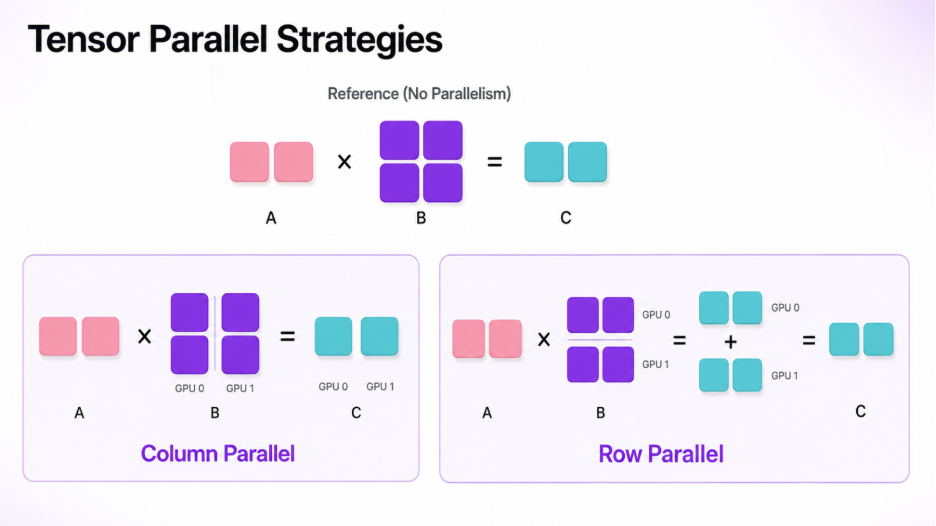
- Column parallelism. The weight matrix is cut into vertical strips (columns). Each GPU multiplies the full input by its strip and produces a slice of the output. To reconstruct the complete output, you simply line the slices up side by side, an all-gather (concatenate) across GPUs.
- Row parallelism. The weight matrix is cut into horizontal strips (rows). Each GPU now produces a partial version of the entire output, computed from part of the input. To get the real answer, you add those partials together element-wise, an all-reduce (sum) across GPUs.
A tiny worked example makes the column-wise case concrete. Suppose GPU 1 holds the first column of the weight matrix and GPU 2 holds the second. Each multiplies the same input by its own column, producing one output column each. Concatenating the outputs from GPU 1 and GPU 2 yields the full result [22, 28], [49, 64], identical to what a single GPU would have computed, but with the work split across two devices.
These two patterns chain together beautifully inside a transformer block. Take the MLP in a Llama model:
- The up-projection uses column parallelism, so each GPU produces its own slice of the hidden activations.
- The activation function (SiLU) is element-wise, so it runs directly on each GPU's slice with no communication.
- The down-projection uses row parallelism, and a single all-reduce at the end sums the partials back into the correct output.
The result is that an entire MLP block runs across N GPUs with just one collective operation at the boundary. The catch is that this communication happens for every layer, every forward pass, so tensor parallelism is only as fast as the link between your GPUs. On a single node with NVLink, PCIe Gen5, or InfiniBand, this overhead is small and the latency gains dominate. Stretch tensor parallelism across a slow network and the communication cost swamps the benefit.
Pipeline Parallelism Explained
When a model is so large that it won't fit even across the combined memory of one node's GPUs, such as Llama-3.1-405B or DeepSeek-class models, tensor parallelism alone isn't enough. This is where pipeline parallelism comes in.
Instead of slicing every layer, pipeline parallelism slices the model by depth. GPU 0 (or node 0) loads, say, the first quarter of the layers, GPU 1 the next quarter, and so on. A request flows through the GPUs like an assembly line: each stage runs its layers, then sends the intermediate activations on to the next stage with a lightweight send/receive operation. Crucially, that hand-off happens only once per stage boundary, not once per layer, so pipeline parallelism moves far less data over the wire than tensor parallelism, which is what makes it viable across nodes connected by slower links.
There's an important nuance: pipeline parallelism relieves the memory ceiling, but it does not reduce per-request latency the way tensor parallelism does. A single request still has to pass through every stage in sequence. Worse, a naive pipeline leaves most GPUs idle while one stage works. vLLM addresses this with micro-batch scheduling, which keeps every stage busy on different in-flight requests at once, so the pipeline stays full and aggregate throughput stays high.
Which One Should You Use?
A practical rule of thumb:
- Within a node, use tensor parallelism. Set
--tensor-parallel-sizeto the number of GPUs in the box. The fast intra-node interconnect makes the per-layer communication cheap. - Across nodes, reach for pipeline parallelism. Set
--pipeline-parallel-sizeto the number of nodes, keeping tensor parallelism inside each node. The cross-node link only carries one hand-off per stage. - If your nodes are joined by a fast fabric (NVLink, high-rate InfiniBand), tensor parallelism can extend across nodes, too.
- Combine them for the very largest models:
TP x PPGPUs in total, with TP inside each node and PP spanning nodes.
For the most common case, a 70B-class model on a single multi-GPU box, tensor parallelism is all you need, and that's exactly the setup we'll build next.
Hands-On: Serving Llama-3.1-70B on a 2x Hyperstack NVIDIA H100 GPU VM
Here's how to serve Llama-3.1-70B with an NVIDIA H100 VM on Hyperstack's real cloud environment.
Provision the GPUs
On Hyperstack, the NVIDIA H100-80GB-PCIe flavour is available in 1x, 2x, 4x, and 8x configurations. At 2x configuration, it gives us 160 GB of GPU memory, comfortably enough to serve Llama-3.1-70B in FP8 with a large KV cache to spare.
A note on interconnect: the PCIe NVIDIA H100 talks to its sibling over PCIe. That is plenty for tensor parallelism across 2 GPUs in one node. If you later scale to 4x or 8x and want to squeeze out every microsecond of latency, the interconnect topology starts to matter more, but for this walkthrough, 2x PCIe is a great sweet spot on price and performance.
Spin up the VM with the latest Ubuntu and CUDA image, then SSH in.
Install vLLM
We recommend uv for fast, reproducible installs, but plain pip works too.
# Create an isolated Python 3.12 environment with uv (recommended)
uv venv --python 3.12 --seed
source .venv/bin/activate

# Install vLLM with the auto-selected CUDA build for your driver
uv pip install vllm --torch-backend auto

# Sanity check: confirm the version and that a CUDA build was installed
vllm --version
python -c "import torch; print('CUDA available:', torch.cuda.is_available(), '| GPUs:', torch.cuda.device_count())"
# 'CUDA available: True | GPUs: 2'
If you prefer pip, running pip3 install vllm inside a fresh virtualenv achieves the same thing.
Launch the Server with Tensor Parallelism
This single command loads Llama-3.1-70B (FP8) and shards it across both GPUs. vLLM serves an OpenAI-compatible HTTP API so that any OpenAI client can talk to it.
# Make both GPUs visible to vLLM (optional; this is the default on a 2-GPU box)
export CUDA_VISIBLE_DEVICES=0,1

# Authenticate to Hugging Face if the model is gated
export HF_TOKEN=hf_your_token_here

vllm serve neuralmagic/Meta-Llama-3.1-70B-Instruct-FP8 \
  --tensor-parallel-size 2 \         # shard each layer across the 2 H100s (TP=2)
  --host 0.0.0.0 \                # listen on all interfaces
  --port 8000 \                  # OpenAI-compatible API on :8000
  --gpu-memory-utilization 0.90 \   # use 90% of each GPU's VRAM (model + KV cache)
  --max-model-len 8192 \           # max context length; lower this if you hit OOM
  --max-num-seqs 256                # max concurrent sequences in a batch
A few notes on the flags:
--tensor-parallel-size 2is the whole point, the one switch that turns a single-GPU server into a tensor-parallel one. vLLM handles all the sharding and the all-reduce / all-gather collectives for you.--gpu-memory-utilization 0.90tells vLLM how much VRAM to pre-allocate for weights and KV cache. Raise it toward0.95for more KV-cache headroom, or lower it if startup runs out of memory.--max-model-lenis the single most effective dial for fitting a model: halving the context roughly halves KV-cache memory.
The server is ready when you see the startup-complete line in the logs.
INFO vllm: Initializing an LLM engine with config: model='neuralmagic/Meta-Llama-3.1-70B-Instruct-FP8',
tensor_parallel_size=2, dtype=fp8, max_seq_len=8192, gpu_memory_utilization=0.9
INFO vllm: Started a worker on GPU 0 and GPU 1 (TP rank 0, TP rank 1)
INFO vllm: # GPU blocks for KV cache: 12830, # CPU blocks: 4096
INFO vllm: Maximum concurrency for 8192 tokens per request: 25.0x
INFO: Started server process [249008]
INFO: Waiting for application startup.
INFO: Application startup complete.
INFO: Uvicorn running on http://0.0.0.0:8000 (Press CTRL+C to quit)
That # GPU blocks for KV cache: 12830 line is worth remembering. We'll come back to it.
Call the Model
From another terminal, hit the endpoint exactly as you would the OpenAI API.
With curl:
curl http://localhost:8000/v1/chat/completions \
  -H "Content-Type: application/json" \
  -d '{
    "model": "neuralmagic/Meta-Llama-3.1-70B-Instruct-FP8",
    "messages": [
      {"role": "user", "content": "Explain tensor parallelism in one sentence."}
    ],
    "max_tokens": 64
  }'
With the Python OpenAI client:
from openai import OpenAI

# Point the standard OpenAI client at your local vLLM server.
# vLLM ignores the api_key, but the client requires a non-empty string.
client = OpenAI(base_url="http://localhost:8000/v1", api_key="EMPTY")

resp = client.chat.completions.create(
    model="neuralmagic/Meta-Llama-3.1-70B-Instruct-FP8",
    messages=[{"role": "user", "content": "Explain tensor parallelism in one sentence."}],
    max_tokens=64,
)
print(resp.choices[0].message.content)
Both return the same kind of answer:
Tensor parallelism splits each layer's weight matrices across multiple GPUs so they
compute a single forward pass together, letting a model that is too large for one GPU
run faster by combining the memory and bandwidth of several.
Prefer Offline Batch Inference?
If you're generating data in bulk rather than serving an API, use vLLM's LLM class directly, with the same tensor_parallel_size switch and no server needed. Import the classes, configure the engine, and define your prompts:
from vllm import LLM, SamplingParams

# tensor_parallel_size=2 shards the model across both H100s, just like the CLI flag.
llm = LLM(
    model="neuralmagic/Meta-Llama-3.1-70B-Instruct-FP8",
    tensor_parallel_size=2,
    gpu_memory_utilization=0.90,
    max_model_len=8192,
)

# vLLM batches these prompts together with continuous batching for high throughput.
prompts = [
    "Write a haiku about GPUs.",
    "Summarise tensor parallelism for a beginner.",
    "List three reasons to serve LLMs on multiple GPUs.",
]
sampling = SamplingParams(temperature=0.7, max_tokens=128)
Then generate and print the results:
for output in llm.generate(prompts, sampling):
    print("PROMPT:", output.prompt)
    print("OUTPUT:", output.outputs[0].text.strip())
    print("-" * 60)
Watch GPU Usage
While the server handles the load, run nvidia-smi to confirm the model is really spread across both cards. With tensor parallelism, you should see both GPUs at high utilisation and near-equal memory use; they're working on the same requests together.
Representative nvidia-smi under load (2x NVIDIA H100-80GB-PCIe, Llama-3.1-70B-FP8, TP=2):
+-----------------------------------------------------------------------------------------+
| NVIDIA-SMI 560.xx.xx              Driver Version: 560.xx.xx        CUDA Version: 12.6    |
|-----------------------------------------+------------------------+----------------------+
| GPU  Name                 Persistence-M | Bus-Id           Disp.A | Volatile Uncorr. ECC |
| Fan  Temp   Perf  Pwr:Usage/Cap |          Memory-Usage         | GPU-Util  Compute M. |
|=========================================+========================+======================|
|   0  NVIDIA H100 80GB PCIe       On     | 00000000:1B:00.0    Off |                    0 |
| N/A   62C    P0   338W / 350W   |    72104MiB / 81559MiB        |     98%      Default |
+-----------------------------------------+------------------------+----------------------+
|   1  NVIDIA H100 80GB PCIe       On     | 00000000:43:00.0    Off |                    0 |
| N/A   60C    P0   331W / 350W   |    72098MiB / 81559MiB        |     97%      Default |
+-----------------------------------------+------------------------+----------------------+

+-----------------------------------------------------------------------------------------+
| Processes:                                                                              |
|  GPU   GI   CI        PID   Type   Process name                            GPU Memory   |
|        ID   ID                                                             Usage        |
|=========================================================================================|
|    0   N/A  N/A     12873      C   .../bin/python (vLLM TP worker rank 0)    72090MiB   |
|    1   N/A  N/A     12874      C   .../bin/python (vLLM TP worker rank 1)    72084MiB   |
+-----------------------------------------------------------------------------------------+
The two GPUs sit at ~97% to 98% utilisation with nearly identical memory footprints, the signature of a healthy tensor-parallel deployment. (If one GPU is busy and the other idle, the model isn't actually sharded, so check that --tensor-parallel-size is set and both cards are visible.)
The Payoff: Super-Linear Throughput Scaling
Here's the part that surprises people. You'd expect to go from 1 GPU to 2 GPUs to roughly double throughput. In practice, for a memory-hungry model like Llama-3.1-70B, it does much better than that.
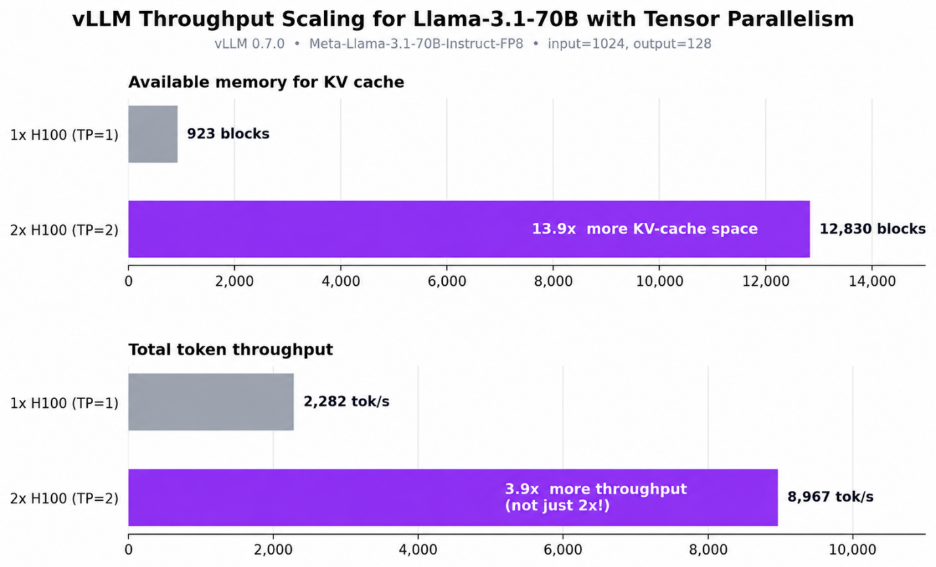
In vLLM's published benchmark (Meta-Llama-3.1-70B-Instruct-FP8), moving from a single NVIDIA H100 to a 2x NVIDIA H100 tensor-parallel setup:
- grew the KV-cache space from 923 to 12,830 GPU blocks, a 13.9x increase, and
- grew total throughput from 2,282 to 8,967 tokens per second, a 3.9x increase.
Why nearly 4x from only 2 GPUs? The answer is the KV cache. When the model is sharded across two cards, each card stores only half the weights, which frees up a disproportionately large amount of memory for the KV cache, because on a single GPU the 70B weights were eating almost everything. That extra cache isn't just nice to have: a bigger KV cache lets vLLM keep far more requests in flight at once (bigger batches) and improves memory locality, so GPU utilisation climbs well past what raw compute alone would predict. The scaling is super-linear: the memory effect compounds with the extra compute.
The practical takeaway for anyone renting GPUs by the hour: for large models, tensor parallelism often improves throughput-per-dollar, not just raw throughput. Two NVIDIA H100s at ~4x the work can be cheaper per token than one.
Reproduce It Yourself
vLLM ships a load generator. Point it at your running server to measure first-party numbers on your own Hyperstack VM:
vllm bench serve \
  --model neuralmagic/Meta-Llama-3.1-70B-Instruct-FP8 \
  --host 0.0.0.0 --port 8000 \
  --dataset-name random \         # synthetic prompts for a clean throughput test
  --random-input-len 1024 \         # fixed input length
  --random-output-len 128 \         # fixed output length
  --num-prompts 1000 \              # total requests in the run
  --max-concurrency 256             # simultaneous in-flight requests
The report includes total token throughput (tok/s), time-to-first-token (TTFT), and inter-token latency, everything you need to compare TP=1 versus TP=2 on your own hardware.
Going Bigger: Pipeline Parallelism for 405B-Class Models
Once a model is too large for even a full node's combined memory, add pipeline parallelism. The flags compose naturally.
Pipeline parallelism on a single node (split the model's layers across 2 GPUs by depth instead of sharding each layer):
vllm serve <very-large-model> \
  --pipeline-parallel-size 2           # 2 pipeline stages, one per GPU
Combine TP and PP across two nodes (for example, an 8x NVIDIA H100 node x2, for a 405B model). vLLM uses Ray to coordinate the cluster; the common layout is tensor parallelism inside each node and pipeline parallelism across nodes:
# After starting a Ray cluster across both nodes, run this once on the head node:
vllm serve meta-llama/Llama-3.1-405B-Instruct \
  --tensor-parallel-size 8 \         # 8 GPUs per node, sharded per layer (within node)
  --pipeline-parallel-size 2 \       # 2 nodes, split by layers (across nodes)
  --distributed-executor-backend ray
# Total GPUs used = TP x PP = 8 x 2 = 16
The guiding principle from earlier holds: TP rides the fast intra-node link, PP rides the slower inter-node link, and together they let you serve models that no single machine could hold.
Tuning Tips
- Hitting
CUDA out of memoryat startup? Lower--max-model-lenfirst (it's the biggest lever), then lower--max-num-seqs, then consider an FP8 or quantised checkpoint. You can also nudge--gpu-memory-utilizationup to give the cache more room if there's headroom. - Seeing "preempted because there is not enough KV cache space" warnings? That's a throughput killer, so raise
--gpu-memory-utilization, or reduce--max-num-seqsor--max-num-batched-tokensso fewer requests compete for cache. - For maximum throughput, push
--max-num-batched-tokensabove 8192, since larger batches favour token throughput (at some cost to per-token latency). - Tensor-parallel size must divide the model's attention-head count and is typically a power of two (2, 4, 8). It also can't exceed your GPU count.
- One GPU pinned, the other idle? The model isn't actually sharded. Confirm
--tensor-parallel-sizeis set and both GPUs are visible (CUDA_VISIBLE_DEVICES,nvidia-smi). - Multi-node only: make sure every node runs the same vLLM version and can reach the others, as mismatched versions or IPs are the usual culprits behind a cluster that won't start.
Conclusion
Distributed inference turns the "model won't fit" problem into a throughput opportunity. Tensor parallelism shards each layer across the GPUs in a node, cutting latency and, thanks to the super-linear KV-cache effect, often delivering far more than linear throughput gains. Pipeline parallelism splits a model by depth across nodes, unlocking the very largest models with minimal communication overhead. vLLM exposes both behind a single flag each, so scaling from one GPU to many is mostly a matter of choosing the right numbers.
On Hyperstack, a 2x NVIDIA H100-80GB-PCIe instance is an ideal place to put this into practice: enough memory to serve a 70B model in FP8 with room for a large KV cache, at a price that makes the throughput-per-dollar math work in your favour.
Scale beyond a single GPU. Explore Hyperstack's NVIDIA H100 GPU VM and build high-throughput AI inference workloads with vLLM and open-source models.

FAQs
What is tensor parallelism in vLLM?
Tensor parallelism splits each model layer across multiple GPUs, allowing larger models to fit in memory and generate tokens faster.
When should I use pipeline parallelism?
Use pipeline parallelism when a model exceeds the combined memory of a single node and must be distributed across nodes.
Can tensor and pipeline parallelism be combined?
Yes. Large deployments commonly use tensor parallelism within nodes and pipeline parallelism across nodes for maximum scalability.
Why does throughput sometimes scale faster than GPU count?
Sharding model weights frees memory for larger KV caches, enabling bigger batches, higher utilisation, and super-linear throughput gains.
What causes CUDA out-of-memory errors in vLLM?
CUDA OOM errors usually result from insufficient GPU memory for model weights, KV cache, context length, or concurrency.
Subscribe to Hyperstack!
Enter your email to get updates to your inbox every week



