



TABLE OF CONTENTS
NVIDIA H100 SXM On-Demand
Key Takeaways
-
Hyperstack AI Studio allows quick comparison between base and fine-tuned models
-
Base models are general-purpose and trained on broad datasets
-
Fine-tuned models are optimised for specific domains or tasks
-
Both models can be deployed without managing infrastructure manually
-
The Playground enables side-by-side prompt testing in real time
-
The same inputs can be run on both models to compare output quality
-
Inference settings like temperature and token limits can be adjusted for fair comparison
-
Differences in accuracy, tone, and task performance are easy to spot visually
-
Automated evaluation tools help measure performance improvements
-
This workflow helps teams decide whether fine-tuning delivers real gains
-
Model comparison can be completed in minutes instead of days
-
AI Studio simplifies experimentation before moving models into production
Ever spent hours training a model only to wonder if it actually gets better?
If you’ve been there, you know how tricky it can be to measure your fine-tuning efforts. Comparing a base model with your customised version often feels daunting, involving multiple tools, scripts and too many trial runs.
That’s exactly where Hyperstack AI Studio helps you by offering a side-by-side comparison between a base model and a fine-tuned model in real time. You’ll see exactly how smarter your model has become after fine-tuning.
So if model comparison has ever felt overwhelming, don’t worry, we’ll walk you through how AI Studio makes it easy. See our full blog below.
What are Base Models
Base models are pretrained AI models that serve as the foundation for a wide range of downstream applications. These models are trained on massive datasets that span text, code, images or other data types. To give you an idea, base models act as the “brains” behind AI tasks, ready to perform general-purpose operations such as summarisation, translation, code generation and conversational understanding.
Hyperstack AI Studio provides several open-source foundation models that you can use to fine-tune to meet your specific project needs. No matter if you’re building a chatbot, creating a custom text generator or developing specialised models for enterprise-grade AI tasks, these base models serve as the perfect starting point.
What are Fine-Tuned Models
Fine-tuned models are customised versions of base models that have been retrained on a smaller, domain-specific dataset. This process allows the model to adapt its responses, tone or reasoning patterns to a particular use case. For instance, a base model might be excellent at general reasoning but fine-tuning it on legal documents, customer support transcripts or code samples helps it master those specific domains.
On Hyperstack AI Studio, fine-tuning takes this process from complex to effortless. Instead of dealing with long training pipelines or infrastructure setups, you can fine-tune your preferred model directly within the platform. Once your fine-tuned model is ready, you can deploy, test and even compare it with its base version in just a few minutes.
Which Models Can You Compare on Hyperstack AI Studio
On AI Studio, you can fine-tune the following base models:
|
Mistral Small 24B Instruct 2501 |
A compact 24B model optimised for low-latency and resource-constrained environments. Despite its smaller size, it performs strongly in instruction following, math and code generation. |
|
Llama 3.3 70B Instruct |
Meta’s flagship 70B parameter model is fine-tuned for instruction-based tasks. It supports advanced reasoning, long-context generation and multilingual capabilities, ideal for chatbots, coding assistants and text analysis systems. |
|
Llama 3.1 8B Instruct |
A smaller yet highly efficient alternative to the 70B model. This 8B model balances performance and cost, making it suitable for a wide range of general-purpose applications and experimentation in both development and production settings. |
How to Compare Base vs Fine-Tuned Models
One of the best parts of fine-tuning is being able to see the results of your work in action. After you’ve invested time in preparing datasets and training your model, Hyperstack AI Studio lets you compare your fine-tuned model against its original base version, so you can immediately measure how much better your model has become.
And since your model’s performance depends directly on the quality of your data, this step cannot be overlooked. Check out our blog here to see how AI Studio helps you produce quality data.
With the Playground feature, you can run both models side-by-side using the same input prompt. The outputs are displayed instantly, so you can evaluate how your fine-tuning improved accuracy, tone and domain relevance. This comparison provides a clear insight into how effectively your model has adapted to your training data.
Trust me, the experience is fully interactive. You can adjust advanced generation parameters such as temperature, top-p, and max tokens to observe how each model behaves under varying conditions. What once required scripting, model checkpoints and manual evaluations can now be done in minutes, directly from your browser.
Deploy the Fine-Tuned Model
- Once your model has completed fine-tuning (following the guide available here), it will display a “Ready to Deploy” status. From there, deployment takes just one click.
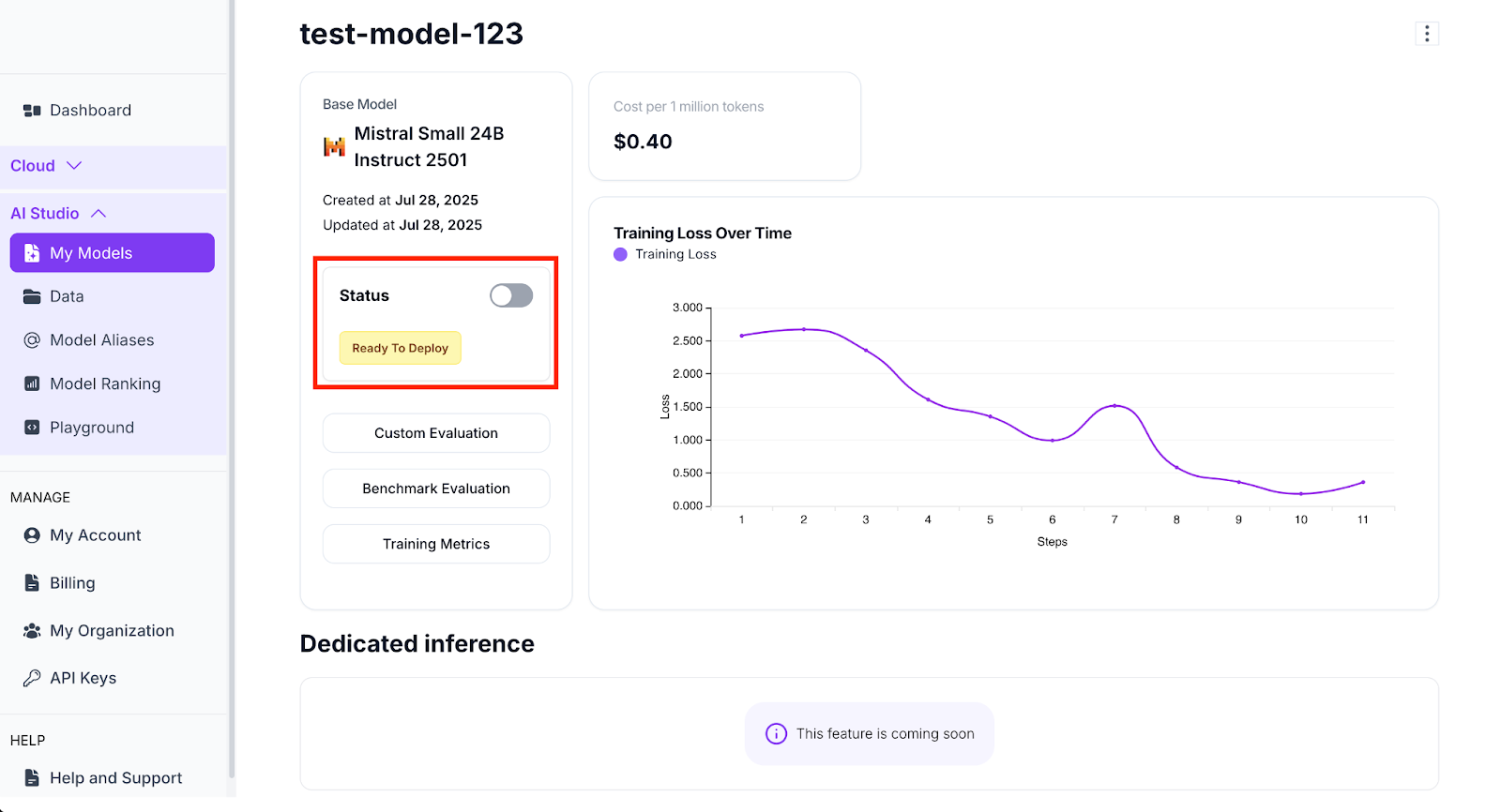
- Now, simply toggle the Status switch next to your fine-tuned model. The status will change to Deploying and within moments, it updates to Deployed, indicating your model is now live and ready to be used across inference, testing and integrations.
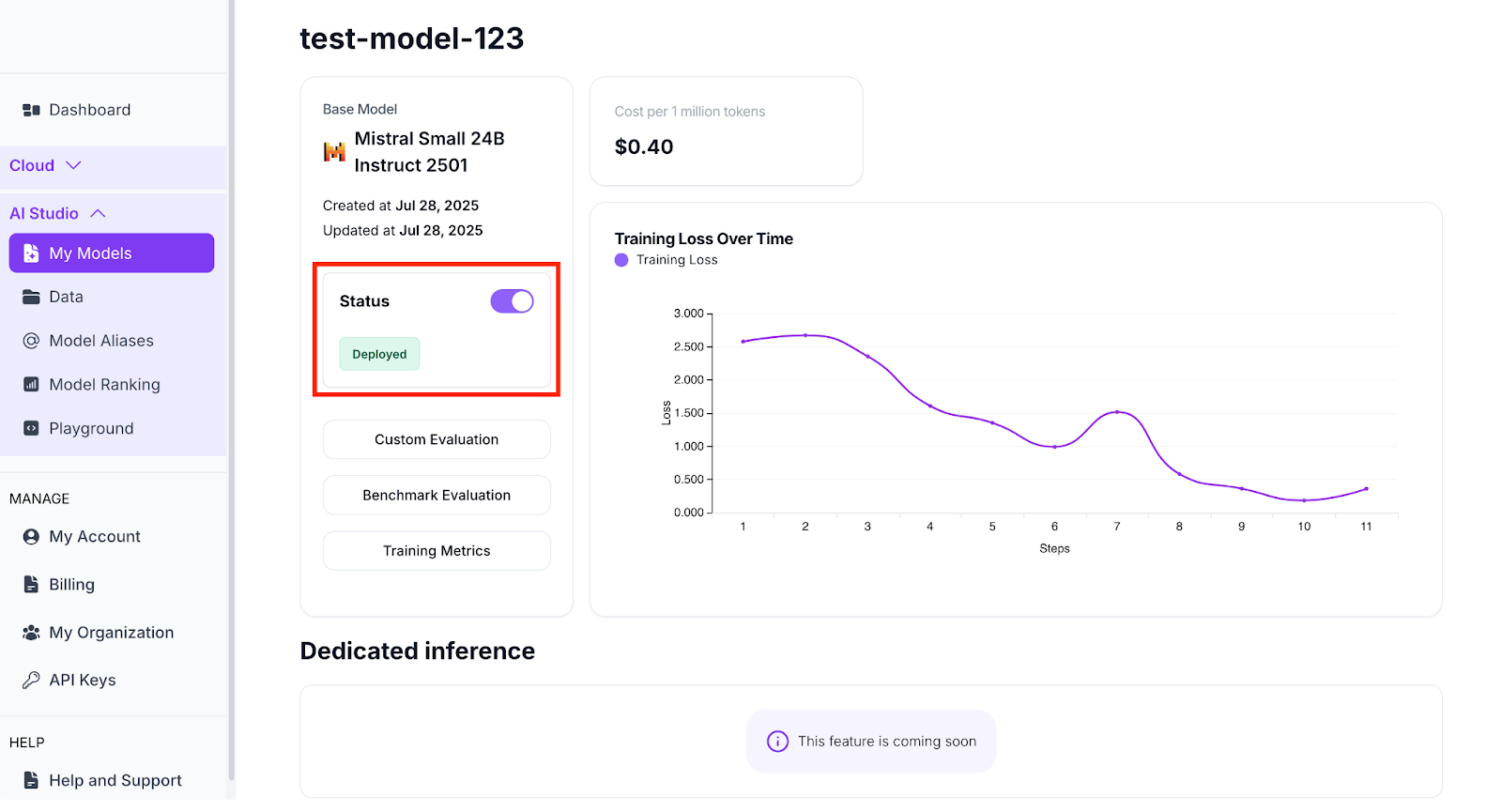
This deployment process eliminates the traditional complexity of managing infrastructure. Your fine-tuned model is hosted and accessible instantly through Hyperstack’s cloud environment.
Testing the Model in the Playground
After deployment, you can move to the Playground, an interactive testing environment within AI Studio that allows you to engage with your model.
Here’s how you can test your fine-tuned model step by step:
- Navigate to the Playground page from the Hyperstack AI Studio interface.
- Click on the Model dropdown menu and select the fine-tuned model you’ve trained and deployed (e.g., test-model-123).
- (Optional) Adjust Advanced Parameters to control your model’s generation behaviour, such as temperature, top-p and max tokens. These parameters help shape how creative or deterministic your outputs will be.
- Type your query into the text box and hit Enter to generate a response.
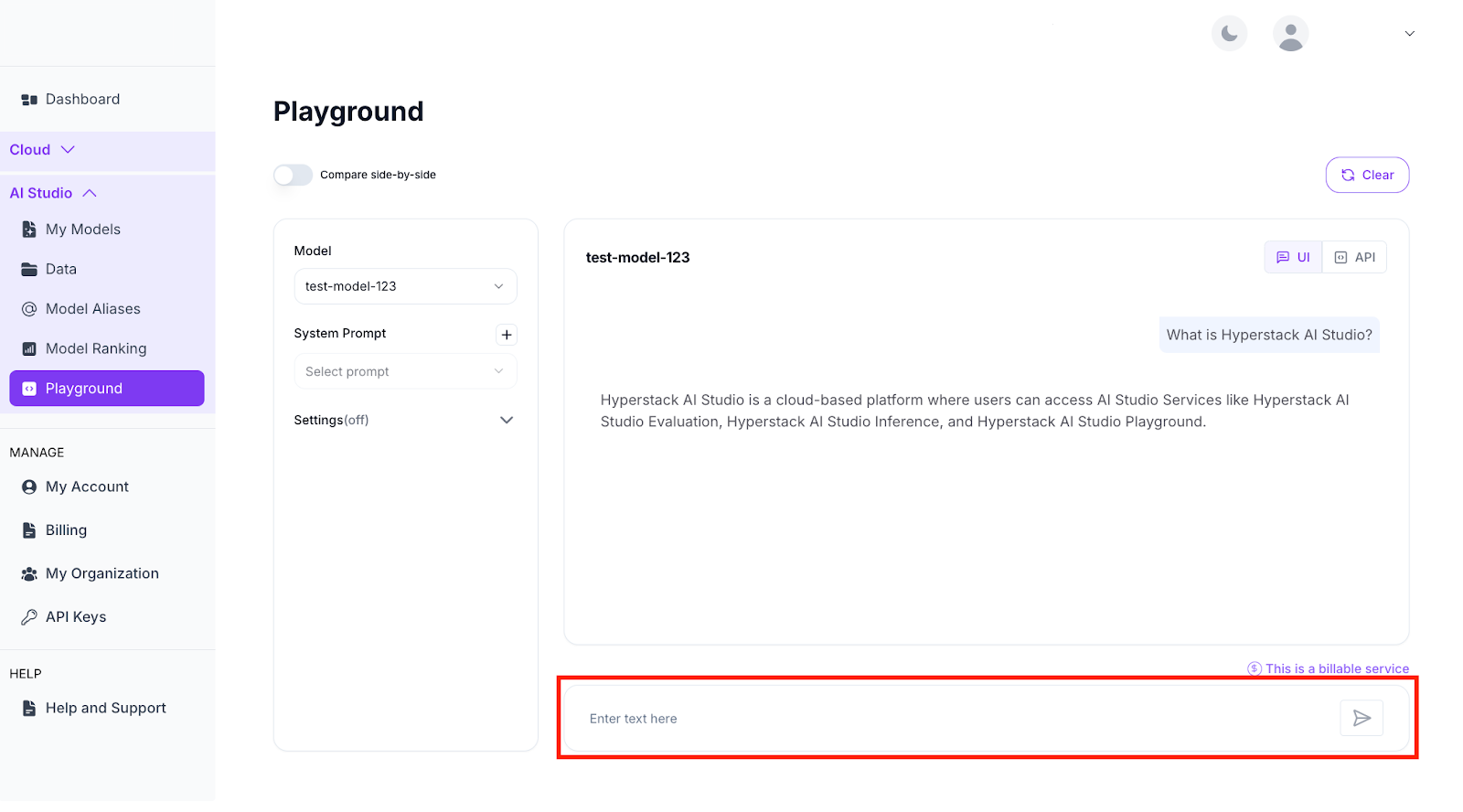
Playground Test Message
Once your model responds in the Playground, you’ll see its conversational output directly in the interface. This step allows you to evaluate how well your fine-tuned model has captured the tone, precision and contextual understanding you intended.
For instance, a fine-tuned model trained on your company’s documentation might now provide structured, brand-aligned responses when asked about your services, while the base model might still return generic or incomplete answers.
This direct feedback loop will accelerate the refinement process, so you can identify improvements instantly, adjust training data if necessary and re-run the fine-tuning cycle without any infrastructure overhead.
Comparing the Fine-Tuned Model Against the Base Model
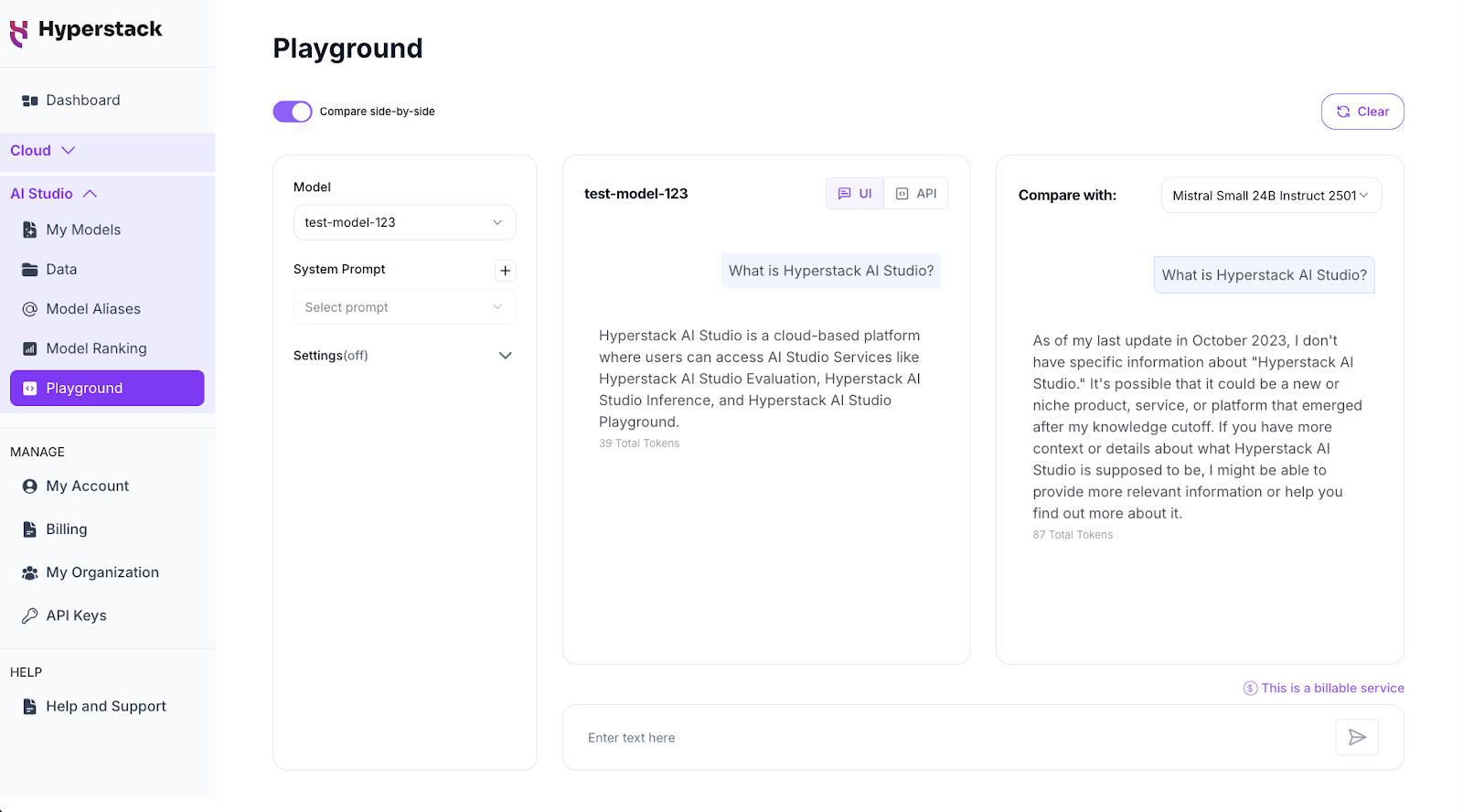
AI Studio’s side-by-side comparison feature allows you to directly compare how your fine-tuned model performs against its base counterpart on the same prompt.
To use it:
- Click Compare Side-by-Side in the Playground interface.
b. Choose your two models from the dropdown menus, typically the fine-tuned version and its corresponding base model (e.g., Mistral Small 24B Instruct 2501).
c. Enter your prompt (for example, “What is Hyperstack AI Studio?”) and press Enter.
Within seconds, you’ll see both outputs next to each other in real time. See an example below:
And if you want to go beyond qualitative comparison, Hyperstack AI Studio also offers Custom Evaluation and Benchmark Evaluation modules to help you measure model performance.
- Custom Evaluation uses an automated LLM-as-a-Judge workflow to score your model against criteria you define.
- Benchmark Evaluation lets you test your models against established public benchmarks (e.g., MATH) to assess specific capabilities like mathematical reasoning, instruction following or coding ability.
Launch AI Studio
If you haven’t already, try Hyperstack AI Studio today and see how effortless model fine-tuning and evaluation can be.

FAQs
What is the main difference between a base model and a fine-tuned model?
A base model is a pretrained, general-purpose model trained on massive datasets covering diverse topics. A fine-tuned model, on the other hand, is a customised version of the base model that’s retrained on domain-specific data to perform better on a particular use case—like legal, customer support, or coding tasks.
Why should I compare my fine-tuned model with the base model?
Comparing helps you measure the actual impact of your fine-tuning. It shows whether your model truly improved in accuracy, tone, and contextual relevance, instead of just performing differently. It’s the best way to validate that your training data produced the intended effect.
How does AI Studio simplify model comparison?
Hyperstack AI Studio offers an intuitive side-by-side Playground where you can test both models on the same prompt and instantly see how they differ. You can tweak parameters like temperature, top-p, and max tokens in real time—no need for external benchmarking tools or scripts.
Do I need any additional infrastructure to fine-tune or compare models?
Not at all. Everything happens directly within Hyperstack AI Studio’s cloud environment. You don’t need to deploy or configure GPUs, just select your model, fine-tune it and start comparing within minutes.
What if my fine-tuned model doesn’t perform as expected?
That’s part of the process! If results aren’t as strong as you hoped, you can revisit your dataset, refine it for better balance or clarity, and run another fine-tuning cycle. Since AI Studio makes iteration fast and infrastructure-free, you can re-train and compare again easily until you achieve the desired outcome.
Subscribe to Hyperstack!
Enter your email to get updates to your inbox every week



