


.png)
TABLE OF CONTENTS
NVIDIA H100 SXM GPUs On-Demand
Key Takeaways
- MiniMax H3 is a 33 billion parameter omni-modal generator, open sourced on 3 August 2026, writing video and native 32 kHz stereo audio in the same forward pass at 24 frames per second.
- Only H3-Base carries open weights. H3-Context-IR and H3-Regenerate-2K stay hosted, so a self-hosted deployment produces a 768 pixel short edge and the structured prompt carries the quality on its own.
- Four NVIDIA H100 80GB GPUs on one node are enough: one task partition is about 135 GiB in BF16, and tensor parallel 4 with Ulysses degree 1 peaked at 54.9 GB per GPU.
- Denoising is 98.6 per cent of server-side time, so inference steps and sequence length are the only settings that move the clock. A reference video triples the cost of a generation.
- Eleven clips across all three task modes took 51.5 minutes of generation on an $8.00 per hour Spot node, or $6.87 of GPU time, with the whole session at about $16.
MiniMax H3 is a 33 billion parameter omni-modal generative system, open sourced on 3 August 2026, and it does something the text-to-video models before it did not: it writes the soundtrack at the same time as the picture. Video latents and audio latents are predicted by the same transformer, in the same forward pass, from one packed multimodal sequence. What lands on disk is a single MP4 carrying H.264 video at 24 frames per second and AAC stereo at 32 kHz, already in sync, with no separate audio model and no post-production step.
This guide serves it on one Hyperstack node: four NVIDIA H100 80GB PCIe GPUs on Spot at $8.00 per hour, through SGLang Diffusion. Every number below comes from a single session on 11 August 2026 that pulled 196 GB of checkpoints, reached a live endpoint, and produced eleven finished clips across all three task modes. Total generation time on the four GPUs was 51.5 minutes for 65.3 seconds of video, and every clip was verified with ffprobe to be carrying two channels of 32 kHz audio.
Serving it yourself means three decisions: how to place the model across four GPUs, how to configure the collectives for the fabric those GPUs sit on, and how to write a prompt without the hosted preprocessor that normally rewrites one. If you have read our technical deep dive into Kimi K3, this is the same shape of exercise on a much smaller cluster and a generative rather than a language workload. If you want a lighter video model on a single GPU first, our Wan 2.1 video generation tutorial covers that ground.
What MiniMax H3 Is, and Which Part of It You Can Run Yourself
H3 is not one model. The model card describes three modules, and only the middle one has open weights. Getting that distinction right before you book hardware saves a great deal of confusion later, because most of the published sample output was produced by all three working together.
The three modules of MiniMax H3
H3-Context-IR turns free-form input into structure, H3-Base generates, H3-Regenerate-2K redraws at higher resolution. Only the middle box has published weights.
Redrawn from the system overview on the MiniMaxAI/MiniMax-H3 model card.
That leaves a self-hosted deployment with two consequences and one advantage. The consequences: output is capped at a 768 pixel short edge, and nothing rewrites a rough prompt into something the model understands well. The advantage: the weights are the whole system you are running, so results are reproducible from a seed and a prompt, with no hidden service in the middle changing what you asked for.
Inside H3-Base
A 33 billion parameter dense single-stream transformer, fed by a Qwen3-VL text and vision encoder and two separate variational autoencoders, predicting picture and sound together.
Architecture figures from the MiniMaxAI/MiniMax-H3 model card and the MiniMax H3 research write-up. Read them alongside the licence: the weights carry the MiniMax H3 Community License Agreement rather than a stock open source licence, and MiniMax publishes a separate application form covering the USA, EU, UK and South Korea.
The two output streams stay together because of how the sequence is built. Text goes through the H3-Encoder. Images and video go through the H3-Encoder and the visual VAE. Audio goes only through the audio VAE. All of it is then packed into one sequence with three-dimensional rotary position embeddings over time, height and width, and the transformer predicts video latents and audio latents jointly. Synchronisation is not a post-process, it is a property of the sequence.
One forward pass, two decoders
Nothing in the attention or feed-forward layers is modality specific. Only the input and output layers and the AdaLN branches know which modality they are looking at.
Drawn from the architecture section of the MiniMaxAI/MiniMax-H3 model card. The frame count shown is from our own 6 second 16:9 output.
What is open, and what is not
| Component | In the open release | What it means for a deployment |
|---|---|---|
| H3-Base FL2VA | Yes, BF16 weights | Text-to-video-audio and first or last frame conditioning, from one server |
| H3-Base Ref2VA | Yes, BF16 weights | Reference conditioning on images, video and audio, from a second server |
| H3-Context-IR | No, hosted API | You write the structured prompt yourself, to the published specification |
| H3-Regenerate-2K | No, hosted API | Self-hosted output stays at a 768 pixel short edge |
| Sparse attention | Not yet | Inference runs full attention, so cost grows quickly with sequence length |
Read the licence before you build on this. H3 ships under the MiniMax H3 Community License Agreement, not a stock open source licence, and MiniMax publishes a separate application form covering the USA, the EU, the UK and South Korea. The open source announcement and the model card are the two documents to read first.
The Arithmetic That Decides the Hardware
Two numbers set the shape of the deployment. The first is what the checkpoints weigh. The repository hosts the original checkpoint and the diffusers format side by side, so scoping the download matters: pulling only model_index.json, FL2VA/* and Ref2VA/* landed 196 GB across 163 files on our node.
The second is what has to be resident while a generation runs. The official vLLM recipe puts the BF16 footprint of one task partition at roughly 135 GiB before any activations: two DiTs at 66.3 GB each, the Qwen3-VL-32B encoder at 51.5 GB, the video VAE at about 10 GB and the audio VAE at about 0.6 GB. No single 80 GB card holds that, which is why four GPUs is the floor rather than a preference.
How those four GPUs are arranged is a choice rather than a default. The SGLang MiniMax-H3 cookbook publishes three placements for 4x NVIDIA H100 80GB, all of which keep the whole pipeline resident, and they trade latency against memory.
Three ways to place H3 on four NVIDIA H100 80GB GPUs
All three keep the pipeline resident. They differ by less than a second of pipeline latency and by 16 GB of peak memory per GPU, which is the entire trade-off.
Latency and peak memory from the SGLang MiniMax-H3 cookbook, hardware profile h100. The highlighted bar is the placement used throughout.
The cookbook labels tensor parallel 2 with Ulysses degree 2 the fastest measured placement on this hardware, and it leads by 0.61 seconds. It also states plainly that pure Ulysses degree 4 cannot keep the pipeline resident on 80 GB NVIDIA H100 cards. We ran tensor parallel 4 with Ulysses degree 1, the lowest-memory row, because it leaves the most headroom for a long reference clip and asks the least of the interconnect on a PCIe fabric.
Sequence parallelism and tensor parallelism are not interchangeable here. Ulysses degree splits the sequence across GPUs and exchanges attention heads between them. Tensor parallel splits the weights. The product of the two has to equal the GPU count, so on four GPUs your only choices are 4x1, 2x2 and 1x4, and each one moves a different amount of data at a different point in the pipeline.
Matching the Configuration to Your Node
Two settings depend on how the four GPUs in your node are wired together. Each one is a single line in the launch command, and each one follows from a check that takes a second.
1. Read the fabric, then set NCCL to match it
Ask the driver how the four cards are connected, and ask CUDA what it will pass directly between them. The two answers agree, and together they tell you which transport NCCL should use.
PHB means every pair of GPUs communicates through a PCIe host bridge, which is the fabric on this flavour, and torch.cuda.can_device_access_peer reports False for all twelve ordered pairs. Collectives therefore travel through host memory, and NCCL is told so explicitly with two NCCL environment variables: NCCL_P2P_DISABLE=1 selects that path, and NCCL_CUMEM_ENABLE=0 keeps the allocator on the matching one. Neither costs anything measurable here, because the sequence is split four ways rather than thirty-two and the collectives are small next to the denoising loop they sit inside.
The same four GPUs, two different fabrics
A PCIe flavour carries every collective through the host bridge. An NVLink node carries them card to card. The model is identical either way, and only NCCL needs to know which it is on.
Topology read directly from nvidia-smi topo -m on the node, and peer access probed with torch.cuda.can_device_access_peer across all twelve ordered pairs.
This is a property of the flavour, not of the GPU. Hyperstack also offers NVIDIA H100 PCIe-NVLink and NVIDIA H100 SXM flavours, which expose peer-to-peer directly. Run nvidia-smi topo -m on whatever you deploy: it takes a second, and it tells you which of the two columns above you are looking at.
2. Choose the parallel placement that suits the fabric
All three documented placements fit on four NVIDIA H100 cards. Tensor parallel 2 with Ulysses degree 2 is the fastest of them by 0.61 seconds, and it is the one to reach for on a node with peer-to-peer. On a PCIe fabric, tensor parallel 4 with Ulysses degree 1 is the better fit: it is the lowest-memory row at 49.80 GB per GPU, and with Ulysses degree 1 there are no sequence-parallel groups to form, so nothing crosses the host bridge that does not have to.
Trading 0.61 seconds of pipeline latency for 16 GB of headroom per card is a comfortable trade when a single Ref2VA job peaks at 54.9 GB as it is, and it leaves room for a longer reference clip than the fastest row would.
Where each placement sits against the 80 GB ceiling
Every configuration below fits. The question is how much room is left for a long reference clip, and how many groups the engine has to form to get there.
Cookbook figures for the three documented placements, and our own peak memory as reported by the server on the two Ref2VA jobs.
How to Deploy MiniMax H3 on Hyperstack
Now, let us walk through the step-by-step process of standing up the node and serving MiniMax H3 across all four GPUs.
The whole exercise runs on one virtual machine. There is no cluster to form and no private network to configure, which makes it a considerably simpler deployment than a multi-node language model. For the parallelism theory behind the placement above, see How to Run Distributed Inference with vLLM.
Four things decide the flavour, and n3-H100x4 supplies all four.
| What the deployment needs | What the flavour gives | Why it matters here |
|---|---|---|
| Four GPUs of at least 80 GB | 4x NVIDIA H100 80GB PCIe | One task partition is about 135 GiB in BF16, so it has to be split four ways |
| Room for 196 GB of weights | 3.2 TB ephemeral NVMe at /ephemeral |
The 96 GB root disk cannot hold the checkpoints and the container image |
| A matched driver and container runtime | Ubuntu 24.04, R570, CUDA 12.8, Docker | The deployment goes from ssh straight to docker run |
| Host memory for the decode path | 720 GB RAM, 124 vCPUs | Reference video is decoded on the host before it ever reaches a GPU |
Step 1: Accessing Hyperstack
First, you will need an account on Hyperstack.
- Go to the Hyperstack website and log in.
- If you are new, create an account and set up your billing information. Our documentation can guide you through the initial setup.
Step 2: Deploying a 4x NVIDIA H100 Virtual Machine
From the Hyperstack dashboard, launch a single GPU virtual machine. The GPU count is fixed by the memory arithmetic above: one task partition is about 135 GiB in BF16, and no smaller shape holds it.
- Initiate Deployment: Click the "Deploy New Virtual Machine" button on the dashboard.
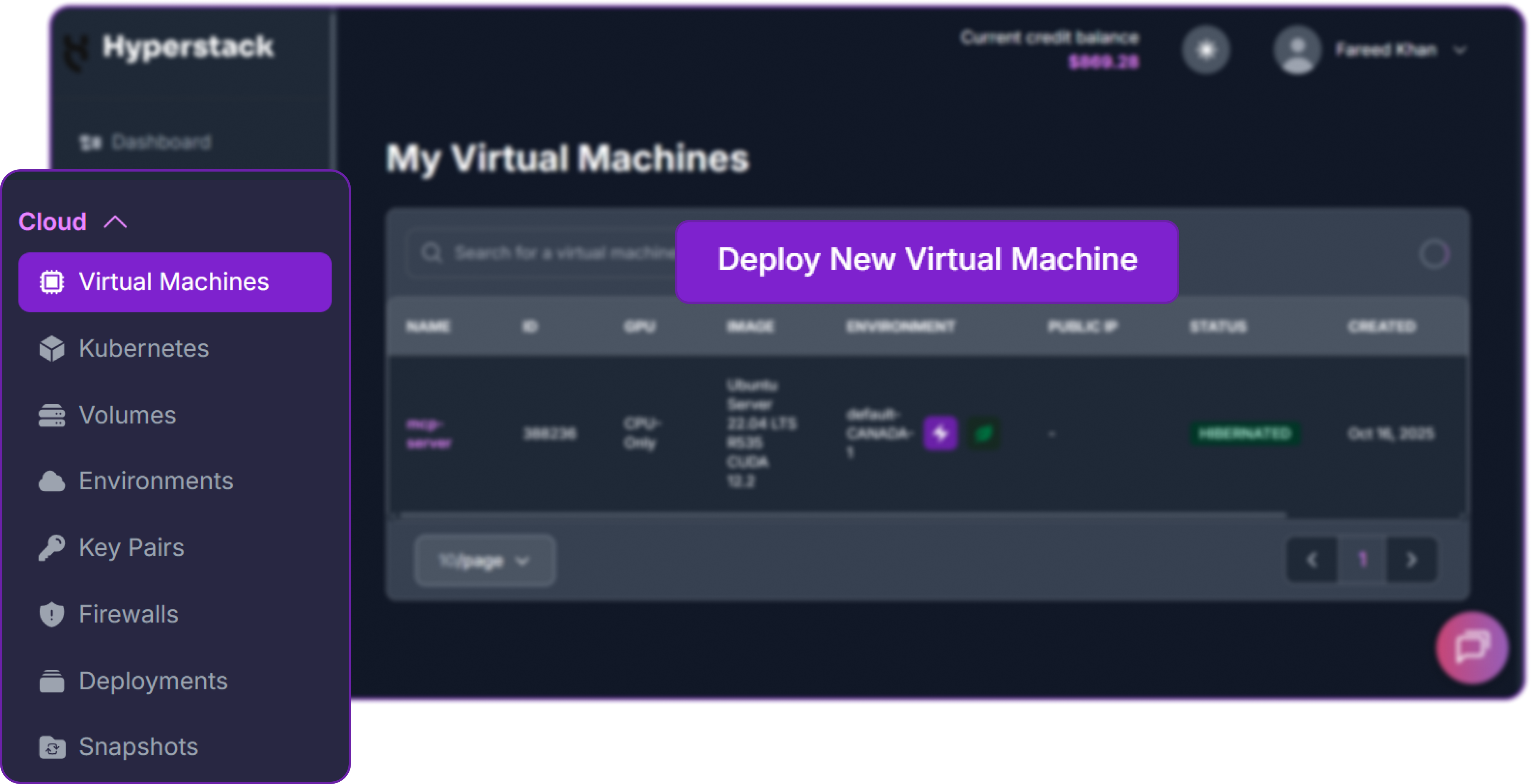
The button sits above the virtual machine list, under Cloud then Virtual Machines.
- Select Hardware Configuration: Choose a 4x NVIDIA H100 80GB PCIe flavour, listed in the flavour reference as
n3-H100x4. Our run used the Spot variant,n3-H100x4-spot, at $2.00 per GPU per hour, which is $8.00 per hour for the node. The flavour also carries 124 vCPUs, 720 GB of RAM and a 3.2 TB ephemeral disk, all three of which this deployment uses.
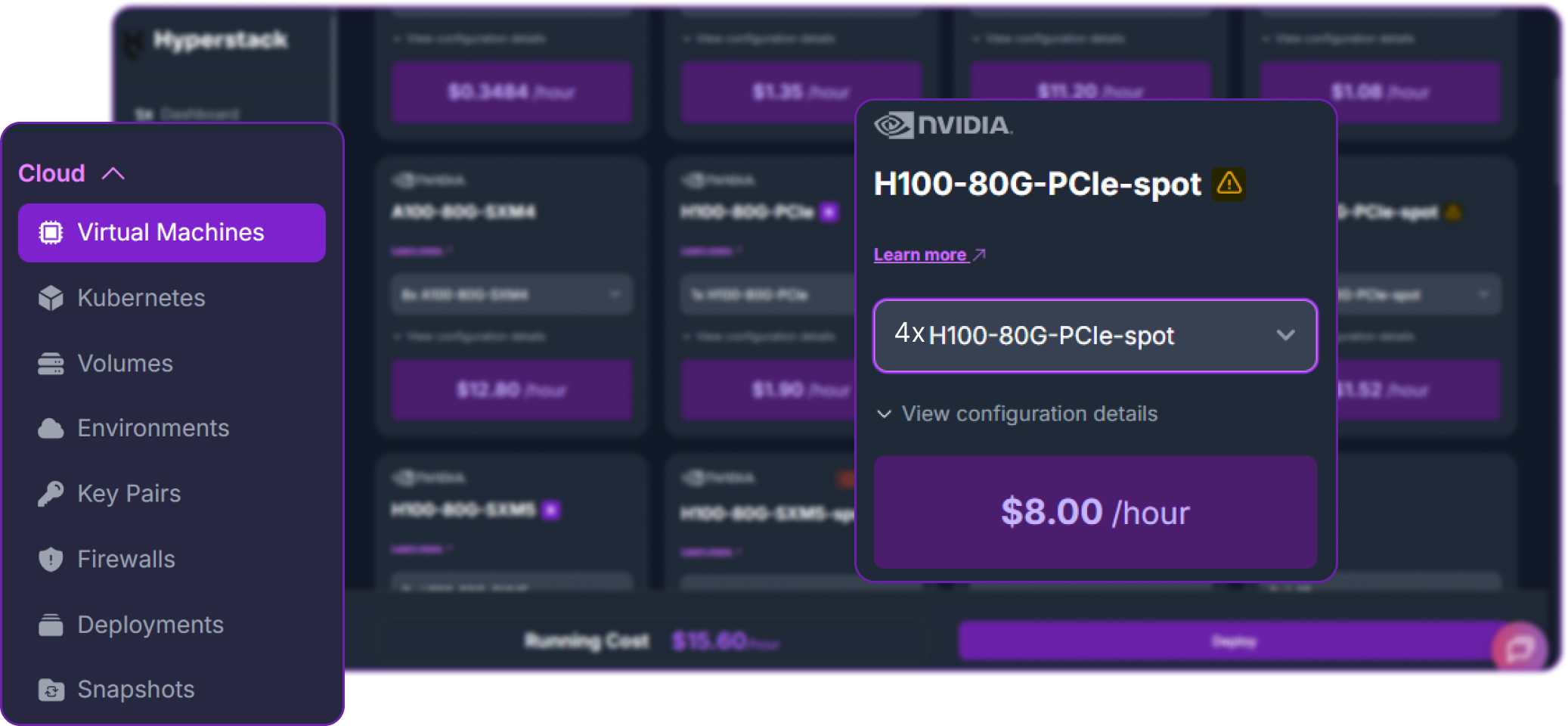
Choose the NVIDIA H100-80G-PCIe card, then set the count to 4x in its dropdown.
- Choose the Operating System: Select the "Ubuntu Server 24.04 LTS R570 CUDA 12.8 with Docker" image. The driver line has to match what the SGLang container expects, and this image also ships Docker and the NVIDIA container runtime ready to use, so there is no driver work at all.
- Environment: Choose an environment carrying NVIDIA H100 stock. Our run used
CANADA-1. - Select a Keypair: Choose an existing SSH keypair, or import one now. You will need it in step 4.
- Network Configuration: Assign a Public IP so you can reach the machine over SSH.
- Enable Ephemeral Storage: Make sure the ephemeral disk is attached. The checkpoints are 196 GB and the root disk is 96 GB, so this is not optional here.
- Review and Deploy: Check the settings and click "Deploy". The machine reaches ACTIVE in a couple of minutes.
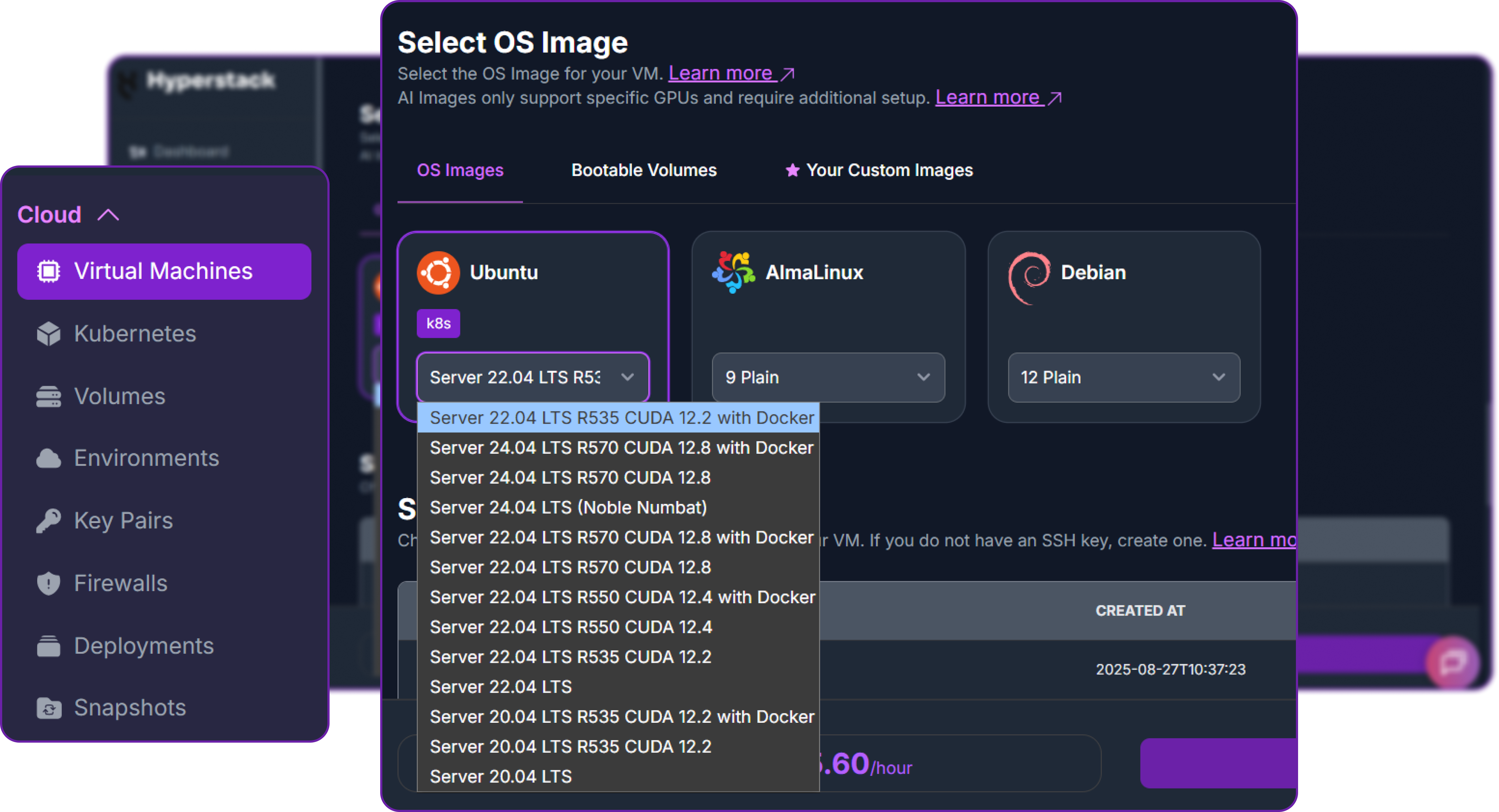
Open the Ubuntu dropdown and take the R570 CUDA 12.8 with Docker build.
Spot capacity suits this workload well, with one condition. Spot VMs run on surplus capacity at a lower rate and can be reclaimed when that capacity is needed, so treat the node as disposable and copy each clip off as it finishes. For a generation run like this one it turns a $10.00 per hour node into an $8.00 per hour node.
Step 3: Configure the Firewall
This deployment needs one inbound rule, and one port deliberately left shut. Add the first under firewall rules on the virtual machine:
| Port | Source | Why |
|---|---|---|
| 22 | your public IP /32 | SSH access to the node |
| 30010 | closed | The inference API. Leave it shut and drive it from the node itself |
Port 30010 stays closed deliberately. Every generation here runs from a script on the node, because reference images and clips are passed as file:// URIs that only resolve inside the server container. Driving the endpoint remotely would put those references out of reach and expose an unauthenticated API at the same time. If you do need it from your own machine, forward it over the SSH session you already have rather than opening a port:
The inference endpoint has no authentication. Anything that reaches port 30010 can spend your GPU hours four minutes at a time. Keep it bound to the node, and never open it to 0.0.0.0/0.
Step 4: Accessing Your Node
Once the virtual machine is running, copy its Public IP from the dashboard and connect.
Confirm the two things this deployment depends on: four NVIDIA H100 cards, and a large disk mounted at /ephemeral.
The disk line is what shapes the rest of the guide. The machine has two disks and only one of them matters here: the root filesystem is roughly 96 GB, while the NVMe disk is mounted separately at /ephemeral and offers around 3.2 TB on this flavour. It is documented under ephemeral storage. The two checkpoint partitions are 196 GB together and the container image adds more on top, so the model cache has to live on the big disk.
Step 5: Prepare the Disks and Pull the Checkpoints
This script does four things: creates the working directories on /ephemeral, installs ffmpeg and jq, and then starts the container image pull and the 196 GB weight download at the same time rather than one after the other.
The download is the long pole. With hf_transfer enabled and sixteen workers it is bounded by the network rather than the disk. Check it landed before you launch anything.
Scope the download. The repository carries the original checkpoint and the diffusers format alongside each other. SGLang and vLLM both want the original layout, so restricting allow_patterns to model_index.json, FL2VA/* and Ref2VA/* is the difference between 196 GB and considerably more. If you only intend to run text-to-video and frame conditioning, drop Ref2VA/* and halve it again.
Step 6: Confirm the GPU Topology
Check the fabric before you serve. It takes one second, and it decides two environment variables in the next step.
If every pair reads PHB and can_device_access_peer reports False, as on ours, keep NCCL_P2P_DISABLE=1 and NCCL_CUMEM_ENABLE=0 in the launch below. If you see NV12 and True, you are on an NVLink flavour and can leave both out. The section above explains the difference.
Step 7: Launch MiniMax H3
The base SGLang image does not ship the diffusion extra, so it is installed from the bundled source at container start, which is exactly what the cookbook Docker form does. The two environment variables from step 6 go on the docker run line, and /ephemeral/media is mounted read-only so that file conditioning resolves later without any upload step.
Three flags shape what the server does. --model-variant fl2va serves both t2va and fl2va from one checkpoint partition, so nine of our eleven clips came from a single server. ref2va is a separate partition and needs a restart, which took about seven minutes including the diffusion extra install. --performance-mode speed deliberately keeps the DiT eager: the cookbook does not recommend torch.compile here because it changes numerical output for a negligible gain.
Step 8: Verify the Deployment
Confirm the pipeline end to end before committing four minutes to a full generation. Eight steps at four seconds is enough to exercise every stage.
Two codecs, one file, 32000 Hz, two channels, back in 16.1 seconds. The 107 frames matter too: H3 quantises duration to a legal frame count, so a request for four seconds becomes 4.46 seconds.
Driving the Asynchronous Video Endpoint
H3 does not stream. A generation takes minutes, so SGLang exposes it as an OpenAI-shaped asynchronous job: submit, poll, then fetch the bytes. Three endpoints cover the whole surface.
| Call | Returns | Notes |
|---|---|---|
POST /v1/videos |
{ "id": ... } |
Accepts the prompt, the task, the target geometry and the sampler settings |
GET /v1/videos/{id} |
{ "status": ... } |
Poll every few seconds until the status reaches completed |
GET /v1/videos/{id}/content |
The MP4 itself | One file, with the video and the audio already muxed together |
The request body carries the decisions that shape the output. This is the exact shape we sent for every text-to-video clip.
| Field | Value we used | What it controls |
|---|---|---|
task |
t2va, fl2va, ref2va |
Which conditioning path runs. The server has to be serving the matching partition |
target.short_edge |
768 |
The only self-hosted option. 2K needs H3-Regenerate-2K, which is not open |
target.aspect_ratio |
21:9 to 1:1 |
Sets the long edge from the short edge, and therefore the sequence length |
num_inference_steps |
50 |
The reference accuracy setting. This is the single biggest lever on wall clock |
flow_shift |
12.0 |
Video sampler shift, at the value the vLLM recipe gives as reference |
audio_flow_shift |
3.0 |
The audio stream gets its own shift, and it is not the same number |
seed |
One per clip | Fixed per clip, so a prompt edit can be attributed to the prompt |
Conditioning is passed as a list. An empty list is text-to-video; an image with the keyframe role and frame_index: 0 anchors the first frame; a video or an image with the reference role drives Ref2VA. Every URI is a file:// path resolved inside the server container, which is why the media directory is bind mounted read-only at /data/minimax-h3.
The client is straightforward: submit, poll on a four second interval, download, then probe the result with ffprobe and write a JSON record holding the exact request, the job id, the wall clock and the measured media properties. Those records are where every timing and every media property quoted here comes from.
Probe every file as it lands. A generation that returns HTTP 200 has still told you nothing about whether the audio stream is present, stereo, or at the right sample rate. One ffprobe call per clip turns the whole run into evidence, and it costs nothing next to the four minutes that produced the file.
Prompting Is the Entire Quality Lever
Because H3-Context-IR is not part of the open release, nothing sits between what you type and what the transformer reads, so a vague prompt stays vague. MiniMax anticipated this and published the specification its own service writes to, as a set of prompt-writing skills in the MiniMax-H3 repository. Writing to that specification is not a style preference, it is the deployment.
The specification has two shapes. Text-to-video and frame conditioning take exactly three sections. Reference conditioning takes exactly six.
| Task | Sections, in this order | What to keep in mind |
|---|---|---|
| T2VA and FL2VA | integrated_multimodal_description, overall_soundscape, non_diegetic_music |
The soundscape is one to four sentences, the music one to three. FL2VA must open with the first-frame anchor sentence before anything else |
| Ref2VA | subject_definitions, summary, retention_analysis, detailed_description, overall_soundscape, non_diegetic_music |
Every reference gets a label such as <Video 1> or <Picture 1>, and every label needs a retention marker |
The four rules that carry the most weight
- Sound is a first-class section, not an afterthought. Splitting diegetic sound from non-diegetic music is what lets the model place a bell motif in the score and a fabric rustle in the room at the same time.
- Camera motion has a canonical phrasing: motion type, then amplitude, then speed. "The camera performs a tracking shot forward with medium amplitude at slow speed" is understood. "Slow dolly in" is a guess.
- First-frame conditioning has a mandatory opening sentence. "For the target video, at 0.00 seconds into the target video, <Picture 1> (from [Shot 1]) is fully referenced." Without it the supplied frame is treated as loose inspiration rather than as frame zero.
- Dialogue is tagged, and speakers are stable. The speaker is described outside the tag and the words go inside it with a language label, so the same identifier keeps the same voice across the clip.
Writing a brand palette into the pixels
Every clip here is in the Hyperstack palette, and none of it was colour graded afterwards. The palette was written into every prompt in natural language, so H3 rendered those colours directly. Hex codes mean nothing to a video model. Colour names do.
| Brand token | Colour | What the prompt says |
|---|---|---|
| Primary purple | #9233e9 |
"electric violet" |
| Secondary indigo | #534ab7 |
"deep royal indigo" |
| Deep purple | #7c2bd0 |
"rich amethyst" |
| Bright accent | #bc3ae9 |
"luminous orchid" |
| Gradient | 135deg |
"a smooth 135-degree gradient running from electric violet at the upper left to deep royal indigo at the lower right" |
| Light tints | #f3eaff |
"pale lilac-white bloom" |
The clause that does the most work is the negative one. Every prompt ends its visual section with the same sentence: a strict colour palette of electric violet, deep royal indigo and rich amethyst, with luminous orchid highlights and pale lilac-white bloom; no warm oranges, no greens and no reds anywhere in frame. Stating what must not appear is what holds the palette steady across eleven independent generations with eleven different seeds.
Abstract scenes only. MiniMax publishes a brand-promotion skill alongside the prompt-writing one, and it prohibits drawing logos, wordmarks and product interfaces. Everything here is motion, atmosphere and conceptual imagery, which is the correct way to generate brand material with a video model in any case: an approximated logo is worse than no logo.
Confirming the structure before you spend GPU time on it
The specification is easy to hold to once it is encoded. Two small helpers build the prompts in the official order, and a block of assertions checks every one of them at import, so the structure is confirmed in a second rather than inferred from the finished video four minutes later.
This is the cheapest quality control in the whole pipeline. On a node costing $8.00 per hour, confirming the structure at import rather than after generation is worth roughly sixty cents of GPU time each time it runs.
Eleven Clips Across Three Task Modes
Every reference image and every reference clip used below came out of this same run. Nothing here is stock footage. After the seven text-to-video clips finished, we pulled one frame out of four of them at roughly forty per cent in, past the opening ramp where the composition has settled, and used those frames to drive the conditioned modes.
The chain: text to video, video to frame, frame back to video
Reference material generated by the same model on the same node, so it is photographic, already in palette, and free of any third-party licensing question.
The frame extraction step is a single ffmpeg call per clip, run on the node.
Text to video and audio
Seven clips, no conditioning of any kind, straight from the three-section prompt. Each one has sound generated in the same pass as the picture, so unmute them.
Liquid gradient silk
A sheet of weightless silk carrying the 135-degree brand gradient, folding in slow motion against near-black. The soundtrack is a fabric swell with a soft bell motif over a sustained pad.
GPU data-centre aisle
A forward tracking shot with medium amplitude at slow speed down a symmetrical aisle. The volumetric haze and the reflected floor came from the prompt, not from a render pass.
Data visualisation materialising
An arc shot around glass bar-chart columns that grow in sequence. This clip later became the style reference for clip 11.
Violet aurora over dark peaks
The widest geometry in the set at 21:9 and eight seconds, which makes it the most expensive clip we generated. Note the aurora reflected in the lake, which no part of the prompt describes twice.
Violet ink bloom, macro
Square, five seconds, and the cheapest clip in the set at 104.1 seconds. Fewer pixels and fewer frames mean a shorter sequence, and the denoising loop scales with it directly.
Refracting glass prisms
An arc shot with medium amplitude at slow speed around three prisms, with caustics thrown across the floor. The audio is glassy interface tones rather than music.
Speech, lip sync and a generated voice
The same three-section prompt, with one dialogue line tagged in the official form. H3 produced the speech, the lip movement and the voice timbre together with the picture, in the same pass, on the same 50 steps. Nothing here was dubbed.
A studio presenter delivering one tagged line. The voice, the lip sync and the rim lighting are all model output from a single prompt.
This clip cost 276.2 seconds against 272.2 for the three silent 16:9 clips of the same geometry. Adding speech, lip sync and a voice to a generation added four seconds, or about 1.5 per cent. The audio stream is cheap next to the video stream it is synchronised with.
First frame to video and audio
Both clips below start from a PNG pulled out of the text-to-video output above, passed as a keyframe condition at frame_index: 0, with the mandatory anchor sentence at the top of the prompt. The task is continuation: hold the composition, keep the motion going.
The hero clip continues from its own frame
Conditioned on a frame taken 40 per cent into clip 01. The gradient keeps sliding and the folds keep forming from exactly where the reference left them.
The aurora continues from its own frame
Conditioned on a frame from clip 04, at 21:9. The peaks hold as a static silhouette while the curtains keep moving, which is what the prompt asked for explicitly.
Reference to video and audio
Ref2VA is the most capable mode and the most expensive one. It is also a separate checkpoint partition, so the server has to be restarted with --model-variant ref2va before either of these will run. The prompt shape changes completely: six sections, labelled references, and a retention marker on every label saying how much of it should survive.
Video to video: clip 02, restyled
The data-centre aisle from clip 02 as a reference video, restyled into glowing monoliths. The forward camera motion and the aisle symmetry are preserved, the surfaces and the light are not.
The retention markers are doing the work here. <Video 1> is marked partially_preserved, which keeps the motion and the pacing. <Subject 1>, the racks, is marked attribute_transfer, which keeps their position and rhythm along the aisle while changing what they are made of. The markers are the dial: fully_preserved holds a reference exactly, weak_reference keeps only its atmosphere, and the two in between set how much of it carries across.
Image reference: a style carried onto a new subject
A frame from clip 03 supplied as a style reference only, marked weak_reference. The bar-chart geometry does not appear: the glass material, the colour system and the particle atmosphere carry across to a network graph instead.
weak_reference is the marker that makes this work. It tells the model to take the material treatment, the lighting and the colour system, and to leave the subject behind. The same image marked fully_preserved would have produced bar charts again.
Verifying all eleven
One loop over the output directory confirms what every file contains.
Every file is H.264 and AAC, at 24 frames per second, 32000 Hz, two channels. Look at that column of frame counts: 158, 192 and 124 are all of the form 17n + 5, which is exactly the frame quantisation the vLLM recipe documents. A request for six seconds becomes 158 frames, which is 6.58 seconds, and the extra 0.58 seconds is the model rounding up to the nearest legal length.
Where the Generation Time Goes
Eleven clips, 3,090.1 seconds of generation, 65.3 seconds of finished video. That is about 47 seconds of four-GPU wall clock for every second you end up with. The server log shows exactly where that time goes.
Where a generation spends its time
Two Ref2VA jobs on the same server, minutes apart. Encoding, latent preparation and VAE decoding barely register against the denoising loop.
Stage timings copied from the SGLang server log. Both jobs ran 50 inference steps at 1344x768.
Denoising is 98.6 per cent of server-side time in both jobs. Everything else together is under nine seconds. That leaves two settings worth tuning: the number of inference steps, and the length of the sequence being denoised. Nothing else moves the needle.
The two jobs also differ by exactly one thing, and it shows. The video-reference job ran at 11.75 seconds per step; the image-reference job, at the same resolution and the same step count, ran at 6.08. A reference video is decoded, encoded and then carried in the attention sequence for every one of the 50 steps, so it nearly doubles the per-step cost. It also lifts peak memory from 46,020 MB to 54,888 MB.
Sequence length is the price, not resolution
Two of the clips isolate frame count directly. A 1344x768 frame and a 1536x672 frame contain exactly the same 1,032,192 pixels, so the only difference between clip 01 and clip 04 is the frame count: 158 against 192. Twenty-two per cent more frames cost thirty-one per cent more time.
Generation time against the size of the output
Four text-to-video clips, all at 50 steps. The bars are measured wall clock. The line is the same numbers divided by the megapixel-seconds of finished video, and it climbs.
Every figure measured on 4x NVIDIA H100 80GB PCIe. Megapixel-seconds is width x height x duration, which tracks the visual token count the transformer has to attend over.
If cost were linear in sequence length that line would be flat. It climbs from 34.1 to 43.1 seconds per megapixel-second instead, because this release ships inference with full attention only: the initial open source drop is full attention, and the sparse attention implementation MiniMax trained with is published separately at a later date. Until it lands, doubling the length of a clip costs more than twice as much.
What each task mode costs
The four clips below are the cleanest comparison in the run: identical geometry at 1344x768, identical duration at 5.17 seconds, identical 50 steps. Only the conditioning path changes.
The same clip length through four different conditioning paths
Frame conditioning is nearly free. An image reference costs half as much again. A reference video triples it.
Clips 07, 08, 11 and 10 respectively, all at 1344x768 and 5.17 seconds with 50 inference steps.
| Task | Conditioning | Generation | Against text to video |
|---|---|---|---|
t2va |
None | 200.1 s | baseline |
fl2va |
One PNG at frame zero | 212.2 s | +6 per cent |
ref2va |
One reference image | 312.2 s | +56 per cent |
ref2va |
One reference video | 600.4 s | 3.0x |
Budget reference video carefully. Ref2VA accepts up to three clips totalling fifteen seconds. Our single five second reference already tripled the cost of the generation. Plan a Ref2VA batch around that multiplier rather than around the text-to-video numbers, and keep reference clips as short as the shot allows.
How four NVIDIA H100 GPUs compare
The vLLM recipe publishes measured end-to-end figures for the same model on other four-GPU configurations. Normalising all of them to megapixel-seconds of finished video makes them roughly comparable, with the caveat that the NVIDIA B300 figure is a first-frame job at 1248x768 while the other two are text to video at 1344x768.
Four GPUs, three generations of hardware
Lower is faster. This is wall clock divided by the megapixel-seconds of video produced, so clips of different lengths can sit on the same axis.
NVIDIA B300 and AMD Instinct MI300X figures from the official vLLM recipe. The NVIDIA H100 figure is our own, on the SGLang path at 50 steps.
NVIDIA H100 is roughly four times the wall clock of NVIDIA B300 on this workload, which is what you would expect from a diffusion transformer that is almost entirely attention and feed-forward compute in BF16. It is also a good deal cheaper per GPU hour, at $2.00 on Spot against $7.40 for NVIDIA B300 on demand, so the cost per finished clip is much closer than the latency suggests. If you want faster iteration on NVIDIA H100 rather than faster hardware, the lever is step count: there is a community Turbo LoRA that distils first-and-last-frame generation down to four steps instead of fifty, with a distillation recipe behind it. We ran the full 50-step path throughout, on the released weights as published.
What the Run Cost
Four NVIDIA H100 80GB PCIe cards on Spot are $2.00 per GPU per hour, so the node runs at $8.00 per hour, or 0.22 cents per second. That makes the cost of every clip a simple multiplication.
What each clip cost to generate
Generation time multiplied by $8.00 per hour. This is GPU time only, and excludes the download and the two server starts.
Rates from the Hyperstack GPU pricing page at the time of the run. Spot capacity can be reclaimed, so a long batch should checkpoint its results to somewhere other than the node.
The session as a whole is a different number, because the 196 GB download and two server starts are on the clock as well. End to end, from an empty node to eleven verified clips, took about two hours.
| Phase | Wall clock | Node cost |
|---|---|---|
| Deploy the node from the dashboard and prepare the disks | about 3 min | $0.40 |
| Pull the container image and 196 GB of weights | about 48 min | $6.40 |
| Start the server, twice, once per checkpoint partition | about 14 min | $1.87 |
| Generate eleven clips, measured | 51.5 min | $6.87 |
| Total, end to end | about 2 hours | about $16 |
The download is the single largest line, and it is the one that does not get cheaper on faster GPUs. Everything after it is minutes, which means the marginal cost of another clip is measured in cents once the node is warm.
Copy each clip off as it lands. The ephemeral disk is runtime storage that lives with the virtual machine, so treat /ephemeral/out as a working directory and pull finished clips down with scp as you go. It also keeps the review loop tight, because you can watch clip 03 while clip 04 is still generating.
Why Deploy MiniMax H3 on Hyperstack?
Hyperstack is a cloud platform built for AI and machine learning workloads. Here is why it suits a generative video model specifically:
H3 needs about 135 GiB resident for one task partition, which is four cards, and it needs them on one machine. The NVIDIA H100 80GB PCIe flavour gives exactly that, with 124 vCPUs and 720 GB of RAM behind it for the decode path.
Two checkpoint partitions and a container image do not fit on a 96 GB root disk. The ephemeral NVMe disk at
/ephemeral took the 196 GB download, the media directory and every generated MP4 with room to spare.The Ubuntu 24.04 R570 CUDA 12.8 with Docker image ships the driver and the container runtime already matched to the SGLang image, so the deployment goes from
ssh to docker run with no driver work at all.Spot VMs put this node at $8.00 per hour, and billing is per minute of runtime. A full evaluation run of a video model costs less than a working lunch.
This deployment runs on the PCIe flavour, with NCCL configured to match it. When peer-to-peer matters, NVIDIA H100 SXM and the NVLink flavours are one
flavor_name away, with no other change to the launch command.Video diffusion rewards newer silicon more than language models do. NVIDIA H200 SXM at 141 GB per card and NVIDIA Blackwell reservations take the same launch command onto hardware where the same clip takes a quarter of the time.

FAQs
What hardware do you need to run MiniMax H3?
One task partition is about 135 GiB in BF16, so four GPUs of 80 GB is the practical floor. We ran it on 4x NVIDIA H100 80GB PCIe on a single Hyperstack node, peaking at 46.0 to 54.9 GB per GPU with tensor parallel 4 and Ulysses degree 1.
Can you get 2K video out of the open MiniMax H3 weights?
No. 2K comes from H3-Regenerate-2K, which is not part of the open release, so a self-hosted deployment produces a 768 pixel short edge. Every published aspect ratio from 21:9 to 9:16 works, and sets the long edge from there.
How long does MiniMax H3 take to generate a video on NVIDIA H100?
On 4x NVIDIA H100 80GB at 50 inference steps we measured 104.1 seconds for a five second square clip, 272.2 seconds for six seconds at 1344x768, and 600.4 seconds with a reference video. Denoising is 98.6 per cent of that.
How much does it cost to run MiniMax H3 on Hyperstack?
The 4x NVIDIA H100 80GB PCIe Spot node is $8.00 per hour, or 0.22 cents per second. The eleven clips cost $6.87 of GPU time between them, and the whole session including the 196 GB download came to about $16.
How do you write a MiniMax H3 prompt without H3-Context-IR?
Follow the prompt-writing skill in the model repository. Text-to-video and frame conditioning take exactly three sections in order: integrated_multimodal_description, overall_soundscape and non_diegetic_music. Reference conditioning takes six, and every labelled reference needs a retention marker.
Subscribe to Hyperstack!
Enter your email to get updates to your inbox every week