


.png)
TABLE OF CONTENTS
NVIDIA H100 SXM GPUs On-Demand
Key Takeaways
- DeepSeek-V4.1-Flash-1017 is a multimodal mixture-of-experts model with 552B backbone parameters, 8B active per prompt token and 16B per generated token, and a 1,048,576-token context.
- Its global KV cache is 890 bytes per token, so a full one-million-token prompt needs under 1 GB of global KV.
- A DeepSeek-V4.1-Flash deployment fits on one 8x NVIDIA H100 machine once the Engram tables and their scales, about 189 GiB, move to pinned host memory, leaving about 36 GiB of resident weights on each card.
- vLLM 0.31.0 serves it with tensor parallel 8, a 4,096-token batch budget and 0.92 memory utilisation, the NVIDIA H100 configuration from the vLLM recipe.
- The endpoint serves thinking with a 1 to 100 effort setting, OpenAI-format tool calls and image input, and Claude Code can drive it directly.
- The whole deployment runs on one machine at $20.80 per hour on demand, or from $14.56 per hour reserved, billed per minute.
DeepSeek-V4.1-Flash-1017 is an updated release of DeepSeek-V4.1-Flash, a multimodal mixture-of-experts model with 552 billion backbone parameters that reads text and images, writes text and holds up to 1,048,576 tokens of context. Only 8 billion parameters are active for each prompt token and 16 billion for each generated token. The whole checkpoint is 510 GB, and once its Engram memory moves to host RAM, a DeepSeek-V4.1-Flash deployment fits on one node of eight 80 GB GPUs.
This guide deploys it on a single Hyperstack virtual machine with 8x NVIDIA H100-80G-PCIe-NVLink GPUs, using vLLM 0.31.0 and the NVIDIA H100 configuration from the vLLM recipe for DeepSeek-V4.1-Flash: tensor parallel 8, the Engram tables in pinned host memory, a 4,096-token batch budget and the full one-million-token context. The result is a private, OpenAI-compatible endpoint with thinking, a reasoning effort setting from 1 to 100, tool calling and image input, ready for an agent harness such as Claude Code.
Most of what lets the model fit on one machine comes from its design rather than from tuning. DeepSeek puts its global KV cache at 890 bytes per token, about a quarter of DeepSeek-V4-Flash's, and 196 billion of its parameters are Engram lookup tables that are read rather than computed, so they can sit in host memory. If you have followed our DeepSeek-V4-Pro multi-node Kubernetes guide, this is the opposite shape: one virtual machine, no cluster and no orchestration layer.
Inside DeepSeek-V4.1-Flash: 552B Parameters, 8B Active in Prefill
DeepSeek titles the release Pushing the Limits of KV Cache Compression, and almost every component serves that aim.
DeepSeek-V4.1-Flash-1017 at a glance
Six numbers that shape the deployment.
Sources: the DeepSeek-V4.1-Flash-1017 and DeepSeek-V4.1-Flash model cards, the technical report, config.json and the 1017 repository file list.
The 1017 Weights: Same Architecture, Stronger Scores
DeepSeek describes DeepSeek-V4.1-Flash-1017 as a minor update to the launch release. The vLLM recipe records that its config.json, tokenizer files and prompt encoding match the launch repository byte for byte, and that the index holds the same 96,085 tensors, so only the weights change and one command serves either checkpoint.
The gains are broad. Terminal-Bench 4.0 rises from 31.2 to 42.3 and HLE without tools from 36.8 to 42.6, and DeepSeek reports shorter outputs and task execution times.
From the launch weights to 1017
Every benchmark on the 1017 model card moves up. Rows are sorted by the size of the gain; the hollow dot is the launch checkpoint, the filled dot the 1017 weights.
Source: the DeepSeek-V4.1-Flash-1017 model card. Terminal-Bench 4.0 uses the Claude Code harness and DeepSWE v1.1 the Mini-SWE-V2 harness, as the card states.
A Causal Encoder-Decoder That Nearly Halves Prefill
The 40 transformer layers are split into a 20-layer causal encoder and a 20-layer decoder. In a decoder-only model, every layer derives its keys and values from its own hidden states, so every prompt token must run through all 40 layers. Here the decoder global KV cache is projected from the final encoder hidden state instead, which lets most prompt tokens stop at the end of the encoder.
According to the technical report, this nearly halves prefill computation, and it is where the 8 billion and 16 billion figures come from: a prompt token runs the encoder, a generated token runs both halves. DeepSeek designed the split for agentic work, which the report describes as increasingly input-heavy, with frequent tool calls generating long prefills.
How far a token travels
Most prompt tokens stop at the encoder. Generated tokens run all 40 layers.
Drawn from section 2.2 of the technical report. The decoder still keeps a 128-token sliding window, so the last 128 prompt tokens also pass through it, a step DeepSeek calls Decoder SWA Bounded Replay.
Compressed Sparse Attention 2: Forty Layers, Four Global Caches
From layer 2 onwards, every layer combines a 128-token sliding window with a sparse view of the global context further back; layers 0 and 1 use the sliding window alone. Compressed Sparse Attention 2, or CSA2, decides where that global context comes from by giving each of those 38 layers one of three static modes:
- Full layers compute their own global KV, score it with a lightweight indexer and keep the top 512 entries for each query.
- Reindex layers reuse the global KV of the latest Full layer, but score it with their own indexer query and pick a fresh top 512.
- Reuse layers take both the KV and the top 512 selection from an earlier layer and run attention directly.
Only four of the 40 layers compute a global cache at all: layers 2, 8, 14 and 20. The encoder stores one global entry for every two tokens, while the decoder keeps one per token. In the decoder, layer 20 also builds a candidate pool of 2,048 blocks of eight positions, and the four Reindex layers search only those 16,384 candidates, so their cost per query stays constant however long the context grows.
Forty layers, four global caches
Each square is one layer, coloured by how it obtains its global context.
Layer modes from section 4.2.1 of the technical report and the kv_source_layer_ids, index_source_layer_ids and compress_ratios fields in config.json.
890 Bytes of Global KV per Token
The saving has two sources. One is sharing caches across layers; the other is precision: DeepSeek trains the main KV cache to be stored in FP4, as E2M1 values with one E4M3 scale per 16 channels, while the sliding-window cache stays in FP8. Together they put the global KV footprint at 890 bytes per token, 3.9 times smaller than DeepSeek-V4-Flash, the model in our DeepSeek-V4 deployment guide, and 437 times smaller than DeepSeek-V1.
Global KV cache per token across DeepSeek generations
Bytes per token on a logarithmic scale. Each generation cuts the footprint by a large factor.
Source: Figure 1(b) of the DeepSeek-V4.1-Flash technical report.
For a broader view of where KV cache memory goes and how serving engines manage it, our guide to optimising the KV cache covers the techniques this design builds on.
Engram: 196B Parameters That Are Looked Up, Not Computed
Engram is the module that makes the memory plan work. At layers 1 and 14, the last two, three and four tokens at each position are hashed into two tables of roughly 384 million rows each, and the retrieved rows are gated into the residual stream. A mixture of experts adds capacity through conditional computation; Engram adds it through conditional memory, which the vLLM documentation describes as parameters that are never computed over, only looked up. The two tables hold 196.6 billion parameters, 183.1 GiB in FP8 or about 189 GiB with their block scales, more than a third of the checkpoint.
Because the lookup indices depend only on the input tokens, they are known before the forward pass reaches the layer. vLLM uses that to keep the tables in pinned host memory and read them over unified virtual addressing (UVA), prefetching on a side CUDA stream so the transfer overlaps the computation of the earlier layers. The GPU memory this frees goes to the KV cache.
Where an Engram lookup runs
Hashing and gating happen on the GPU. The tables stay in host memory, and only the rows a token needs cross the PCIe link.
Mechanism from the Engram page of the vLLM documentation and section 2.4.2 of the technical report. Table sizes from config.json: 384,006,168 and 384,016,682 rows.
DSpark: Five Draft Tokens per Round
DeepSeek-V4.1-Flash drops the multi-token prediction module of earlier DeepSeek models in favour of DSpark, a speculative decoding module trained after pre-training. Three transformer blocks, each with 128 routed experts and 3 active, attend over a 128-token window and compute draft logits for five positions in one pass. A Markov head models the dependencies between those drafts, and a confidence head predicts how likely each position is to be accepted.
The recipe keeps DSpark opt-in, behind one speculative decoding flag, and counts the drafter's experts, roughly 14B parameters, as an addition to the load when it is on. On NVIDIA GPUs, the same flag turns on adaptive verification, which vLLM leaves off by default. It uses the confidence head's predictions to decide how many drafts to check for each request, within a compute budget profiled at start-up.
How DSpark drafts
One pass drafts five tokens. The chance that a draft survives falls with each position, because every draft before it must be accepted too, and the scheduler chooses where to stop checking.
From section 2.4.3 of the technical report, the speculative decoding notes in the vLLM recipe and vLLM's adaptive verification page.
What the Published Scores Say
On the 1017 model card, DeepSeek-V4.1-Flash-1017 leads the other open models listed on every benchmark except HLE without tools, where Kimi K3 is 0.9 points ahead; our Kimi K3 deployment guide serves that model on 32 NVIDIA H100 GPUs. Against the closed models the picture is mixed: Opus 5 leads on six benchmarks and GPT-5.6 Sol on ZeroBench, while DeepSeek-V4.1-Flash-1017 leads on DeepSWE v1.1, Automation-Bench, Agents' Last Exam and Apex Bench.
DeepSeek-V4.1-Flash-1017 against open and closed models
Shading ranks each row: the deepest purple marks the leader on that benchmark.
| Benchmark | DeepSeek 1017 | Kimi K3 | GLM-5.3 | GPT-5.6 Sol | Opus 5 |
|---|---|---|---|---|---|
| HLE w/o tools † | 42.6 | 43.5 | 42.0 | 44.5 | 56.3 |
| Terminal-Bench 4.0 | 42.3 | 12.6 | 37.9 | 39.9 | 51.8 |
| DeepSWE v1.1 | 77.0 | 67.5 | 66.9 | 73.0 | 74.0 |
| ProgramBench | 29.1 | 17.5 | 19.0 | 23.0 | 37.0 |
| NL2Repo-Bench | 68.2 | 58.0 | 58.0 | 56.8 | 75.3 |
| Automation-Bench | 60.5 | 46.7 | 48.8 | 45.8 | 50.3 |
| Agents' Last Exam | 35.4 | 27.6 | 28.5 | 26.7 | 28.6 |
| Apex Bench v1.1 | 72.1 | 47.8 | 56.6 | 54.3 | 65.8 |
| Chartography, tools | 83.0 | 68.1 | n/a | 79.9 | 84.0 |
| BabyVision, tools | 92.5 | 85.7 | n/a | 88.9 | 94.1 |
| ZeroBench, tools | 51.0 | 41.0 | n/a | 53.0 | 52.0 |
Source: the DeepSeek-V4.1-Flash-1017 model card. n/a marks a score the card does not publish. † The GLM-5.3 HLE figure is for the text-only subset.
The DeepSeek-V4.1-Flash Deployment Architecture on 8 NVIDIA H100 GPUs
The checkpoint is 510.3 GB across 48 safetensors shards, and each NVIDIA H100 PCIe card reports 81,559 MiB of memory. The vLLM recipe calls eight 80 GB cards the smallest NVIDIA node that serves this checkpoint, and only with a set of memory settings. Those settings define the DeepSeek-V4.1-Flash deployment architecture, and the largest of them moves the Engram tables off the GPUs.
What is inside the 1017 checkpoint
Five components, and where each one lives once the server is running.
| Component | Parameters | Stored | Lives in |
|---|---|---|---|
| Routed and DSpark experts, MXFP4 | 557.2B | 259.5 GiB | GPU memory, across the 8 cards |
| Engram tables, FP8 | 196.6B | 183.1 GiB | Pinned host memory |
| Attention, dense projections and routers, FP8 | 7.4B | 6.9 GiB | GPU memory, across the 8 cards |
| Embedding and LM head in BF16, norms in FP32 | 2.0B | 3.9 GiB | GPU memory, across the 8 cards |
| UE8M0 block scales | 23.6B | 21.9 GiB | Beside the weights they scale |
| Total | 475.3 GiB | 510.3 GB on disk |
Component sizes from the memory table in the vLLM recipe. DeepSeek's 552B backbone figure covers the routed experts, attention and embeddings; the Engram tables, the DSpark drafter and the scales sit outside it. The recipe counts the drafter's experts, roughly 14B parameters of the first row, as an addition to the load when DSpark is on.
Host memory takes the two Engram tables together with their block scales, which the recipe puts at 189 GiB. Tensor parallelism splits the remaining weights across the eight cards, with small parts such as the vision encoder and the norms copied to every card instead, and the recipe's NVIDIA H100 notes put the result at about 36 GiB of resident weights per card. vLLM manages 92 per cent of each card:
Where the checkpoint lives on one node
Engram goes to host memory. The rest is split across the eight cards, with room left on every card for the KV cache.
Shares calculated from the recipe's component sizes, the 81,559 MiB each card reports, and the 1,440 GB of RAM and 6,500 GB of ephemeral disk the flavour reference lists for this machine.
Why the Batch Budget Is 4,096 Tokens
The sparse-attention indexer allocates a logits buffer at start-up, sized by the number of tokens batched in one scheduler step and by the maximum context length, at two bytes per entry. At the full 1,048,576-token context, a budget of 8,192 tokens would make that buffer 16 GiB on every card. The recipe's NVIDIA H100 profile caps the budget at 4,096 tokens instead, which halves the buffer and keeps the whole context available for long agentic traces.
The profile adds two environment variables that keep the KV pool from fragmenting around that buffer: VLLM_USE_V2_MODEL_RUNNER=1 and PYTORCH_CUDA_ALLOC_CONF=expandable_segments:True.
Inside the Node: Four NVLink Pairs Over PCIe
The 8x NVIDIA H100-80G-PCIe-NVLink flavour bridges each card to one neighbour with NVLink, which Hyperstack rates at 600 GB/s bidirectional on its NVIDIA H100 PCIe page, and reaches the other six cards over PCIe Gen5 through the host bridge. Tensor parallel 8 spans all eight cards, so every all-reduce uses both kinds of link. Our guide to distributed inference with vLLM explains how tensor parallelism splits each layer across GPUs.
Eight NVIDIA H100 PCIe cards, four NVLink pairs
Each pair shares an NVLink bridge; pairs reach one another through the PCIe host bridge.
The topology nvidia-smi topo -m reports on this flavour. Step 4 prints the same matrix.
The Launch Settings, Flag by Flag
Every engine flag below comes from the command the vLLM recipe generates for NVIDIA H100, apart from the served name and the API key, which turn the server into a private endpoint.
Engine flags
What each flag does on this machine.
Profile values from the vLLM recipe. Flag semantics from the vLLM documentation for reasoning outputs and tool calling.
Environment variables
Set on the container with -e.
Compatibility mode from the vLLM Docker documentation. The recipe's command builder also sets VLLM_USE_RUST_FRONTEND=1, which selects a Rust API server that vLLM describes as experimental; this deployment keeps vLLM's default Python server.
How to Deploy DeepSeek-V4.1-Flash on Hyperstack, Step by Step
The whole DeepSeek-V4.1-Flash deployment runs on one machine in eight steps. Start the 510 GB download as soon as the machine is active, and pull the container image while it runs.
Sign in to the console and activate billing.
8x NVIDIA H100-80G-PCIe-NVLink, Ubuntu 24.04 with Docker.
One inbound TCP rule, scoped to your own address.
Eight cards in four NVLink pairs.
48 shards to the ephemeral disk.
vllm/vllm-openai:v0.31.0, pinned.
The recipe's NVIDIA H100 command, plus an API key.
17 × 19, answered as 323.
Step 1: Access Hyperstack
- Go to the Hyperstack console and sign in.
- If you are new, create an account, activate billing and add credit. The getting started guide walks through a first deployment from start to finish.
Step 2: Deploy a New Virtual Machine
On the Virtual Machines page, click Deploy New Virtual Machine.
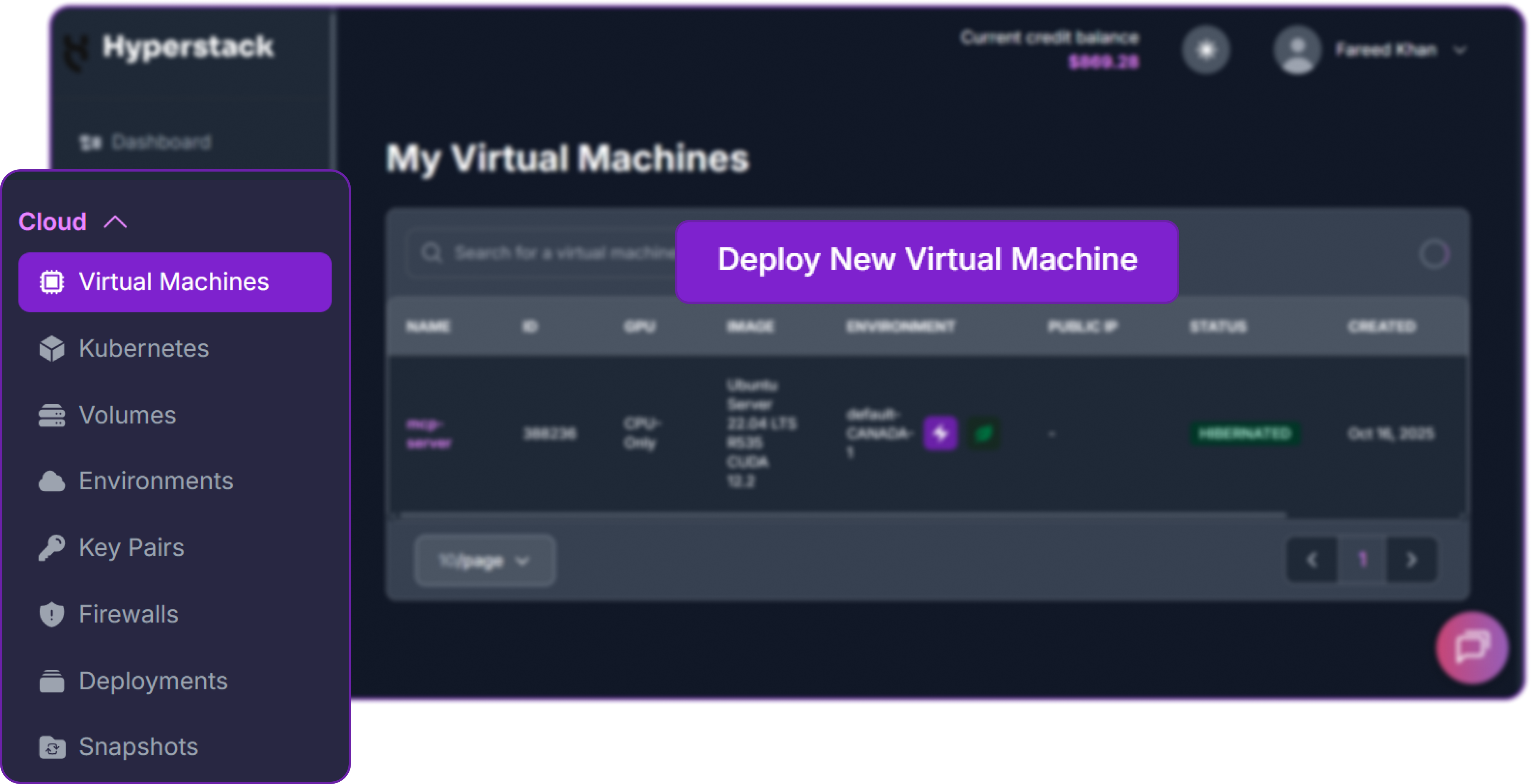
The Deploy New Virtual Machine button.
Then make six choices in the deployment form.
What to select, and why
The flavour and the image carry the deployment; the rest is access.
| Field | Selection | Why |
|---|---|---|
| Flavour | 8x NVIDIA H100-80G-PCIe-NVLink, API name n3-H100x8-NVLink |
252 vCPUs, 1,440 GB of RAM, a 100 GB root disk and 6,500 GB of ephemeral storage, per the flavour reference. The RAM holds the Engram tables and the ephemeral disk holds the checkpoint. |
| Environment | One in CANADA-1 | The region the flavour reference lists for this machine. An environment groups the machine with its keys and network. |
| OS image | Ubuntu Server 24.04 LTS R570 CUDA 12.8 with Docker | Driver, CUDA toolkit and Docker come installed, as the image reference describes, so the machine is ready for Docker as soon as you connect. |
| SSH key | Import an existing key or generate one | Generating one downloads the private key to your computer. The SSH key guide covers both routes. |
| SSH access | Enabled | Adds a firewall rule for TCP port 22. |
| Public IP | Assign Public IP | Reaches the machine over SSH and the endpoint over HTTP. |
Each choice maps to a field on the Deploy New Virtual Machine page.
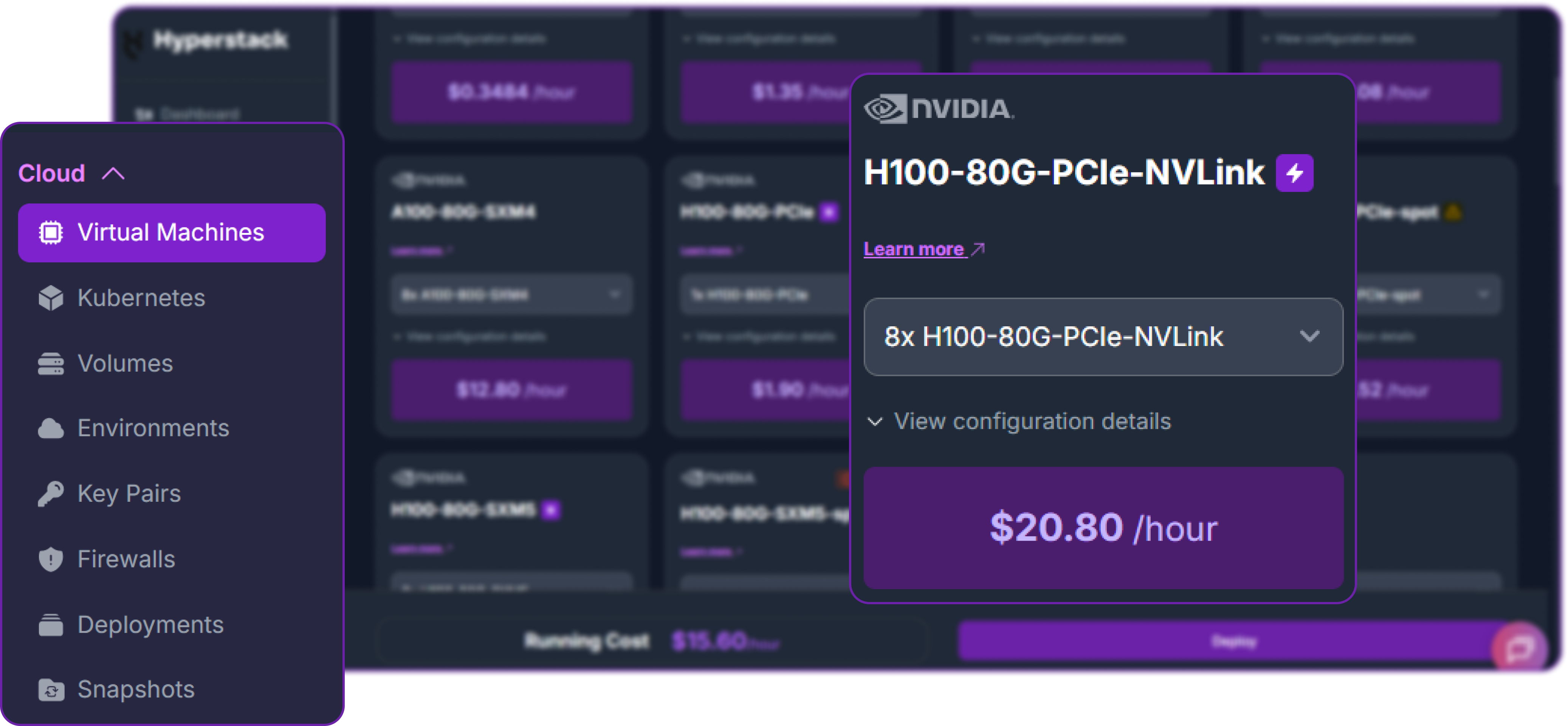
The flavour card for 8x NVIDIA H100-80G-PCIe-NVLink.
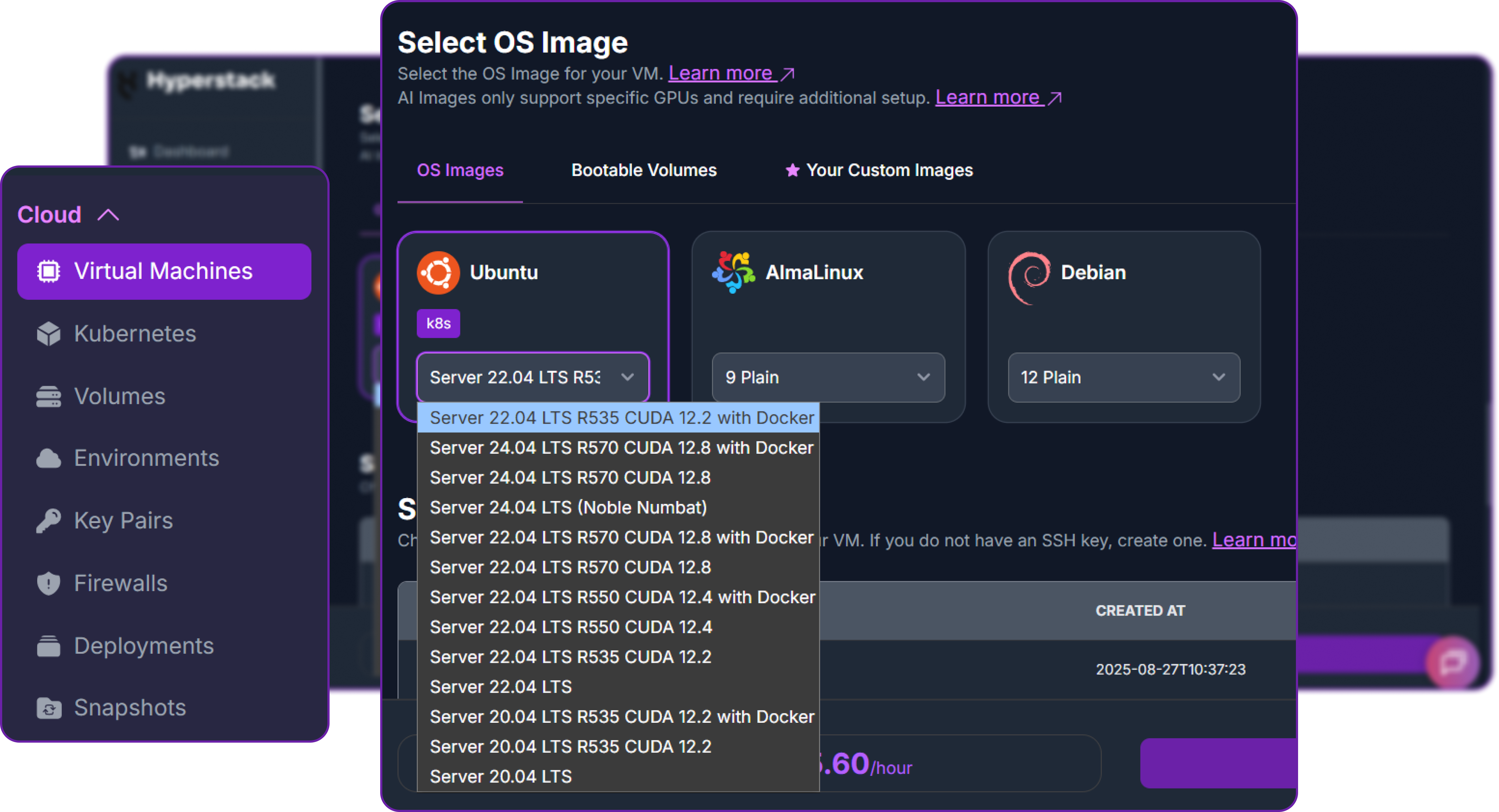
The OS image list. Choose Ubuntu Server 24.04 LTS R570 CUDA 12.8 with Docker.
Click Deploy. The machine is ready once its status shows ACTIVE, and billing starts from that state.
Driver and container. The OS image ships the NVIDIA R570 driver, and the vLLM 0.31.0 container carries NVIDIA's CUDA 13.0 forward-compatibility libraries, which VLLM_ENABLE_CUDA_COMPATIBILITY=1 switches on in Step 7. The vLLM Docker documentation lists R570 as a supported host driver for this mode on data centre GPUs such as the NVIDIA H100.
Step 3: Open Port 8000 for the Endpoint
Apart from the SSH rule from Step 2, a new virtual machine accepts no inbound traffic until a firewall rule allows it. Open the machine's details page, go to the Firewall tab and add one inbound rule:
- Ether type: IPv4
- Protocol: TCP
- Port range: 8000
- Remote IP prefix: your own public address followed by
/32
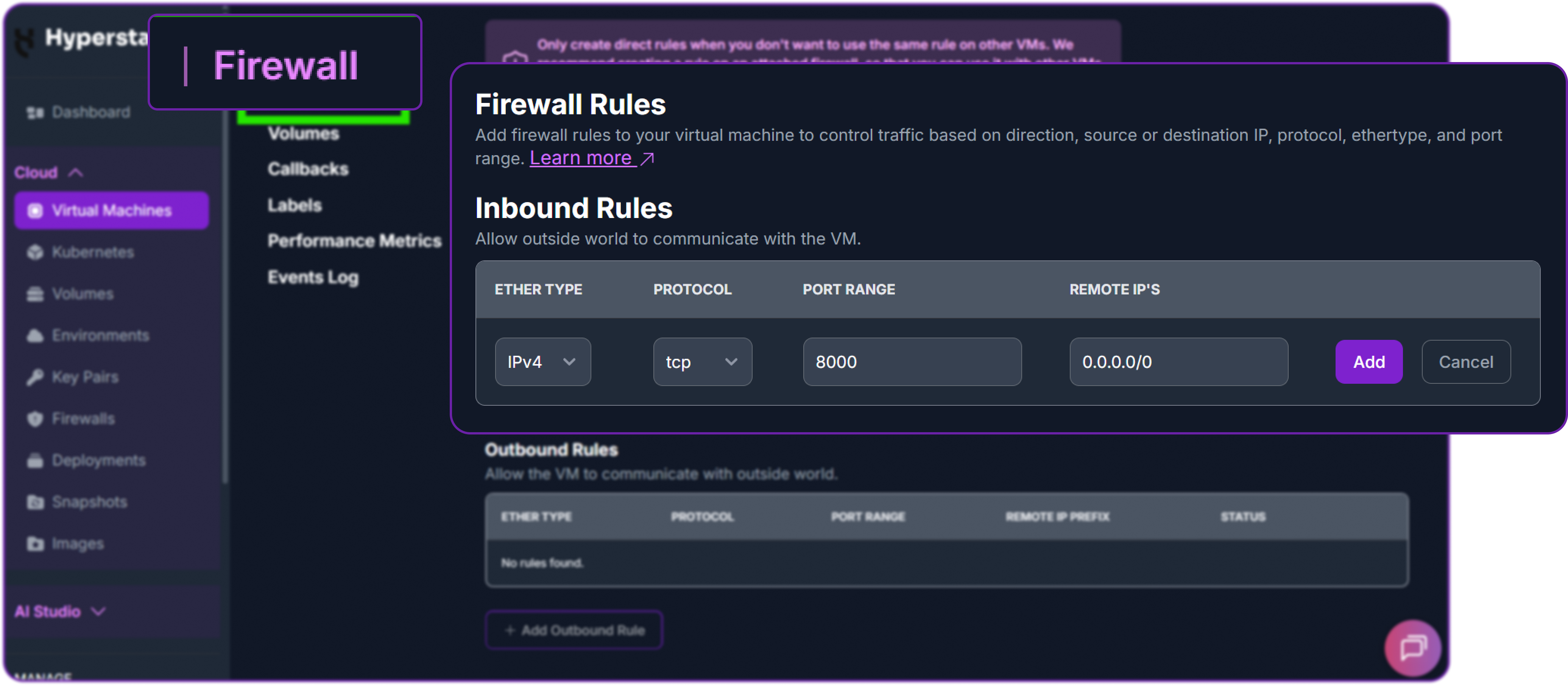
The inbound rule on the Firewall tab. In the remote IP field, enter your own address followed by /32 rather than 0.0.0.0/0.
Two layers guard the endpoint. The API key from Step 7 protects every route under /v1, and the firewall rule decides who can reach the port at all. The vLLM security guide advises against relying on an API key alone, so keep the remote prefix as narrow as your clients allow.
Step 4: Connect and Check the GPUs
Once the Ubuntu welcome banner appears, confirm what the machine holds before installing anything.
Eight NVIDIA H100 PCIe cards at 81,559 MiB each, with NV12 between GPU0 and GPU1, GPU2 and GPU3, GPU4 and GPU5, and GPU6 and GPU7. Every other pair shows PHB, a path through the PCIe host bridge.
Step 5: Download the Weights to the Ephemeral Disk
The root disk is 100 GB, so the Hugging Face cache goes on the 6,500 GB ephemeral disk mounted at /ephemeral.
Detach from tmux with Ctrl+b then d, and reattach with tmux attach -t weights. The repository is public under the MIT licence, so the download needs no Hugging Face token. When the command returns, confirm that all 48 shards are present and none is partial:
Keep the checkpoint between sessions. Data on /ephemeral does not persist through hibernation, so copy the 510 GB to a shared storage volume, as the ephemeral storage guide describes.
Step 6: Pull the vLLM Image
In a second SSH session, pull the image while the weights download. DeepSeek-V4.1-Flash support arrived in vLLM 0.30.0, and the recipe sets vLLM 0.31.0 as its minimum, so pin that release rather than latest.
Step 7: Launch vLLM
Create a key for the endpoint first. Clients send it as a bearer token.
Then start the container. The engine flags are the recipe's NVIDIA H100 command, with the served name, the API key and CUDA compatibility added.
The first start reads 510 GB of weights from the ephemeral disk and pins about 189 GiB of Engram tables and scales in host memory before the API opens; VLLM_ENGINE_READY_TIMEOUT_S=3600, set by the recipe, gives that first load up to an hour.
What happens between docker run and the first request
Five stages, in order.
vLLM 0.31.0 reads the launch flags and environment variables.
One per GPU, joined into a tensor parallel group of eight.
Experts, attention and embeddings are sharded eight ways; the Engram tables are pinned in host memory.
The indexer reserves its 8 GiB buffer, and the KV cache takes what remains of the 0.92 share once activations and CUDA graphs are accounted for.
Port 8000 accepts requests and /health starts answering.
Stages of a vLLM start-up for this configuration.
Step 8: Send the First Request
List the served model, then send the question the recipe uses as its own check, with thinking off. The correct answer is 323.
Setting thinking to false in chat_template_kwargs asks for a direct answer. Without it, the server renders the prompt in thinking mode at effort 75. From your workstation, the same request works against http://[VM PUBLIC IP]:8000 once the Step 3 rule is in place.
DeepSeek-V4.1-Flash Inference: Thinking, Effort, Tools and Images
Every DeepSeek-V4.1-Flash inference request follows the same path. The API server checks the key, vLLM's deepseek_v41 prompt encoder writes the conversation in DeepSeek's V4.1 format, the engine runs it across the eight GPUs, and the reasoning and tool-call parsers turn the raw output back into OpenAI fields.
What one request passes through
Six stages, from your client and back again.
The prompt encoder and parsers are vLLM's implementation of DeepSeek's encoding reference.
Connect a Python Client
The server speaks the OpenAI Chat Completions API, so the official OpenAI SDK works unchanged. DeepSeek recommends a temperature of 1.0 and a top_p of 1.0 for the 1017 checkpoint, as its model card lists.
Chat Mode for Direct Answers
With thinking off, the encoder closes the reasoning block before generation starts, so the reply is the answer and nothing else.
Thinking Mode and the 1 to 100 Effort Dial
DeepSeek-V4.1-Flash exposes reasoning as a number rather than a handful of tiers. During reinforcement learning, DeepSeek trained the model at a set of effort levels on a scale from 1 to 100, penalising long reasoning less as the level rises, and the report notes that values between the trained levels give interpolated behaviour. In thinking mode, the encoder writes the value into the prompt as a Reasoning Effort line at the start of the conversation. DeepSeek's own API maps its low, high and max tiers to 50, 75 and 100, as section 5.1.4 of the technical report sets out.
On this server, a request that sets neither thinking key runs in thinking mode at effort 75, the default in DeepSeek's encoder and in vLLM 0.31.0. Set thinking explicitly on every request, and add reasoning_effort whenever thinking is on. Give thinking requests room in max_tokens, since the reasoning trace and the answer share one budget and the answer begins only once the trace closes.
One dial from 1 to 100
DeepSeek's API tiers sit at 50, 75 and 100. The report finds that efforts of 60 to 80 recover most of the maximum setting's accuracy.
Tier mapping from Table 2 of the technical report and the encoding reference; the 60 to 80 band from section 5.3.2 of the report.
The reasoning arrives in the reasoning field and the answer in content. The deepseek_v41 reasoning parser makes that split, and the vLLM documentation notes that the field was called reasoning_content in older releases.
What effort 25 and effort 100 buy
Pass@1 at effort 25 and effort 100. The higher setting spends roughly 2.5 times the output tokens.
Source: section 5.3.2 of the technical report, which scores the launch weights. The reasoning line averages eight benchmarks, including GPQA Diamond, HLE, LiveCodeBench and MathArena Apex; DeepSWE v1.1 runs on mini-SWE and Terminal-Bench 2.1 on DeepSeek Harness in Minimal mode.
Efforts of 60 to 80 recover most of effort 100's accuracy at less than half its tokens, while the last step to 100 lengthens agent trajectories by 1.6 to 1.8 times for marginal gains. Effort therefore sets how many tokens each request spends, and so how much of the machine's capacity it uses, with no change to the server.
Tool Calling Through the DSML Parser
DeepSeek-V4.1-Flash writes tool calls as DSML tag blocks rather than JSON. vLLM handles both directions: the encoder wraps your tool messages in tool_result tags, and the deepseek_v41 parser turns DSML blocks into standard OpenAI tool_calls. With --enable-auto-tool-choice, the model decides for itself when to call a tool.
One tool call, two notations
The parser turns the DSML block the model writes into the OpenAI structure your client reads.
DSML format from DeepSeek's encoding reference; tool_calls follows the OpenAI schema.
The example below gives the model one tool that returns the hardware of a Hyperstack flavour, then asks a question it can only answer after calling it.
Passing the assistant turn back with its reasoning keeps the model's plan intact across the call. When a conversation declares tools, DeepSeek's encoder keeps the reasoning from every turn rather than dropping earlier traces, so the model can follow one plan through several calls.
Image Input
Images go in as image_url content parts, the format vLLM's multimodal input guide documents. vLLM fetches each image, runs the 32-layer vision encoder and places the visual tokens where the image sits in the prompt. Each image costs up to 1,024 tokens, as the vLLM recipe notes, and the 3 by 3 pixel-unshuffle supports inputs up to about 1,344 by 1,344 pixels. The request below asks the model to read DeepSeek's own KV cache chart from the DeepSeek-V4.1-Flash model card.
Keep one text request and one image request in your deployment checks, since the vision encoder is a separate path through the model.
Connect an Agent Harness to DeepSeek-V4.1-Flash
DeepSeek scored DeepSeek-V4.1-Flash in eight harness configurations from six families, with the checkpoint and decoding settings held fixed, and reports that its agentic behaviour carries across them. You can therefore pick the harness that fits your own workflow.
The same model in eight harnesses
Resolved rate on DeepSWE v1.1 and Pass@1 on Terminal-Bench 2.1, at maximum effort. Switch between the two benchmarks.
Source: Table 4 of the technical report, which scores the launch weights. Eight samples per task on DeepSWE v1.1 and three on Terminal-Bench 2.1, a 1M-token context, a temperature of 1.0 and a top-p of 0.95.
vLLM serves the Anthropic Messages API beside the OpenAI one, so Claude Code can use this endpoint directly. Point it at the server and map every model tier to the served name:
As its environment variable reference states, Claude Code sends ANTHROPIC_AUTH_TOKEN as a bearer token, which the server's API key check accepts. Harnesses that speak the OpenAI API take http://[VM PUBLIC IP]:8000/v1 as the base URL and the same key.
Tuning DeepSeek-V4.1-Flash on vLLM
Turn On DSpark Drafting
To enable DSpark, add the recipe's speculative decoding flag as the last line of the launch command, with a backslash at the end of the line before it:
It drafts five tokens per round, the block size DSpark was trained on, and turns on adaptive verification on NVIDIA GPUs. How many drafts are accepted depends on how predictable your traffic is, so measure the acceptance rate on your own prompts before adopting it.
Serve Text Only
For text-only traffic, replace --mm-encoder-tp-mode data with the flag below. It skips the vision encoder and its aligner and frees that memory for the KV cache; the two flags cannot be used together.
Size the Context to the Workload
The indexer buffer grows with the context limit as well as the batch budget. A workload that never needs a million tokens can set --max-model-len lower, and the memory the buffer gives up goes to the KV cache.
DeepSeek-V4.1-Flash Deployment Cost
A DeepSeek-V4.1-Flash deployment on one machine comes down to one hourly GPU rate. Hyperstack lists NVIDIA H100 NVLink at $2.60 per GPU hour on demand and from $1.82 per GPU hour reserved on its GPU pricing page, and this machine carries eight cards. The public IP the endpoint needs is listed separately on the same page, at $0.00672043 per hour. Billing runs per minute, as the billing policies set out, and starts once the machine is ACTIVE, as the getting started guide notes.
The 8x NVIDIA H100-80G-PCIe-NVLink machine, priced
One machine carries the whole deployment, so these rows are the full GPU bill.
| Pricing | Per GPU hour | Per hour | Per day | Per 730-hour month |
|---|---|---|---|---|
| On demand | $2.60 | $20.80 | $499.20 | $15,184.00 |
| Reserved, from | $1.82 | $14.56 | $349.44 | $10,628.80 |
Per GPU rates from the Hyperstack GPU pricing page, multiplied by eight GPUs, then by 24 hours and by 730 hours. On demand, a minute costs about $0.35.
What a month of runtime costs
Drag the slider to the hours the machine runs. Billing is per minute, so a partial hour costs only the minutes used.
On-demand and reserved rates for eight NVIDIA H100 NVLink GPUs, from the pricing page.
Three Levers on the Bill
What moves the cost, and how
One lever is a commitment, one is a per-request setting and one is a habit.
| Lever | Effect |
|---|---|
| Reserved pricing | From $1.82 against $2.60 per GPU hour, 30 per cent lower, for an endpoint that runs continuously. |
| Reasoning effort | Sets how many tokens each answer spends, and so the cost of each answer on a machine billed by the hour. DeepSeek finds most of the maximum accuracy between 60 and 80, at under half the tokens of 100. |
| Hibernation between sessions | This flavour supports hibernation, which bills only the root disk while the machine is paused. Keep a copy of the checkpoint on a shared storage volume, because /ephemeral does not persist through it. Shared storage is listed at $0.000096774 per GB per hour, about $0.05 per hour for the 510 GB checkpoint. |
Hibernation support and billing from the flavour reference; storage behaviour from the ephemeral storage guide; the shared storage rate from the GPU pricing page.
Why self-host a model that DeepSeek also serves as an API? The MIT licence lets you run the weights on a machine you control, so your prompts and every response stay inside your own environment. You set the context length and the parsers at launch and the effort on every request, and the machine costs the same per hour however many tokens it serves. For a primer on the serving engine itself, see what vLLM is and how it serves models.
Why Deploy DeepSeek-V4.1-Flash on Hyperstack?
Hyperstack is a cloud platform built for AI and machine learning workloads. Here is what a single-node DeepSeek-V4.1-Flash deployment needs from a provider, and how that maps onto the platform:
The 8x NVIDIA H100-80G-PCIe-NVLink flavour serves the 1017 checkpoint with about 36 GiB of resident weights per card, and NVLink bridges each pair of cards at 600 GB/s bidirectional.
Room to pin both Engram tables and their scales, about 189 GiB, with most of the machine's memory still free, per the flavour reference.
The ephemeral disk holds the 510 GB checkpoint more than twelve times over, on the same machine as the GPUs that read it.
Ubuntu Server 24.04 LTS R570 CUDA 12.8 with Docker goes from SSH to docker run with no driver work.
$20.80 per hour on demand, from $14.56 reserved, billed by the minute.
One inbound firewall rule scopes the endpoint to your own address.

FAQs
What is DeepSeek-V4.1-Flash-1017?
DeepSeek-V4.1-Flash-1017 is an updated release of DeepSeek-V4.1-Flash, a multimodal mixture-of-experts model with 552B backbone parameters. It activates 8B parameters per prompt token and 16B per generated token, holds 1,048,576 tokens of context and ships under the MIT licence.
What hardware do you need to deploy DeepSeek-V4.1-Flash?
DeepSeek-V4.1-Flash needs one node of eight 80 GB GPUs, the smallest NVIDIA configuration the vLLM recipe serves. Its 475 GiB checkpoint fits once the Engram tables and their scales, about 189 GiB, move to host memory, leaving about 36 GiB of resident weights on each NVIDIA H100.
How much does a DeepSeek-V4.1-Flash deployment cost on Hyperstack?
An 8x NVIDIA H100-80G-PCIe-NVLink machine costs $20.80 per hour on demand, or from $14.56 per hour reserved, billed per minute. The whole deployment runs on that one machine, so one hourly rate covers every GPU.
How do you control thinking on DeepSeek-V4.1-Flash?
Send chat_template_kwargs with thinking set to true or false and, when thinking is on, a reasoning_effort integer from 1 to 100 in the same object. With neither key set, vLLM 0.31.0 runs thinking mode at effort 75.
Does DeepSeek-V4.1-Flash support tool calling and images on vLLM?
Yes. With the deepseek_v41 tool parser and auto tool choice, the tag blocks the model writes for tool calls arrive as OpenAI tool_calls, and image_url content parts run through its 32-layer vision encoder at up to 1,024 tokens per image.
Subscribe to Hyperstack!
Enter your email to get updates to your inbox every week